Podcast Production Checklist

A podcast episode passes through four or five pairs of hands in a week. The recording is usually fine. What goes wrong is the release form nobody collected, the chapters nobody added and the episode that went out quieter than the last one.

This free podcast production checklist takes one episode from idea to 30-day review. It covers planning and the outline, guest booking and prep, recording, editing and mastering to platform loudness, show notes, chapters, transcripts and clips, a host or producer sign-off, publishing to your podcast host, and promotion. Guest and video steps appear only when the episode needs them. It suits in-house content teams and agencies producing a show for a client, and slots in after the Content Production Workflow Checklist when the podcast is one channel among several.

Use This Template Free See Live Example
No Credit Card Required

Last reviewed: October 2026

Why Episodes Slip Between Recording and Release

A regular show is a production line. The host records, an editor cuts and mixes, someone writes the show notes, someone else cuts clips for social, and the producer publishes. Each handover is a chance for a step to fall between two people, and with a fixed release day the missing step is usually discovered an hour before the episode goes live. A checklist per episode, started as soon as the topic is agreed, gives every step a name and a date.

Loudness should be the same every week. Apple’s audio requirements ask for a loudness of about −16 LKFS, within 1 dB either way, with true peaks no higher than −1 dBFS. Spotify’s loudness normalisation targets −14 LUFS and turns softer masters up, so most podcasters still master to −16 and let Spotify raise it slightly. Pick one target, measure every master against it, and listeners stop reaching for the volume when your show follows another in their queue.

The RSS feed is the product. Apple Podcasts, Spotify and most other apps read your show from its RSS feed. Apple requires each episode to carry a title, a publication date, an enclosure with the file’s URL, length and type, and a globally unique identifier, the GUID, which never changes. If an episode is re-uploaded or the show moves host, the GUID has to come with it. The server hosting the audio must also support HTTP HEAD and byte-range requests, which matters if you self-host.

Transcripts and chapters are now expected. Apple Podcasts generates a transcript automatically after each episode is published, shown on iOS 17.4 or later. If your host supports the podcast:transcript tag, you can supply your own VTT or SRT file and set the show to display transcripts you provide, which is the only way to be sure guest names and product terms are spelt correctly. Apple reads chapters from timestamps in the episode description, from a podcast:chapters file or from markers embedded in the audio file; the first chapter starts at 00:00:00 and there should be at least three. Since iOS 26.2 Apple also creates chapters automatically for English episodes over ten minutes long, but your own will reflect the structure you planned.

One person owns the episode. In most teams that is the producer: they start the checklist, assign the editor and the person writing show notes, and chase the guest. The host records and approves, but should not also be the one remembering whether the transcript was corrected. Agencies producing a show for a client usually put their own producer in that seat and add the client as the approver, so the client sees one clear request rather than a thread of files.

Someone has to say yes. Once an episode is in the feed, apps can download it to subscribers’ devices, and removing it later does not undo those downloads. That is why the template ends production with a sign-off from the host or producer, and for agencies the client, before anything is uploaded. If the answer is no, the checklist stops there.

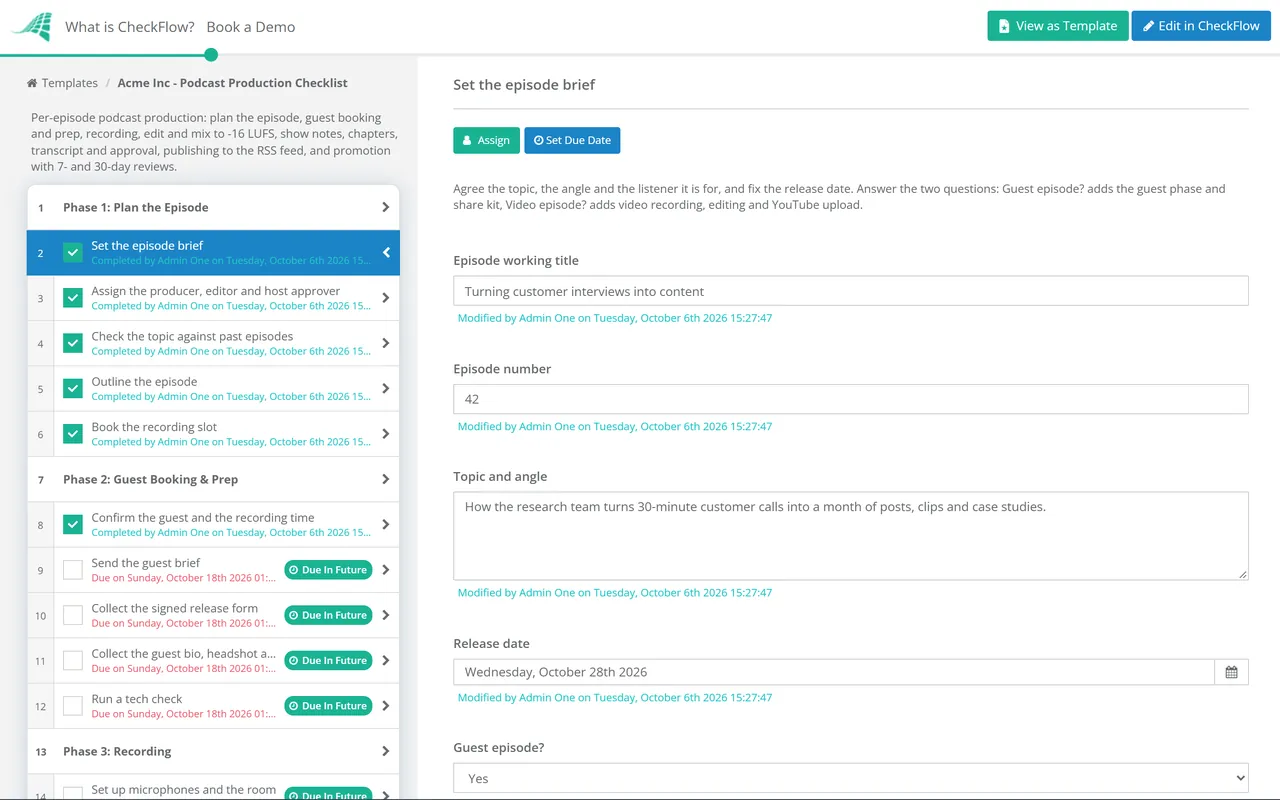
Guest episode? Yes

What a guest adds

Before: booking, a guest brief, a signed release form and a tech check.

During: a separate track for the guest and a backup recording.

After: a share kit so the guest can promote the episode.

Covered by: Phase 2 and one task in Phase 7.

Video episode? Yes

What video adds

Recording: camera framing, lighting and a video feed for every speaker.

Editing: a synced video edit with captions.

Publishing: a YouTube upload with chapters and a thumbnail.

Covered by: one task each in Phases 3, 4 and 6.

What the Podcast Production Checklist Covers

Seven phases for each episode. Guest and video steps switch on from two questions in Phase 1.

Phase 1

Phase 1: Plan the Episode

  • Set the episode brief — topic, angle, release date, and whether there is a guest or video
  • Assign the producer, editor and host approver
  • Check the topic against past episodes — avoid repeats and find earlier shows to link
  • Outline the episode — segments, key questions, sponsor reads and the call to action
  • Book the recording slot — studio or remote tool, with a backup date
Phase 2 — Guest

Phase 2: Guest Booking & Prep

Shown when “Guest episode?” is set to Yes in Phase 1.

  • Confirm the guest and the recording time — in both time zones
  • Send the guest brief — topic, outline, length, audience and how it will be promoted
  • Collect the signed release form — recording, editing, distribution and clips
  • Collect the guest bio, headshot and links for the show notes
  • Run a tech check — microphone, headphones, quiet room and a wired connection
Phase 3

Phase 3: Recording

  • Set up microphones and the room — soft surfaces, notifications off, phones away
  • Check levels before you start — leave headroom so loud moments do not clip
  • Record each speaker on a separate track — local recordings where the tool allows
  • Run a backup recorder
  • Mark timestamps for edits and clips as you go
  • Record the video feed — framing, lighting and every speaker (video episodes)
Phase 4

Phase 4: Edit & Mix

  • Edit for content — false starts, tangents and anything the guest asked to remove
  • Clean up the audio — background noise, clicks, plosives and long breaths
  • Balance levels between speakers
  • Master to −16 LUFS — true peak no higher than −1 dBFS
  • Export the audio master — AAC or MP3 at Apple’s recommended bitrates
  • Edit the video version — synced to the final audio, with captions (video episodes)
Phase 5

Phase 5: Assets & Approval

  • Write the episode title and show notes — guest links, resources, sponsor and call to action
  • Add chapters — starting at 00:00:00, with at least three
  • Produce and correct the transcript — names, products and jargon
  • Cut clips and audiograms for social
  • Approve the episode for release — the checklist stops here if the answer is no
Phase 6

Phase 6: Publish

  • Upload the episode to your podcast host
  • Complete the episode metadata — title, description, episode number and explicit flag
  • Check the GUID and enclosure — a new, unique GUID and the right file size and type
  • Schedule the release for the agreed date and time
  • Confirm the episode appears in Apple Podcasts, Spotify and YouTube
  • Publish the video episode on YouTube — chapters, captions and thumbnail (video episodes)
Phase 7

Phase 7: Promote & Review

  • Post clips and the episode link on social channels
  • Send the newsletter and publish the episode page — with the transcript
  • Send the guest share kit — links, clips and suggested posts (guest episodes)
  • Review the 7-day numbers — downloads, listens and where they came from
  • Review the 30-day results — and note one change for the next episode

Podcast Delivery Specs at a Glance

Check the master and the feed against this table before the Phase 5 sign-off. Most podcast hosts handle the feed for you, but they publish whatever file and artwork you give them.

Item Target Notes
Loudness −16 LKFS, ±1 dB Apple’s guidance; Spotify normalises to about −14 LUFS
True peak No higher than −1 dBFS Leaves headroom so lossy encoding does not add distortion
File format AAC (recommended) or MP3 44.1 or 48 kHz sample rate
Bitrate Stereo 128–256 kbps; mono 64–128 kbps Apple lists both; pick one and keep it
Show artwork Square, 1400–3000 px, JPEG or PNG, RGB Check it reads at thumbnail size
Episode identity Unique GUID that never changes Keep it through re-uploads and host moves
Explicit flag true or false, every episode Set it per episode, not just for the show
Transcript SRT or VTT via podcast:transcript Shown instead of Apple’s auto-generated transcript when you choose to display your own
Chapters First at 00:00:00, at least three YouTube also needs each chapter to be 10 seconds or longer

For audio-first shows, YouTube can take your RSS feed directly in selected countries. It turns each episode into a static-image video using your show artwork and uploads new episodes as they appear in the feed. A video episode is better uploaded as a proper video, with its own thumbnail, captions and chapters.

Why Run Podcast Production in CheckFlow?

1

Only the steps this episode needs

Answer “Guest episode?” and “Video episode?” when you set the brief. Guest booking, release forms and share kits, or video recording, editing and upload, appear only when they apply, so a solo audio episode is not cluttered with steps to skip.

2

Nothing goes out unapproved

The host approver is picked at the start and the sign-off is a required Approved or Not approved choice. Not approved halts the checklist before the upload, so a draft cut never reaches subscribers by accident.

3

Deadlines that work back from release

Due dates are set from the release date, so the edit, the show notes and the approval each have a deadline before the episode goes out. Everyone sees who holds the episode now, and the finished checklist is a record of what shipped.

Sign-off works the same way across creative work. CheckFlow’s approval workflows put a named approver on the task before publishing, and the Design Review & Approval Checklist applies the same pattern to artwork and campaign assets.

Producing a show for a client? Start with a clear brief using our creative brief intake workflow guide, and handle edit requests with the Client Feedback & Revision Process Checklist before the episode reaches the approval step.

Frequently Asked Questions

What loudness should a podcast be mastered to?

+

Around −16 LUFS integrated, with true peaks no higher than −1 dBFS. That matches Apple’s guidance of −16 LKFS within 1 dB either way; LUFS and LKFS measure the same thing. Spotify normalises to −14 LUFS and turns softer masters up, so a −16 master simply plays a little louder there. What matters most is consistency, so measure every episode against the same target.

What does Apple Podcasts need for each episode?

+

Each episode in the RSS feed needs a title, a publication date, an enclosure giving the audio file’s URL, length and type, and a GUID that is unique and never changes. The show itself needs a title, description, artwork between 1400 and 3000 pixels square, a language, a category and an explicit flag. Your podcast host fills in most of this from the episode form, which is why Phase 6 checks the metadata rather than assuming it.

Do podcast episodes need transcripts and chapters?

+

They are not required, but listeners now expect them. Apple Podcasts creates transcripts automatically, and will show your own VTT or SRT file instead if you supply one and choose to display it, which lets you correct names and terms. Chapters help people jump to the part they want: Apple reads them from description timestamps starting at 00:00:00 with at least three entries, from a chapters file or from markers in the audio, and recommends them for episodes over ten minutes. YouTube uses a similar timestamp list in the video description.

Do podcast guests need to sign a release form?

+

It is good practice for every guest. A short release confirms the guest agrees to be recorded and to the episode being edited, published on every platform and cut into clips for promotion. It avoids awkward conversations if a guest later changes their mind or moves to an employer with strict media rules. Take legal advice on the wording for your jurisdiction, and keep the signed copy on the episode’s checklist.

How do I get my podcast onto YouTube?

+

There are two routes. For audio-first shows, YouTube Studio can ingest your RSS feed in selected countries: it creates a static-image video from your show artwork for each episode and uploads new episodes automatically. For a video podcast, upload each episode as a video with a thumbnail, captions and chapters. The template’s “Video episode?” question adds the recording, editing and upload steps for the second route.

How far ahead of release should an episode be finished?

+

Far enough that the approval is not a formality. A practical rule is to have the final mix, show notes and transcript ready a few working days before release, so the approver has time to listen and the editor has time to make changes. Many weekly shows keep one or two finished episodes in reserve to absorb a cancelled guest or a sick host. In the template, due dates are set back from the release date, so the gap is built in rather than hoped for.

Is CheckFlow free for this template?

+

14-day free trial, no card required. The Business plan is $10 per user per month after the trial. Full details at checkflow.io/pricing.

Ship Every Episode on Time, at the Right Level, Signed Off

Free trial — no credit card required.