Server Maintenance Checklist Template

Servers rarely fail without warning. The volume filled over six weeks, the certificate expiry date sat in a spreadsheet, and the RAID controller logged a predictive drive failure that nobody read.

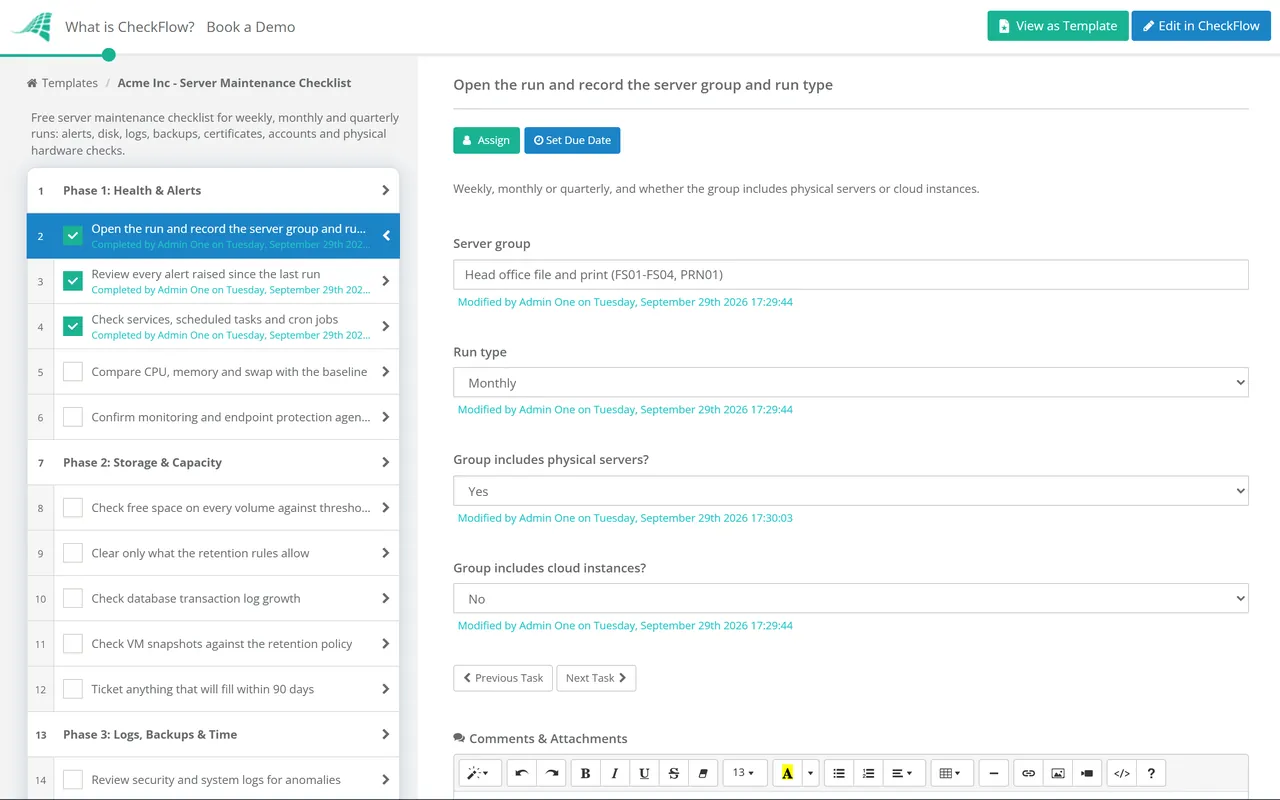
Monitoring catches the sudden failures. The slow ones need a person to look on a schedule. This free server maintenance checklist gives system administrators, infrastructure teams and MSPs a routine for Windows and Linux servers, whether physical, virtual or cloud. One template covers three cadences: a short weekly run for alerts, capacity, logs and backup job status, a monthly run that adds account hygiene and expiry dates, and a quarterly review of owners, drift and capacity. A hardware and firmware phase appears only for groups that include physical servers. Each run leaves a dated record of what was checked, what was found and which ticket now owns it.

Use This Template Free See Live Example
No Credit Card Required

Monitoring Watches Servers. Maintenance Reviews What Monitoring Cannot Judge.

A monitoring platform is very good at thresholds. It will page someone when a disk passes 95% or a service stops. It is poor at slow trends, at dates that are months away, and at anything that needs judgement: whether an alert that has been muted for three weeks still matters, whether a local admin account belongs to someone who left, or whether a server still has an owner at all. Those are the checks that drift when nobody is scheduled to do them.

Daily checks belong in monitoring and should page someone. This checklist starts at weekly, where a person reviews what monitoring produced and looks for what it missed.

Monitoring

Automated, continuous, threshold-based

Catches: a stopped service, a full disk, a host that stops responding.

Misses: slow growth, silenced alerts, expiring certificates and licences, stale accounts.

Cadence: every minute, around the clock.

Output: alerts and tickets.
Scheduled maintenance

A person reviewing the group on a cadence

Catches: trends, dates, drift and ownership gaps, and alerts that were acknowledged but never fixed.

Misses: anything that fails between runs, which is why monitoring still matters.

Cadence: weekly, monthly and quarterly.

Output: a dated record per server group, with every finding ticketed.

Two jobs are deliberately left out. Patching has its own monthly cycle with testing, approval and exceptions; the maintenance run only confirms that the cycle was signed off for this group. Restore testing also runs separately, because proving a backup can be restored takes longer than checking that last night’s job succeeded.

What the Server Maintenance Checklist Covers

Weekly runs cover Phases 1 to 3. Monthly runs add Phases 4 and 5, quarterly runs add Phase 6, and Phase 7 appears on monthly and quarterly runs for groups with physical servers.

Phase 1

Phase 1: Health & Alerts

Runs every time. The run type and host mix recorded here decide which later phases appear. The last task shows only for groups with cloud instances.

  • Open the run and record the server group and run type — weekly, monthly or quarterly, and whether the group includes physical servers or cloud instances
  • Review every alert raised since the last run — each one resolved or ticketed; silenced alerts need an owner and an end date
  • Check services, scheduled tasks and cron jobs — everything expected is running and the last scheduled run succeeded
  • Compare CPU, memory and swap with the baseline — a steady climb matters more than today’s value
  • Confirm monitoring and endpoint protection agents are reporting — a silent agent looks exactly like a healthy server
  • Check the provider’s scheduled maintenance and retirement notices — a retirement date means a planned move now or an unplanned outage later
Phase 2

Phase 2: Storage & Capacity

  • Check free space on every volume against thresholds — for example warn at 80% and act at 90%, and project the date each volume fills at its current growth rate
  • Clear only what the retention rules allow — rotated logs, temporary files, installer caches and old crash dumps
  • Check database transaction log growth — a log that never shrinks usually means log backups are failing
  • Check VM snapshots against the retention policy — old snapshots keep growing, slow the host and are not backups
  • Ticket anything that will fill within 90 days — or add it to the capacity plan with an owner
Phase 3

Phase 3: Logs, Backups & Time

  • Review security and system logs for anomalies — failed logons, new admin rights, service crashes, disk and hardware events
  • Confirm logs reach the central store and meet retention — CIS Controls v8.1 sets a minimum of 90 days
  • Check backup job results for every server in the group — record the date of the last good backup, not just last night’s status
  • Check that new servers and volumes are in a backup job — coverage gaps open when servers are built, not when they fail
  • Confirm time sync against at least two sources — clock drift breaks Kerberos authentication and log correlation
  • Raise a ticket for every failure before closing the run — a finding without a ticket number is forgotten by next week
Phase 4

Phase 4: Access & Security Hygiene

Shown on monthly and quarterly runs.

  • Confirm this month’s patch cycle was signed off for the group — list any server on an open patch exception; the patching itself is not done from here
  • Review local and privileged accounts — remove leavers and disable accounts dormant for 45 days
  • Review service accounts and scheduled task credentials — each has an owner, a purpose and a known password or key age
  • Compare listening ports and installed services with the build baseline — anything new needs an explanation or removal
  • Confirm endpoint protection is current — definitions updated and no unresolved detections
Phase 5

Phase 5: Expiry Dates & Records

Shown on monthly and quarterly runs.

  • Check TLS certificate expiry dates — renew anything expiring within 30 days; public certificates issued now last at most 200 days
  • Check software licences and support contracts — raise renewals with enough lead time for procurement
  • Check operating system end-of-support dates — Windows Server 2016 extended support ends in January 2027, so its upgrade or retirement needs a plan now
  • Check DNS records and domain registrations for hosted services — stale records and lapsed domains break services quietly
  • Update the server record — owner, role, dependencies and last maintenance date in the CMDB or asset register
Phase 6

Phase 6: Quarterly Review

Shown on quarterly runs only.

  • Confirm each server still has a business owner and a purpose — servers nobody claims go to decommissioning
  • Check configuration drift against the hardening baseline — manual fixes made during incidents tend to stay
  • Review the quarter’s capacity trends — and the resizing or purchases needed in the next twelve months
  • Review monitoring thresholds and alert noise — alerts nobody acts on teach people to ignore alerts
  • Confirm runbooks and recovery notes are current — they should describe the server as it runs today, not as it was built
  • Confirm this quarter’s restore test is booked or done — the test runs in its own checklist; this task only checks that it happened
Phase 7 — Physical Hosts Only

Phase 7: Hardware & Firmware

Shown on monthly and quarterly runs when the group includes physical servers. Virtual machines and cloud instances skip it: their hardware belongs to the host cluster’s own run or to the provider.

  • Read the out-of-band management controller’s hardware log — predictive drive failures, corrected memory errors, fan and temperature warnings
  • Check RAID and storage controller health — degraded arrays, rebuilds in progress, cache battery or capacitor status
  • Confirm both power supplies are online and fed from separate circuits — a server on one supply has lost redundancy with no outage to show for it
  • Compare firmware, BIOS and controller versions with current vendor releases — schedule any update through the patch cycle, not ad hoc
  • Check hardware warranty and support dates — a server out of warranty needs a replacement plan or extended cover
  • Inspect the hardware during site visits — blocked airflow, dust, strained cables and amber lights

Server Maintenance Cadence at a Glance

The cadence for each check should follow how quickly the thing it looks at can go wrong. Where the CIS Critical Security Controls v8.1 set a minimum frequency, the table shows it. Everything else is a sensible default to tune for your estate.

Check Cadence Phase Benchmark
Alerts, services, agents, resource trendsWeekly (monitoring runs daily)1Team default
Disk space and capacity projectionWeekly2Team default
Security log reviewWeekly3CIS Safeguard 8.11: weekly or more often
Log retentionWeekly3CIS Safeguard 8.10: at least 90 days
Backup job results and coverageWeekly3CIS Safeguard 11.2: backups weekly or more often
Patch cycle signed offMonthly4CIS Safeguards 7.3 and 7.4: monthly or more often
Dormant and privileged accountsMonthly4CIS Safeguard 5.3: disable after 45 days of inactivity
Certificates, licences, end of supportMonthly5CA/Browser Forum validity limits; vendor lifecycle dates
Hardware logs, RAID, power, firmwareMonthly (physical only)7Vendor guidance
Owners, drift, thresholds, restore test bookedQuarterly6CIS Safeguard 11.5: test recovery quarterly or more often

Certificate checks are moving up the list. Under the CA/Browser Forum’s Baseline Requirements, the maximum life of a public TLS certificate fell from 398 days to 200 days in March 2026, and will fall to 100 days in March 2027 and 47 days in March 2029. At 47 days, a certificate renewed by hand once a year becomes roughly eight renewals a year per name, which is a strong argument for automated renewal, with the monthly check confirming that the automation worked.

End-of-support dates matter for certification too. The UK Cyber Essentials scheme requires in-scope software to be licensed and supported, and unsupported software to be removed or cut off from the internet. An old server that nobody has upgraded can cost you the certificate.

Why Run Server Maintenance in CheckFlow?

1

One template, three cadences

Three recurring schedules start the same template every week, month and quarter, each assigned to the group’s owner. Conditional logic reads the run type and shows only the phases that run is due, so the weekly check stays short.

2

The server list fills itself in

A data set holds each group’s servers with their owner, role and host type, so the hardware phase appears only where physical servers exist. Volume readings go into a table inside the capacity task, which makes growth visible run after run.

3

A record an auditor can read

Log review notes, backup reports and certificate lists attach to the task they support. Every task records who completed it and when, and tags separate production, test and DR groups when you need to show that each one was checked.

Maintenance confirms the patch cycle ran but does not run it. Testing, approval, staged deployment and exceptions live in the Patch Management Checklist. Restore tests, including measuring recovery time against your targets, live in the Backup Verification & Restore Test Checklist.

A server enters this routine on the day it is built: the Server Setup & Provisioning Checklist ends by adding it to a maintenance group. It leaves through the Server Decommissioning Checklist when the quarterly review finds it has no owner. CheckFlow’s recurring checklist software shows how schedules, assignments and due dates work across all of them.

Frequently Asked Questions

What should a server maintenance checklist include?

+

The checks monitoring cannot make on its own: a review of alerts and silenced alarms, disk growth and capacity, security log review, backup job results and coverage, time synchronisation, account and service-account hygiene, and dates that expire such as certificates, licences, support contracts and operating system end of support. Physical servers add hardware logs, RAID health, power supply redundancy and firmware versions. Each check should end with either “fine” or a ticket number.

How often should server maintenance be done?

+

Use layers. Monitoring covers the daily picture. A weekly run reviews alerts, capacity, logs and backup jobs, which also matches the CIS Controls v8.1 minimum of weekly audit log reviews. A monthly run adds accounts, certificates, licences and hardware. A quarterly review asks the bigger questions: does each server still have an owner, has the configuration drifted and what capacity is needed next year.

Is patching part of server maintenance?

+

It is related but works better as its own process. Patching follows the vendors’ release calendar and needs testing, change approval, staged rollout and an exception register, which would swamp a routine health check. This template includes one monthly task that confirms the patch cycle was signed off for the server group and lists any servers on an open exception.

Do virtual machines and cloud servers need maintenance?

+

Yes, just not hardware maintenance. A VM or cloud instance still fills its disks, collects stale accounts, runs certificates that expire and depends on backup jobs that can fail. What changes is the hardware layer. For VMs it moves to the host cluster, which should have its own run, and for cloud instances it moves to the provider. The template hides the hardware phase for those groups and adds a check of the provider’s maintenance and retirement notices instead.

How far ahead should TLS certificates be renewed?

+

Thirty days is a common working margin for certificates renewed by hand, because it leaves time for approval and for installing the certificate on every server and load balancer that uses it. As maximum validity drops towards 47 days by March 2029, manual renewal stops being practical and automated renewal becomes the norm. The monthly check then confirms that automation renewed everything it should have.

Is CheckFlow free for this template?

+

14-day free trial, no card required. The Business plan is $10 per user per month after the trial. Full details at checkflow.io/pricing.

Catch the Slow Failures Before They Become Outages

Free trial — no credit card required.