The same ticket gets closed four times a quarter, each time by a different engineer, each time with a restart. Nobody owns the question of why it keeps happening, so it keeps happening.
Incident management restores service. Problem management removes the reason it failed, and in many IT teams it exists on the org chart but not in the working week. This free problem management checklist follows the three phases of the ITIL 4 practice: problem identification, problem control and error control. It is for service desk managers, problem managers, infrastructure leads and managed service providers who need problem records to reach “fixed and verified”. Each run produces a problem statement backed by linked incidents, a root cause with the evidence and method attached, a known error record and workaround where one exists, a change request for the permanent fix, and a closure check that proves the incidents stopped. A separate monthly run handles trend analysis and the review of every open known error.
Problems, Known Errors and Workarounds: What Each Record Is For
ITIL 4 defines a problem as a cause, or potential cause, of one or more incidents. The purpose of the practice is to reduce both the likelihood and the impact of incidents by finding those causes and by managing workarounds and known errors. A known error is a problem that has been analysed but not yet resolved. A workaround is anything that reduces or removes the impact of an incident or problem while a full resolution is not yet available. Keeping them separate matters: the service desk needs the workaround today, the change authority needs the root cause evidence next week, and the problem owner needs to see which known errors have waited longest.
The practice also works at a different scale from a single incident review. An incident postmortem looks back at one outage in depth and produces actions for that event. Problem management looks across many incidents, including small ones nobody would write a postmortem for, and asks what they share. A postmortem often opens a problem record, and the investigation carries on there after the meeting ends.
Post-incident review
One incident, looked at closely
Starts from: a single SEV-1 or SEV-2, or any event that meets the review criteria.
Question: what happened, and what should we change after this outage?
Timescale: days, while memories and logs are fresh.
Output: a written review and a list of owned actions.

Problem record
One cause, traced across many incidents
Starts from: trend analysis, a recurring ticket pattern, a major incident with no confirmed cause, or a supplier notice.
Question: why does this keep happening, and what would stop it for good?
Timescale: weeks, sometimes longer if the fix needs a release or a hardware change.
Output: a root cause, a known error and workaround, and a change that removes the cause.
What the Problem Management Checklist Covers
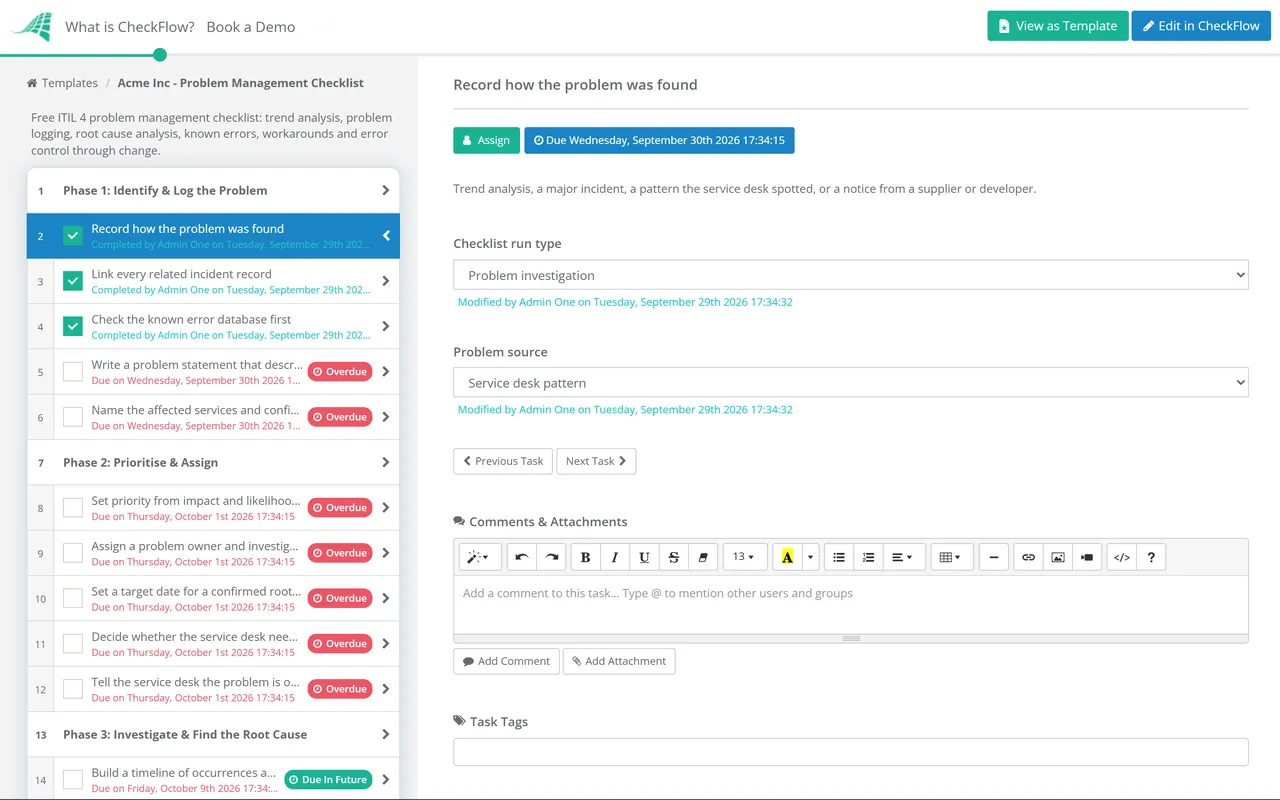
Six phases take each problem from identification to verified closure. Answers on the record decide which workaround and fix tasks appear. A seventh phase runs on its own as the monthly problem review.
Phase 1
Phase 1: Identify & Log the Problem
ITIL 4 problem identification is both reactive and proactive. Record the source: a trend needs different evidence from a major incident.
Record how the problem was found — trend analysis, a major incident, a pattern the service desk spotted, or a notice from a supplier or developer
Link every related incident record — search the last 90 days for the same configuration item, symptom or error text; the count is your evidence for priority
Check the known error database first — if the cause is already recorded, link the new incidents to that record instead of opening a duplicate
Write a problem statement that describes the fault, not a guess at the cause — “payroll export fails between 01:00 and 02:00 on the first working day”, not “database issue”
Name the affected services and configuration items — from the CMDB or service catalogue, so the investigation starts from the right components
Phase 2
Phase 2: Prioritise & Assign
Set priority from impact and likelihood of recurrence — ten minor incidents a week on a payment service can outrank one noisy outage on an internal wiki
Assign a problem owner and investigators — one owner accountable for the record, with engineers from each team that runs an affected component
Set a target date for a confirmed root cause — driven by priority, with a review date if the target is missed rather than a silent slip
Decide whether the service desk needs an interim workaround now — if incidents are still arriving, first line needs something to apply before the cause is known
Tell the service desk the problem is open — new incidents with the same signature get linked to the record instead of being worked from scratch
Phase 3
Phase 3: Investigate & Find the Root Cause
Build a timeline of occurrences and changes — every linked incident alongside deployments, patches, configuration changes and capacity events in the same window
Specify the problem as IS and IS NOT — which servers, times, users and transactions are affected, and which comparable ones are not; the differences point at the cause
Map candidate causes on an Ishikawa diagram — group them under people, process, technology, suppliers and environment so no category is skipped
Drill each plausible cause with 5 Whys — stop at a condition the organisation can change, never at a person
Test the most likely cause against the evidence — a true cause explains every IS and every IS NOT; reproduce it in a test environment where you can
Record the root cause, the evidence and the method used — attach the diagram, log extracts and test results to the task
Phase 4
Phase 4: Known Error & Workaround
Tasks 2–4 appear only when the record answers Yes to “Is a workaround available?”. Task 5 appears only when it answers No.
Record the problem as a known error — the cause is analysed and the fix is not yet in place, so the record changes status and stays open
Document the workaround step by step — written so a first-line analyst can apply it without escalating to the team that found it
Publish the workaround to the service desk knowledge base — linked to the known error, so incidents can cite it and be resolved faster
Measure how well the workaround works — time to apply, and whether incidents that use it still escalate to second line
Record the business impact of having no workaround — it raises the priority of the permanent fix in Phase 5
Phase 5
Phase 5: Error Control & the Permanent Fix
The “Permanent fix route” answer controls this phase. Tasks 2–4 appear for “Change required”, task 5 for “No change needed” and task 6 for “Accept the known error”.
Compare the options for a permanent fix — cost, risk and time to deliver, set against the cost of living with the workaround
Raise a request for change for the fix — the problem record is the justification, and the change follows your normal approval route
Attach the root cause evidence to the change — so the change authority can weigh the risk of fixing against the risk of waiting
Track the change through to implementation — the problem stays open until the change is deployed, not when it is approved
Apply and document a fix that needs no change — such as a corrected knowledge article or a revised operating procedure
Record the decision to accept the known error — who accepted the risk, why, and the date it will be reassessed
Phase 6
Phase 6: Verify & Close
Watch for recurrence over an agreed period — for example 30 days, or through the next month-end run for a cyclical fault
Confirm the fix with the service owner — the people who raised the incidents agree the symptom has gone
Close the known error and retire its workaround article — a stale workaround sends future analysts down the wrong path
Record what made the cause hard to find — missing logs, weak monitoring or unclear ownership become improvement actions
Close the problem record with owner sign-off — the linked incidents, root cause and change stay attached as the audit trail
Phase 7 — Monthly Review Only
Phase 7: Monthly Problem Review
Shown only when the checklist is started as the monthly review. Phases 1–6 are hidden for that run, and a recurring schedule starts it on the first working day of the month.
Run trend analysis on last month’s incidents — group by configuration item, category and error text; any cluster above your threshold becomes a candidate problem
Check every major incident from the month — each one whose review left the cause unconfirmed should have a problem record
Reassess every open known error — current impact, the cost of a permanent fix and how well the workaround is holding up
Chase problems past their root cause target date — agree a new date with the owner or escalate to the service owner
Review supplier notices and published defects — known bugs in products you run are problems you can log before they cause an incident
Report the problem KPIs — open problems by age, incidents linked to known errors, and problems closed with a verified fix
A repeatable fault on one component rarely needs more than a timeline and 5 Whys. An intermittent fault that affects some servers and not others is where a structured comparison earns its time. Phase 3 asks the investigator to record which method was used, so the monthly review can see which approaches actually produce confirmed causes.
Technique
Best for
Watch out for
Attach to the record
Timeline and change correlation
Any problem; always the first step
Changes made outside the change process never appear in the log
Timeline with incident and change references
5 Whys
Single-path faults with a clear chain of events
Stopping at “human error”, or following one chain when several causes combined
The question chain, with evidence for each answer
Ishikawa (fishbone) diagram
Group sessions where many causes are plausible
A long list of possibilities with nothing tested
The diagram, with each cause marked tested or ruled out
Kepner-Tregoe problem analysis
Intermittent faults that affect some systems, times or users and not others
Thin IS NOT data, which leaves no distinctions to work from
The IS / IS NOT specification, distinctions, changes and the cause tested against both columns
Why Run Problem Management in CheckFlow?
1
Proactive work that starts itself
Trend analysis is the first thing dropped in a busy month. A recurring schedule starts the monthly review on the first working day and assigns it to the problem manager, so a skipped month shows as an overdue checklist.
2
The record shapes itself to the problem
Answer whether a workaround exists and how the fix will be delivered, and conditional logic shows only the tasks that apply. Linked incident counts, root cause method and target dates are captured as form fields, and the fishbone diagram and log extracts are attached as evidence.
3
Known errors that do not go stale
A dynamic due date sets the reassessment date when a known error is accepted, and the monthly review brings every open one back in front of an owner. The activity trail shows who accepted each risk, who approved each fix and when the problem was verified closed.
Problem management starts where live response stops. The Incident Management Checklist restores service and checks the known error database before anyone starts diagnosing, which is where this template’s workarounds pay off.
It is the ITIL 4 practice that reduces the likelihood and impact of incidents by finding their actual and potential causes and managing workarounds and known errors. It has three phases. Problem identification finds and logs problems, from incident trends, major incidents, recurring tickets and supplier information. Problem control analyses the problem and documents workarounds and known errors. Error control manages known errors through to a permanent fix, usually by raising a change.
What is the difference between a problem and a known error?
+
A problem is the cause, or potential cause, of one or more incidents, and it may not be understood when it is first logged. A known error is a problem that has been analysed but not yet resolved. The record usually gains a documented workaround at that point, and stays a known error until the permanent fix is verified or the organisation formally accepts it.
What is the difference between incident management and problem management?
+
Incident management restores normal service as quickly as possible, and a restart or a workaround is a perfectly good incident resolution. Problem management asks why the incident happened and removes the cause so it does not happen again. The two are linked: incidents feed problem records, and the known errors and workarounds that problem management publishes help the service desk resolve future incidents faster.
When should a problem record be opened?
+
Open one when the same symptom or configuration item keeps generating incidents, when a major incident was resolved without a confirmed cause, when trend analysis shows a cluster above your agreed threshold, or when a supplier publishes a defect in something you run. Set the threshold in advance, for example three incidents on one component in 30 days, so nobody has to notice the pattern by chance.
What is proactive problem management?
+
Reactive problem management starts from incidents that have already happened. Proactive problem management looks for causes before they produce one: trend analysis of incident records, monitoring data, and known defects reported by suppliers, developers and test teams. In this template that work lives in the scheduled monthly review.
Which root cause analysis techniques are used in problem management?
+
The most common are 5 Whys, Ishikawa (fishbone) diagrams and Kepner-Tregoe problem analysis, which compares what the problem IS with what it IS NOT to isolate the cause. Most investigations also start from a timeline of incidents and changes. The test at the end is the same for all of them: a confirmed root cause explains every occurrence, and removing it stops the incidents.
Is CheckFlow free for this template?
+
14-day free trial, no card required. The Business plan is $10 per user per month after the trial. Full details at checkflow.io/pricing.
Fix the Cause Once Instead of the Symptom Every Week
Free trial — no credit card required.
Do you like cookies? 🍪 We use cookies to ensure you get the best experience on our website. Learn more