Is every rule still justified?
Scope: the rule base on each network filter.
Cadence: every six months, often more.
Performed by: the engineers who run the firewalls, with rule owners.
Output: rules removed or tightened through change control.
A network security audit compares the network you think you have with the one that is actually running, then checks whether each layer of defence still does its job. It covers architecture and data flows, segmentation, the perimeter, remote access, wireless, the hardening of routers, switches and access points, and the monitoring that should notice when something goes wrong. Most organisations run it once a year and again after a major change such as an acquisition, an office move or a data centre exit. This free network security audit checklist gives the audit a fixed structure: seven phases, each with an owner, evidence attached to every test and findings tracked to closure. Tasks that do not apply, such as wireless configuration checks where no Wi-Fi is deployed or segmentation testing where segmentation is not used to reduce scope, stay hidden.
The two are often confused because both involve firewalls. A rule review is a focused, frequent check of the policy loaded on each filtering device, and it has its own Firewall Rule Review Checklist. The network audit sits a level above. It asks whether the firewalls are in the right places at all, whether traffic can find a way around them, and whether everything else on the network is configured, patched and watched. The audit should confirm that rule reviews happened on schedule rather than repeat them.
The audit is also narrower than a full IT security audit. It stays at the network layer and leaves policies, endpoint security, identity governance and application security to the wider programme review.
Scope: the rule base on each network filter.
Cadence: every six months, often more.
Performed by: the engineers who run the firewalls, with rule owners.
Output: rules removed or tightened through change control.
Scope: architecture, segmentation, remote access, wireless, devices and monitoring.
Cadence: annually and after major change.
Performed by: someone independent of day-to-day network operations.
Output: a rated findings report with owners and due dates.
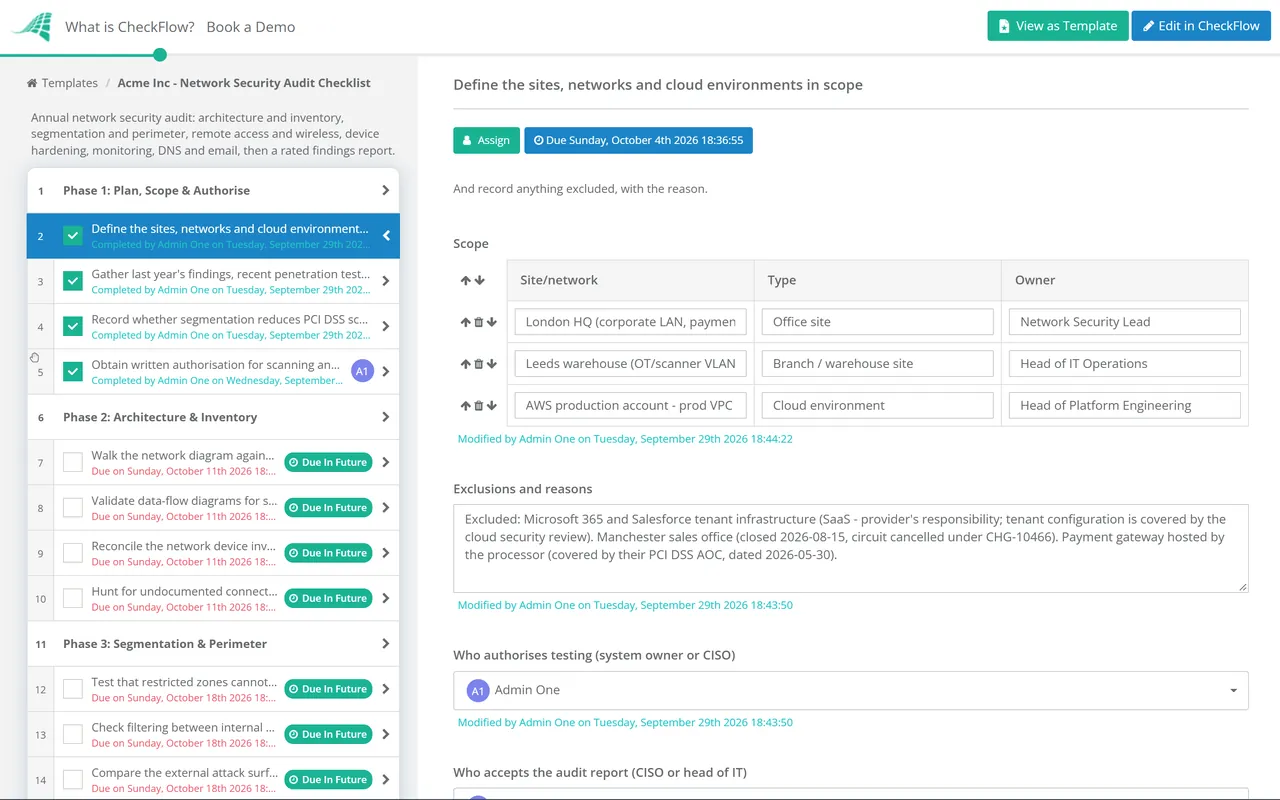
Seven phases run from scoping and authorisation to a signed report. Answers in Phase 1 decide whether the segmentation test and the wireless configuration task appear.
Led by the audit lead. Written authorisation for active testing is an approval step for the system owner or CISO.
The PCI DSS segmentation task appears only when segmentation is used to reduce scope.
The wireless configuration task is hidden when no site in scope runs approved Wi-Fi. Rogue access point detection stays, because an unapproved access point can appear anywhere.
Acceptance of the report is an approval step for the CISO or head of IT.
No framework calls this exact exercise a “network security audit”, but several expect the things it tests. ISO/IEC 27001:2022 groups them under three Annex A network controls. PCI DSS v4.0.1 adds specific cadences, such as annual segmentation testing under 11.4.5 (every six months for service providers under 11.4.6) and quarterly wireless access point testing under 11.2.1. CIS Controls v8.1 asks for network architecture documentation to be reviewed at least annually. The table maps each reference to the phase that evidences it.
| Framework | Reference | What it expects | Evidenced in |
|---|---|---|---|
| ISO/IEC 27001:2022 Annex A | 8.20, 8.21, 8.22 | Networks security, security of network services and segregation of networks | Phases 2–5 |
| PCI DSS v4.0.1 | 1.2.3, 1.2.4 | Accurate network and data-flow diagrams, updated when the environment changes | Phase 2 |
| PCI DSS v4.0.1 | 11.4.5, 11.2.1 | Segmentation controls tested at least every 12 months and after change; wireless access points tested for every three months | Phases 3 and 4 |
| PCI DSS v4.0.1 | 2.2.2, 2.2.4, 8.4.3 | Vendor defaults managed; only necessary services enabled; MFA for remote access that could reach the cardholder data environment | Phases 4 and 5 |
| CIS Controls v8.1 | Control 12 (12.1, 12.2, 12.4) | Network infrastructure kept up to date, a secure architecture, and diagrams reviewed at least annually | Phases 2 and 5 |
| CIS Controls v8.1 | Control 13 (13.4, 13.6, 13.9) | Filtering between segments, network flow logs and port-level access control | Phases 3, 5 and 6 |
| SOC 2 (2017 TSC, 2022 points of focus) | CC6.6, CC7.2 | Protection against threats from outside the system boundary; monitoring for anomalies | Phases 3, 4 and 6 |
For testing technique, NIST SP 800-115 remains the standard reference on planning and running technical security assessments. For email, DMARC was republished as a standards-track specification, RFC 9989, in May 2026. Your auditor, assessor or certification body decides what satisfies each control in your scope, so treat the table as a starting point, not legal or audit advice. The framework programmes that call for these checks have their own templates: the PCI DSS 4.0 Compliance Checklist, the NIST CSF 2.0 Checklist and, for UK organisations, the Cyber Essentials Certification Checklist.
Two answers in Phase 1 shape the rest of the audit. Segmentation testing appears only where segmentation reduces scope, and the wireless configuration check disappears where no Wi-Fi is deployed, so the checklist fits each environment without editing.
Diagrams, scan output, configuration extracts and screenshots are uploaded to the task that tested them. Each task records who completed it and when, so the report can point straight at its proof.
Every finding gets an owner and a due date, and dashboards show what is open, overdue or awaiting retest. A yearly schedule opens the next audit automatically, with last year’s export ready to compare against.
CheckFlow is not a network scanner, a configuration auditing tool or a SIEM. It runs the planning, evidence, sign-off and follow-up around those tools. CheckFlow’s compliance checklist software shows how the annual audit sits alongside the shorter recurring reviews in your compliance calendar, and our guide to recurring compliance checklists for IT teams covers how to schedule them.
Most audit findings turn into patching or retesting work. The Vulnerability Management Checklist tracks remediation through to rescan, and the Penetration Test Checklist covers scoping, rules of engagement and retesting when you bring in an external tester.
Two neighbouring templates keep this audit accurate. The IT Asset Management Checklist keeps the device inventory in Phase 2 current, and firmware found out of date in Phase 5 goes into the monthly Patch Management Checklist.
Describe the process in a sentence and the AI checklist generator drafts the phases and tasks for you.
It is a structured assessment of an organisation’s network layer: how it is designed and segmented, how traffic enters and leaves, how remote users and wireless devices connect, how network devices are configured, and whether activity is logged and monitored. The auditor compares what is found against internal standards and any frameworks in scope, then reports rated findings with owners and deadlines.
Annually is the common baseline, plus an extra audit after significant change: a merger, a new site, a cloud migration or a redesign of the core network. Some parts run more often inside the audit year. PCI DSS, for example, expects firewall configurations to be reviewed every six months and wireless access points to be tested for every three months, so the annual audit checks that those shorter cycles happened.
Someone independent of the team that runs the network day to day. That can be internal audit, a security team outside network operations, or an external firm. Network engineers still take part, since they provide diagrams, configurations and access, but they should not be the ones marking their own work as passed.
No. A penetration test tries to exploit weaknesses to show what an attacker could achieve. An audit checks configuration, design and process against a defined standard, and uses light active testing, such as connection attempts between segments, to confirm what the documents claim. The two complement each other: the audit should review the latest penetration test findings, and the test is often scoped using the audit’s diagrams.
Yes, at the network layer. Virtual networks, peering links, transit gateways, VPN attachments and cloud firewalls belong on the same diagram as the office and data centre, because traffic moves between them. Account-level settings such as identity and access management, storage exposure and logging configuration are better covered by a dedicated cloud security review, so this audit links to that evidence rather than repeating it.
Because they are network-facing configuration that attackers use directly. A DNS record left pointing at a retired cloud service can be taken over, and a domain without a DMARC policy is easy to spoof in phishing emails. These records are cheap to check and are often owned by nobody in particular, which makes the annual audit a sensible place to catch them.
14-day free trial, no card required. The Business plan is $10 per user per month after the trial. Full details at checkflow.io/pricing.
14-day free trial, no credit cardFull refund in your first 30 daysUS hosting, EU on request