Disaster Recovery Audit Checklist Template

Most organisations believe they have a disaster recovery plan. Very few have tested whether it would actually work. An untested plan is not a plan — it is a hope.

A disaster recovery plan sitting in a document repository is not a disaster recovery capability. A backup system that has never had a restore tested is not a backup — it is a file transfer whose contents may or may not be usable when they are needed. The organisations that recover from ransomware, server failures, and data centre outages in hours rather than weeks are not the ones with the best written documentation — they are the ones who tested their recovery process regularly, discovered and fixed the gaps before a crisis revealed them, and confirmed that their RTO and RPO targets were achievable in practice, not just on paper. A disaster recovery audit assesses all of this systematically — the plan documentation, the backup integrity, the restore process, the failover capability, and the communication plan. This free DR audit checklist gives IT teams, IT managers, and MSPs a structured framework for assessing and improving disaster recovery readiness.

Use This Template Free See Live Example
No Credit Card Required

RTO and RPO — The Two Numbers Every DR Audit Must Validate

RTO

Recovery Time Objective

Definition: The maximum acceptable downtime for a system or service after a disaster — how quickly it must be restored before the business impact becomes unacceptable.

Example: A payment processing system with an RTO of 4 hours must be restored within 4 hours of a failure event.

What the audit validates: Can the system actually be restored within this timeframe under realistic conditions? What is the measured actual recovery time from testing?

RPO

Recovery Point Objective

Definition: The maximum acceptable data loss measured in time — how far back the most recent usable backup can be, before the loss of that data is unacceptable.

Example: A financial system with an RPO of 1 hour cannot lose more than 1 hour of transaction data in any failure scenario.

What the audit validates: Are backups running at the frequency required to meet this RPO? Are those backups actually complete and restorable?

The Gap

What Audits Reveal

The most common DR audit finding is not a missing RTO/RPO — it is an RTO/RPO that has been defined in the plan but never tested against actual recovery capability.

An RTO of 4 hours documented in the plan is meaningless if the actual restore process takes 16 hours. The audit measures the gap between the documented objective and the demonstrated capability.

What the Disaster Recovery Audit Checklist Covers

This checklist covers six phases of the DR audit cycle — from plan documentation review through to gap remediation planning.

Phase 1

Phase 1: DR Plan Documentation Review

The DR plan document is the starting point — but it is the least important part of disaster recovery capability. Many organisations have excellent documentation and untested processes. The audit assesses both.

  • Confirm a current, written DR plan exists — version controlled; approved by senior leadership; reviewed within the last 12 months
  • Confirm the plan covers all critical systems — every system with defined RTO/RPO requirements is included; no critical system omitted
  • Confirm RTO and RPO are defined for each critical system — agreed with business leadership; not just set by IT
  • Confirm the plan includes documented recovery procedures — step-by-step procedures granular enough for a technician unfamiliar with the system to follow
  • Confirm critical contact lists are current — all internal and external contacts needed during a DR event; tested within the last 6 months
  • Confirm the plan has been reviewed after any significant infrastructure change — new systems, cloud migrations, or architecture changes may invalidate existing procedures
Phase 2

Phase 2: Backup System & Data Protection Audit

  • Audit backup coverage — confirm every system with an RPO requirement has a backup job running at the frequency required to meet that RPO
  • Review backup success rates — backup job logs for the last 30 days; confirm success rate is 99%+; investigate and resolve any failed jobs
  • Confirm backups are stored off-site or in the cloud — a backup that is only on-site is destroyed in a fire, flood, or ransomware event
  • Confirm backup data is encrypted — both in transit and at rest; encryption keys managed separately from the backup data
  • Confirm backups are immutable or air-gapped — ransomware can encrypt or delete backup data accessible from the network; immutable or air-gapped backups cannot be modified
  • Confirm backup retention policy is documented and enforced — how long backups are retained; consistent with RPO requirements and compliance obligations
Phase 3

Phase 3: Restore & Failover Testing

This is the most critical phase of the DR audit — and the most commonly skipped. An untested restore is an untested disaster recovery plan. NIST SP 800-34 and most compliance frameworks require documented testing at defined intervals.

  • Perform a full restore test of critical data — restore a representative sample of critical business data from backup; confirm data integrity and completeness
  • Perform a full system restore test — restore at least one critical server or virtual machine from backup to a test environment; measure the actual restore time
  • Measure actual RTO for each critical system — time the restore process; compare to the documented RTO target; identify any system where actual recovery time exceeds the target
  • Validate RPO for each critical system — confirm the most recent backup is within the RPO window
  • Test failover to the DR site or cloud environment — where a DR site exists; test the failover process; measure the failover time
  • Test application functionality post-restore — a restored server that does not run its applications correctly has not been successfully recovered
  • Document all test results — date, system, test type, actual RTO achieved, data integrity confirmed, issues discovered, and remediation actions
Phase 4

Phase 4: Communication & Escalation Plan Review

  • Confirm the DR communication plan is documented — who notifies whom, in what sequence, using what channels, when a DR event occurs
  • Confirm escalation thresholds are defined — which events trigger DR declaration; who has authority to declare a DR event
  • Confirm contact lists are current — IT team, vendors, cloud providers, senior management, and any regulatory notification contacts
  • Confirm external communication plan exists — how customers, partners, or regulators are notified in the event of a significant outage
  • Conduct a tabletop exercise — a guided discussion-based simulation of a realistic DR scenario; walk through who does what, when, and using what tools; without activating recovery systems
  • Document the tabletop exercise findings — gaps identified, decisions tested, and actions to improve the plan
Phase 5

Phase 5: Compliance & Regulatory Alignment

  • Confirm DR requirements for applicable frameworks — HIPAA (requires DR plan, testing, and documentation), SOC 2 (availability and continuity controls), ISO 27001, CMMC 2.0, or applicable industry-specific requirements
  • Confirm DR testing frequency meets requirements — most frameworks require annual testing at minimum; some require quarterly
  • Confirm DR documentation is audit-ready — test results, plan reviews, and sign-offs retained and accessible
  • Confirm vendor and third-party DR obligations are reviewed — key vendors and cloud providers with SLAs that affect your RTO/RPO
  • Review cyber insurance policy against DR requirements — many cyber insurance policies require specific DR controls; confirm current DR posture meets policy requirements
Phase 6

Phase 6: Gap Remediation & Improvement Planning

  • Document all audit findings — gaps identified across plan, backup, testing, communication, and compliance phases
  • Prioritise remediation by risk — systems failing to meet RTO/RPO in testing are highest priority; documentation gaps are lower
  • Create the remediation action plan — specific actions, named owners, and target completion dates for each finding
  • Schedule the next test cycle — at minimum annually; quarterly for critical systems or after significant infrastructure changes
  • Report findings to senior management and relevant stakeholders — DR capability gaps are a business risk; leadership must be informed and able to prioritise investment

Recovery Site Types — Choosing the Right Model for Your RTO

Highest availability

Hot Site

Description: A fully configured, continuously synchronised replica of the primary environment — hardware, software, data, and network connectivity — ready for immediate failover.

RTO: Minutes to one hour.

Cost: Highest — duplicate infrastructure running at all times.

Best for: Organisations with RTO requirements of hours or less, particularly for mission-critical applications where any significant downtime is unacceptable.

Balanced approach

Warm Site

Description: Pre-configured infrastructure with periodic data replication — hardware and network ready, but data must be restored from recent backups before the site is operational.

RTO: Hours to half a day.

Cost: Moderate — infrastructure maintained but not running at full capacity.

Best for: Organisations with RTO requirements of 4–24 hours for most systems.

Lower cost

Cold Site / Cloud DRaaS

Description: Basic facilities or cloud infrastructure available for recovery, but requiring full software installation and data restoration from scratch. DRaaS provides cloud-based recovery infrastructure on demand.

RTO: Days.

Cost: Lowest — infrastructure only activated during a disaster.

Best for: Less critical systems where extended recovery time is acceptable; or organisations using DRaaS for flexible cloud-based recovery.

Why Use CheckFlow for Disaster Recovery Audits?

1

A structured, recurring annual DR audit process

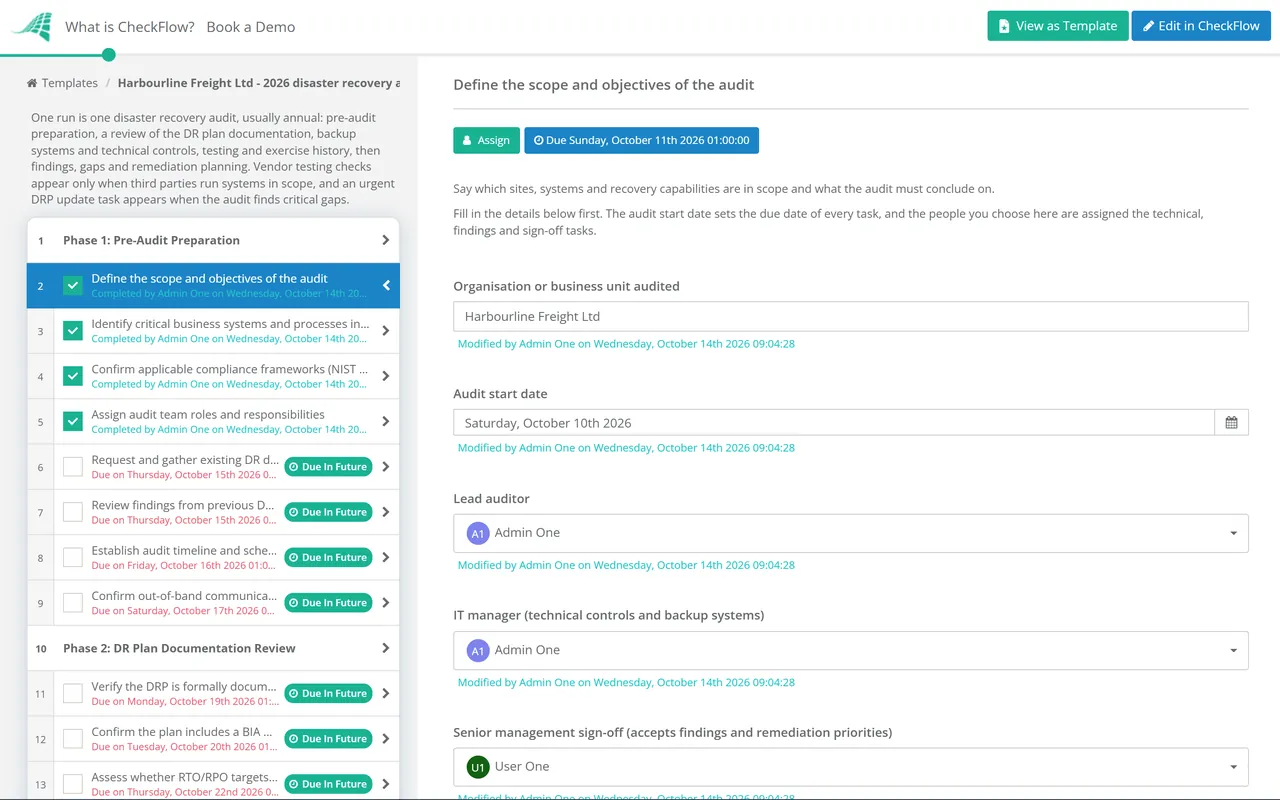
CheckFlow’s recurring checklist feature schedules the DR audit automatically at the defined interval — annually for most organisations, quarterly for high-compliance environments. The audit checklist assigns each phase to the relevant team member, sets deadlines, and ensures the full audit is completed before the compliance reporting period.

2

Documented test results for compliance evidence

HIPAA, SOC 2, and ISO 27001 auditors ask for evidence that DR testing was conducted and findings were documented. Every completed task in CheckFlow is timestamped with the name of the person who completed it. The restore test dates, RTO measurements, and gap findings are archived — producing compliance evidence as a byproduct of running the audit process.

3

Remediation tracking through to completion

A DR audit that identifies gaps but does not track their remediation is worse than not auditing — it creates a documented record of known vulnerabilities. CheckFlow’s remediation action plan assigns each finding to a named owner with a deadline, sends reminders, and makes the status of every open finding visible until it is resolved.

The Disaster Recovery Audit also appears in CheckFlow’s compliance template series, where it is framed within the broader IT compliance and audit framework. See the DR Audit in the Compliance Series →

Disaster recovery and incident management are connected — a major IT incident that cannot be resolved may trigger DR procedures. CheckFlow’s Incident Management Process Template covers the escalation from incident to DR activation. See the Incident Management Template →

Frequently Asked Questions

What does a disaster recovery audit cover?

+

A DR audit covers six areas: DR plan documentation review (verifying the plan is current, covers all critical systems, and has defined RTO/RPO for each), backup system audit (confirming backup coverage, success rates, off-site storage, encryption, and immutability), restore and failover testing (actually testing restores and measuring actual recovery time against RTO targets — the most critical phase), communication and escalation plan review (confirming contact lists are current and escalation procedures are documented and tested via tabletop exercise), compliance and regulatory alignment (confirming DR controls meet the requirements of applicable frameworks), and gap remediation planning (documenting findings and creating a prioritised action plan with named owners).

What is the difference between RTO and RPO?

+

Recovery Time Objective (RTO) is the maximum acceptable downtime — how quickly the system must be restored after a failure before the business impact is unacceptable. Recovery Point Objective (RPO) is the maximum acceptable data loss measured in time — the furthest back the most recent usable backup can be. A payment system might have an RTO of 4 hours (must be running again within 4 hours) and an RPO of 1 hour (cannot lose more than 1 hour of transactions). RTO drives recovery site design and failover capability. RPO drives backup frequency. Both must be defined, agreed with business stakeholders, and validated through testing.

How often should DR testing be conducted?

+

At minimum, annual DR testing is required for most compliance frameworks (HIPAA, SOC 2, ISO 27001). Quarterly testing is recommended for critical systems and required by some frameworks in highly regulated industries. Additional testing should be triggered whenever significant infrastructure changes are made (cloud migrations, new critical systems, major software upgrades). The most important principle: test more frequently than you think you need to. Most DR failures are discovered in testing, not during actual disasters — and discovering them in testing is infinitely preferable.

What is a tabletop exercise for disaster recovery?

+

A tabletop exercise is a guided, discussion-based simulation of a disaster scenario where leadership, IT, and key stakeholders walk through the recovery process step by step without actually activating recovery systems. A facilitator presents a realistic scenario (ransomware encrypts production servers; primary data centre loses power; a critical vendor goes offline) and guides participants through the response: who is notified, what decisions are made, who has authority to declare a DR event, how are customers communicated to, what are the dependencies. Tabletop exercises reveal plan gaps, decision-making ambiguities, and communication failures that technical testing does not uncover.

Is CheckFlow free for this template?

+

14-day free trial, no card required. The Business plan is $10 per user per month after the trial. Full details at checkflow.io/pricing.

Test Your DR Plan Before a Disaster Tests It for You

Free trial — no credit card required.