Firewall Rule Review Checklist Template

Every rule on your firewall was approved by someone, for a reason, at some point. After a few years nobody can say which of those reasons still hold, so nobody dares remove anything.

Rule bases only grow. A project needs a port opened for a migration, a vendor needs a temporary path for a support call, an outage is fixed with a broad allow rule that was meant to be tightened next week. Each change went through change control, yet the rule base as a whole is never looked at. A firewall rule review is that look. It exports the policy, finds rules that are too broad, never used, hidden behind other rules or past their expiry date, asks each rule’s owner whether it is still needed, and removes or tightens what is not. This free firewall rule review checklist runs that work every six months across perimeter, internal and cloud network controls. Change requests appear only for the rules you decide to touch.

Use This Template Free See Live Example
No Credit Card Required

Six Kinds of Rule a Review Is Designed to Catch

Change control judges each rule on the day it is added. A rule-base review judges the whole policy as it stands today, including everything the environment has outgrown. NIST SP 800-41 Rev. 1, the US government’s firewall guidance, recommends reviewing policy at regular intervals rather than only during audits or emergencies, and examining every change made since the previous review. The table lists the problems a review typically finds, how to spot each one and what usually happens next.

Rule problem How to spot it Usual outcome
Overly permissive (any-any)Source, destination or service set to “any”Tighten to named hosts and ports
ShadowedAn earlier rule already matches all its traffic, so it never firesRemove, or reorder if the intent was different
RedundantDuplicates another rule or object groupMerge and remove the duplicate
UnusedZero hits across the whole review windowConfirm with the owner, disable, then remove
Expired temporaryPast the end date in its comment or ticketRemove unless the owner renews it with a new date
OrphanedNo owner, ticket or business reason recordedFind an owner or schedule for removal

The first two problems widen your attack surface. The rest mostly add clutter, but clutter has a cost: a policy with thousands of rules is hard to reason about, slow to change safely and easy to get wrong during an incident. Removing dead rules is what makes the risky ones visible.

What the Firewall Rule Review Checklist Covers

Six phases move each review from a fresh configuration export to a signed record. Change request tasks switch on only when a rule is marked for tightening or removal.

Phase 1

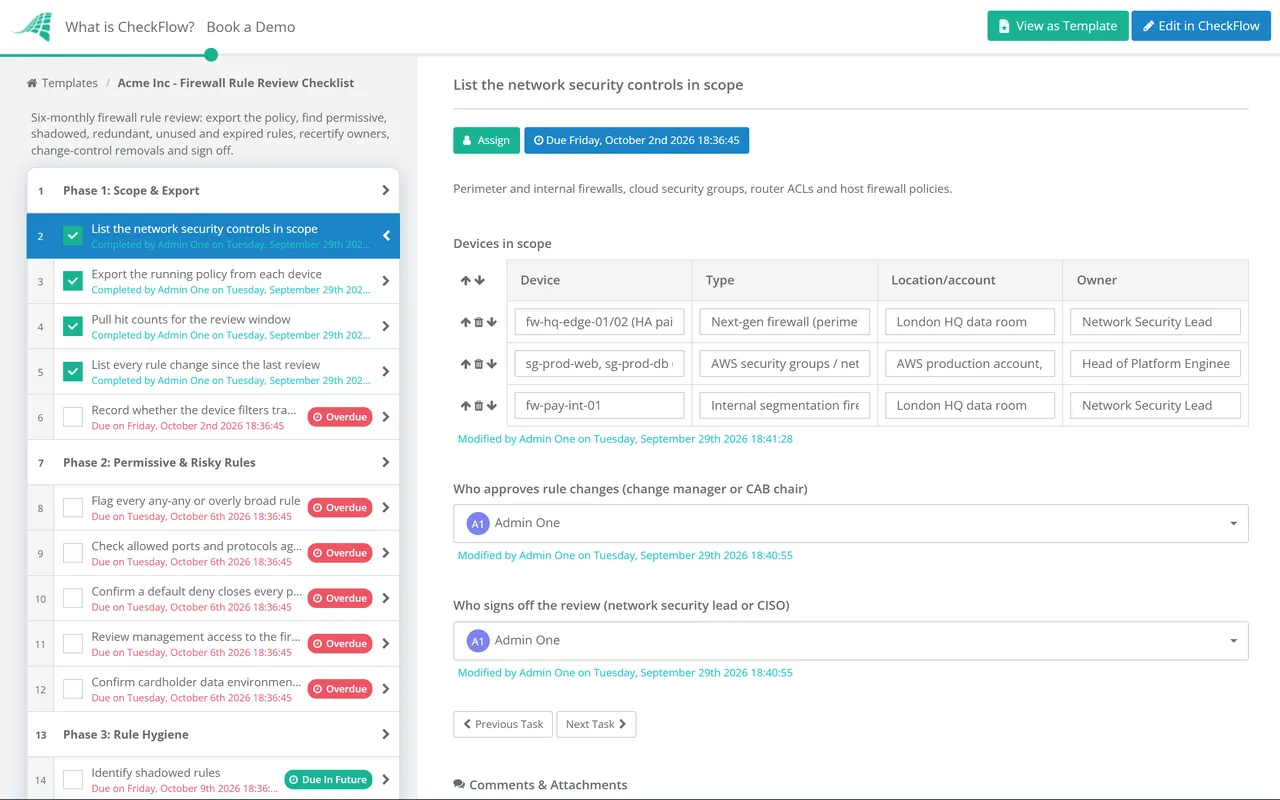
Phase 1: Scope & Export

Assigned to the network security engineer who owns the devices under review.

  • List the network security controls in scope — perimeter and internal firewalls, cloud security groups, router ACLs and host firewall policies
  • Export the running policy from each device — and confirm it matches the saved backup, so you are reviewing what is actually enforced
  • Pull hit counts for the review window — note when counters were last reset, because a reboot or failover can zero them
  • List every rule change since the last review — matched to its change ticket, requester and approver
  • Record whether the device filters traffic to or from the cardholder data environment — answering yes adds the PCI DSS checks in Phase 2
Phase 2

Phase 2: Permissive & Risky Rules

The last task appears only for devices that filter cardholder data traffic.

  • Flag every any-any or overly broad rule — each needs a named reason or a plan to narrow it
  • Check allowed ports and protocols against the approved list — insecure services such as Telnet or unencrypted FTP need documented justification and compensating controls
  • Confirm a default deny closes every policy — traffic not explicitly allowed should be dropped and logged
  • Review management access to the firewall itself — admin interfaces reachable only from a management network, over encrypted protocols, with MFA
  • Confirm cardholder data environment restrictions — inbound and outbound traffic limited to what is necessary, and wireless networks denied by default
Phase 3

Phase 3: Rule Hygiene

  • Identify shadowed rules — rules that can never match because an earlier rule already catches their traffic
  • Identify redundant rules and duplicate objects — the same host defined three times under three names
  • List rules with zero hits — but check for seasonal, year-end or disaster recovery traffic before assuming a rule is dead
  • Check every temporary rule against its end date — expired rules go straight onto the removal list
  • Remove unused address and service objects — they clutter the policy and hide real problems
Phase 4

Phase 4: Owner Recertification

  • Send each rule group to its business owner — with the original ticket, the justification and recent hit counts
  • Record the owner’s decision for each rule — keep, tighten or remove
  • Escalate rules nobody will own — an unowned rule is treated as a removal candidate by default
  • Update rule comments — owner, ticket reference and date of this review, so the next reviewer starts with context
Phase 5

Phase 5: Change Requests

Switches on when any rule is marked tighten or remove in Phase 4. The change approval is an approval step for the change manager or CAB.

  • Raise a change request for each rule to change — grouped by device and risk so the CAB reviews them together
  • Obtain change approval — through the same change process as any other production change
  • Disable before deleting — leave a removed rule disabled and logged for an agreed period so a hidden dependency shows up safely
  • Attach the post-change policy export — and close each ticket once no impact has been reported
Phase 6

Phase 6: Logging, Backup & Sign-Off

Sign-off is an approval step for the network security lead or CISO.

  • Confirm logging on deny rules and sensitive allow rules — and that logs reach the central log platform with accurate timestamps
  • Confirm alerts fire on policy changes — an unapproved edit should not wait six months to be noticed
  • Back up the reviewed configuration — stored where only authorised administrators can reach it
  • Write up the review record — participants, devices, configuration date, findings and ticket numbers
  • Approve the review and set the next date — six months out, or sooner after a major network change

Where the Six-Monthly Cadence Comes From

PCI DSS v4.0.1 requirement 1.2.7 requires the configurations of network security controls to be reviewed at least once every six months to confirm they are relevant and effective. Version 4 replaced the old wording about firewalls and routers with the broader term “network security controls”, which is why this template covers cloud security groups and host policies as well as appliances. Outside card payments no framework fixes a number, but six-monthly has become a common benchmark, and busy networks often review quarterly. The table shows the references most teams map this review to.

Framework Reference What it expects Evidenced in
PCI DSS v4.0.11.2.7Network security control configurations reviewed at least every six monthsThe whole checklist
PCI DSS v4.0.11.2.5, 1.2.6Every allowed service, protocol and port approved with a business need; insecure ones mitigatedPhases 2 and 4
PCI DSS v4.0.11.2.2, 1.2.8Rule changes follow change control; configuration files secured and consistent with the running configurationPhases 1, 5 and 6
ISO/IEC 27001:2022 Annex A8.20, 8.21, 8.22Networks security, security of network services and segregation of networksPhases 2–4
CIS Controls v8.14.4, 4.5, 13.4Firewalls managed on servers and end-user devices; traffic filtered between network segmentsPhases 1–3
NIST SP 800-41 Rev. 1Section 5 (management)Regular policy reviews, a log of every ruleset change, rule comments and configuration backupsPhases 1, 4 and 6

Your QSA, auditor or certification body has the final word on what evidence satisfies each control in your scope, so treat the table as a starting point, not legal or audit advice. Cardholder data environments are covered end to end by the PCI DSS 4.0 Compliance Checklist.

Why Run Your Firewall Reviews in CheckFlow?

1

The review starts itself twice a year

A recurring schedule opens the checklist every six months and assigns the export phase to the engineer. The deadline does not depend on someone remembering it, and a slipped review shows as overdue rather than surfacing at assessment time.

2

Change work only when a rule changes

Conditional logic keeps the change request phase hidden until an owner marks a rule for tightening or removal, and adds the cardholder data checks only for devices that filter that traffic.

3

Evidence your assessor can follow

Exports, hit-count reports, owner decisions and change tickets are attached to the task they support. Each step records who completed it and when, and the final approval shows who signed the review off.

CheckFlow does not analyse rule bases or push configuration to firewalls; your firewall manager and policy analysis tools do that. It runs the review, ownership and approval work around them. CheckFlow’s recurring checklist software explains how scheduled reviews, assignments and evidence work, and change management checklists cover the approval path each rule removal goes through.

A rule review looks at policy on the devices. The broader Network Security Audit Checklist tests the network around them once a year: diagrams, segmentation, remote access, wireless and device hardening. For the change side, the IT Change Management Checklist handles individual requests.

Rule reviews and network audits both feed the annual IT Security Audit Checklist, which looks at the security programme as a whole. The configuration backups taken in Phase 6 are only useful if they restore, which is what the Backup Verification & Restore Test Checklist proves.

Frequently Asked Questions

What is a firewall rule review?

+

It is a scheduled examination of every rule on a firewall or other network filter to confirm that each one is still needed, is no broader than it has to be, is owned by someone and is logged appropriately. Rules that fail are tightened or removed through change control, and the outcome is documented and signed off.

How often should firewall rules be reviewed?

+

If you are subject to PCI DSS, at least once every six months for every network security control in scope, under requirement 1.2.7. Other frameworks expect regular reviews without fixing a number, so many organisations adopt the same six-monthly cycle everywhere for simplicity. Environments with frequent rule changes often review quarterly. An extra review after a major network change, merger or migration is also sensible.

Is a rule with zero hits safe to delete?

+

Not automatically. Hit counters reset on reboot or failover, and some traffic only happens at year-end, during an audit or in a disaster recovery test. Confirm the counter history covers the full window, ask the owner, then disable the rule with logging turned on for an agreed period before deleting it. If something breaks, re-enabling a disabled rule takes seconds.

Do cloud security groups count?

+

Yes. PCI DSS v4 talks about network security controls rather than firewalls, and assessors generally treat cloud security groups, network ACLs and virtual firewalls as part of that population. They also tend to drift faster than on-premises rules because engineers can change them directly. List each cloud account or subscription in Phase 1 and export its rules alongside the physical devices.

How is a rule review different from a network security audit?

+

A rule review is narrow and frequent: it examines the policy loaded on each filtering device and asks whether every rule should still be there. A network security audit is broad and usually annual: it tests whether the network as a whole matches its diagrams, whether segmentation actually holds, and how remote access, wireless and device hardening are managed. The audit should check that rule reviews happened on time, not repeat them.

Who should sign off the review?

+

The engineer who manages the firewalls prepares the review, but sign-off should come from someone accountable for network risk who did not do the analysis, such as the network security lead or the CISO. Rule owners in the business confirm whether their rules are still needed; they should not approve the review as a whole.

Is CheckFlow free for this template?

+

14-day free trial, no card required. The Business plan is $10 per user per month after the trial. Full details at checkflow.io/pricing.

A Leaner Rule Base Every Six Months, Signed and Evidenced

Free trial — no credit card required.