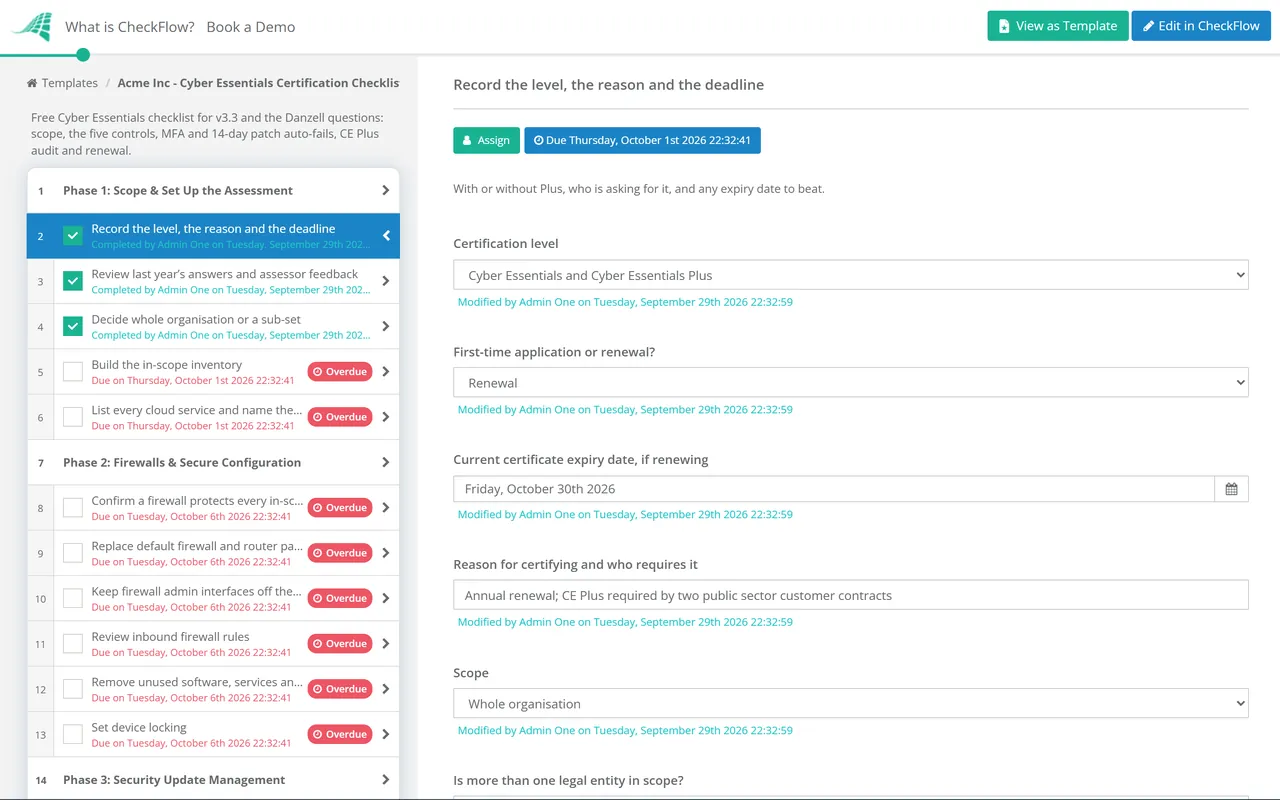
Cyber Essentials Certification Checklist Template

Under the current question set, one answer can fail the whole assessment: a cloud service with MFA off, a browser update installed on day 20, a laptop on an unsupported operating system.

Cyber Essentials is the UK government-backed certification built on five technical controls: firewalls, secure configuration, security update management, user access control and malware protection. This free Cyber Essentials checklist is for organisations certifying or renewing, suppliers bidding for public contracts, and MSPs running it for clients. It covers scoping, each control as the Danzell question set tests it, sign-off and submission, the optional Cyber Essentials Plus audit and renewal. You finish with evidence behind every answer and a record next year’s renewal starts from.

Use This Template Free See Live Example
No Credit Card Required

Last reviewed: September 2026

Same Five Controls, Stricter Marking Since April 2026

The National Cyber Security Centre owns the scheme and IASME delivers it as its Delivery Partner, through licensed Certification Bodies. The standard itself is the NCSC’s Requirements for IT Infrastructure, now at v3.3. Accounts created from 27 April 2026 answer the Danzell question set, which replaced Willow (v3.2, in use since 28 April 2025).

The five controls did not change; the scope and the marking did. Version 3.3 defines a cloud service for the first time, states that cloud services cannot be excluded from scope, requires a justification for any partial scope and gives passkeys and other passwordless sign-in more prominence. Danzell makes several answers automatic fails.

Cyber Essentials

A verified self-assessment

How: you answer the questions in IASME’s platform and a board-level representative or owner approves them.

Checked by: an Assessor at a Certification Body. No scan or site visit.

Cost: IASME’s fee is set by headcount, from £320 + VAT for 0–9 employees to £600 + VAT for 250 or more, at the time of review.

Lasts: 12 months from the date the certificate is issued.
Cyber Essentials Plus

The same controls, technically audited

How: an Assessor tests sampled devices and every cloud service: external and authenticated scans, malware tests, MFA prompts and account separation.

Prerequisite: a Cyber Essentials certificate, with the audit completed within three months of it. Both can run together.

Cost: quoted by the Certification Body on the size and complexity of your network.

Lasts: 12 months, like the self-assessment.

Automatic fails under Danzell

Answers that end the assessment on their own

A “no” to A6.4 or A6.5: high-risk or critical updates for operating systems, firmware and applications installed within 14 days of release. A “no” to A7.16 or A7.17: MFA for every administrator and user of every cloud service that offers it, free or paid. Listing a service under A7.15 as having no MFA when it does. And, as before, unsupported software in scope.

What the Cyber Essentials Checklist Covers

Five phases take you from scope to a certificate, a sixth appears only for Plus, and the last keeps you compliant through the year. Question numbers are from the Danzell question set.

Phase 1

Phase 1: Scope & Set Up the Assessment

Answers on the first task decide whether Phase 6 appears and switch on the renewal, sub-set, legal entity and supplier account tasks.

  • Record the level, the reason and the deadline — with or without Plus, who is asking for it, and any expiry date to beat
  • Review last year’s answers and assessor feedback — every answer must be entered again, and questions may have changed
  • Decide whole organisation or a sub-set — a sub-set must be segregated by a firewall or VLAN and justified to the assessor (A2.1, A2.2)
  • Describe the excluded networks and how they are segregated — this description is not published (A2.2.1)
  • List every legal entity in scope — name, address and company number; an entity left off cannot be added after certification (A1.6)
  • Build the in-scope inventory — networks, firewalls and routers by model, servers, end-user and BYOD devices, with operating systems (A2.4–A2.8)
  • List every cloud service and name the in-house IT lead — cloud services cannot be excluded, and the IT lead cannot be employed by your outsourced provider (A2.9, A2.10)
Phase 2

Phase 2: Firewalls & Secure Configuration

  • Confirm a firewall protects every in-scope device — boundary firewalls, plus software firewalls on computers and servers (A4.1, A4.1.1)
  • Replace default firewall and router passwords — or disable remote administration entirely (A4.2, A4.3)
  • Keep firewall admin interfaces off the internet — unless a documented business need exists and MFA or an IP allow list protects them (A4.9–A4.11)
  • Review inbound firewall rules — each approved and documented with its business need; remove the rest (A4.6–A4.8)
  • Remove unused software, services and accounts — and disable auto-run of downloaded files (A5.1, A5.2, A5.8)
  • Set device locking — biometric, or a PIN or password of at least six characters, with throttling or lock-out (A5.9, A5.10)
Phase 3

Phase 3: Security Update Management

A6.4 and A6.5 are automatic fails. Attach patch reports that show the 14 days were met, not a policy.

  • Confirm every operating system and firmware version is supported — check end-of-life dates and keep any extended security update subscription current (A6.1)
  • Record browsers, malware protection and office applications with versions — so the assessor can confirm they are supported (A6.2)
  • Remove unsupported or unlicensed software — or move it into a sub-set with no traffic to or from the internet (A6.3, A6.6, A6.7)
  • Turn on automatic updates wherever the software allows it — operating systems and applications (A6.4.1, A6.5.1)
  • Evidence the 14-day rule for operating systems and firmware — updates rated critical or high risk, CVSS v3 7 or above, or unrated by the vendor (A6.4)
  • Evidence the 14-day rule for applications — including associated files and extensions (A6.5)
Phase 4

Phase 4: User Access Control & MFA

A7.16 and A7.17 are automatic fails. The last task appears only when a third party manages or supports your IT.

  • Confirm accounts are approved before creation and disabled on leaving — including after a defined period of inactivity (A7.1, A7.3)
  • Separate administrator accounts from everyday accounts — no email or web browsing on admin accounts, cloud admin included (A7.6, A7.7)
  • Review who holds administrator access — keep a tracked list and remove what the role does not need (A7.8, A7.9)
  • Check password controls — MFA, or at least 12 characters, or 8 with a deny list of common passwords, plus brute-force protection (A7.10, A7.11)
  • Switch on MFA for every user and administrator of every cloud service — free or paid, or linked to another service’s MFA (A7.14, A7.16, A7.17)
  • List cloud services with no MFA option at all — listing a service that does offer MFA fails the assessment (A7.15)
  • Bring supplier and MSP accounts under the same controls — accounts you own are in scope even when a third party uses them to support you
Phase 5

Phase 5: Malware Protection, Sign-Off & Submission

  • Confirm malware protection on every device — anti-malware that blocks malicious code and websites, or application allow listing (A8.1–A8.5)
  • Draft every answer offline from the question set — with evidence for each, before paying for the assessment account
  • Decide on the included cyber liability insurance — available when the whole organisation is certified, UK-domiciled, with turnover under £20m (A3)
  • Obtain board-level approval of the answers — the declaration now covers staying compliant for the whole certificate year
  • Submit within the account’s six-month window — marking takes about three working days; a fail allows two working days to fix and resubmit
  • Record the certificate number and issue date — the issue date is the scheme’s “point in time”, and the expiry is 12 months later
Phase 6 — Plus Only

Phase 6: Cyber Essentials Plus Audit

Shown only when Phase 1 records Plus. The booking task falls due three months after the Phase 5 certificate date.

  • Book the audit within three months of the self-assessment certificate — or run both together
  • Freeze the self-assessment answers — they must be final before testing starts and cannot be changed to match the results
  • Prepare devices, users and access — a representative sample, one standard and one admin user per cloud service, written permission
  • Run your own checks before the assessor does — missing 14-day fixes, MFA prompts in a private browser session, and admin rights on standard accounts
  • Fix failures across the whole scope, not just the sample — a retest rechecks the original devices and a new random sample
  • Record the Plus report and certificate — advisory notes become next year’s starting list
Phase 7 — Through the Year

Phase 7: Stay Compliant & Renew

The certificate is a point-in-time check, but the declaration covers the year. Run the fortnightly check as its own recurring checklist and attach the runs here.

  • Check patching and cloud MFA every fortnight — missed high-risk updates, cloud services without MFA, software nearing end of life
  • Update the scope record after significant change — new sites, entities, cloud services or device types
  • Review administrator access and firewall rules at a set interval — quarterly is a common choice
  • Check which requirements version applies before renewing — the scheme is reviewed every year
  • Start the renewal two months before expiry — a lapsed certificate can breach a contract requiring annual renewal

The Five Controls, Mapped to the Question Set

The table maps each part of the Requirements for IT Infrastructure v3.3 to the Danzell questions and Plus test that check it, and to the phase that collects the evidence. Check the version your assessment account uses, and treat the table as a starting point, not legal advice.

Requirement (v3.3) What it asks for Danzell questions Plus test Evidenced in
ScopeWhole organisation or a segregated sub-set; end-user devices, BYOD and cloud services always includedA1.6, A2Scope and sub-set segregation verified before testingPhase 1
1. FirewallsEvery device behind a correctly configured firewall; no default passwords; admin interfaces protectedA4External vulnerability scanPhase 2
2. Secure configurationUnused accounts and software removed; auto-run off; device lockingA5No separate test casePhase 2
3. Security update managementLicensed, supported software; automatic updates; high-risk fixes within 14 daysA6Authenticated patch scanPhases 3 and 7
4. User access controlApproved, unique accounts; separate admin accounts; MFA on every cloud serviceA7MFA prompt and account separation testsPhases 4 and 7
5. Malware protectionAnti-malware or application allow listing on every deviceA8Test files by email and browser, or manual checksPhase 5

Accounts opened before 27 April 2026 can still be completed against Willow within their six-month window, so the last of those close in late October 2026. The scheme is reviewed yearly: the April 2026 changes were announced in November 2025, and at the time of review no version after v3.3 had been announced. Procurement Policy Note 014 (February 2025) remains current for public buyers and says a fuller update will follow the NCSC’s redevelopment of the scheme.

Why Run Cyber Essentials in CheckFlow?

1

Patch evidence every fortnight, not once a year

A recurring schedule starts a short patch and MFA check every two weeks and assigns it to your IT lead. Each run carries its patch report, so your answers to A6.4 and A6.5 rest on 26 dated records.

2

One template for every client

Conditional logic reads the Phase 1 answers and shows the Plus audit, sub-set, legal entity and supplier tasks only where they apply. An MSP can run it per client and share a white-labelled view with the client’s director, whose sign-off is recorded as an approval before anyone submits.

3

Next year starts from this year

Dynamic due dates set the Plus booking from the certificate date and the renewal from the expiry. Answers, evidence and feedback stay on the completed checklist, and template versioning updates the tasks when the question set changes without losing last year’s record.

CheckFlow is not a Certification Body, a vulnerability scanner or a device management tool, and it does not submit your assessment: you answer in IASME’s platform and a licensed Assessor marks it. CheckFlow runs the preparation, evidence and sign-off. MSPs can see how one template runs across a client base on CheckFlow for MSPs, and CheckFlow’s compliance checklist software shows how the renewal sits alongside the rest of your compliance calendar.

Cyber Essentials is a baseline, not a security programme. When a customer asks for more, see the ISO 27001 Compliance Checklist or the NIST CSF 2.0 Checklist.

Frequently Asked Questions

What changed in Cyber Essentials in April 2026?

+

For assessment accounts created from 27 April 2026, the requirements moved to v3.3 and the question set to Danzell. Missing MFA on a cloud service that offers it is now an automatic fail, as is missing the 14-day window for high-risk updates. Cloud services cannot be excluded from scope, partial scopes need a justification, every legal entity must be listed, the declaration covers ongoing compliance, and answers cannot be changed after Plus testing.

What is the difference between Cyber Essentials and Cyber Essentials Plus?

+

The controls are identical. Cyber Essentials is a verified self-assessment that an Assessor marks. Plus adds a technical audit of sampled devices and your cloud services: vulnerability scans, patch levels, malware defences, MFA and admin account separation. You need the self-assessment certificate first, and the Plus audit must be completed within three months of it.

How long does Cyber Essentials certification take, and how long does it last?

+

Once you pay, you have six months to submit. IASME says marking takes about three working days, and a failed submission gets two working days to fix and resubmit without paying again. Most of the time goes on preparation. The certificate expires 12 months after issue; IASME sends a reminder about a month before, and the checklist schedules renewal earlier.

Do I need Cyber Essentials for a UK government contract?

+

Often, yes. PPN 014, which replaced PPN 09/14 and PPN 09/23 in February 2025, tells central government departments, their agencies and NHS bodies to require Cyber Essentials or Plus, or equivalent controls, where a supplier handles citizens’ or government staff’s personal data or supplies ICT systems handling OFFICIAL information, among other cases. Evidence is needed before data passes to the supplier, and certification must be renewed yearly for the contract’s duration.

Can our MSP complete Cyber Essentials for us?

+

An MSP can do most of the work: inventory, configuration changes, patch evidence and draft answers. Three things stay with you. A board-level person or owner must approve the answers. The person named as responsible for your IT in question A2.10 must be a member of your organisation, not someone employed by the provider. And the accounts the MSP uses on your systems are in scope, with the same MFA and admin separation.

Is CheckFlow free for this template?

+

14-day free trial, no card required. The Business plan is $10 per user per month after the trial. Full details at checkflow.io/pricing.

Every Answer Backed by Evidence Before You Press Submit

Free trial — no credit card required.