Part of the sales process
Scope: mostly technical: devices, patching, exposed services.
Depth: a snapshot, often automated.
Output: a findings report that supports a proposal.
Managed services clients assume that because they pay an MSP, they are secure. Usually they are more secure than they were, but every environment drifts. Staff join and leave, new SaaS applications appear, a supplier is given remote access, a server passes end of support, an exception made for one user becomes permanent. The annual client cybersecurity risk assessment is where you step back from day-to-day operations, measure the whole environment against a recognised framework, score what you find and agree a remediation roadmap with the client’s decision-maker. This free checklist is written for MSP owners, vCIOs and security leads who run that review for existing clients. It is organised around the six functions of the NIST Cybersecurity Framework 2.0, collects evidence for each finding, and ends with a scored report, a risk register and a presentation to the client. Extra tasks appear for clients in regulated sectors that require a documented risk assessment.
Many MSPs already run a network assessment during the sales process: a quick scan that finds enough problems to justify the proposal. That is a useful tool, but it is not a risk assessment. It is designed to be fast, it looks mainly at technology, and its audience is someone who hasn’t yet bought anything.
The annual client risk assessment has a different job. You already manage the environment, so the question is no longer “what is wrong?” but “what risks remain, how serious are they, and what has the client decided to do about each one?”. It covers governance, people and suppliers as well as technology. It compares this year with last year. And it produces a record of decisions, including the risks the client chose to accept, which protects both of you when something goes wrong.
Scope: mostly technical: devices, patching, exposed services.
Depth: a snapshot, often automated.
Output: a findings report that supports a proposal.
Scope: governance, identity, devices, data, suppliers, detection and recovery.
Depth: evidence-based, scored and compared year on year.
Output: a risk register, a remediation roadmap and recorded client decisions.
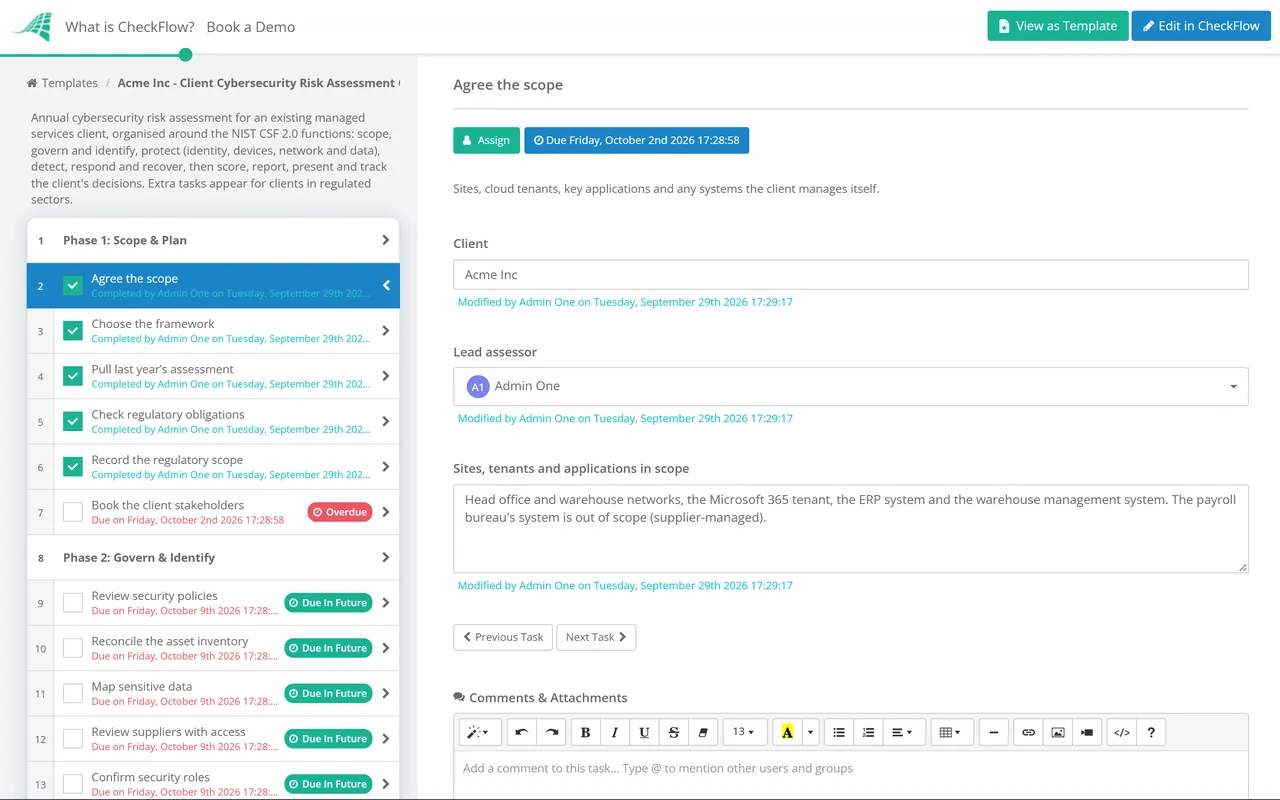
Seven phases take the assessment from scoping to a presented, agreed roadmap. Two extra tasks appear for clients in regulated sectors.
The checklist follows the six functions of the NIST Cybersecurity Framework 2.0, published in February 2024: Govern, Identify, Protect, Detect, Respond and Recover. Version 2.0 added Govern, which covers strategy, roles, policy and supplier risk. That is the part smaller clients most often miss. For clients who need something more prescriptive, the CIS Critical Security Controls v8.1 define Implementation Group 1, a set of 56 safeguards described as essential cyber hygiene for organisations with limited security expertise. UK clients will often know Cyber Essentials, whose five technical controls cover firewalls, secure configuration, security update management, user access control and malware protection.
| Checklist phase | NIST CSF 2.0 function | Cyber Essentials control |
|---|---|---|
| Phase 2: Govern & Identify | Govern, Identify | — (outside Cyber Essentials’ technical scope) |
| Phase 3: Identity & Access | Protect | User access control |
| Phase 4: Devices, Network & Data | Protect | Firewalls, secure configuration, security update management, malware protection |
| Phase 5: Detect, Respond & Recover | Detect, Respond, Recover | — (outside Cyber Essentials’ technical scope) |
Some clients are legally required to carry out a documented risk assessment, not just advised to. In the US, the HIPAA Security Rule requires covered entities and their business associates to conduct a risk analysis. The FTC Safeguards Rule requires a written risk assessment from the non-bank financial institutions it covers, which include tax preparers, mortgage brokers and many other small firms. For these clients, the conditional tasks in Phases 1 and 6 record the obligation and map findings to it. The checklist supports that work, but it is not legal advice. The client’s compliance adviser should confirm what their regulator expects.
Set a yearly recurring schedule for each client, staggered across the year so assessments don’t all land in the same month. The grid view shows which clients are due, in progress or overdue.
Scan results, MFA reports, sampled leaver records and restore tests are attached to the task they support. When the client, an auditor or an insurer asks how a finding was reached, the evidence is there with the date it was collected.
Each finding ends with the client’s decision (remediate, defer or accept) recorded by name and date. Accepted risks are no longer a line in an email. They are part of a dated record that you can bring back at the next QBR.
The annual risk assessment is one of the core recurring security processes in the CheckFlow for MSPs toolkit, alongside client onboarding, monthly reviews and QBRs.
For clients who must evidence the result to an auditor or a regulator, CheckFlow’s compliance checklist software shows how recurring reviews and approvals build a single audit trail. Clients buying cyber insurance can reuse much of the same evidence in the Cyber Insurance Readiness Checklist.
Describe the process in a sentence and the AI checklist generator drafts the phases and tasks for you.
It is a structured, evidence-based review of a client’s security posture, usually run once a year by their MSP. It identifies the risks that remain in the environment, rates them by likelihood and impact, and agrees what the client will do about each one. The output is a scored report, a remediation roadmap and a record of the client’s decisions, including the risks they chose to accept.
At least once a year, and again after any significant change such as a merger, a new site, a move to a new core system or a serious incident. Some regulations expect the risk assessment to be kept up to date as the environment changes, not just repeated on a date. Between assessments, the monthly report and the QBR track progress on the roadmap.
Use the one your client will recognise and can realistically meet. NIST CSF 2.0 works well as an organising structure for most clients because its six functions are easy to explain. The CIS Controls Implementation Group 1 gives a prescriptive baseline for small organisations. Cyber Essentials is widely recognised in the UK. Many MSPs use NIST CSF 2.0 for the structure and one of the others for the detailed checks.
A prospect assessment is a quick, mainly technical snapshot used in the sales process. The annual client risk assessment covers governance, identity, suppliers, detection and recovery as well as technology. It compares results year on year and records the client’s decisions. It is part of the service you deliver, not part of the sale.
Record the decision. Phase 7 asks for the client’s decision on every finding (remediate, defer or accept) with a name and a date. An accepted risk is a legitimate business choice, as long as it is an informed one. Bring accepted and deferred risks back at the next QBR, and revisit them if circumstances change, such as a new insurance requirement or a customer contract.
Scanners, RMM reports and identity tools produce much of the evidence, and you should use them. They can’t judge whether a policy is followed, whether a supplier’s access is still needed or which risk matters most to this particular business, and they can’t record what the client decided. The checklist structures that judgement and keeps the tool output attached to the finding it supports.
14-day free trial, no card required. The Business plan is $10 per user per month after the trial. Full details at checkflow.io/pricing.
14-day free trial, no credit cardFull refund in your first 30 daysUS hosting, EU on request