Construction Daily Report Checklist Template

A site diary written up on Friday from memory is little use when a delay claim, a payment dispute or an accident investigation turns on what happened on Tuesday. The record has to be made on the day, with the facts, the names and the photographs.

Last reviewed: October 2026

This free construction daily report checklist is for site managers, superintendents and site engineers who keep the site diary on a building project. One run is one working day on one project. It starts with the weather, the day’s programme and the start-of-day briefing, then records the labour on site by company and trade, the plant and its hours, the deliveries, the work completed in each area against the programme, the inspections and tests, the instructions received, the visitors, and the day’s safety, quality and environmental issues. Weather steps appear when the weather affects work. A delays phase collects the evidence and the notice decision when work is held up, and an incident phase records an accident or near miss and checks whether it must be reported under RIDDOR in the UK or to OSHA in the US. The day ends with tomorrow’s issues, a secure site and the site manager’s sign-off before the report is sent.

A Daily Report Is the Site’s Record of the Day

A daily report, called a site diary in the UK and a daily log or daily report in the US, is the record of one working day on one site: who was there, what plant worked, what arrived, what was built, what was inspected, what was instructed and what went wrong. The site manager or superintendent writes it, usually because the contract, the client or the company’s own procedures ask for it rather than because a regulation sets out its form. Its value comes later. When a delay claim, a payment dispute, a defect or an accident is looked at months afterwards, the daily report is the record that was made at the time.

The Society of Construction Law’s Delay and Disruption Protocol (2nd edition, 2017) treats these as raw records: normally compiled daily on anything other than a very small project, made as the work happens rather than afterwards, and setting out facts rather than opinions. This checklist works to that standard. It records that other checks took place without repeating them: each worker’s site induction, each permit to work and each change that goes through a scope change request has its own checklist.

Every working day

Daily report or site diary

Records: the weather, labour, plant, deliveries, progress, inspections, instructions, visitors, safety and quality for one day.

Who: the site manager or superintendent, with the site engineer and the subcontractors’ supervisors.

Output: a signed, factual record of the day, sent to the project manager.

Weekly or monthly

Progress report

Records: progress against the programme, the critical path, risks and the look-ahead.

Who: the project manager, usually for the client.

Built from: the daily reports, which supply the facts it summarises.

Per event

Instructions, permits and incidents

Records: the instruction, permit or incident itself, in its own process.

Who: whoever owns that process, such as the permit issuer or the project manager.

In the daily report: a line saying it happened, with its reference, so the day’s record is complete.

What the Construction Daily Report Checklist Covers

Eight phases follow one working day, from opening the report before work starts to the site manager’s sign-off. The weather steps appear when the weather affects work, Phase 6 appears when work is delayed or disrupted, and Phase 7 appears when there is an accident, injury or near miss, with the reporting rules for the UK or the US. Nothing after the sign-off can be completed until it is given.

  1. Phase 1

    Phase 1: Start of the Day

    5 tasks

    Open the report before work starts, not at the end of the day. Every due time counts from the start of the working day, and the weather answer decides whether the weather steps appear.

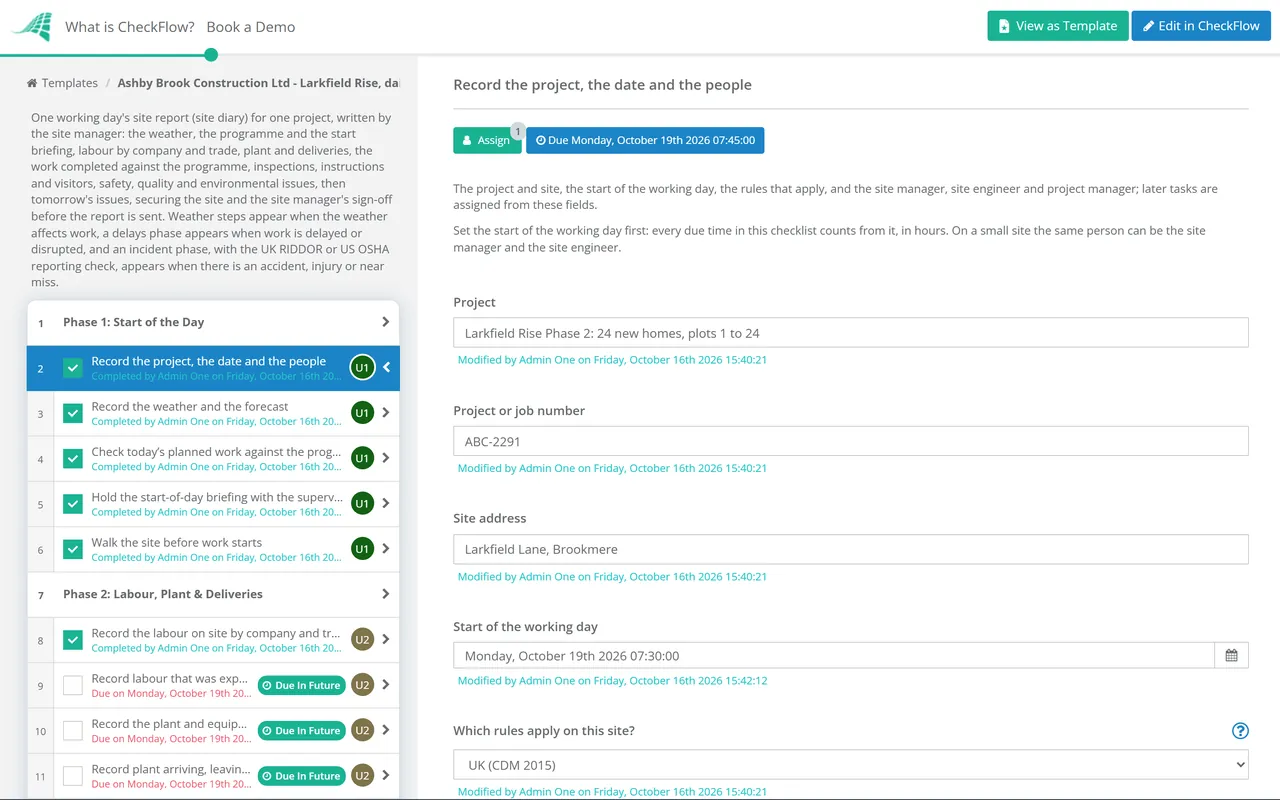
    • Record the project, the date and the people — the project and site, the start of the working day, the rules that apply, and the site manager, site engineer and project manager; later tasks are assigned from these fields
    • Record the weather and the forecast — conditions at the start of the day, the temperature, rain and wind, the forecast and where it came from, and whether the weather is affecting or likely to affect work
    • Check today’s planned work against the programme — the activities due today in the short-term look-ahead, by area, and anything that must happen first, such as an inspection, a delivery or a handover from another trade
    • Hold the start-of-day briefing with the supervisors — the day’s work and where each trade will be, lifts and deliveries, shared areas, permits needed today, and any change to access routes or the site layout
    • Walk the site before work starts — overnight damage or intrusion, the security of the site, access routes, edge protection and barriers, and anything that has changed since yesterday
  2. Phase 2

    Phase 2: Labour, Plant & Deliveries

    6 tasks

    Resources are the records most often missing when a delay or a dayworks claim is examined later. Count them on the day, by company, with the hours.

    • Record the labour on site by company and trade — operatives and supervisors for each company, taken from the sign-in records, with the hours worked
    • Record labour that was expected but not on site — a subcontractor or gang that the programme needed today and did not turn up, or turned up short, and what you were told
    • Record the plant and equipment on site — each item of plant, who supplied it, the hours it worked and the hours it stood idle, and its operator
    • Record plant arriving, leaving or breaking down — on-hire and off-hire dates and references, breakdowns and how long the plant was out of use, and replacements ordered
    • Log the deliveries received — the time, the supplier, the material and quantity, the delivery note number, and whether it was checked and accepted
    • Record rejected, short or damaged deliveries — what was wrong, what was sent back, photos of the damage, and materials needed today that did not arrive
  3. Phase 3

    Phase 3: Work Completed & Progress

    6 tasks

    Record progress against the programme activities, area by area, so the report can be matched to the programme later. The delay answer decides whether Phase 6 appears.

    • Record the work completed in each area — for each area or level, the activity, the company doing it and what was achieved today, using the programme’s activity names
    • Compare today’s progress with the programme — which activities are ahead, on time or behind, and whether any work was delayed or disrupted today; a Yes adds the delays phase
    • Record the weather’s effect on work — the hours lost, the activities stopped or slowed, the labour and plant stood down, and the work protected from the weather; shown when the weather affected work
    • Photograph work before it is covered up — foundations, drainage, reinforcement before a pour, and services inside walls, floors and ceilings, with the location of each photo
    • Take the day’s progress photographs — dated photos of each active area, from the same viewpoints each day where you can, so progress can be compared
    • Record dayworks and extra work — work done on daywork sheets or outside the agreed scope, the labour, plant and materials used, and the instruction it was done under
  4. Phase 4

    Phase 4: Inspections, Instructions & Visitors

    6 tasks

    Some inspections are required by law before work starts in an area. Record each one, its result and where its report is kept, beside every instruction and visit that could change the work.

    • Record the inspections and tests carried out — statutory inspections of excavations, scaffolds and lifting equipment, quality tests such as concrete or pressure tests, and inspections by building control or the client
    • Re-inspect weather-exposed work before it is used — excavations, scaffolds, temporary works and stored materials after heavy rain, frost, snow or high wind, before anyone works on or in them; shown when the weather affected work
    • Record the instructions received — site instructions, architect’s or engineer’s instructions, answers to RFIs and verbal instructions, with who gave each one and when
    • Confirm verbal instructions in writing — send a written confirmation of each verbal instruction the same day, to the person who gave it, before acting on anything that changes the work
    • Record the RFIs raised and still open — each request for information raised today, the question, who it went to, the date the answer is needed by, and older RFIs still waiting
    • Log the visitors to site — each visitor’s name and organisation, the purpose of the visit, the times in and out, and whether they were inducted or escorted
  5. Phase 5

    Phase 5: Safety, Quality & Environment

    6 tasks

    Record what happened today, good and bad. The incident answer decides whether Phase 7 appears.

    • Record the toolbox talk — the topic, who gave it, how many attended and the signed attendance sheet
    • Check the permits active today — hot work, confined space, excavation, work at height and electrical permits, who holds each one, where, and when it expires
    • Record safety observations and the action taken — unsafe acts and conditions seen and put right, good practice worth repeating, and anything that needs a follow-up
    • Record any incidents, injuries or near misses — an accident, an injury needing first aid, damage, a dangerous occurrence or a near miss today; a Yes adds the incident phase
    • Record quality issues and defects found — work that does not meet the drawings or specification, who found it, the action agreed and any non-conformance report
    • Record environmental issues and complaints — dust, noise, mud on the road, spills, waste removed from site, and any complaint from a neighbour or the public
  6. Phase 6 — If Delayed

    Phase 6: Delays & Disruption

    6 tasks

    Applies only when work was delayed or disrupted today. Record the facts while they are fresh. The contract decides whether and when a notice is needed, so the project manager checks it the same day.

    • Record each delay and its cause — what was delayed, where, from what time until when, and the cause: weather, late information, a late delivery, another contractor, a client change, plant breakdown or access
    • Record the labour and plant affected — who was stood down or moved to other work, for how long, and the plant that stood idle because of the delay
    • Collect the evidence for each delay — photos, delivery notes, emails, instructions and the programme activity affected, recorded as facts without opinion or blame
    • Record what was done to reduce the delay — work re-sequenced, labour moved to another area, materials re-ordered or plant replaced
    • Tell the project manager about the delay the same day — what happened, the likely effect on the programme and what is needed from others to recover it
    • Decide whether a contract notice is needed — check the contract’s notice clause and any time limit, decide whether to give notice of delay or an early warning, and record when it was sent
  7. Phase 7 — If an Incident

    Phase 7: Incident or Near Miss Record

    7 tasks

    Applies only when Phase 5 records an accident, injury, dangerous occurrence or near miss. Make the area safe and get help first; this phase records what happened and checks whether it must be reported.

    • Record what happened, where and when — the time, the location, the people involved and who employs them, what they were doing, any injury and the first aid or treatment given
    • Preserve the scene and take photographs — leave the scene as it was once it is safe, where it may need investigating, and photograph it, the equipment involved and the conditions
    • Take witness accounts — names and contact details and a short account from each witness, taken the same day while memories are fresh
    • Tell the project manager and the injured person’s employer — and the client where the contract requires it; record who was told, by whom and when
    • Decide whether the incident is reportable — check it against the reporting rules that apply on this site and record the decision and the reason
    • Report it to the enforcing authority within the time limit — the regulator for the site, in the way and within the time its rules require, and record the reference you are given
    • Start the investigation and record the immediate actions — the immediate cause as far as it is known, what was done to stop it happening again today, and who will lead the investigation
  8. Phase 8

    Phase 8: Plan Tomorrow & Sign Off

    6 tasks

    The site manager signs the report before it is sent, and the checklist halts at the sign-off until they do.

    • List the issues for tomorrow — anything that could stop work tomorrow, the action needed, who owns it and by when
    • Confirm tomorrow’s labour, plant and deliveries — the companies and numbers expected, plant arriving or leaving, deliveries booked, and inspections or visits arranged
    • Secure the site at the end of the day — permits closed or handed back, plant immobilised and keys secured, excavations and open edges protected, materials stored and the gates locked
    • Check the report is complete and factual — every section filled in or marked not applicable, photos attached, and facts rather than opinions, written today rather than from memory later
    • Site manager signs off the daily report — confirming the report is a true record of the day; the checklist halts here until it is signed
    • Send the report and file it with the project records — to the project manager and the distribution list agreed for the project, such as the client’s representative, and keep it for as long as the contract requires

Inspections and Reports a Daily Report Should Show

The daily report itself is usually a contract or company requirement, but some of what it records is required by law, often before anyone starts work in an area. The table sets out the inspections and reports that come up most often on a building site in the UK and the US, with the rule behind each one. Use it as a prompt for the inspections task in Phase 4 and the incident phase, not as legal advice, and read the regulations for the work you do.

What UK US
ExcavationsWhere supports or battering are provided, inspected by a competent person at the start of the shift, after any event likely to have affected its strength or stability, and after any material unintentionally falls or is dislodged. An inspector who is not satisfied says so before the end of the shift and provides a report within 24 hours (CDM 2015, regulations 22(4) and 24).Inspected daily by a competent person, before work starts and as needed through the shift, and after every rainstorm or other hazard-increasing occurrence. Exposed employees are removed from the area if there is evidence of a possible cave-in or another hazardous condition (29 CFR 1926.651(k)).
Scaffolds and working platformsA working platform used for construction work, from which a person could fall 2 metres or more, is not used unless it has been inspected in that position within the previous 7 days, and is inspected after exceptional circumstances liable to jeopardise its safety. The report is prepared before the end of the working period and provided within 24 hours (Work at Height Regulations 2005, regulation 12).Inspected for visible defects by a competent person before each work shift, and after any occurrence which could affect its structural integrity (1926.451(f)(3)).
Cranes and lifting equipmentThoroughly examined at least every 6 months for equipment that lifts people and for lifting accessories, at least every 12 months for other lifting equipment, or under an examination scheme, and after exceptional circumstances liable to jeopardise its safety (LOLER 1998, regulation 9(3)).A competent person begins a visual inspection before each shift the equipment is used. A documented monthly inspection and an annual inspection by a qualified person are also required (1926.1412(d) to (f)).
Serious injuries and dangerous occurrencesDeaths, specified injuries to workers, injuries to people not at work who are taken to hospital, and listed dangerous occurrences are notified to HSE without delay; HSE says the report must be received within 10 days. Over-7-day injuries are reported within 15 days (RIDDOR 2013).Fatalities are reported to OSHA within 8 hours, and in-patient hospitalizations, amputations and losses of an eye within 24 hours. Recordable cases go on the OSHA 300 Log within 7 calendar days (1904.39 and 1904.29).
Keeping the recordsRIDDOR records are kept for at least 3 years. Excavation and working platform inspection reports are kept at the site until the construction work is completed, then for 3 months (CDM 2015 regulation 24(3), Work at Height Regulations regulation 12(8)).The OSHA 300 Log, the annual summary and the 301 forms are kept for 5 years after the end of the calendar year they cover (1904.33).

Weather and re-inspection. Heavy rain, frost and high winds are the kind of event these rules have in mind. OSHA names rainstorms in 1926.651(k)(1), and in the UK a supported excavation is inspected again after any event likely to have affected its strength or stability. When the weather affects work, this checklist adds a step to re-inspect excavations, scaffolds and temporary works before anyone uses them, and a step to record the hours and activities lost.

Agree the records at the start. The SCL Protocol suggests the parties agree at the outset which records are kept, who produces and checks them, how often, who receives them and in what format. It also says records should be kept for at least as long as the contract requires or any relevant statutory limitation period. Set the distribution list and the retention period before the first daily report is written.

Why Run Construction Daily Reports in CheckFlow?

1

A report for every working day

A recurring schedule starts the day’s report on the weekdays you choose, assigned to the site manager and the site engineer. Due times count in hours from the start of the working day, so a report not finished by the end of the day shows as overdue on the Reports Grid instead of being written up from memory at the end of the week.

2

Delays and incidents get their own steps

Answer Yes to the delay question and the evidence, the labour and plant affected and the decision on a contract notice appear, with the notice decision assigned to the project manager. An accident or near miss adds the incident record and the reporting check for the UK or the US. Rules show and hide each step, so a quiet day stays short.

3

Signed before it is sent

The sign-off is assigned to the site manager alone, and nothing after it can be completed until they record a decision, so the report is approved before it goes out. Photos, delivery notes, inspection reports and daywork sheets sit on the tasks that produced them, with names and times.

CheckFlow is not a programme or scheduling tool, and it does not replace your planning software or your contract. It runs the daily record around them, so every day’s report is complete, in the same order, with the evidence attached. A finished report can be printed or saved as a PDF from the browser’s print dialog for the client or the project file.

The daily report sits beside the other site routines. Induct each worker with the Construction Site Induction Checklist, control hazardous jobs with the Permit to Work Checklist, assess the risks of the work with the Health & Safety Risk Assessment Checklist, and put a change instructed on site through the Scope Change Request Checklist before the work is done.

AI generator

Didn’t find what you need? Describe it.

Describe the process in a sentence and the AI checklist generator drafts the phases and tasks for you.

Frequently Asked Questions

What should a construction daily report include?

Enough for someone who was not there to know what happened that day: the date and weather, the labour on site by company and trade with hours, the plant and its working and idle hours, deliveries, the work done in each area against the programme, inspections and tests, instructions and RFIs, visitors, delays and their causes, safety observations, incidents and near misses, quality issues and photos. The Society of Construction Law’s Delay and Disruption Protocol gives a similar list for daily reports: weather, manpower, deliveries of key materials, adverse site conditions, working hours, major plant and the work under way.

What is the difference between a site diary and a daily report?

Usually only the name. Site diary is the common term in the UK, and daily report or daily log in the US, for the same record of one working day. Some contractors keep both: a diary in which the site manager notes events and conversations as they happen, and a formal daily report built from it and sent to the project manager or the client. If you keep both, make sure they agree, because two records of the same day that contradict each other are hard to rely on in a dispute.

Who should fill out the daily report on a construction site?

The site manager, superintendent or foreman in charge of the site, who signs it. They rarely collect everything alone: a site engineer or assistant usually counts the labour and plant and logs deliveries and visitors, and each subcontractor’s supervisor gives their numbers and hours. What matters is that one named person is responsible for the report each day and checks it before it goes out. The SCL Protocol suggests that factual progress and resource records are signed by both the contractor and the contract administrator where reasonably practicable.

Is a construction daily report a legal requirement?

The report itself is usually required by the contract, the client or your own procedures rather than by law. Some of what goes into it is a legal requirement, though. In the UK, supported excavations are inspected at the start of each shift under CDM 2015, working platforms within the previous 7 days under the Work at Height Regulations 2005, and serious injuries and dangerous occurrences are reported under RIDDOR. In the US, OSHA requires daily excavation inspections, scaffold inspections before each shift and reports of serious injuries within 8 or 24 hours.

Why do daily reports matter for delay claims?

A claim for more time or money has to show what was delayed, when, why and what it cost, and the daily report is the record made at the time. The SCL Delay and Disruption Protocol says records of progress should be made as the work happens, not afterwards, and should set out facts rather than opinions. A report that names the cause of a delay, the activity affected, the labour and plant stood down and the instruction or late information behind it is far easier to rely on than a reconstruction months later. Give any notice the contract requires as well.

Do near misses have to be reported?

Not usually to the regulator, but they should be recorded. In the UK, RIDDOR requires a near miss to be reported only when it is one of the dangerous occurrences listed in Schedule 2, such as the collapse of a substantial part of a scaffold more than 5 metres high or plant touching an overhead power line above 200 volts. In the US, OSHA’s reporting rule in 29 CFR 1904.39 covers fatalities, in-patient hospitalizations, amputations and losses of an eye, so a near miss with no injury is not reported under it. Record every near miss in the daily report anyway.

How long should construction daily reports be kept?

At least as long as the contract requires and any statutory limitation period for claims under it. The SCL Protocol recommends keeping project records until after completion, the end of the defects liability period and the resolution of any disputes. Some records in the report have their own legal periods: in the UK, RIDDOR records for at least three years, and excavation and scaffold inspection reports at the site until the work is finished, then for three months; in the US, OSHA 300 Logs and 301 forms for five years after the year they cover.

Is CheckFlow free for this template?

14-day free trial, no card required. The Business plan is $10 per user per month after the trial. Full details at checkflow.io/pricing.

Write Every Day’s Site Report on the Day

Free trial — no credit card required.

14-day free trial, no credit cardFull refund in your first 30 daysUS or EU hosting