Search for "SOP software" and you'll find tools that do fundamentally different things. Document editors, training platforms, workflow automation engines, AI screenshot recorders, and general wikis are all marketed as "SOP tools." Buying the wrong category is the most common and expensive mistake teams make — and the category mismatch usually isn't discovered until after months of adoption have failed to solve the original problem.
This article compares 8 tools honestly — covering what each one actually does, what it genuinely cannot do, current pricing, and which teams each is built for. CheckFlow is one of them; it is reviewed with the same objectivity as the rest.
What Is SOP Software?
SOP software helps organizations create, manage, and execute Standard Operating Procedures — the documented steps that define how recurring processes should be performed. The "software" part should do at least one of three things: make SOPs easier to write, easier to distribute and learn, or easier to follow consistently.
The challenge: most teams underestimate how different these three goals are, and buy a tool built for one while expecting it to deliver all three. A tool that stores SOPs beautifully as documents cannot guarantee anyone followed them. A tool that automates training workflows may not enforce day-to-day execution. A tool that auto-generates documentation from screen recordings doesn't manage anything after the guide is created.
The core question every buyer should start with: "Do I need my SOPs to be better documented, better trained, or better executed?" The answer points to a completely different category of tool — and often, the honest answer is "all three," which means evaluating whether one tool handles all three well or whether a two-tool stack is more practical.
The Three Jobs of SOP Software
This is the most important framing in the entire article. The three jobs are distinct, and most tools do one or two well — not all three.
Job 1: Documentation — Writing and Storing SOPs
The SOP document: a written procedure with steps, screenshots, responsible roles, version history, and a place to find it. Tools optimized for this job include SweetProcess, Notion, Confluence, Trainual's content module, and Scribe (for auto-generating the document). The measure of success: can a new team member find the SOP and understand what to do? The gap: this job ends when the document is published. It has no mechanism to confirm anyone followed it.
Job 2: Training — Ensuring People Have Read and Understood SOPs
Adding an accountability layer to the document: read receipts, knowledge tests, onboarding flows that track completion. Tools optimized for this job include Trainual (training paths with quizzes), Whale (training verification and quiz builder), and Waybook. The measure of success: can the manager confirm that every team member has read and passed a knowledge check on the SOP? The gap: training verification confirms someone read and understood the SOP in training. It does not confirm they followed it the 47th time they performed the task under pressure.
Job 3: Execution — Running SOPs as Live, Tracked Process Instances
Converting the SOP into an active checklist that is launched, assigned, worked through in order, and closed with a timestamped record for every run. Tools optimized for this job include CheckFlow and Process Street. The measure of success: every time the process runs, there is a completion record showing who did what, when, and whether anything was skipped. The gap (for tools that only do this): the SOP template is built inside the execution tool — teams that also want a separate formatted document or training curriculum may need an additional tool.
The most effective SOP stack in 2026 uses a lightweight auto-capture tool (Scribe) to create the initial documentation, a training tool (Trainual or Whale) for onboarding new staff, and an execution tool (CheckFlow) to ensure the process is followed every time it runs. For smaller teams, CheckFlow alone — with its built-in template content, descriptions, and embedded media — can serve as both the documentation and execution layer.
Quick Comparison: 8 Tools at a Glance
Here is how the 8 tools in this comparison break down across the dimensions that matter most for SOP management. Use this as a starting point, not a verdict — the tool reviews below cover the nuance that a table cannot.
| Tool | Category | Best For | Starting Price | Free Plan | SOP Execution | Training Verification | Auto-Capture |
|---|---|---|---|---|---|---|---|
| CheckFlow | Execution | IT teams, MSPs, recurring ops | $9/user/month billed annually ($10 monthly) | ❌ (14-day trial) | ✅ Full | ❌ | ❌ |
| Process Street | Execution + Compliance | Compliance-heavy workflow automation | Not published (contact sales) | ❌ (14-day trial) | ✅ Full | ⚠️ Partial | ❌ |
| Trainual | Documentation + Training | Employee onboarding curriculum | Not published (demo only) | ❌ (no trial, demo only) | ❌ | ✅ Full | ❌ |
| SweetProcess | Documentation | Simple SOP libraries, small teams | $82.50/month | ❌ (14-day trial) | ⚠️ Partial | ❌ | ❌ |
| Scribe | Auto-Capture | Quickly capturing screen-based processes | $23/seat/month billed annually (5-seat minimum) | ✅ | ❌ | ❌ | ✅ Full |
| Notion | General Wiki | Flexible documentation, small teams | $10/seat/month billed annually | ✅ | ❌ | ❌ | ❌ |
| Whale | Documentation + Training | European SMBs, onboarding with quizzes | $249/month billed annually (3 creators) | ✅ (1 creator) | ⚠️ Partial | ⚠️ Partial | ❌ |
| Confluence | General Wiki | Engineering teams on Atlassian | $5.42/user/month billed annually | ✅ | ❌ | ❌ | ❌ |
Quick Jump: Find the Best Tool For...
- 🚀 Best for Running SOPs as Live Checklists: CheckFlow
- 📚 Best for Documenting and Training on SOPs: Trainual, Whale, SweetProcess
- 📸 Best for Auto-Generating SOPs from Screen Recordings: Scribe
- 🔧 Best for Engineering Teams on Atlassian: Confluence
- 💰 Best for Lightweight Documentation on a Budget: Notion
How We Chose and Checked These Tools
We compared the eight tools teams most often shortlist for SOPs on the three jobs above (documentation, training and execution), and on price, free plans and trials, AI, integrations and who each tool is built for.
- Prices and plans were checked on each vendor’s own pricing page on 13 October 2026.
- Features come from each vendor’s product and help pages.
- No ratings, review counts or star scores were used.
- CheckFlow is our product. Its review lists what it can’t do, and the guide below says which tool suits each job.
1. CheckFlow
Best for Executing SOPs as Live Recurring Checklists
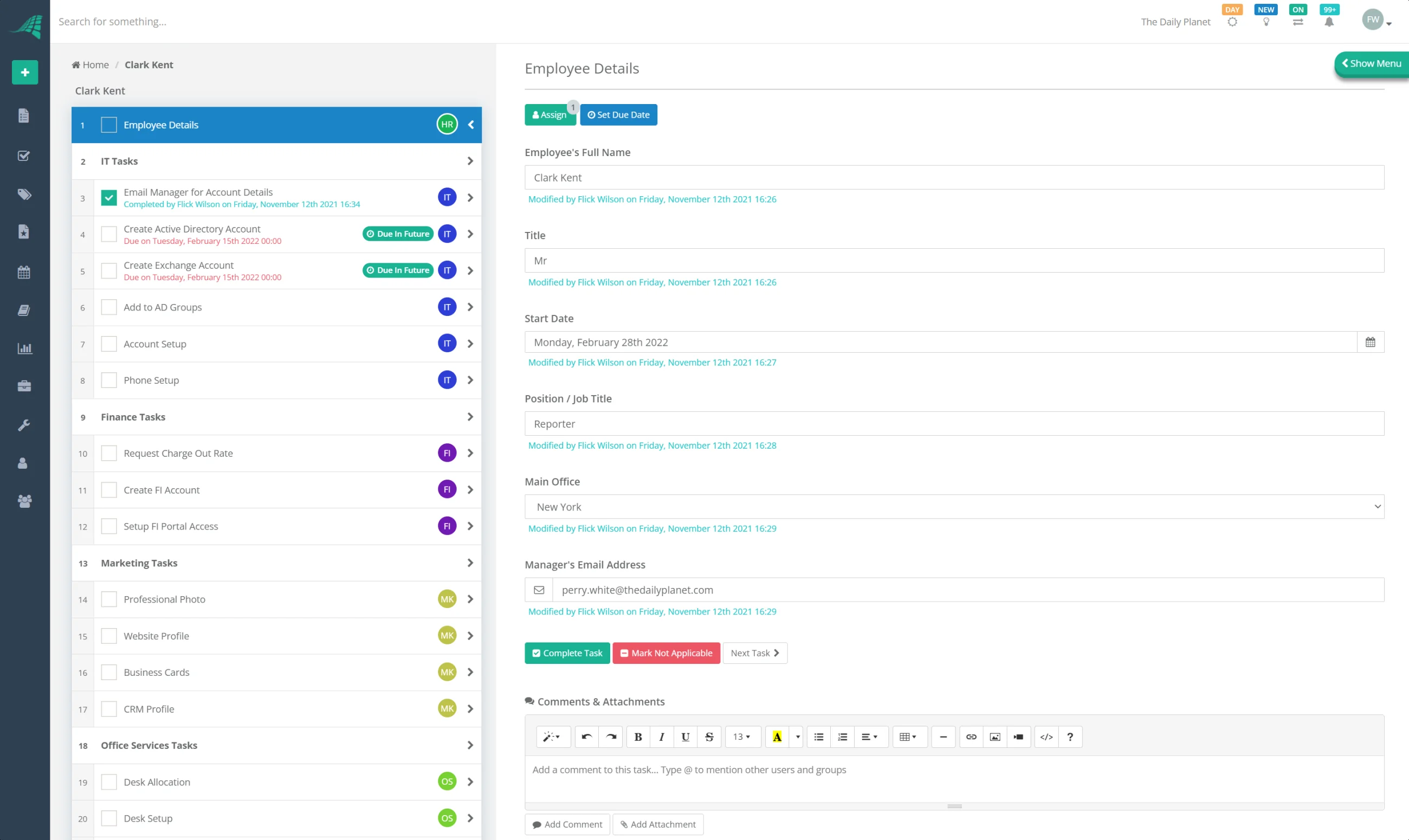
CheckFlow is purpose-built for one specific problem: ensuring that recurring processes are followed consistently, every time, by the right people. Where most tools in this list help you document what should happen, CheckFlow is the tool that makes it happen. Each SOP lives as a reusable template in CheckFlow. When a process runs — a new employee joins, a client is onboarded, a monthly compliance check is due, an incident is raised — a new checklist instance is launched from that template, assigned to the relevant team member, and tracked through to a timestamped completion record.
For IT teams and MSPs, this is particularly valuable: the same onboarding process, offboarding process, change management workflow, or compliance checklist runs consistently every time — regardless of who's on shift. The completion record is automatically available as audit evidence for SOC 2, ISO 27001, and HIPAA audits, without any post-hoc reconstruction. For MSPs managing concurrent processes across multiple clients, CheckFlow's dashboard shows every in-flight process instance across all clients simultaneously. See the MSP process management capabilities for a deeper look at the multi-client use case.
Key Features
- Template-based checklists: build once, run repeatedly — each run is its own assigned, tracked instance
- Conditional logic and halt tasks: control process flow based on responses; block downstream steps until prerequisites are complete
- Dynamic task assignments and due dates: tasks auto-assign to the right role based on configurable rules; due dates calculate from the process start date
- Recurring schedules: daily, weekly, monthly, or custom cadence checklists launch automatically — nothing falls through the cracks
- Nested checklists and sub-tasks: complex multi-phase processes with dependent sub-processes
- Analytics and reporting: completion rates, bottleneck identification, team performance; export via CSV or JSON
- Integrations: Zapier, Make, Power Automate, webhooks, and REST API — checklists auto-launch from HR, helpdesk, or CRM events
- Enterprise features: SSO, dedicated databases, regional hosting
Pros
- Purpose-built for recurring processes — not adapted from a project management or documentation tool
- Every process run produces a timestamped completion record with named assignees — audit evidence out of the box
- Unlimited free guest and client users — ideal for agencies and MSPs with external collaborators
- Simpler and more affordable than Process Street for teams whose primary need is structured recurring checklists
- Scales from a 5-person team to enterprise without switching platforms
Cons
- Not a standalone SOP documentation library — the template content (text, images, descriptions) serves as the SOP reference, but teams wanting a separately formatted document repository may want a dedicated wiki alongside it
- No built-in training verification (quizzes, read receipts) — for onboarding that requires verified knowledge testing, pair with Trainual or Whale
Pricing: Plans start at $9/user/month billed annually, or $10/user/month billed monthly. Unlimited free guest/client users included. 14-day free trial, no credit card required.
Best For: IT teams, MSPs, and operations teams that run the same processes repeatedly and need every execution tracked, assigned, and auditable. The right choice when compliance evidence and execution consistency matter more than a stand-alone document library.
2. Process Street
Best for Compliance-Heavy Workflow Automation
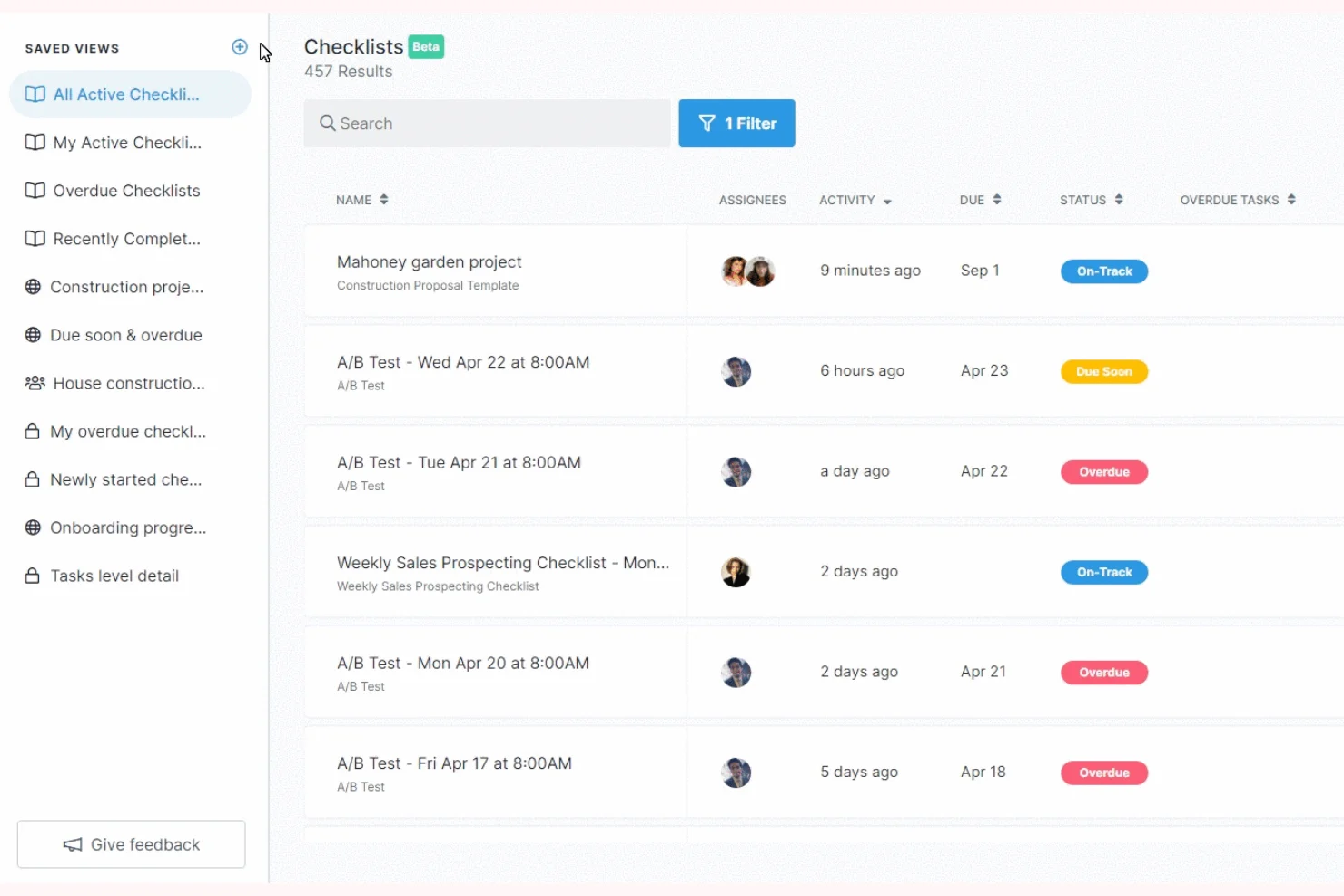
Process Street positions itself as a "Compliance Operations Platform" — a workflow automation tool built for teams that need controlled documents, audit trails, and process enforcement with more sophisticated automation than a standard checklist tool. It combines workflow checklists (similar to CheckFlow) with a built-in knowledge base called Pages, which lets teams attach SOP reference documents directly to their workflows. For compliance-heavy environments where documented policies, approval gates, and evidence trails are required at each step, Process Street's conditional logic and AI-powered oversight features are genuinely capable.
The honest limitation: Process Street has grown into a more complex, more expensive product than most small and mid-sized teams need. Its pricing structure has shifted toward enterprise, and the setup overhead for automated workflows is meaningful. Teams that primarily need structured recurring checklists without complex automation rules often find CheckFlow delivers the same execution value at significantly lower cost and complexity.
Key Features
- Workflow checklists with conditional logic, form fields, file uploads, and approvals
- Pages: a built-in free knowledge base for attaching SOP documentation to workflows
- AI Workflow Generator: create workflows from natural language prompts
- Approval workflows with one-click sign-off steps
- Version control for controlled documents
- Rich integrations: Slack, Zapier, Salesforce, Jira, Google Sheets, DocuSign, and more
Pros
- Strong compliance focus — built for environments where every step must be documented and approved
- Pages feature provides a useful documentation layer alongside workflow execution (free for all users)
- Conditional logic and automation are more sophisticated than most checklist tools
- Good integration ecosystem for enterprise stacks
Cons
- Pricing has moved upmarket — no plan has a published price, so even the Startup tier means a sales conversation
- Steeper setup time — automation rules require initial configuration that can slow adoption
- Mobile app has limited functionality compared to the desktop experience
- For teams that primarily need recurring checklists without heavy automation, it is more tool than necessary
Pricing: Not published as of October 2026; every plan is "contact sales". The Startup plan is limited to companies with fewer than 15 employees and under $2M revenue, and caps you at 5 users and 100 automation actions a month. 14-day free trial on Pro.
Best For: Mid-sized to enterprise operations teams in regulated industries that need documented, approval-gated workflows with deep audit trails — and are willing to invest in setup and a higher price point for those capabilities.
3. Trainual
Best for Structured Employee Training Curriculum
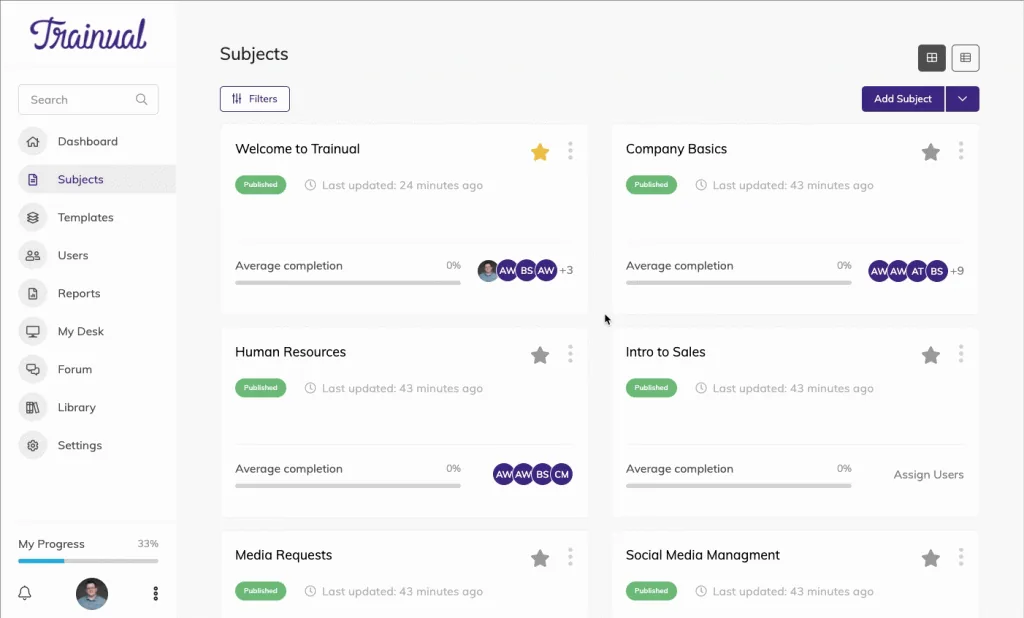
Trainual is a training-first platform, not a process execution tool. Its core design is a structured onboarding curriculum: you define a sequence of content (policies, procedures, role-specific training modules), employees work through it step by step, and managers track completion with verified quizzes. For franchise businesses, multi-location operators, and HR teams building formal onboarding programmes, Trainual does this job cleanly. The interface is approachable, the progress tracking is clear, and the quiz builder ensures knowledge retention.
What Trainual is not: a tool for running SOPs as live process instances. There is no recurring checklist engine, no conditional task logic, no per-run audit records. When your onboarded employee encounters the same process for the 20th time six months later, Trainual has no mechanism to ensure they still follow the SOP correctly. Trainual publishes no prices (you get a quote after a demo, plus a required $1,000 implementation fee), and what that buys is structured training content management, not process execution.
Key Features
- Curriculum-style training path builder with defined learning sequences
- Quizzes and knowledge checks for retention testing
- Progress tracking: see exactly who has completed which modules
- Role-based content assignment: different training paths for different job roles
- Customisable templates for training manuals and onboarding content
- Integrations: Slack, Zapier, BambooHR, Gusto, QuickBooks Payroll, and more
Pros
- The strongest training curriculum tool on this list — genuinely well-designed for structured onboarding programmes
- Clear progress visibility for managers and HR teams
- Role-specific training paths eliminate irrelevant content for different team members
- Approachable interface for non-technical users building onboarding content
Cons
- No published pricing: you get a quote after a demo, plus a required $1,000 one-time implementation fee
- No recurring checklist execution or per-run audit trails
- No AI-assisted SOP drafting or visual process capture
- Better described as a training LMS than SOP software — the "SOP" in its marketing refers to storing documented procedures as training content, not executing them as live workflows
Pricing: Not published as of October 2026. Every plan is quoted after a demo, with a required $1,000 one-time implementation fee. No self-serve trial.
Best For: HR teams and franchise/multi-location businesses building formal onboarding programmes where new employees need to complete a defined training curriculum with verified knowledge testing.
4. SweetProcess
Best for Simple SOP Documentation in Small Teams
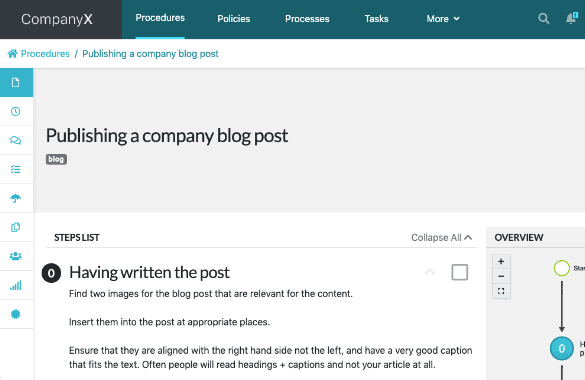
SweetProcess has been a reliable, simple SOP documentation tool since 2013. Procedures nest logically inside processes, the interface is clean and predictable, and teams that have tried more complex tools and got overwhelmed often appreciate its consistency. You can create step-by-step procedures, attach images, assign tasks, and track basic completion — everything a small team needs to stop relying on tribal knowledge and get their processes written down.
The honest assessment: SweetProcess feels like a 2018-era tool. There is no AI drafting, no visual process capture, no modern search layer, and no recurring checklist execution engine. The UI is functional but dated compared to every other tool on this list. At $82.50–99/month for up to 10 users, plus $4.17–5 for each extra user, it is a reasonable price for what it does — but teams that are growing quickly will find themselves wanting more within a year.
Key Features
- Step-by-step procedure creation with text, images, and file attachments
- Procedures nested inside processes — logical, predictable hierarchy
- Task assignment and basic completion tracking
- Version history with approval workflow
- Public procedure sharing via link
- Integrations: Zapier, Google Drive, Dropbox, Box, OneDrive, Salesforce, Slack, Microsoft Teams
Pros
- Genuinely simple — new users can build their first SOP in minutes
- Stable and reliable — consistent interface that does not change unexpectedly
- Reasonable flat-rate pricing for small teams
- Clean procedure hierarchy that makes sense to non-technical staff
Cons
- Interface feels dated compared to modern tools — no AI drafting, no visual capture, no smart search
- Limited reporting and analytics — basic completion tracking, not dashboard-level process visibility
- No recurring checklist execution — processes are documented but not run as live instances
- Teams growing beyond 30 people typically need more capability than SweetProcess provides
Pricing: From $82.50/month (billed annually, up to 10 users; $4.17/month per extra user). 14-day free trial.
Best For: Small teams under 30 people who need a simple, affordable place to document their procedures and are not yet ready for a full process execution platform.
5. Scribe
Best for Auto-Generating Process Documentation from Your Screen
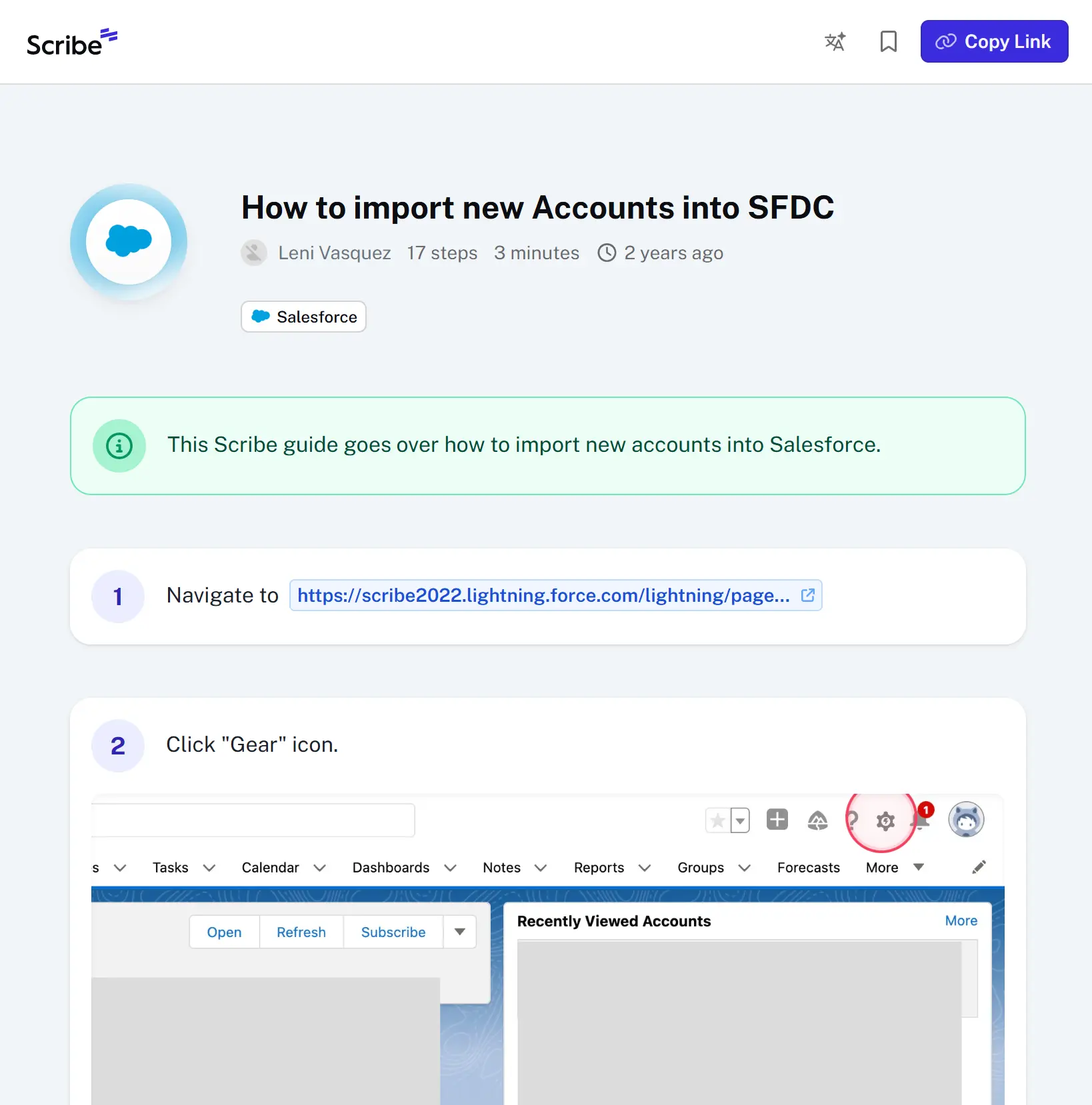
Scribe does one thing remarkably well: it watches you work through a process on your screen — every click, every form field, every navigation step — and automatically generates a clean, annotated step-by-step guide with screenshots. What would take 45 minutes to document manually takes 5 minutes with Scribe. The output is professional, editable, and shareable via link, embed, or PDF. For IT teams, customer support, HR, and operations staff who need to document browser-based and desktop software workflows fast, Scribe is genuinely transformative. It is backed by Series C funding, serves over 5 million users across 78,000+ organizations (including 94% of the Fortune 500), and has a free tier that is useful for occasional use.
The honest limitation must be stated clearly: Scribe is a documentation creation tool, not a process management platform. It generates the guide; it does not manage it. There is no task assignment, no recurring checklists, no audit trails, no tracking of whether anyone followed the guide. Users save an average of 41.6 hours per month on documentation according to Scribe's own data — but those saved hours are creation hours, not execution hours. Most teams use Scribe to create process content that then lives inside their actual SOP platform (like CheckFlow). Scribe and a dedicated execution tool are complementary, not competitive.
Key Features
- Auto-captures any workflow from browser or desktop app as you perform it
- Generates annotated step-by-step guides with screenshots, highlighted click targets, and AI captions
- Auto-redaction of sensitive data in screenshots (enterprise feature)
- Export to PDF, HTML, or shareable link; embed into Confluence, Notion, Slack, or other tools
- Workflow AI to generate documentation from text descriptions
- SOC 2 Type II and HIPAA compliant (enterprise tier)
- Browser extension for Chrome; desktop app for Windows and Mac
Pros
- Fastest way to document any software-based process — significantly faster than manual documentation
- Free tier is genuinely useful for individuals and small teams
- Output is professional-quality with minimal editing required
- Integrates into every major documentation and communication platform
- Backed by strong enterprise credentials (Fortune 500 adoption, Series C-funded)
Cons
- Not a process management tool — no assignments, no recurring runs, no audit trails, no execution tracking
- The free Basic plan captures in the browser only; desktop capture, exports and branding need a Pro plan
- Some users report the editor is clunky for reordering steps or adjusting screenshot highlights
- Only captures browser and desktop workflows — cannot auto-document physical or verbal processes
Pricing: Free Basic plan (browser-only capture). Pro Personal from $25/seat/month billed annually ($35 monthly); Pro Team from $23/seat/month billed annually ($29 monthly), with a 5-seat minimum.
Best For: Any team that documents software-based processes — ideal as the creation layer in a two-tool SOP stack: Scribe to generate documentation fast, CheckFlow to execute it consistently.
Make Sure Your SOPs Are Actually Followed
Documenting processes is step one. CheckFlow makes them executable — every SOP runs as an assigned, tracked checklist with a timestamped completion record for every run. IT teams and MSPs use it to ensure compliance evidence exists automatically.
Start free trial See IT Process Templates6. Notion
Best for Flexible Documentation on a Budget
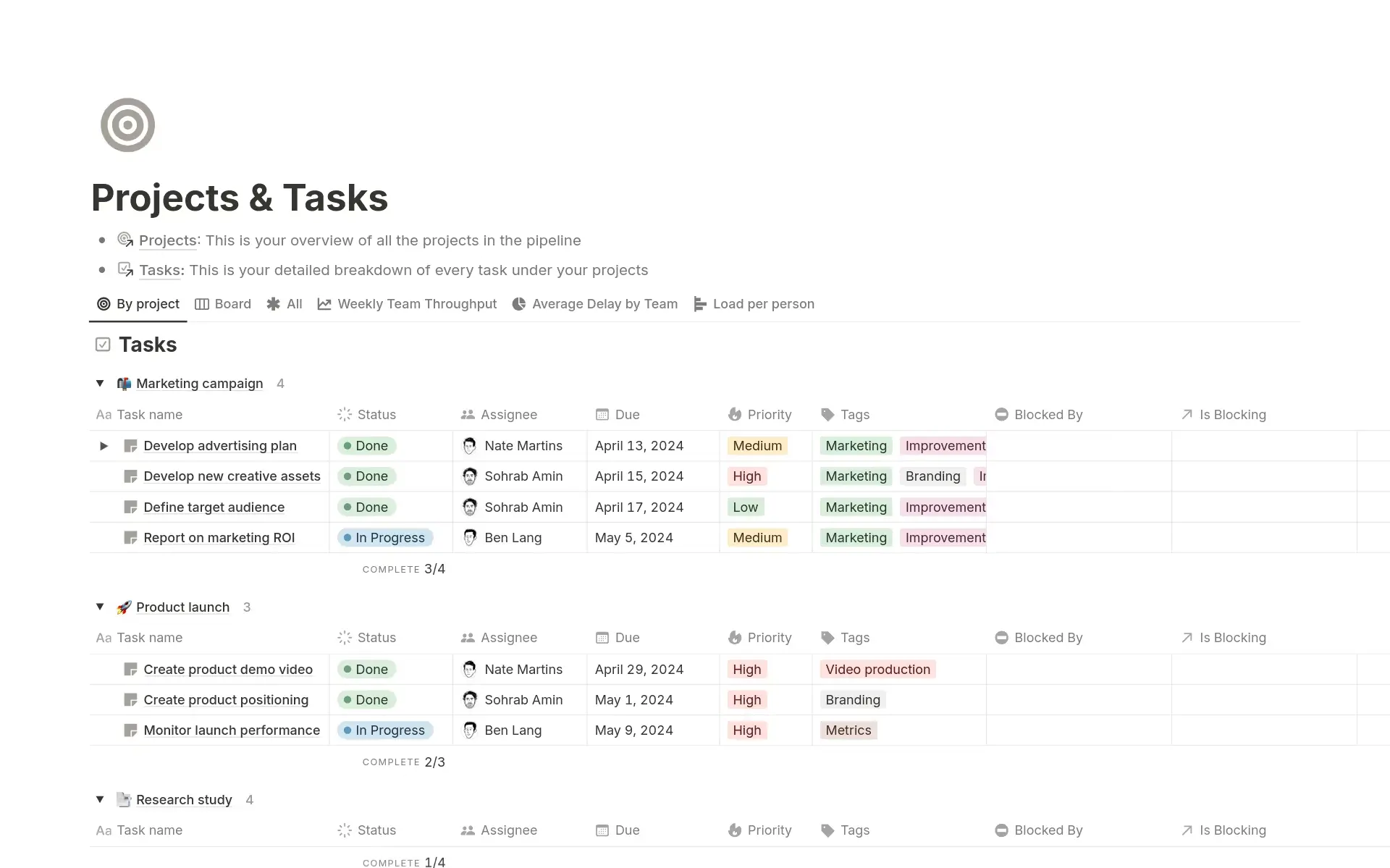
Notion is the tool almost every team already uses or has considered. It is highly flexible, well-designed, and genuinely powerful for documentation, wikis, and knowledge management. You can build SOP pages with numbered steps, embed images and videos, create linked databases of procedures, and share them across your team. At $8/seat/month (with a generous free tier), it is the most cost-effective documentation layer on this list.
The honest limitation: Notion has no accountability layer. There is no way to see who has read an SOP, no training verification, no recurring checklists, and no execution tracking. The flexibility that makes it great at five people becomes a liability at fifty — folders drift, naming conventions break down, pages go out of date with no named owner to maintain them. If your SOP problem is "we need somewhere to write and find our procedures," Notion is fine. If your problem is "we need to ensure our procedures are actually followed," Notion cannot help with that.
Key Features
- Pages combining text, databases, checklists, and embeds in a single flexible workspace
- Database views: Table, Board, Timeline, Calendar — adaptable to many SOP formats
- AI assistant for drafting and summarising content
- Strong template community with SOP templates available
- Team wikis with nested pages and linked databases
- Free plan for individual use; Plus at $10/seat/month billed annually for teams
Pros
- Most affordable documentation tool on this list with a full-featured free tier
- Infinite flexibility — can be adapted to almost any documentation format
- Familiar to most teams — low adoption barrier
- Notion AI on the Business and Enterprise plans; Free and Plus get a limited trial
- Strong template library reduces time to first SOP
Cons
- Zero accountability — no way to confirm who read, verified, or followed an SOP
- Becomes disorganised at scale without a dedicated person maintaining structure
- No recurring checklists, task assignment, or process execution
- Version history is limited (30 days on free; 90 days on Plus) — inadequate for compliance-grade audit trails
- Not purpose-built for SOPs: teams regularly need to fight the tool to get consistent structure
Pricing: Free plan (personal). Plus from $10/seat/month billed annually ($12 monthly).
Best For: Small teams (under 15 people) who need a low-cost, flexible documentation layer and are not yet in a regulated environment where process execution needs to be proved.
7. Whale
Best for European SMBs Wanting SOPs and Training in One Tool
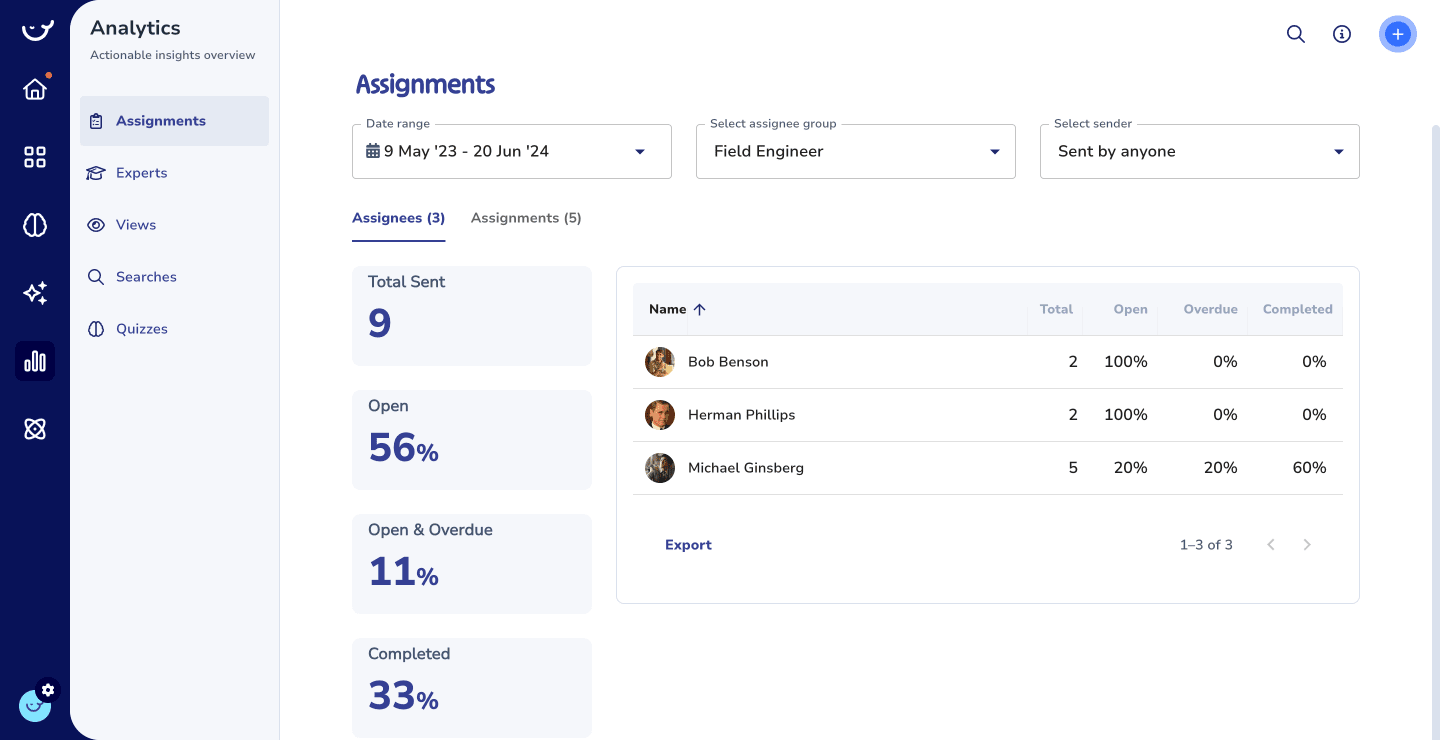
Whale is an SOP and training platform built by a European team, with EU data hosting as its primary differentiator. For European businesses where GDPR data residency is a hard compliance requirement, Whale removes the complexity of working with US-based vendors whose EU hosting is an add-on rather than a default. Beyond the data residency angle, Whale offers a reasonably complete set of SOP management features: a document editor for writing procedures, a quiz builder for training verification, update notifications that prompt team members to review changed SOPs, and integration with Slack and Google Drive. The interface is clean and modern.
The honest limitation: Whale has a smaller ecosystem than most tools on this list — fewer integrations, a smaller template library, and less mature AI features than comparable tools. For non-EU businesses, the data residency advantage does not apply, and tools like CheckFlow (for execution) or SweetProcess (for documentation) offer more established feature sets and support communities. Whale is the right call specifically for European teams where GDPR-native hosting is a requirement.
Key Features
- SOP editor for creating and updating documented procedures
- Quiz builder for knowledge verification and training completion tracking
- Update notifications: automatically prompts staff to review SOPs when they change
- Analytics on training effectiveness and SOP read rates
- GDPR-native: EU data hosting by default, not as an enterprise add-on
- Integrations: Slack, Google Drive, YouTube, Microsoft OneDrive
Pros
- GDPR-native EU data hosting — no configuration required for EU compliance
- Clean, modern interface accessible to non-technical staff
- Quiz builder and training verification built in — useful for onboarding
- A free plan for one creator and up to ten members
Cons
- Smaller integration ecosystem than US-based competitors
- AI features less mature than leading tools
- No recurring checklist execution engine — SOPs are documented and trained, not run as live process instances
- Less established support community and template library
Pricing: Free for 1 creator and up to 10 members (20 Playbook items). Scale from $249/month billed annually ($399 monthly) with 3 creators, plus $29 a month for each extra creator.
Best For: European SMBs (20–100 people) for whom GDPR-native data residency is a genuine compliance requirement, and who want SOP documentation and basic training verification in one EU-hosted tool.
8. Confluence
Best for Engineering Teams in the Atlassian Ecosystem
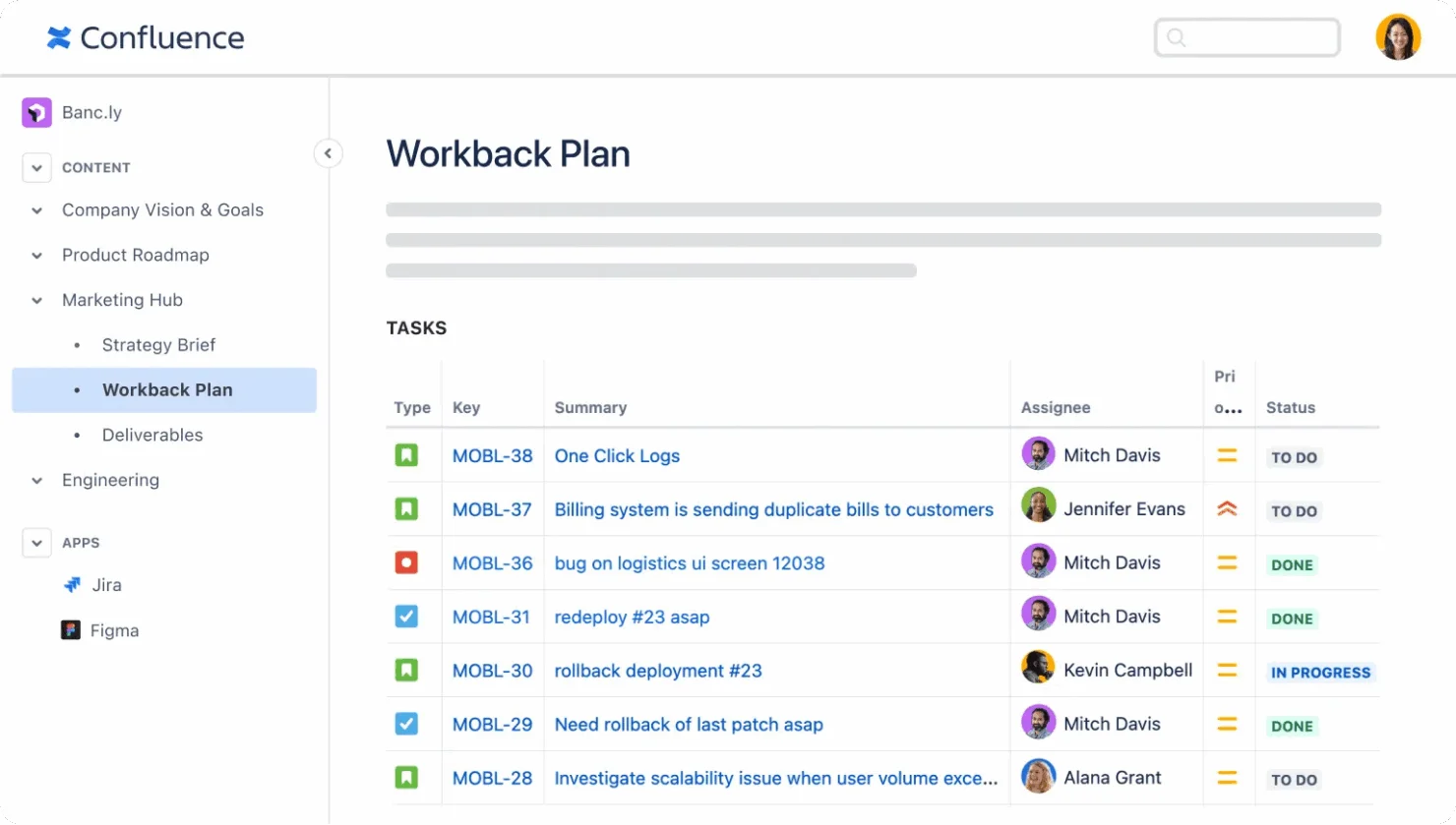
Confluence is Atlassian's enterprise wiki, and for software engineering teams already running Jira for issue tracking, it is the natural documentation home. The Jira integration is genuinely valuable: you can link runbooks, incident response procedures, and technical SOPs directly to Jira tickets and epics, giving engineers the relevant procedure at the point of work. Confluence also offers strong permission controls, space-level governance, and — on enterprise plans — support for up to 150,000 users with unlimited version history. For large engineering organisations, this is a serious enterprise documentation platform.
The honest limitation: Confluence is built for engineers, and non-engineering teams know it. Field staff, HR, customer service, and operations managers routinely avoid it. The search is notoriously unreliable for non-technical users. Pages require more formatting effort than modern tools. And like Notion, Confluence is a documentation tool with no process execution layer — it stores the SOP, but has no mechanism to track whether it was followed or to run it as an assigned checklist instance.
Key Features
- Tightly integrated with Jira — link documentation to tickets, sprints, and projects
- Structured spaces and pages with templates for runbooks, meeting notes, and technical specs
- Strong permissions and access control at space and page level
- Enterprise features: unlimited version history, compliance data residency, advanced analytics
- Rovo AI search, chat and agents, included from the Standard plan
- Free plan for up to 10 users; Standard scales to 250,000 users per site
Pros
- The natural choice for Atlassian-invested engineering teams — deep Jira integration is genuinely valuable
- Strong enterprise governance and compliance features
- Mature, stable platform with extensive template library
- Starting price ($5.42 per user a month billed annually) is competitive for what it offers engineering teams
Cons
- Non-technical users find it clunky and avoid it — limits cross-functional SOP adoption
- Search is frequently cited as unreliable in user reviews
- No process execution — documentation only, no task assignment or checklist runs
- For teams outside the Atlassian ecosystem, there is no meaningful advantage over Notion at lower cost
Pricing: Standard from $5.42 per user a month billed annually ($6.70 monthly), with a 7-day free trial. Free plan for up to 10 users.
Best For: Software engineering teams already on Jira who need a governed documentation layer for runbooks, technical SOPs, and architectural references — linked directly to their development workflow.
How to Choose the Right SOP Software
The right tool depends on which problem you're actually solving. Here is a practical decision framework based on the real pain points teams bring when evaluating SOP software.
"Our SOPs exist but nobody follows them"
This is an execution problem. You need a tool that converts the SOP into an active, assigned, trackable process instance — not a better documentation tool. The document is fine; the mechanism to run it consistently is missing. → CheckFlow or Process Street.
"We don't have our processes documented anywhere"
You need to write SOPs before you can execute them. Start with a fast documentation tool. Scribe is the fastest if your processes involve software (auto-captures from your screen in minutes). SweetProcess or Notion work for teams that want to write procedures manually. → Scribe + CheckFlow, or SweetProcess. Do not buy an execution tool without content to put in it.
"New hires don't know our processes"
This is an onboarding and training problem. You need a tool with structured learning paths, progress tracking, and knowledge verification — not just a document library. → Trainual (for formal training curricula) or Whale (for EU teams). Pair with CheckFlow so that once trained, each process run is also tracked.
Your team is an IT department or MSP
Your SOP needs are specific: security processes must be executed consistently and produce audit evidence; recurring processes (monthly reviews, client onboarding, access reviews) need to run on schedule; multiple concurrent processes need to be visible on a single dashboard. → CheckFlow is purpose-built for this. It handles the recurring schedule, the per-run assignment, and the compliance audit trail automatically.
You are in a regulated industry (ISO 27001, SOC 2, HIPAA)
Compliance auditors do not just ask whether you have documented procedures. They ask for evidence that the procedure was followed — a completion record, timestamped, with named assignees. A document in a wiki cannot produce that evidence. A completed CheckFlow checklist can. → CheckFlow for execution evidence; Process Street if you additionally need complex approval gates.
You are a small team (under 15 people) on a tight budget
Notion's free tier handles basic documentation. Scribe's free Basic plan captures guides in the browser. CheckFlow's 14-day trial lets you test execution workflows. You do not need to spend $250/month on software at this stage. Get the processes written in Notion, use Scribe for screen-based captures, and start your CheckFlow trial when you are ready to enforce execution.
Budget Guide
| Budget | What You Get | Recommended Tools |
|---|---|---|
| Under $50/month | Documentation only, no execution or training verification | Notion (free) + Scribe (free tier) |
| $9/user/month billed annually | Full recurring checklist execution with audit trails | CheckFlow |
| ~$85–100/month | Documentation + basic training | SweetProcess |
| From $249/month | Documentation + training for several creators | Whale |
| Quote only | Execution + compliance automation, or a structured training curriculum | Process Street, Trainual |
Free SOP Process Templates
CheckFlow includes ready-to-use process templates for the most common SOP use cases — each built as a live, executable checklist so the SOP doesn't just sit in a folder but actually runs as an assigned, tracked process. The following templates are free to try and fully customisable.






Your SOP Is Only As Good As Its Execution
Every CheckFlow template runs as a live, assigned checklist — launched when needed, completed in order, and closed with a timestamped audit record. Start free, no credit card required.
Start free trialWhy CheckFlow for SOP Execution
Most of the tools in this comparison help you write SOPs. Some help you train people on them. Only CheckFlow and Process Street are designed to ensure SOPs are actually followed every time — and CheckFlow does this with published pricing and less complexity than Process Street for teams whose primary need is recurring checklists rather than enterprise compliance automation. For teams paying for Process Street primarily for checklist execution, CheckFlow delivers the same core capability starting at $9/user/month billed annually.
The core proposition of CheckFlow's SOP management software: every SOP in your business has a corresponding checklist template. Every time that process runs, a new instance is launched, assigned to the right person, and tracked to completion. At the end, there is a record. The record contains who did what, when, and whether anything was skipped. This is what an ISO 27001 or SOC 2 auditor needs — and it exists automatically, without any manual effort. The analytics dashboard surfaces completion rates, overdue instances, and bottlenecks across every process simultaneously. The automations engine means checklists launch without anyone pressing a button — triggered by calendar schedules, HR system events, or helpdesk ticket changes via Zapier, Make, or the REST API.
For IT teams and MSPs specifically, CheckFlow is purpose-built for the way recurring IT processes actually work: the same process runs repeatedly, for multiple clients simultaneously, with compliance evidence required at the end. The MSP process management capabilities cover the concurrent multi-client dashboard view, the per-client template customisation, and the unlimited free guest users that make client-facing checklists practical without per-seat billing for every client contact. The IT process template library covers the most common IT and MSP processes — onboarding, offboarding, change management, incident response, and compliance reviews — ready to run immediately.