Partner Onboarding Checklist Template

The partner agreement is signed and everyone is keen. Two months later half the partner’s sales team has not finished the training, its website shows an old logo, and the first deal arrived by email instead of through deal registration.

Last reviewed: October 2026

Printed from checkflow.io/templates/sales/partner-onboarding-checklist

This free partner onboarding checklist is for partner managers, channel leads and the enablement, marketing and operations people who bring a new partner on board. One run onboards one reseller, referral or technology partner, starting on the first working day after the partner agreement is signed. It records the tier, territory and commercial terms and the partner’s named contacts, holds the kick-off, and sets up the partner portal, deal registration, demo access and finance. It trains and certifies the partner’s people, sends the co-marketing kit, agrees how your brand may be used and writes a joint business plan. The channel lead decides whether the partner is ready to sell before anything is announced, and the run ends with the first registered deal and the 90-day review. It includes the steps that SaaS partner onboarding needs, such as demo access and an integration listing, and works for any product sold through partners. Each partner type adds its own tasks, and a partner that misses its certification requirement gets extra training and a retake. Vetting a partner before you sign is a separate job, in the Business Partnership Due Diligence Checklist.

SaaS Partner Onboarding Starts Where Due Diligence Ends

Partner onboarding is the work between a signed partner agreement and a partner that sells, refers or integrates on its own: the terms recorded, the systems set up, the partner’s people trained and certified, the marketing agreed, and a plan for the first year. This checklist runs it for one partner, with the channel lead’s readiness decision before the partner goes to market. No law sets out these steps. They are this template’s practice, and where a task touches anti-bribery or data protection it names the UK source.

Three other templates sit next to it. Vetting a partner before you sign is the Business Partnership Due Diligence Checklist. Onboarding a customer who has bought your product is the SaaS Customer Onboarding Checklist. And if you are the reseller, setting up each client account on a white-label platform you resell is the White-Label Reseller Account Setup Checklist.

This checklist

One partner, after signing

Asks: is this partner ready to sell, refer or integrate, and does it have what it needs?

When: from the first working day after the agreement is signed to the review about 90 days later.

Output: a trained and certified partner with a joint business plan, the channel lead’s decision, its first registered deal and a 90-day review.
Before signing

Business partnership due diligence

Asks: should we sign with this partner at all?

When: before the agreement, in the Business Partnership Due Diligence Checklist.

Output: a vetted partner and agreed terms, which this checklist starts from.

Customers

SaaS customer onboarding

Asks: does this customer set up the product and reach the result it bought it for?

When: after a customer buys, including customers a partner brings, in the SaaS Customer Onboarding Checklist.

Output: a live customer, not a partner.

What the Partner Onboarding Checklist Covers

Nine phases take one partner from the signed agreement to the 90-day review. The partner type adds its own tasks: a reseller adds ordering and pricing, support for its customers and a check of its first order; a referral partner adds introductions and referral fees; a technology partner adds the integration’s scope, technical training, an integration test and the integration listing. A tier with a marketing fund adds the fund plan, and a partner that misses its certification requirement adds extra training and a retake. The channel lead’s readiness decision is the gate: nothing after it can be completed until it is recorded.

  1. Phase 1

    Phase 1: Set Up the Partner Onboarding

    5 tasks

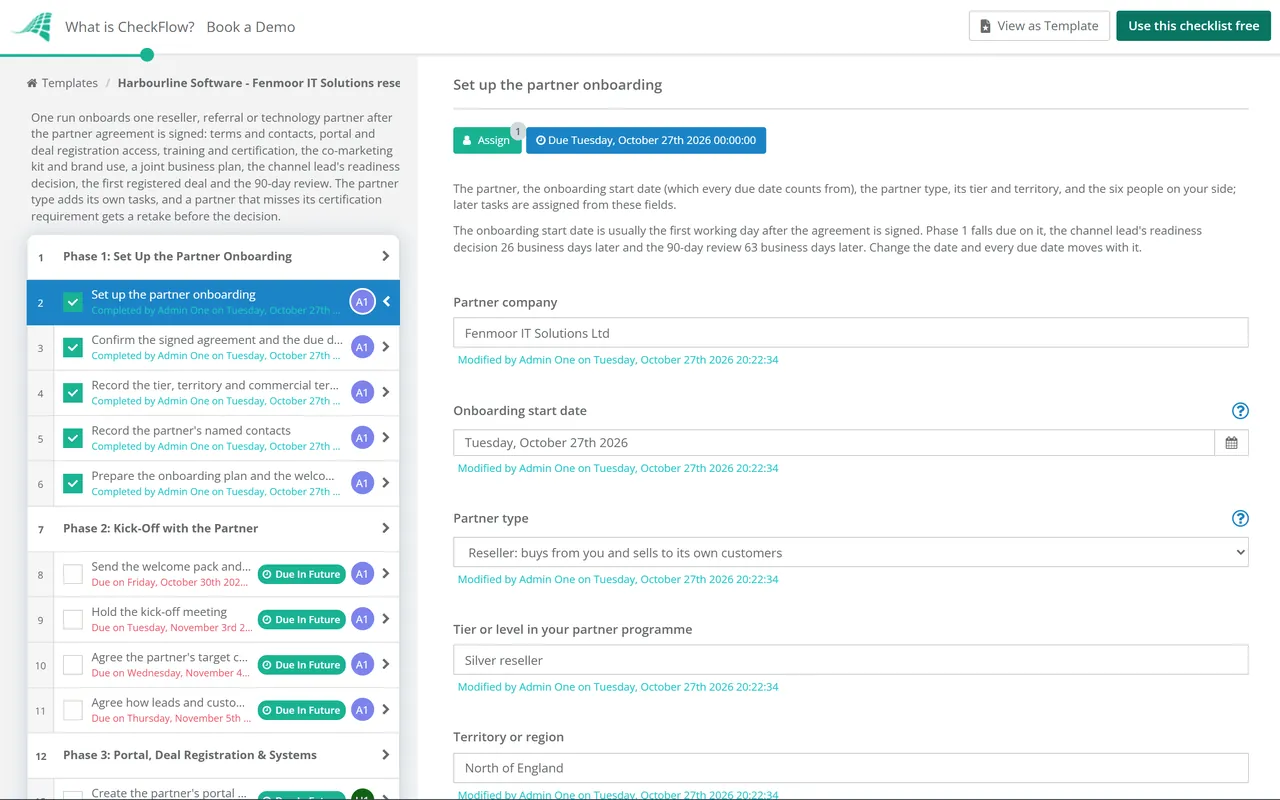
    Start on the first working day after the partner agreement is signed. The first task names the partner type and the six people on your side; the type adds the tasks that reseller, referral and technology partners need. Every due date counts in business days from the onboarding start date.

    • Set up the partner onboarding — the partner, the onboarding start date (which every due date counts from), the partner type, its tier and territory, and the six people on your side; later tasks are assigned from these fields
    • Confirm the signed agreement and the due diligence are on file — the signed partner agreement and its schedules, the date it was signed, its term, and the due diligence record from before signing, with anything it said to follow up
    • Record the tier, territory and commercial terms — the tier, the discount, margin or referral fee, the territory and any exclusivity, the targets or minimums for the tier, how registered deals are protected, and when the terms are reviewed
    • Record the partner's named contacts — the partner's executive sponsor, main contact, sales lead, technical lead, marketing contact and billing contact, with an email address for each
    • Prepare the onboarding plan and the welcome pack — the onboarding plan with its dates, the people on both sides, the training path, what the partner must do to be ready to sell, and a welcome pack with the programme guide and how to get help
  2. Phase 2

    Phase 2: Kick-Off with the Partner

    6 tasks

    Meet the partner's team in the first week. Agree the plan, who does what, and how introductions, deals and data pass between you. A referral partner adds a task to agree how introductions work, and a technology partner adds one to agree the integration's scope.

    • Send the welcome pack and book the kick-off — the welcome pack and onboarding plan sent to the partner's main contact, and a kick-off meeting booked with their sales, technical and marketing leads
    • Hold the kick-off meeting — introductions, the partner's goals, the onboarding plan and its dates, what ready to sell means, how to get help, and the next steps for each side
    • Agree the partner's target customers — the segments, regions and company sizes the partner will focus on, the problems your product solves for them, and the first accounts the partner has in mind
    • Agree how the partner introduces customers to you — how the partner passes on an introduction, what it tells the customer first, who on your side picks it up and how quickly, and how the partner hears what happened
    • Agree how leads and customer data are shared — what personal data passes each way, such as leads you pass on and prospects registered through deal registration, each side's role under data protection law, and the terms that cover it
    • Agree the integration's scope and the technical contacts — what the integration does, which API or plan it uses, who builds and maintains it, the test accounts each side needs, and the technical contacts on both sides
  3. Phase 3

    Phase 3: Portal, Deal Registration & Systems

    8 tasks

    Give the partner what it needs to work with you day to day: the partner portal, deal registration, demo access and its records on your side. A reseller adds ordering, pricing and support for its customers; a referral partner adds how referrals are submitted and fees paid.

    • Create the partner's portal accounts — an account in the partner portal for each named contact, at the right tier, with access to the content library and the partner's company profile filled in
    • Give access to deal registration and explain the rules — how to register a deal, what qualifies, how long a registration protects the partner, what happens when two partners or your own team claim the same customer, and how quickly you approve or reject
    • Add the partner to the CRM and partner reports — the partner account, its contacts, tier and territory in the CRM, and the partner added to the reports that track registrations, pipeline and wins
    • Set up demo access for the partner's team — a demo environment, sandbox or not-for-resale licences for the partner's sales and technical people, with sample data, and who renews or removes the access
    • Set up the partner in finance — a reseller set up as a customer for invoicing, a referral partner as a supplier for fee payments, with tax and bank details checked by finance; a technology partner only if money changes hands
    • Set up ordering, quoting and the partner price list — the partner price list or discount, how the partner quotes and places an order, how subscriptions or licences are provisioned for its customers, and how you invoice the partner
    • Set up how referrals are submitted and fees paid — the form or portal page for submitting a referral, how a referral is matched to a sale, when the fee is earned and paid, and the invoice details the partner needs
    • Agree who supports the partner's customers — what the partner handles as first-line support, how it escalates to you, the response times each side commits to, and what the end customer is told
  4. Phase 4

    Phase 4: Sales & Product Training

    6 tasks

    Train each person for their role and record who has finished what. Certification in Phase 5 checks what they learned. A technology partner adds technical training and a test of the integration.

    • Assign the training path for each person — the courses for each role on the partner's side, such as sales, presales and support, the certification each role must pass, and the number of certified people the tier needs
    • Run the product training — what the product does, the main use cases, a live demo the partner's people then give themselves, and where to find answers
    • Run the sales training — positioning, the target customer, pricing and packaging, the main competitors and objections, deal registration, and how to bring your team into a deal
    • Run the technical training on the API and the integration — the API and its authentication, webhooks and limits, the sandbox, how releases are announced, and how integration problems are reported
    • Record who has completed each course — each person, their role, the courses finished and the dates, and anyone still to finish, from the training platform or the partner portal
    • Review and test the integration — the integration tested in a sandbox against the agreed scope, error handling and security checked, its documentation reviewed, and any fixes agreed with the partner
  5. Phase 5

    Phase 5: Certification

    3 tasks

    Certification shows the partner's people can sell, demo and support the product without you in the room. If the partner has not met the certification requirement for its tier, a task appears to arrange extra training and a retake before the readiness decision.

    • Run the certification assessments and record the results — each person's assessment, such as a test, a recorded demo or a live pitch, the result, and whether the partner now meets the certification requirement for its tier
    • Issue certificates and update the partner's status — certificates or badges for the people who passed, their status updated in the partner portal and the CRM, and their renewal dates noted
    • Arrange extra training and a retake — what each person who did not pass needs to learn, a coaching session or extra course, a retake date before the readiness decision, and the result
  6. Phase 6

    Phase 6: Co-Marketing Kit & Brand Use

    6 tasks

    Give the partner the material to market you, agree how your brand may be used and prepare the announcement. Nothing is published until the channel lead decides the partner is ready to sell. A tier with a marketing fund adds a task to agree its plan.

    • Send the co-marketing kit — logos and the partner badge, product descriptions, slide decks, case studies you have permission to share, email and social media copy, and the brand guidelines
    • Agree how the partner may use your brand — which logos, names and badges it may use, the brand guidelines it must follow, what needs your approval before it goes out, and how use ends if the partnership ends
    • Agree the marketing fund plan and how claims are made — the amount for the period, the activities it pays for, what the partner submits for approval before spending, the proof needed for a claim, and the claim deadlines
    • Review the partner's first marketing materials — the partner's web page, launch email or slide deck about you, checked against the brand guidelines and for accurate claims about your product, with changes sent back
    • Prepare the partner's listing in your partner directory — the partner's profile, tier, regions and services ready for the partner directory on your website, to publish after the readiness decision
    • Plan the joint announcement — what will be announced, where (press release, blogs, social media, emails to customers), who writes and approves each part, and the date after the readiness decision
  7. Phase 7

    Phase 7: Joint Business Plan & Readiness Decision

    6 tasks

    Agree what the partnership will achieve in its first year, check the partner against what ready to sell means, and get the channel lead's decision. Nothing after the decision can be completed until it is recorded.

    • Write the joint business plan — the targets for the first year, the target accounts and segments, the joint activities each quarter, the support each side gives, and the dates of the reviews
    • List the first target accounts and opportunities — the accounts the partner will approach first, any opportunities it already has, and who on each side owns the next step
    • Check readiness against the onboarding plan — each item on what ready to sell means, such as certification, portal and deal registration access, demo access, the co-marketing kit and the joint business plan, marked done or still open
    • Channel lead confirms the partner is ready to sell — the channel lead reviews the readiness check and decides whether the partner can go to market and start co-selling; nothing after this task can be completed until a decision is recorded
    • Meet the conditions set by the channel lead — each condition, who meets it and by when, and confirmation to the channel lead when it is met
    • Put right what stopped the launch and ask for a fresh decision — what the channel lead said was missing, the plan and the date to fix it, and a fresh decision once it is fixed
  8. Phase 8

    Phase 8: Launch & First Registered Deal

    7 tasks

    Announce the partnership and get the first deal through deal registration, with your team alongside. A reseller adds a check of its first order, and a technology partner adds the integration listing.

    • Publish the announcement and the directory listing — the joint announcement released on the agreed date and the partner's listing live in your partner directory
    • Publish the integration listing — the integration's page in your marketplace or app directory, and in the partner's, with its description, set-up guide and support contact
    • Tell your sales and support teams about the partner — who the partner is, its territory and target customers, how deal registration protects its deals, and who to contact
    • Get the first deal registered — the partner's first opportunity entered through deal registration rather than by email, approved or rejected within the time you promised, with the reason recorded
    • Support the first deal — a joint call or demo, help with the proposal or pricing, and a named person on your side the partner can call
    • Check the first order and invoice — the partner's first order placed at the right price, the subscriptions or licences provisioned for its customer, and the invoice to the partner correct
    • Record where the first deal stands — won, lost or still open, its value, what helped or slowed it, and what the partner needs next
  9. Phase 9

    Phase 9: 90-Day Review

    5 tasks

    About 90 days after the start, review the partner's first results with them, update the joint business plan and record what to change in onboarding for the next partner.

    • Gather the partner's results for the first 90 days — deal registrations, pipeline and wins, people trained and certified, marketing activity and any support issues, from the CRM and the partner portal
    • Ask the partner for feedback on onboarding — what helped, what was slow or missing, and what the partner still needs, from the main contact and the people who were trained
    • Hold the 90-day review with the partner — the results against the joint business plan, what worked and what did not, and the actions for the next quarter, with the partner's executive sponsor where you can
    • Update the joint business plan and book the next review — targets and activities changed where the review showed they should be, an owner and a date for each action, and the next review date
    • Record what to change in partner onboarding — what to add, drop or do earlier in this checklist for the next partner, sent to the channel lead

Reseller, Referral or Technology Partner: What Changes in Onboarding

The first task asks which of three types the partner is. Partner programmes name their types and tiers in different ways, so map your own to the nearest one. The table shows what each type does in this template and the tasks the checklist adds for it.

Partner type What the partner does How it is paid (this template’s assumption) What the checklist adds
ResellerBuys from you and sells to its own customersA discount or margin on your priceThe partner price list, quoting and ordering; who supports its customers; a check of its first order and invoice
Referral partnerIntroduces customers, who then buy from youA referral fee when an introduced customer buysHow introductions reach your sales team; how referrals are submitted, matched to a sale and paid
Technology or integration partnerBuilds or maintains an integration between its product and yours, and may sell alongside youOften no payment either way: the value is the integration and the customers you shareThe integration’s scope and technical contacts; technical training; an integration test; the integration listing
All threeWorks under the partner agreement and its tierAs the agreement sets outTerms and contacts, portal and deal registration, demo access, training and certification, the co-marketing kit and brand use, a joint business plan, the readiness decision, the first registered deal and the 90-day review

Anti-bribery. A partner that wins business for you may be an associated person under the UK Bribery Act 2010. Section 7 makes a commercial organisation guilty of an offence if a person associated with it bribes someone to obtain or retain business for it, with a defence for adequate procedures to prevent it. Section 8 says a person is associated if they perform services for or on behalf of the organisation, judged on all the circumstances. The Ministry of Justice guidance says a supplier performing services, rather than simply acting as the seller of goods, may be associated. The offence covers bodies and partnerships formed in the UK, wherever the bribery takes place, and those formed elsewhere that carry on business, or part of a business, in the UK (sections 7(5) and 12(5)). The checklist’s second task confirms the partner went through your anti-bribery checks before signing; the Anti-Bribery & Corruption Compliance Checklist reviews the programme itself.

Shared personal data. Leads you pass to a partner and prospects it registers with you are personal data. In the UK, a partner that processes personal data on your behalf is a processor, and Article 28(3) of the UK GDPR says that processing must be governed by a contract or other legal act. Where each side decides for itself what to do with the data, the ICO’s data sharing code says a data sharing agreement is good practice, though not mandatory; the ICO says it is reviewing that guidance after the Data (Use and Access) Act 2025. The checklist records which terms cover what you share. Outside the UK, check your own law.

Why Onboard Partners in CheckFlow?

1

No launch before the channel lead decides

The channel lead’s readiness decision is assigned to them alone, and the checklist halts there: the announcement, the directory listing and the first registered deal cannot be completed until a decision is recorded. Ready with conditions or Not ready adds the next step for the partner manager. See how approvals that halt a checklist work.

2

Only the tasks this partner needs

Choose reseller, referral or technology partner on the first task and the checklist adds that type’s tasks, from the price list to the integration listing. A tier with a marketing fund adds the fund plan, and a missed certification requirement adds a retake before the decision.

3

Every partner’s onboarding in one view

Enter the onboarding start date and every task falls due a set number of business days after it, assigned from the six people named on the first task. The Reports Grid lists every partner onboarding with its answers, such as the partner type, the certification result and the channel lead’s decision, and the Tasks Grid shows each person what is due this week.

CheckFlow does not replace your partner portal, CRM or learning platform: deal registrations, courses and certificates stay there. CheckFlow makes sure every new partner gets the same steps in the same order, with an owner and a due date for each, a decision before launch, and a record of who did what and when. See how a checklist runs.

This template starts once the partner is signed. Vet a partner before signing with the Business Partnership Due Diligence Checklist, and review your anti-bribery programme with the Anti-Bribery & Corruption Compliance Checklist. Once the partner is selling, plan its key accounts with the Account Planning Checklist and onboard the customers it brings with the SaaS Customer Onboarding Checklist. Your own new sales hires follow the Sales Rep Onboarding Checklist, and the joint announcement can follow the Press Release Checklist. If you are the one reselling a white-label platform, set up each client account with the White-Label Reseller Account Setup Checklist.

AI generator

Didn’t find what you need? Describe it.

Describe the process in a sentence and the AI checklist generator drafts the phases and tasks for you.

Frequently Asked Questions

What is partner onboarding?

Partner onboarding is the work that turns a signed partner agreement into a partner that can sell, refer or integrate on its own. It covers recording the terms and contacts, access to the partner portal and deal registration, training and certifying the partner’s people, agreeing how they may use your brand, and a joint business plan. This template runs it for one partner, from the first working day after signing to a review about 90 days later.

What should a SaaS partner onboarding checklist include?

This template covers the tier, territory and commercial terms, the partner’s named contacts, a kick-off, portal and deal registration access, demo access, finance set-up, product and sales training, certification, the co-marketing kit and brand rules, a joint business plan, a readiness decision, the first registered deal and a 90-day review. For SaaS partner onboarding it adds a demo environment or sandbox and, for a technology partner, an integration test and a listing in your marketplace.
How long does partner onboarding take?

This template allows about five weeks to the channel lead’s readiness decision (26 business days after the start) and about 90 days to the first review. Those are its own choices, not a standard. A referral partner with a simple fee needs less training than a reseller that supports its own customers, and a technology partner’s timeline depends on the integration. Change the offsets to fit your programme.

How is onboarding different for resellers, referral partners and technology partners?

A reseller buys from you and sells to its customers, so it needs a price list, a way to order and an agreement on who supports its customers. A referral partner introduces customers who buy from you, so it needs a way to pass on introductions and a clear rule for when its fee is paid. A technology partner builds an integration, so it needs technical training, a test and a listing. This template adds each type’s tasks.

What is deal registration?

Deal registration is how a partner tells you about an opportunity it is working on and asks for it to be protected, so that another partner or your own sales team does not compete for the same customer. Write down what qualifies, how long a registration lasts, how quickly you approve or reject, and how conflicts are settled. This template sends the rules in Phase 3 and checks that the first deal comes in through registration.

What happens if a partner fails certification?

In this template the enablement lead records whether the partner has met the certification requirement for its tier. Not yet adds a task to arrange extra training and a retake before the readiness decision. If the requirement is still not met, the channel lead can decide Not ready, or Ready with conditions with a later date for the missing certifications. Either decision adds a follow-up task for the partner manager.

What goes in a partner co-marketing kit?

Logos and the partner badge, product descriptions, slide decks, case studies you have permission to share, email and social media copy, and the brand guidelines. With it, agree which logos and names the partner may use, what needs your approval before it goes out, and how use ends if the partnership ends. This template reviews the partner’s first materials and holds the joint announcement until the partner is ready to sell.

What is a joint business plan with a partner?

A joint business plan sets out what you and the partner aim to achieve together in the first year: the targets, the target accounts and segments, the joint activities each quarter, the support each side gives and the dates of the reviews. In this template it is written before the readiness decision and updated at the 90-day review. To plan one key account in depth, use the Account Planning Checklist.

Do you need a data sharing agreement with a partner?

It depends on each side’s role. In the UK, a partner that processes personal data on your behalf is a processor, and Article 28(3) of the UK GDPR says that processing must be governed by a contract or other legal act. Where each side decides for itself what to do with shared data, the ICO’s data sharing code, which it is reviewing after the Data (Use and Access) Act 2025, calls a data sharing agreement good practice, not mandatory. This template records which terms apply.

Is CheckFlow free for this template?

14-day free trial, no card required. The Business plan is $10 per user per month after the trial. Full details at checkflow.io/pricing.

Get Every New Partner Ready to Sell the Same Way

Free trial — no credit card required.

14-day free trial, no credit cardFull refund in your first 30 daysUS hosting, EU on request