
DORA Register of Information Checklist Template

Compile the year’s register of ICT third-party arrangements as at the reference date, check it against the ESAs’ rules, get it signed off and submit it in your authority’s window.

Last reviewed: November 2026

Printed from checkflow.io/templates/financial-services/dora-register-of-information-checklist

This free DORA register of information checklist is for the ICT third-party risk, procurement and regulatory reporting teams of EU financial entities. One run covers one year’s register: the entity, branch and group data, every contractual arrangement for ICT services in force at the reference date, the ICT third-party service providers and their LEI or EUID, the supply chain behind services that support critical or important functions, the functions and their assessments, the file built and checked against the ESAs’ validation rules, sign-off by a named approver, submission in the competent authority’s window and any rejected file corrected and resent. It then keeps the register current until the next run. Every due date counts from the reference date, and the first task’s answers add tasks for a group register, branches abroad and last year’s feedback.

The Annual Register Return, Run on Its Own

The DORA ICT Risk Management Checklist reviews the whole framework each quarter and year, and the Vendor Risk Assessment Checklist adds one new arrangement to the register when a provider is approved. This checklist is the yearly job between them: the whole register, as at the reference date, compiled, checked, signed off and submitted, then kept current until the next one.

The framework

DORA ICT risk management

Covers: the ICT risk management framework, incidents, testing and third-party risk, reviewed every quarter with an annual review.

The register: one task in the annual review, to refresh and submit it, in the DORA ICT Risk Management Checklist.

This checklist

The register of information

Covers: every ICT arrangement, provider, identifier, function and assessment in the templates of Implementing Regulation (EU) 2024/2956, validation, sign-off, submission and resubmission.

Ends: with an accepted file and a register kept current until the next reference date.

One provider

Vendor risk and oversight

Covers: assessing one provider before the contract, in the Vendor Risk Assessment Checklist, and SLA, KPI and exit reviews of the providers you have, in the Vendor Oversight Checklist.

Feeds: the contract, provider and exit plan data this register reports.

What the DORA Register of Information Checklist Covers

Nine phases take one year’s register from scoping, about eight weeks before the reference date, to submission early in the authority’s window and the checkpoints that keep it current through the year. The checklist halts at the sign-off in Phase 7. The first task’s answers add tasks for a group register, branches abroad and last year’s feedback; a rejected file and data quality feedback add their own.

  1. Phase 1

    Phase 1: Scope, Owners & the Authority’s Instructions

    5 tasks

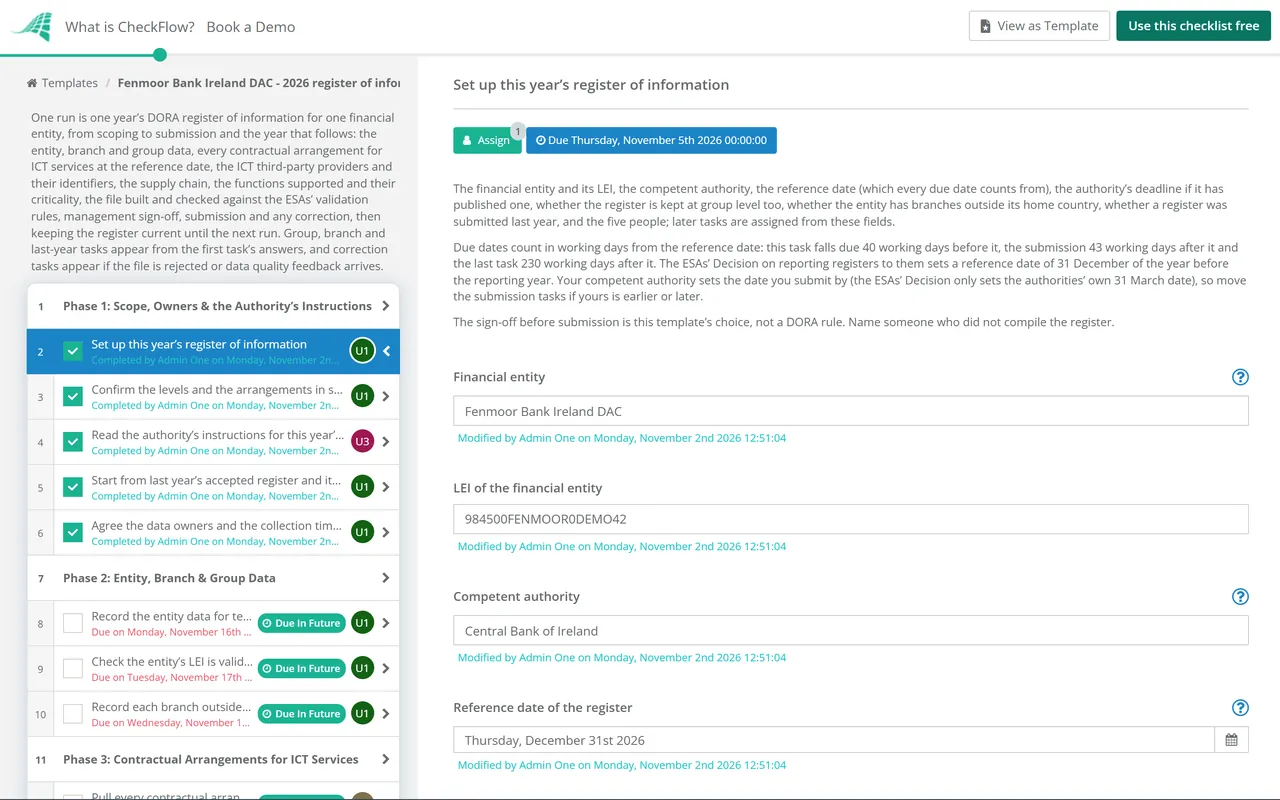
    Start about eight weeks before the reference date. The first task records the entity, its LEI, the competent authority, the reference date that every due date counts from, the five people, and three answers that add tasks for a group register, branches abroad and last year’s feedback.

    • Set up this year’s register of information — the financial entity and its LEI, the competent authority, the reference date (which every due date counts from), the authority’s deadline if it has published one, whether the register is kept at group level too, whether the entity has branches outside its home country, whether a register was submitted last year, and the five people; later tasks are assigned from these fields
    • Confirm the levels and the arrangements in scope — the register covers every contractual arrangement for ICT services from ICT third-party service providers, intra-group providers included, and marks those that support critical or important functions; agree which entities and levels are in this run
    • Read the authority’s instructions for this year’s submission — the window, the portal, the file format and taxonomy version it names, the naming rules for the file and any changes since last year; check the page again in January
    • Start from last year’s accepted register and its feedback — the file the authority accepted, the validation and data quality feedback it sent, and the fixes still open, so the same errors are not made again
    • Agree the data owners and the collection timetable — who supplies the contract, provider, function and assessment data, in what form and by which date, so the register can be frozen just after the reference date
  2. Phase 2

    Phase 2: Entity, Branch & Group Data

    4 tasks

    Templates B_01.01 to B_01.03 describe who maintains the register, the entities in it and their branches abroad. A group register adds the entities in the consolidation.

    • Record the entity data for templates B_01.01 and B_01.02 — the LEI, name, country, type of entity, competent authority, direct parent undertaking and the value of total assets, reported as Annex IV of the implementing regulation says for that type of entity
    • Check the entity’s LEI is valid and active — look the LEI up in GLEIF and renew it before the reference date if it has lapsed; the authority needs a valid LEI for the entity that submits
    • Record each branch outside the home country in template B_01.03 — a unique code for each branch, its head office’s LEI, its name and its country; branches are not financial entities but part of their head office
    • List the entities in the consolidation — every financial entity and ICT intra-group service provider in the sub-group or group, with its LEI, following the sectoral rules the parent uses to decide what is consolidated
  3. Phase 3

    Phase 3: Contractual Arrangements for ICT Services

    6 tasks

    Every contractual arrangement for ICT services goes in the register, not only the ones that support critical or important functions. Templates B_02 to B_04 hold the contract data and who signs and uses each service.

    • Pull every contractual arrangement for ICT services from the contract inventory — contracts, orders and intra-group agreements for ICT services, including cloud, software, data and support services bought by business teams, each with a unique reference number used the same way across the group
    • Record the general and specific contract data for templates B_02.01 and B_02.02 — type of arrangement, any overarching arrangement, annual expense or estimated cost for the past year and its currency, start and end dates, both sides’ notice periods, the country of governing law, the country of provision, whether data is stored, where it is stored and processed, how sensitive it is and the level of reliance on the service
    • Give each ICT service its type from Annex III — one of the 19 types, from S01 ICT project management to S19 cloud software as a service; where one contract covers several types, add a row for each
    • Record who signs and who uses each service (B_03.01, B_03.02 and B_04.01) — the entity that signed each arrangement, the provider that signed it, and every entity, or branch, that uses the services under it
    • Link intra-group arrangements to the external contracts behind them (B_02.03 and B_03.03) — where a group company provides ICT services to others, record its arrangements and the reference numbers of the external contracts its services rely on
    • Record arrangements that ended or were terminated, with the reason — the reason from the closed list in B_02.02 for each arrangement that ended or was terminated, so the register shows what changed since last year
  4. Phase 4

    Phase 4: ICT Third-Party Providers, Identifiers & Supply Chain

    5 tasks

    Template B_05.01 identifies every direct provider and subcontractor, and B_05.02 the supply chain behind each service. Missing or wrong identifiers were among the common errors the ESAs found in the 2025 registers.

    • Record each direct ICT third-party service provider in template B_05.01 — legal name, type of person, country of headquarters, total annual expense or estimated cost and its currency, and the identifier and type of code for each provider
    • Get a valid LEI or EUID for every provider that is a legal person — an LEI or the EUID, and both where available; a provider established outside the EU needs an LEI; other codes are only for individuals acting in a business capacity
    • Identify the ultimate parent undertaking of each provider — the ultimate parent’s identifier in B_05.01, which the ESAs use to group providers that belong to the same group
    • Map the supply chain for services that support critical or important functions (B_05.02) — each subcontractor that effectively underpins those services, with its rank: the direct provider is always rank 1 and each subcontractor higher than 1
    • Collect identifiers for those subcontractors through the direct provider — a valid LEI or EUID for each subcontractor in those chains, obtained through the direct provider, except for individuals acting in a business capacity
  5. Phase 5

    Phase 5: Functions, Criticality & Service Assessments

    5 tasks

    Template B_06.01 lists the functions the ICT services support and whether each is critical or important. B_07.01 records the assessment of each service that supports one.

    • List the functions the ICT services support (B_06.01) — a function identifier starting with F, the function’s name, the licensed activity it belongs to from Annex II, and the entity that performs it
    • Confirm whether each function is critical or important — the yes or no, the reasons and the date of the last assessment, using DORA’s definition of a critical or important function
    • Record the recovery time and recovery point objectives of each function — in hours, as the business continuity plans set them, and the impact of discontinuing each function
    • Link each ICT service to the functions it supports — every service that supports a critical or important function marked as such, so the contract data and the function list agree
    • Record the assessment of each service that supports a critical or important function (B_07.01) — substitutability of the provider and the reason if it is hard to replace, the date of the last audit, whether an exit plan exists, whether the service could be brought back in house, the impact of stopping it, and any alternative providers
  6. Phase 6

    Phase 6: Build & Validate the Register

    6 tasks

    Freeze the data as at the reference date, build the file in the format the authority names and check it against the ESAs’ validation rules before anyone signs it off.

    • Freeze the register as at the reference date — add the arrangements signed and remove the ones ended in the last weeks before the reference date, then keep a dated copy of the data
    • Complete template B_99.01 and check every closed list — the terms used in the closed lists and classification systems, and every drop-down value checked against the ESAs’ list of possible values
    • Build the file in the format the authority names — check the authority’s page again for any change, then build the reporting package with the taxonomy version and file naming it asks for
    • Run the ESAs’ validation rules and fix every error — the technical checks, validation rules and business checks the EBA publishes for the register, run in your tool before the file goes to the authority
    • Check the entity-level data agrees with the group register — the entries for each entity in the consolidation match the sub-consolidated and consolidated register, and the reference numbers are the same at every level
    • Check the content makes sense, not only that it passes — no dummy identifiers or generic provider names, expenses in the right currency, dates in the right year and no contract missing because a business team bought it
  7. Phase 7

    Phase 7: Management Sign-Off

    3 tasks

    The approver named on the first task signs the register off before it is submitted. The checklist halts here until they decide.

    • Prepare the sign-off pack — the number of arrangements and providers, the services supporting critical or important functions, changes since last year, identifier gaps, validation results and open issues
    • Approve the register for submission — the approver records the decision and any conditions; nothing after this task can be completed until it is done
    • Rework the register and return it for sign-off — fix what the approver raised, run the validation rules again, then ask the approver to change the decision to Approved and complete the sign-off again
  8. Phase 8

    Phase 8: Submission, Feedback & Resubmission

    7 tasks

    Submit early in the authority’s window to leave time for corrections. A rejected file adds two tasks to correct and resend it; data quality feedback later in the spring adds one more.

    • Submit the register in the authority’s window — upload the signed-off file through the authority’s portal, early in the window, and keep the receipt
    • Read the validation feedback on the file — the portal’s and the ESAs’ technical validation feedback: accepted, or rejected with the errors listed
    • Correct the errors in the rejected file — fix each error at its source, not only in the file, and run the validation rules again
    • Resubmit the corrected file before the window closes — upload the corrected file, keep the new receipt and read the feedback again
    • Record the accepted submission — the final file, the receipt and the acceptance kept with this checklist as the record of the year’s submission
    • Check for data quality feedback on the register — feedback on the content of the data, which can come weeks after the file was accepted
    • Answer the data quality feedback and resubmit if asked — correct the data the feedback names, resubmit if the authority asks for it, and carry the fixes into the live register
  9. Phase 9

    Phase 9: Keeping the Register Current

    5 tasks

    The register is kept up to date all year, not only at the reference date. These tasks are checkpoints through the year until the next run starts.

    • Tell the authority about planned arrangements for critical or important functions — each planned contractual arrangement for ICT services supporting a critical or important function, and each function that has become critical or important, reported in a timely manner
    • Update the register for new, changed and ended arrangements — each new arrangement added when it is signed, changes recorded, and ended arrangements given their reason, so the register is current between reference dates
    • Keep the full register ready to send on request — the authority can ask for the full register or specified sections at any time, along with other information it needs to supervise the entity
    • Review the register for errors and gaps — a mid-year check of the data against the contract inventory and the function list, with errors corrected promptly
    • Hand over to next year’s run — lessons from this year, open identifier and data gaps, and the people for the next run, which starts about eight weeks before the next reference date

The Templates in the Register and Where This Checklist Fills Them

Article 5 of Implementing Regulation (EU) 2024/2956 lists the templates in Annex I. The table sets out what each holds and the phase of this checklist that collects it, read on EUR-Lex on 2 November 2026. A corrigendum published on 19 September 2025 changed the list of other identifier codes in template B_05.01. This is a summary, not legal advice: the annex, the ESAs’ data model and your authority’s instructions are the sources.

Template What it holds Phase
B_01.01The entity maintaining the register: LEI, name, country, type, competent authority and date of reporting2
B_01.02The entities in the register: LEI, type, direct parent, currency and value of total assets2
B_01.03Branches outside the home country, where the entity has any2
B_02.01, B_02.02Each contractual arrangement: type, annual expense, dates, notice periods, governing law, ICT service type, data location and reliance3
B_02.03, B_03.03Links between intra-group arrangements and the external contracts behind them, and intra-group providers3
B_03.01, B_03.02, B_04.01The entities that sign each arrangement, the providers that sign it and the entities that use the services3
B_05.01Each ICT third-party service provider and subcontractor: identifier (LEI or EUID), name, type of person, headquarters, expense, ultimate parent4
B_05.02The supply chain behind each service, with each provider’s rank4
B_06.01The functions supported: identifier, licensed activity, critical or important, reasons, recovery time and point objectives5
B_07.01The assessment of each service supporting a critical or important function: substitutability, last audit, exit plan, reintegration, alternatives5
B_99.01The terminology of the closed lists and classification systems used6

Dates and rules that set the yearly cycle, as each source says them:

What What the source says Source
The registerKept at entity level, and at sub-consolidated and consolidated levels, for all contractual arrangements on the use of ICT services from ICT third-party service providers, marking those that support critical or important functionsDORA, Article 28(3)
Reference date31 December of the calendar year before the reporting year (31 March 2025 for the first submission in 2025)ESAs’ Decision of 8 November 2024 on reporting for CTPP designation, Article 4
Authorities to the ESAsCompetent authorities send the registers to the ESAs by 31 March each yearESAs’ Decision, Article 5
Your submission windowSet by your competent authority (the ESAs’ Decision only sets the authorities’ 31 March date). The Central Bank of Ireland’s 2026 window ran from 2 to 31 March 2026 for registers as at 31 December 2025; its page showed no 2027 window on 2 November 2026Central Bank of Ireland, Reporting Registers of Information
Provider identifiersA valid and active LEI or the EUID, and both where available; only an LEI for legal persons not established in the UnionImplementing Regulation (EU) 2024/2956, Article 3(5) and Annex I (B_05.01.0020)
Planned arrangementsInform the competent authority in a timely manner about planned arrangements for ICT services supporting critical or important functions, and when a function becomes critical or importantDORA, Article 28(3)

Article 28(3) has no exemption for microenterprises or for entities on the simplified ICT risk management framework; the ICT third-party strategy in Article 28(2) does. Ask your authority what it expects if you are unsure.

Why Run Your DORA Register of Information in CheckFlow?

1

Every source of data has an owner

Contracts, providers, functions and the file each go to the person named on the first task, with a due date counted in working days from the reference date. Each person sees their work in the Tasks Grid, and every year’s run sits in the Reports Grid with its progress.

2

Signed off before it is sent

Only the approver named on the first task can complete the sign-off, and the checklist halts there: nothing after it can be completed until they decide. Not approved adds a rework task. See how approvals that halt a checklist work.

3

Ready for a rejected file

A rejected file adds the tasks to correct and resend it, and data quality feedback adds one more, so the corrections are tracked like the rest. A group register, branches abroad and last year’s feedback add their own tasks through conditional logic.

CheckFlow runs the work around the register: who collects what and by when, the checks, the sign-off and the evidence. It does not hold the register’s data model, run the ESAs’ validation rules or build the file your authority accepts; your register tool or reporting vendor does that. The DORA ICT Risk Management Checklist covers the rest of DORA, and CheckFlow for financial services shows other recurring compliance workflows.

AI generator

Didn’t find what you need? Describe it.

Describe the process in a sentence and the AI checklist generator drafts the phases and tasks for you.

Frequently Asked Questions

What does the DORA register of information contain?

The templates in Annex I of Implementing Regulation (EU) 2024/2956: the entity and its branches, the entities in a group, every contractual arrangement for ICT services and who signs and uses it, each ICT third-party service provider and its identifier, the supply chain behind services that support critical or important functions, the functions themselves, the assessment of those services and the terminology used. The table above lists each template.

What reference date does the register of information use?

The ESAs’ Decision has competent authorities send them registers with a reference date of 31 December of the year before, so the register submitted in 2027 shows the arrangements as at 31 December 2026. Your authority asks you for that date: the Central Bank of Ireland asked for registers as at 31 December 2025 in 2026. This template counts every due date from the reference date, starting about eight weeks before it.

Which ICT arrangements go in the register?

All contractual arrangements on the use of ICT services provided by ICT third-party service providers, not only those for critical or important functions; intra-group providers count too. The register marks the arrangements that support critical or important functions, and for those services it also lists the subcontractors that effectively underpin them, ranked by their place in the supply chain.

Which identifiers do ICT third-party service providers need?

A valid and active LEI or the EUID, and both where available, for every provider that is a legal person. The implementing regulation’s instructions for template B_05.01 say only an LEI may be used for a legal person not established in the EU. Other codes are for individuals acting in a business capacity. The ESAs’ FAQ says EUIDs can be found through BRIS on the e-Justice Portal.

What happens if the register file is rejected?

The ESAs’ FAQ says an empty identifier fails the referential integrity check and the whole file is rejected. The portal and the ESAs’ checks return the validation errors, and the entity corrects them and resubmits before the window closes; in 2026 the Central Bank of Ireland asked firms to resubmit before 31 March. This template adds correction and resubmission tasks when the file is rejected.

When is the 2027 register of information due?

The ESAs’ Decision is addressed to the competent authorities: it has them send the registers on to the ESAs by 31 March. The date your firm submits by comes from your own authority. The Central Bank of Ireland’s 2026 window ran from 2 to 31 March 2026; on 2 November 2026 its page showed no 2027 window yet. Enter your authority’s deadline on the first task when it is published and move the submission tasks to fit.

Do microenterprises have to keep a register of information?

Article 28(3) of DORA, which requires the register, has no exemption for microenterprises or for entities on the simplified ICT risk management framework. Article 28(2), the ICT third-party risk strategy, does exempt them. DORA applies proportionality overall, so ask your competent authority what it expects of a small entity’s register.

Is CheckFlow free for this template?

14-day free trial, no card required. The Business plan is $10 per user per month after the trial. Full details at checkflow.io/pricing.

Submit an Accepted Register, With the Evidence Attached

Free trial — no credit card required.

14-day free trial, no credit cardFull refund in your first 30 daysUS hosting, EU on request