Incident response
Covers: containment, eradication, recovery and evidence for a security incident, in the Cybersecurity Incident Response Checklist.
Feeds: the timeline, impact figures and root cause that these reports need.
Last reviewed: November 2026
No Credit Card Required
Printed from checkflow.io/templates/financial-services/dora-major-ict-incident-reporting-checklist
This free DORA incident reporting checklist is for the compliance, operational risk and ICT teams of EU financial entities. One run covers one ICT-related incident: logging it, classifying it against the criteria and materiality thresholds of Delegated Regulation (EU) 2024/1772, telling senior management, deciding whether clients and personal data are affected, the initial notification, the intermediate report and its updates, the root cause and actual figures, the final report and its sign-off, and a post-incident review approved by the management body. Every due date counts from the date of detection. Tasks appear for an incident that is not major, a client notice, a possible personal data breach, a report sent by other means, a reclassification and a sign-off that asks for changes.
The Cybersecurity Incident Response Checklist runs the technical response, and the DORA ICT Risk Management Checklist reviews the whole framework every quarter. This checklist runs beside the response for one incident: the classification, the three reports to the competent authority, the client notice and the review, owned by the compliance or risk function. The Data Breach Response Checklist keeps the GDPR notice, which may run at the same time on its own clock.
Covers: containment, eradication, recovery and evidence for a security incident, in the Cybersecurity Incident Response Checklist.
Feeds: the timeline, impact figures and root cause that these reports need.
Covers: classification under Delegated Regulation (EU) 2024/1772, senior management, the initial notification, intermediate and final reports under Delegated Regulation (EU) 2025/301 in the template of Implementing Regulation (EU) 2025/302, the client notice and the post-incident review.
Ends: with the final report submitted and the improvements checked.
Personal data: the GDPR notice within 72 hours where feasible, in the Data Breach Response Checklist.
The framework: incident records reconciled each quarter, in the DORA ICT Risk Management Checklist.
Eight phases take one incident from detection to the final report, about four weeks later, and the review that follows. The first three phases are set out for the day of detection and the day after. The checklist halts at the management body’s approval in Phase 7, after every report to the authority has gone. Answers on the way add tasks for an incident that is not major, a client notice, a possible personal data breach, a report sent by other means, a reclassification and a final report that needs changes.
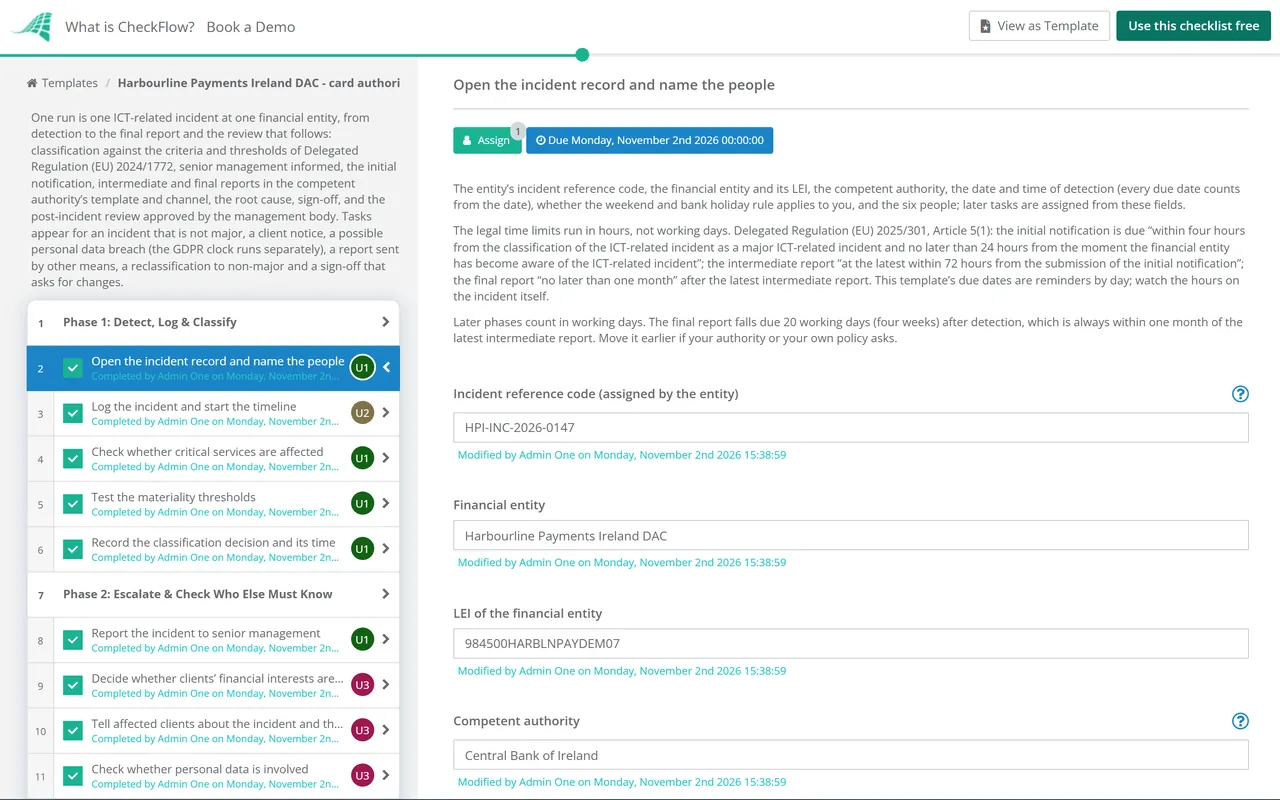
Start the run as soon as an ICT-related incident is detected. The first task records the incident, the entity, the competent authority, the date of detection that every due date counts from, and the six people. Classification decides whether the reporting clock runs.
On the day of detection or the next. Senior management hears of the major incident, the client and data protection questions are answered, and any other report or copy the law asks for is listed.
On the day the incident is classified as major: within four hours of classifying it and no later than 24 hours after becoming aware of it. Use the authority’s template and its secure channel.
Within 72 hours of the initial notification, even if nothing has changed, then an updated report when regular activities recover and whenever the status changes significantly.
The final report is due when the root cause analysis is complete and the actual impact figures replace the estimates, whether or not every fix is in place.
No later than one month after the latest intermediate report. The senior manager signs off the report before it goes, but a sign-off never holds a report past its time limit.
The review of what happened and what changes, reported to the management body. The checklist halts at the approval in this phase; every report to the authority comes before it.
The lessons go into the ICT risk assessment and the incident process, and the incident closes when the improvements are done and checked.
Under Article 8 of Delegated Regulation (EU) 2024/1772, an incident is major where it has affected critical services (Article 6) and either meets the unauthorised access threshold in Article 9(5)(b) or meets two or more of the other thresholds. The thresholds below are as Article 9 states them, read on EUR-Lex on 2 November 2026. This is a summary, not legal advice: the regulations and your authority’s instructions are the sources.
| Criterion | Threshold met when | Article 9 |
|---|---|---|
| Clients, financial counterparts and transactions | More than 10% of clients using the service, or more than 100,000 clients; more than 30% of financial counterparts; more than 10% of the daily average number or value of transactions; or clients or counterparts identified as relevant are affected | 9(1) |
| Reputational impact | The incident is reflected in the media, causes repetitive complaints, means you will or are likely to miss regulatory requirements, or will or is likely to lose clients or counterparts with a material impact | 9(2) |
| Duration and service downtime | The incident lasts more than 24 hours, or service downtime exceeds 2 hours for ICT services that support critical or important functions | 9(3) |
| Geographical spread | An impact in two or more Member States | 9(4) |
| Data losses | An impact on the availability, authenticity, integrity or confidentiality of data that harms the business objectives or regulatory compliance, or any successful, malicious and unauthorised access that may result in data losses | 9(5) |
| Economic impact | Costs and losses exceed, or are likely to exceed, EUR 100,000 | 9(6) |
The reports and their time limits, as the sources say them:
| Report | Time limit | Source |
|---|---|---|
| Initial notification | As early as possible, within four hours of classifying the incident as major and no later than 24 hours after becoming aware of it; if it is classified as major later, within four hours of that classification | Delegated Regulation (EU) 2025/301, Article 5(1)(a) and 5(2) |
| Intermediate report | At the latest 72 hours after the initial notification was submitted, even if nothing has changed; an updated report without undue delay, and in any case when regular activities recover | Article 5(1)(b) |
| Final report | No later than one month after the intermediate report or the latest updated intermediate report, once the root cause analysis is complete and actual figures replace estimates | Article 5(1)(c); DORA, Article 19(4)(c) |
| A limit you cannot meet | Tell the competent authority without undue delay, and no later than the time limit, with the reasons | Article 5(3) |
| Weekends and bank holidays | A limit on a weekend day or bank holiday may move to noon of the next working day, except for initial and intermediate reports by credit institutions, central counterparties, trading venues, NIS2 essential or important entities, and other significant or systemic entities their authority has told | Article 5(4) to (6) |
| Clients | Without undue delay, where the incident affects clients’ financial interests: the incident and the measures taken | DORA, Article 19(3) |
| Form and channel | The template in Annex I with the glossary in Annex II, through the secure electronic channel the authority provides | Implementing Regulation (EU) 2025/302, Articles 1 and 4 |
No amendment to these rules has been adopted: EUR-Lex lists no amending act for DORA, Delegated Regulation (EU) 2024/1772, Delegated Regulation (EU) 2025/301 or Implementing Regulation (EU) 2025/302 (only language corrections). The Commission’s Digital Omnibus proposal of 19 November 2025 (COM(2025) 837) would send these reports through a single entry point run by ENISA, without changing the time limits; on 2 November 2026 it was still before the European Parliament’s committees. The ESAs’ operational instructions of 16 September 2026 add reporting practice, and authorities publish their own: the Central Bank of Ireland’s page (updated 29 January 2026) links its template and its portal guide.
The classification, each report and the client notice go to the people named on the first task, with due dates counted from the date of detection. Each person sees their work in the Tasks Grid, and every incident sits in the Reports Grid with its progress.
The senior manager signs off the final report without stopping the clock, and the checklist halts only at the management body’s approval of the review, after the last report has gone. Not approved adds a rework task. See how approvals that halt a checklist work.
Clients’ financial interests, personal data, a report sent by other means, a reclassification and a sign-off with changes each add their own task through conditional logic, and the weekend rule note matches your entity type.
CheckFlow runs the work around the reports: who does what and by when, the checks, the sign-offs and the evidence. It does not classify the incident for you, fill in the authority’s template or submit it; your team and your authority’s portal do that. The DORA Register of Information Checklist covers the yearly register, and CheckFlow for financial services shows other compliance workflows.
Describe the process in a sentence and the AI checklist generator drafts the phases and tasks for you.
Under Article 8 of Delegated Regulation (EU) 2024/1772, an incident is major when it has affected critical services and either involves a successful, malicious and unauthorised access that may cause data losses, or meets two or more of the other materiality thresholds in Article 9. Those cover clients and transactions, reputation, duration and downtime, spread across Member States, data losses and costs over EUR 100,000. Recurring incidents with the same apparent root cause can together count as one.
Two limits run at once. The initial notification is due within four hours of classifying the incident as major, and no later than 24 hours after the entity became aware of it (Delegated Regulation (EU) 2025/301, Article 5(1)(a)). If the incident is classified as major more than 24 hours after awareness, the four hours run from that later classification. This template records both times on the first phase’s tasks.
Article 4 of Delegated Regulation (EU) 2025/301 lists it: the root causes, when they were addressed and the incident resolved, how it was resolved, information for resolution authorities where it applies, direct and indirect costs and losses with any financial recoveries, and any recurring incidents. DORA says it is due once the root cause analysis is complete and actual figures replace estimates, even if fixes are still in progress.
Yes, where further assessment shows it at no time met the criteria and thresholds for a major incident. Article 5 of Implementing Regulation (EU) 2025/302 says to notify the authority in the reporting template, choosing “major incident reclassified as non-major” as the type of submission and giving the reasons in the other information field. This template adds that task when the review in Phase 4 says so.
Sometimes. A limit that falls on a weekend day or a bank holiday in your Member State may move to noon of the next working day. That does not apply to initial notifications or intermediate reports by credit institutions, central counterparties, operators of trading venues or NIS2 essential or important entities, and an authority may decide it does not apply to those two reports from other significant or systemic entities. Final reports can always use it.
Article 19(3) of DORA says that where a major incident affects the financial interests of clients, the entity informs them without undue delay as soon as it becomes aware of it, covering the incident and the measures taken to limit its effects. This template asks the question on the day of detection and adds the client notice task when the answer is yes.
No. If personal data is involved, Article 33 of the GDPR asks the controller to notify its data protection supervisory authority without undue delay and, where feasible, within 72 hours, unless the breach is unlikely to result in a risk to people. That is a separate notice to a separate authority. This template asks the data protection officer on day one and links the breach record.
Not yet. The Commission’s Digital Omnibus proposal of 19 November 2025 would have financial entities send these reports through a single entry point run by ENISA, and would also change the GDPR breach notice. On 2 November 2026 it was still with the European Parliament’s committees, and EUR-Lex listed no amendment to DORA’s reporting rules. Check its progress before relying on this answer.
14-day free trial, no card required. The Business plan is $10 per user per month after the trial. Full details at checkflow.io/pricing.
14-day free trial, no credit cardFull refund in your first 30 daysUS hosting, EU on request