SOC 2 Readiness Checklist Template

A SOC 2 Type 2 examination tests what happened inside the audit window, not what you fixed afterwards. A control that has never run or an owner nobody named is an exception waiting to happen.

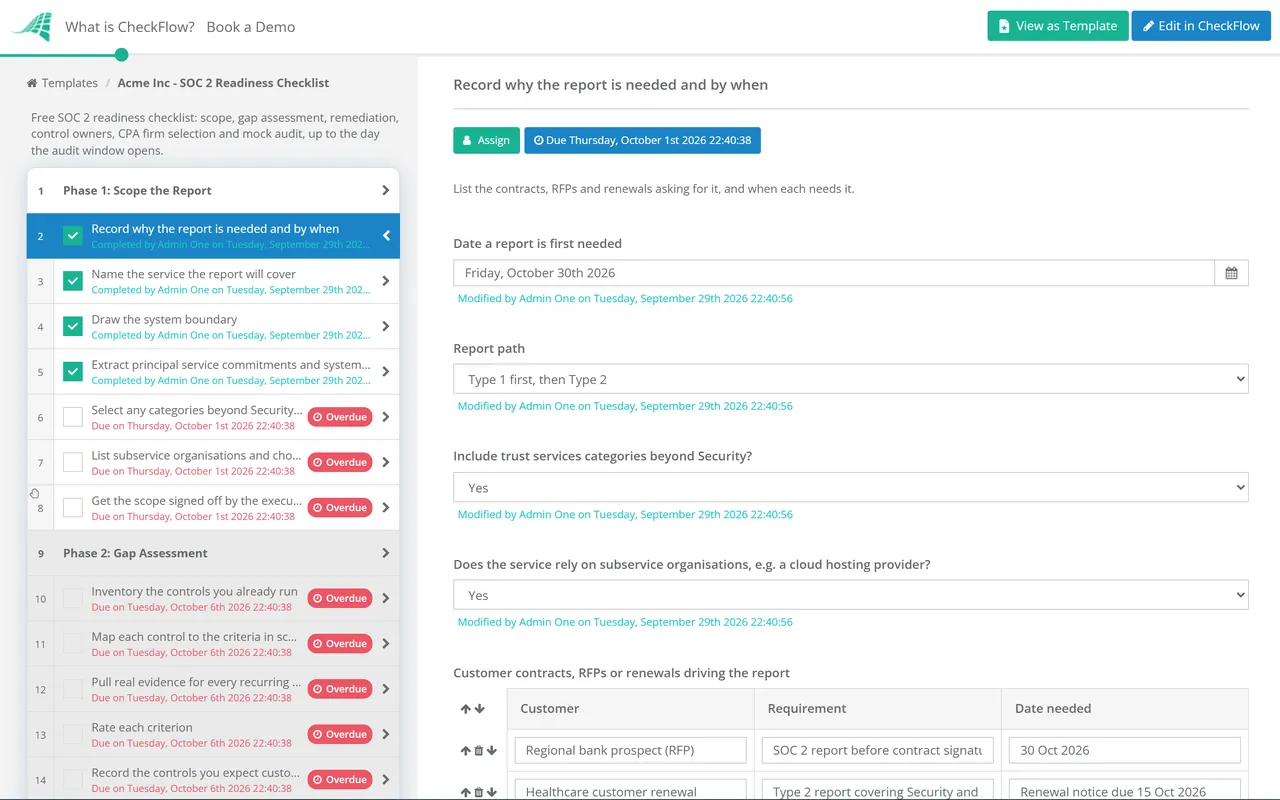
This free SOC 2 readiness checklist is for whoever has just been told to “get us SOC 2”, usually an engineering, security or operations lead at a SaaS or IT services company with a customer deadline. It runs the readiness project from scoping to the day the observation window opens: report path and categories, system boundary, a gap assessment against the AICPA’s 2017 Trust Services Criteria, remediation, control owners and evidence, choosing a CPA firm and a mock audit. You finish with a signed scope, a closed gap register, a draft system description and a start date your sponsor and auditor have agreed.

Use This Template Free See Live Example
No Credit Card Required

Last reviewed: September 2026

Readiness Ends Where the Observation Window Begins

A Type 2 report gives a CPA firm’s opinion on whether your controls operated effectively throughout a stated period. A failure inside that period is reported as an exception, and fixing it later does not remove it. Readiness is the work before the clock starts: decide what is being reported on, close the gaps and prove each control produces evidence on demand.

The common mistake is treating the start date as a formality. Once the window is open, a skipped quarterly access review is simply a skipped review. Pushing the start date back costs a month. Starting before the controls are running costs an exception in a report your customers will read.

Readiness project

Owned by you, before the window

Work: scoping, gaps, remediation, owners, evidence set-up, mock audit.

Who: an internal lead and an executive sponsor.

Output: a signed scope, a closed gap register and an agreed start date.

Cost of a mistake: time. You move the date.
The examination

Performed by a licensed CPA firm

Work: risk assessment, evidence requests, sampling, testing and reporting.

Who: the service auditor, independent of you.

Output: a report carrying the auditor’s opinion and any exceptions found.

Cost of a mistake: an exception your customers can read.

This checklist stops on the first day of the window. For the categories, typical costs and the controls that run during the audit, read our SOC 2 compliance checklist guide.

What the SOC 2 Readiness Checklist Covers

Seven phases take a first SOC 2 from a scoping decision to an open observation window. Answers in Phase 1 switch tasks on or off for subservice organisations, extra categories and a Type 1 first report.

Phase 1

Phase 1: Scope the Report

The first task carries the scope questions. The category task appears only when categories beyond Security are in scope, and the subservice tasks here and in Phase 4 only when the service relies on one.

  • Record why the report is needed and by when — list the contracts, RFPs and renewals asking for it, and when each needs it
  • Name the service the report will cover — one product or service line, described the way customers buy it, not the whole company
  • Draw the system boundary — list the infrastructure, software, people, procedures and data inside it, and what is deliberately left out
  • Extract principal service commitments and system requirements — from MSAs, SLAs, DPAs and your public security page, because the criteria are judged against them
  • Select any categories beyond Security and record why — Availability where you sell an uptime SLA, Confidentiality where contracts define confidential data
  • List subservice organisations and choose carve-out or inclusive — the inclusive method needs the provider’s own written assertion and cooperation
  • Get the scope signed off by the executive sponsor — changing scope after the window opens is slow and expensive
Phase 2

Phase 2: Gap Assessment

  • Inventory the controls you already run — what actually happens today and the record that proves it, not what a policy says
  • Map each control to the criteria in scope — use the points of focus as prompts, not as a list to tick off
  • Pull real evidence for every recurring control — if you cannot produce the last two cycles of a review, treat the control as missing
  • Rate each criterion — designed and evidenced, designed but not evidenced, or missing
  • Record the controls you expect customers to operate — they become complementary user entity controls in the description, so keep them reasonable
  • Log every gap in the gap register — one row per gap with the criterion, an owner, an effort estimate and a target date
Phase 3

Phase 3: Remediation & Policies

  • Sequence fixes by when each control first has to run — quarterly controls go live before the window; annual ones get a date inside it
  • Write or update the policies the gaps call for — set cadences you can keep, because a weekly policy and a monthly practice is an exception
  • Approve each policy and collect staff acknowledgements — the named policy owner approves, and the approval date is recorded
  • Implement technical fixes and keep configuration evidence — an export or screenshot showing the setting and its effective date
  • Retest each remediated gap before closing it — someone other than the person who made the fix confirms it works
Phase 4

Phase 4: Control Owners & Evidence

  • Assign a named owner and a backup to every control — a control with one owner stops the week that person leaves
  • Define the evidence each control produces — what record, stored where, and who can retrieve it for a sampled date
  • Schedule every recurring control across the planned window — each quarterly and annual control has its first dated occurrence
  • Confirm you can export complete populations for any date range — joiners, leavers, production changes and incidents; auditors sample from these lists
  • Draft the system description against the AICPA description criteria — services, commitments, components, boundaries and complementary controls
  • Set up monitoring of each subservice organisation — plan how you will review its SOC report and record the controls you rely on it for
Phase 5

Phase 5: Select the CPA Firm

  • Shortlist licensed CPA firms with SOC 2 experience in your sector — verify each firm’s licence with the state board of accountancy
  • Ask each firm for its latest peer review report — and how it tailors risk assessment, sample sizes and testing to your system
  • Check the firm’s independence from your tools and advisers — ask about referral fees or other arrangements with your compliance platform or consultant
  • Decide whether the same firm will run the readiness assessment — if so, management makes every decision and owns every fix, agreed in writing
  • Agree the engagement letter — report type, categories, system, planned period or as-of date, fees and evidence request timing
Phase 6

Phase 6: Readiness Assessment

Assign this phase to someone who did not build the controls: internal audit, an adviser or the CPA firm under a readiness engagement.

  • Walk through each control with its owner — the owner explains it and produces the evidence without help
  • Sample evidence from the populations as an auditor would — pick dates at random, not the cycle you know went well
  • Compare the draft system description with what is running — every tool, team and process it names must exist and match
  • Log findings, fix them and retest — anything still open goes back to the gap register with a new date
  • Record a go or no-go decision on the window start date — the sponsor signs; a no-go moves the date, not the standard
Phase 7

Phase 7: Open the Observation Window

The two Type 1 tasks appear only when the Phase 1 report path is Type 1 first. After this phase, recurring control checklists take over.

  • Confirm the window start date in writing with the CPA firm — every control in scope must operate from that date
  • Check each recurring control runs at least once inside the window — a three-month window still needs a quarterly cycle
  • Agree the Type 1 as-of date with the CPA firm — the description and controls must be in place on that date
  • Plan the Type 2 period to start from the Type 1 date — so customers see continuous coverage with no gap between reports
  • Hand each control over to its recurring checklist — the project closes and the operating cadence begins
  • Brief every control owner on the window rules — no skipped cycles, no backdated evidence, and exceptions reported, not hidden

The AICPA Sources Behind Each Readiness Decision

SOC 2 is not a regulation. It is an attestation report built on AICPA standards and criteria, and the table maps each readiness decision to its source and to the phase that evidences it. Your auditor’s methodology and your customers’ contracts shape the detail, so treat the table as a starting point, not legal advice.

Readiness decision AICPA source What it means in practice Evidenced in
Report type and periodSOC 2 Guide (updated as of 15 October 2022); attestation standards AT-C 105 and 205Type 1 covers design at a point in time; Type 2 covers design and operating effectiveness over a periodPhases 1 and 7
Categories and criteriaTSP section 100: 2017 Trust Services Criteria (with revised points of focus, 2022)Security (the common criteria) is always in scope; the other four categories are optionalPhases 1 and 2
Points of focusTSP section 100Illustrations of how a criterion can be met; an assessment of each one is not requiredPhase 2
System descriptionDC section 200: 2018 description criteria (with revised implementation guidance, 2022)Management describes services, commitments, components, subservice organisations and complementary controlsPhases 1 and 4
Subservice organisationsSOC 2 Guide: carve-out or inclusive methodCarve-out leaves the provider’s controls out of scope but discloses the controls you expect it to operatePhases 1 and 4
Choice of auditorState licensing and the AICPA Code of Professional ConductOnly a licensed CPA firm can issue the report, and it must stay independent of youPhase 5

At the time of review, the 2017 criteria and the 2018 description criteria are still current. The AICPA’s Auditing Standards Board exposed proposed revisions to the core attestation standards in February 2026, with a proposed effective date of 15 June 2029; they are not final. In April and May 2026 the AICPA also published ethics guidance on audit firms’ arrangements with SOC 2 tool providers, and a peer review alert about SOC 2 engagements with identical risk assessments, sample sizes and testing across clients. Neither changes what you must evidence, but both are reasons to ask harder questions in Phase 5. If your window starts in 2027, check the AICPA site for newer criteria first.

Why Run Your SOC 2 Readiness Project in CheckFlow?

1

The gap register is a live checklist

Each gap from Phase 2 sits in a table inside the task, with its criterion, owner, effort and target date. Retest evidence is attached as a file, and the sponsor sees what is still open without a status meeting.

2

Scope answers shape the plan

Phase 1 answers drive conditional logic, so subservice, extra-category and Type 1 tasks appear only when they apply. Scope sign-off and the go or no-go decision are approvals, recorded with who and when.

3

Controls are running before day one

Each control goes onto a recurring schedule during readiness, with dynamic due dates and a named assignee. The first quarterly cycle has run before the mock audit, so Phase 6 samples real records.

CheckFlow is not a GRC platform, a CPA firm or an auditor, and it cannot issue or certify a SOC 2 report. It runs the readiness project and the human controls that follow, next to your monitoring tools. CheckFlow for SOC 2 shows how those controls keep running once the window is open.

Each subservice organisation you carve out will send you its own SOC report, and customers will review yours the same way. The SOC Report Review Checklist covers that side of the process.

Frequently Asked Questions

What is a SOC 2 readiness assessment?

+

It is a rehearsal of the audit before the window opens. Someone who did not build the controls walks through each one with its owner, samples evidence as an auditor would and compares the draft system description with what is running. The result is a findings list and a decision on whether the window can start. It is not a report you can give customers.

What is the difference between a SOC 2 gap assessment and a readiness assessment?

+

They sit at opposite ends of the project. A gap assessment comes first: it compares what you do today with the criteria in scope and lists what is missing or unevidenced. A readiness assessment comes last: it tests whether the fixed controls work and produce evidence on demand. This checklist runs them in Phase 2 and Phase 6.

Can the same CPA firm do our readiness assessment and our SOC 2 audit?

+

Often, yes, within the AICPA’s independence rules for non-attest services. Your management must make every decision, name a suitably skilled person to oversee the work and accept responsibility for the results. The firm can assess and recommend, but it cannot take on management responsibilities, such as deciding which gaps to fix or running your controls. Some firms keep the two engagements separate, so ask in Phase 5.

How long should our first SOC 2 Type 2 observation period be?

+

Practice and your customers set the length, not a fixed rule. Three months is the shortest period commonly seen and a frequent choice for a first report; 12 months is the usual cadence afterwards. A short first window still has to contain at least one run of every quarterly control. Check what your largest customers accept.

When should the SOC 2 observation window start?

+

When the readiness assessment says go, not when sales needs it. Every control in scope has run at least once, every owner can produce evidence unaided, populations export for any date range and the draft description matches reality. If any of those is missing, move the date.

Do we need a compliance automation platform to get SOC 2 ready?

+

No. The Trust Services Criteria do not require any particular tool. Monitoring platforms save time on technical evidence, but people still run access reviews, approve policies and decide scope. If you use one, check that your CPA firm sets its own scope, timing and sampling, and ask about any referral arrangement with the platform.

Is CheckFlow free for this template?

+

14-day free trial, no card required. The Business plan is $10 per user per month after the trial. Full details at checkflow.io/pricing.

Open the Audit Window With Every Control Already Running

Free trial — no credit card required.