What could be exploited?
Looks at: scan results, patch levels and configurations.
Cadence: scan cycles and patch windows.
Output: remediated weaknesses and accepted risks.
No Credit Card Required
Printed from checkflow.io/templates/cybersecurity/security-log-review-checklist
Most organisations already send their logs somewhere: a SIEM, a managed detection service or the audit console of their cloud platform. The weak point is the routine around it. A firewall stops sending events after a firmware update and nobody notices for a month. An alert about a new global administrator is closed as “expected” without anyone checking the change ticket. Retention is set to 30 days on a source the auditor expects to see 12 months of. This free security log review checklist is the recurring routine that catches those gaps. It runs in daily, weekly, monthly and quarterly tiers: confirm every log source is still reporting, triage the alerts, review the high-risk events by hand, record exceptions and escalate, then check retention, time synchronisation and rule tuning each month and what you log at all each quarter. Security analysts, IT managers and MSP service desks run it; the compliance lead uses its record as evidence.
Log review sits between two processes people often confuse it with. Vulnerability management looks for weaknesses before anyone uses them: missing patches, exposed services, weak configurations. Incident response starts once something bad is known to have happened. Log review is the step in the middle. It looks at what actually happened on your systems in the last day or week and asks whether any of it was an attack, a misuse or a control that has quietly stopped working. When it finds something, it hands over to the Cybersecurity Incident Response Checklist.
Tooling has changed what log review means, but not removed the need for it. PCI DSS v4.0.1 now expects automated mechanisms to perform the daily review of security event logs, and most teams rely on SIEM rules or a managed service to raise alerts. Automation only reviews what it receives and only flags what someone wrote a rule for. A person still has to confirm that the sources are reporting, triage the alerts with business context, look at the handful of event types that matter too much to leave to a rule, and record what they decided. That human routine, and its evidence, is what this checklist covers.
Looks at: scan results, patch levels and configurations.
Cadence: scan cycles and patch windows.
Output: remediated weaknesses and accepted risks.
Looks at: authentication, administrative, network and audit events.
Cadence: daily, with weekly, monthly and quarterly checks on top.
Output: reviewed alerts, recorded exceptions and escalations.
Looks at: one confirmed or suspected incident.
Cadence: event-driven, from declaration to closure.
Output: containment, recovery and lessons learned.
Seven phases across four recurring tiers. The tier chosen in Phase 1 decides which review phases appear; Phases 1 and 5 run every time.
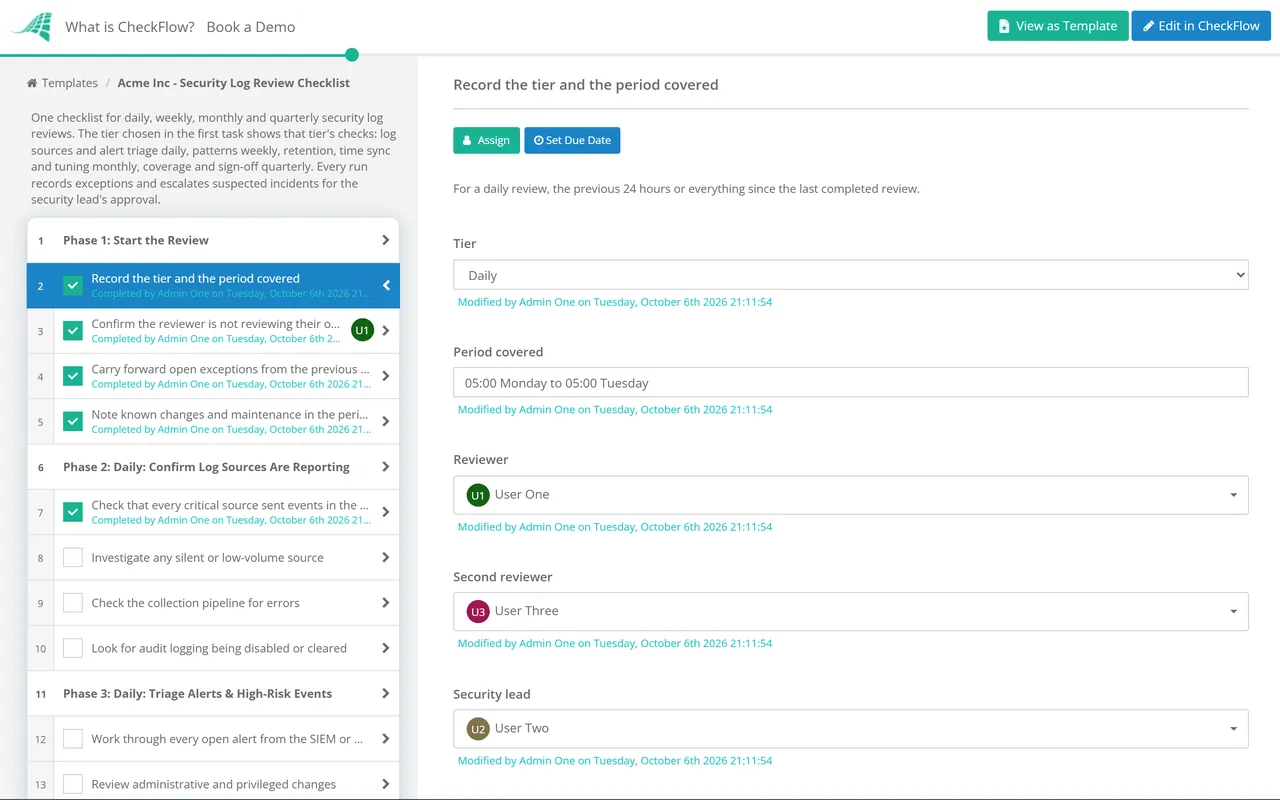
Runs every tier. Task 1 is a required DropDown (Daily, Weekly, Monthly, Quarterly) that shows the matching phases and hides the rest.
Daily tier.
Daily tier. Each event in task 6 is recorded in the task’s table as explained, benign or escalated.
Weekly tier.
Runs every tier. The escalation in task 3 is an approval step for the security lead; the review cannot be completed until they approve or reject it.
Monthly tier.
Quarterly tier. Sign-off is an approval step for the head of security or IT manager.
Log review appears in almost every security framework, but only some put a number on it. PCI DSS is the most specific about daily review and retention, CIS Controls set a weekly minimum, and HIPAA, SOC 2, ISO 27001 and NIST SP 800-53 leave the frequency to your risk assessment. Each row names the reference and the phase whose output you would show an assessor. Your auditor or assessor decides what is sufficient for your scope, so treat the table as a starting point, not legal or audit advice.
| Framework | Reference | What it expects | Evidenced in |
|---|---|---|---|
| PCI DSS v4.0.1 | 10.4.1, 10.4.1.1 | All security events, and logs of components that store, process or transmit cardholder data, critical components and security-function servers, reviewed at least once daily; automated mechanisms used for the reviews | Phases 2, 3 and 5 |
| PCI DSS v4.0.1 | 10.4.2, 10.4.2.1 | Logs of all other system components reviewed periodically, at a frequency set by a targeted risk analysis | Phases 3 and 4 |
| PCI DSS v4.0.1 | 10.5.1, 10.7.2 | Audit log history retained for at least 12 months, with the latest three months immediately available; failures of critical security controls, including logging, detected and addressed promptly | Phases 2 and 6 |
| CIS Controls v8.1 | 8.2, 8.9 | Audit logs collected across enterprise assets and centralised as far as possible | Phases 2 and 7 |
| CIS Controls v8.1 | 8.10, 8.11 | Audit logs retained for at least 90 days; reviews to detect anomalies weekly or more often | Phases 3, 4 and 6 |
| ISO/IEC 27001:2022 Annex A | A.8.15, A.8.16 | Logs of activities, exceptions and events produced, protected and analysed; systems monitored for anomalous behaviour and action taken | Phases 2–5, 7 |
| ISO/IEC 27001:2022 Annex A | A.8.17 | Clocks synchronised to approved time sources | Phase 6 |
| SOC 2 (2017 TSC, 2022 points of focus) | CC7.2 | System components monitored for anomalies indicating malicious acts, natural disasters and errors; anomalies analysed to decide whether they are security events | Phases 3–5 |
| HIPAA Security Rule | 164.308(a)(1)(ii)(D) | Procedures to regularly review records of information system activity, such as audit logs, access reports and security incident tracking reports | Phases 3–5 |
| HIPAA Security Rule | 164.312(b) | Mechanisms that record and examine activity in systems containing or using ePHI | Phases 2 and 7 |
| NIST SP 800-53 Rev. 5 | AU-6 | Audit records reviewed and analysed at a defined frequency for inappropriate or unusual activity; findings reported; review level adjusted when risk changes | Phases 3–5, 7 |
PCI DSS v4.0.1 requirements 10.4.1.1 and 10.7.2 were future-dated in version 4.0 and have applied to all assessed entities since 31 March 2025, so automated review and detection of logging failures are now assessed rather than best practice. CIS Controls v8.1 also includes safeguard 8.4, which asks for at least two synchronised time sources across enterprise assets where supported. Retention defaults in cloud platforms rarely match these numbers on their own: Microsoft Purview Audit (Standard), for example, keeps most audit records for 180 days by default as of October 2026, so a 12-month requirement needs a longer retention policy or an export. For the wider programmes, see the PCI DSS 4.0 Compliance Checklist and the SOC 2 Readiness Checklist.
Recurring schedules start the daily, weekly, monthly and quarterly runs on their own and assign them to the reviewer on duty. A missed day is visible as an overdue checklist rather than an absence nobody notices until the audit.
The tier chosen in the first task shows that tier’s phases and hides the rest, so the daily run stays short enough to finish every morning while the quarterly run still covers coverage and sign-off.
Each flagged event is a row in the run’s table with an owner and an outcome. Open items carry forward, escalations need the security lead’s approval, and the audit trail records who reviewed what and when.
CheckFlow is not a SIEM and does not collect, store or analyse logs. It runs the human routine around those tools: who reviews, what they checked, what they found and what happened next. CheckFlow’s recurring checklist software schedules each tier and keeps the record, and our guide to recurring compliance checklists for IT teams shows how log review fits alongside the other periodic controls.
When a review finds a suspicious sign-in after a reported phishing email, the Phishing Incident Response Checklist handles the account containment. Admin changes without a ticket usually trace back to the IT Change Management Checklist, and firewall changes found in the weekly reconciliation are worth a look at the next run of the Firewall Rule Review Checklist.
Describe the process in a sentence and the AI checklist generator drafts the phases and tasks for you.
It depends on the framework and the system. PCI DSS v4.0.1 requires security events and the logs of cardholder data systems, critical components and security-function servers to be reviewed at least daily, using automated mechanisms. CIS Controls v8.1 asks for audit log reviews weekly or more often. HIPAA, SOC 2, ISO 27001 and NIST SP 800-53 require regular review at a frequency you set through risk assessment. Many teams settle on daily triage of alerts and high-risk events, a weekly pattern review, and monthly and quarterly checks on the logging itself.
Four things. First, confirm every log source is still sending events, because a silent source hides everything. Second, triage the alerts your SIEM or managed service raised. Third, look directly at the event types too important to leave to rules: privileged changes, failed and unusual sign-ins, MFA changes, audit logging being disabled, new mail forwarding and firewall changes. Fourth, record what you reviewed, what you flagged and what you escalated.
At minimum: new administrators and changes to privileged groups, repeated or unusual failed sign-ins, successful sign-ins from unexpected locations, MFA methods added, reset or disabled, audit logging stopped or logs cleared, new mailbox forwarding or inbox rules, and firewall or cloud security group changes. Each one is either a common early sign of an attack or a sign that a control has been weakened.
PCI DSS v4.0.1 requires at least 12 months of audit log history, with the most recent three months immediately available for analysis. CIS Controls v8.1 sets a minimum of 90 days. Other frameworks leave it to your policy, and legal or contractual duties can require longer. Check each source, because default retention in cloud platforms is often shorter than your policy and needs to be extended or exported.
Yes, though it looks different. The SIEM or managed service does the bulk filtering, which PCI DSS now expects. A person still has to confirm the SIEM is receiving everything, triage what it raises with knowledge of the business, check the event types that matter most, tune rules that are noisy or missing, and record the review. Auditors ask for evidence of that human step, not just proof that the tool is switched on.
Show a dated record for each review period: who reviewed, which sources and alert queues they covered, what they flagged, the explanation or escalation for each exception, and sign-off. Auditors usually sample dates across the period, so gaps matter. A recurring checklist with an audit trail gives you that record without a separate spreadsheet.
14-day free trial, no card required. The Business plan is $10 per user per month after the trial. Full details at checkflow.io/pricing.
14-day free trial, no credit cardFull refund in your first 30 daysUS hosting, EU on request