Annual Compliance Calendar Checklist Template

Missed compliance deadlines are rarely hard ones. The filing, the poster and the certificate renewal were all known in January; nobody owned the date, and the person who used to remember it had moved on.

This free compliance calendar checklist is for compliance leads, company secretaries and the operations and finance managers who carry a list of dated obligations. It builds the year’s obligations register, gives every item an owner, a backup, a date and a lead time, puts each one on its own recurring schedule, then runs monthly and quarterly check-ins and a year-end review that rolls the register into next year. Each recurring item points to the template that does the work, so the calendar stays a plan rather than a copy of every process.

Use This Template Free See Live Example
No Credit Card Required

Last reviewed: October 2026

Three Kinds of Date, and the Obligations That Have None

A compliance calendar is the register of every obligation that falls due on a date, with the person who will meet it and the day they need to start. Dates come in three kinds. Fixed dates are set by a rule and fall on the same day every year, like a posting window. Anniversary dates run from something you did, such as a certificate issue date or the date of your last filing, and they move when you act early or late. Self-set cadences are dates you choose to satisfy a standard that says ‘planned intervals’: internal audits, policy reviews, access reviews.

The calendar fails in predictable ways. Anniversary dates are copied forward from last year when the anchor has moved. Lead times are missing, so the reminder arrives on the deadline. Items belong to a team rather than a person. And event-driven duties are forced into the calendar where they do not fit.

On the calendar

Obligations with a date you can predict

Filings and postings: statutory returns, annual summaries and fees on a fixed or anniversary date.

Certifications and licences: surveillance audits, renewals and expiry dates.

Internal cadences: audits, policy reviews, control testing, declarations and training windows.

Board items: annual approvals timed to the meeting that gives them.

Off the calendar

Duties triggered by an event, not a date

Requests: a data subject access request starts its own one-month clock.

Incidents: breach notifications and serious injury reports run from the incident, or from when you learn of it.

Reports: whistleblowing reports have their own acknowledgement and feedback deadlines.

These need a process template ready to start. The calendar holds only their periodic metrics review.

The calendar decides when things happen. What happens is in each item’s own template: the Annual Policy Review Checklist, for example, runs the review that the calendar schedules.

What the Annual Compliance Calendar Checklist Covers

Six phases. Your jurisdictions and certifications decide which items are added, and the check-ins run on their own monthly and quarterly schedules.

Phase 1

Phase 1: Build the Obligations Register

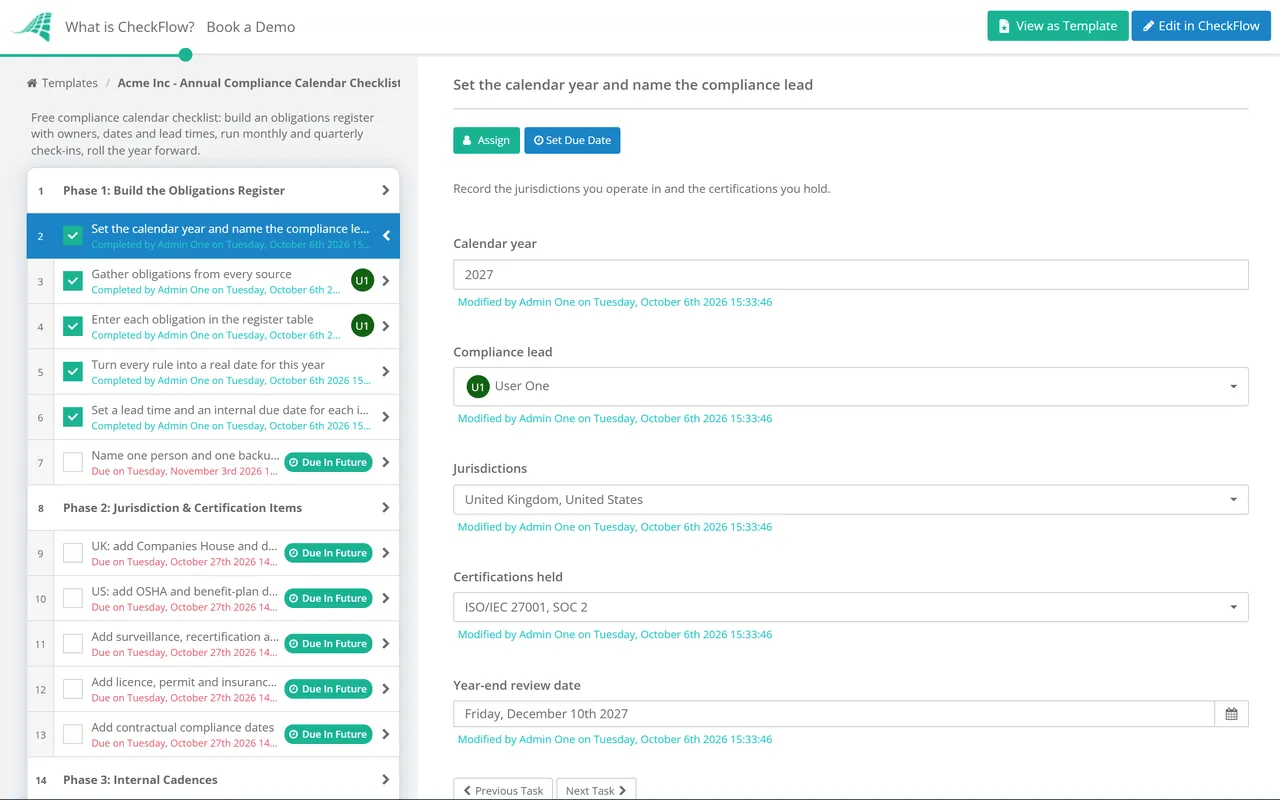
The first task records the jurisdictions and certifications that bring in the Phase 2 items, and names the compliance lead who signs off the year-end review.

  • Set the calendar year and name the compliance lead — record the jurisdictions you operate in and the certifications you hold
  • Gather obligations from every source — regulators’ guidance, licence conditions, contracts, certification body letters, insurance policies, the board calendar and last year’s misses
  • Enter each obligation in the register table — obligation, source, rule, this year’s date, frequency, owner, backup, lead time, evidence and linked template
  • Turn every rule into a real date for this year — keep the rule beside the date, so next year’s roll-forward recalculates instead of copying
  • Set a lead time and an internal due date for each item — work back from the external date through data gathering, review and approval
  • Name one person and one backup per obligation — a team name is not an owner; the backup covers leave and departures
Phase 2

Phase 2: Jurisdiction & Certification Items

The first four tasks appear according to the jurisdictions and certifications chosen in Phase 1.

  • UK: add Companies House and data protection fee dates — the confirmation statement review period and the 12-month data protection fee renewal
  • US: add OSHA and benefit-plan dates — the Form 300A posting window, any electronic submission and each plan’s Form 5500 due date
  • EU: set your own dates for GDPR reviews — the GDPR sets no annual filing, so schedule the audit, records of processing review and DPIA reviews yourself
  • Add surveillance, recertification and renewal dates — take them from certification body letters and certificates, and book auditors months ahead
  • Add licence, permit and insurance renewals — read the expiry and notice dates from the documents, not from memory
  • Add contractual compliance dates — annual certificates, assurance reports and audit rights your customer contracts require
Phase 3

Phase 3: Internal Cadences

These are dates you choose. Spread them so the same people are not hit by every review in one quarter.

  • Schedule the annual policy review — finish it before the training window, so training teaches the current versions
  • Schedule the conflict of interest declaration campaign — after the policy review, and before the board meeting that receives the summary
  • Schedule internal audits and control testing — ISO internal audits before surveillance visits, SOX testing quarter by quarter, ITGC testing before year end
  • Schedule access reviews and vendor reassessments — quarterly access reviews and reassessments by vendor risk tier
  • Schedule metrics reviews for event-driven processes — access requests, whistleblowing reports and incidents reviewed each quarter
  • Schedule training and attestation windows — annual compliance training and policy acknowledgements, with a cut-off for chasing
Phase 4

Phase 4: Schedules, Owners & Escalation

Each register line becomes its own recurring schedule that starts the item’s template on time.

  • Create a recurring schedule for every register line — monthly, quarterly, annual or custom, starting on the internal due date minus the lead time
  • Link each schedule to the template that runs the work — the item starts as a checklist with steps, not a reminder with a title
  • Assign owners and backups on each schedule — use people or groups exactly as named in the register
  • Agree the escalation path for overdue items — owner, then compliance lead, then an executive sponsor, with the number of days at each step
  • Share the calendar with owners and the company secretary — align board approvals with meeting dates and agenda deadlines
Phase 5

Phase 5: Monthly & Quarterly Check-Ins

The first three tasks run as a short checklist on a monthly schedule, the last three on a quarterly one, each assigned to the compliance lead.

  • Monthly: look 90 days ahead and confirm each item has started — anything inside its lead time without a running checklist gets a call
  • Monthly: chase overdue items through the escalation path — record the new date and the reason for every slip
  • Monthly: file evidence for items completed — the filing receipt, posted notice, certificate or approval, linked to the register line
  • Quarterly: scan for new or changed obligations — new law, new sites, new contracts or a new certification, added to the register with an owner
  • Quarterly: report status to the risk or audit committee — items met, late and missed, and what is due next quarter
  • Quarterly: test a sample of completed items — check the evidence actually proves the obligation was met, on time
Phase 6

Phase 6: Year-End Review & Roll Forward

The approval is assigned to the compliance lead named in Phase 1. The annual schedule then starts next year’s checklist.

  • Reconcile the register against the year — mark every item met, late, missed or not applicable, each with its evidence
  • Find the cause of each late or missed item — lead time too short, owner gone, wrong date, or an obligation nobody had listed
  • Retire obligations that no longer apply — a closed site, a lapsed licence or an ended contract, with the reason recorded
  • Compliance lead approves the year-end review — checks the reconciliation and causes, then records Approved or Not approved
  • Roll the register forward to next year — recalculate anniversary dates from this year’s actual filings and carry open actions across

Common Calendar Items and the Templates That Run Them

The first rows are external dates with their source. The rest are cadences you set to meet a standard, with the template that runs each one. Which items apply depends on your size, sector and locations, so treat the table as a starting point, not legal advice.

Calendar item Date or cadence Set by Run it with
OSHA Form 300A annual summary posting (US)Posted by 1 February, kept up until 30 April29 CFR 1904.32(b)(6)OSHA Recordkeeping Checklist
OSHA electronic submission (US, covered establishments)By 2 March for the previous calendar year29 CFR 1904.41(c)OSHA Recordkeeping Checklist
Form 5500 annual return for employee benefit plans (US)Last day of the seventh month after the plan year ends; Form 5558 extends by up to two and a half monthsIRS and Department of LaborPhase 2
Confirmation statement (UK companies)At least once every 12 months, filed up to 14 days after the review period endsCompanies HousePhase 2
Data protection fee (UK controllers)Each 12-month charge periodData Protection (Charges and Information) Regulations 2018, reg. 2Phase 2
Cyber Essentials certificate (UK)Expires 12 months after issueIASMECyber Essentials Checklist
ISO certification surveillance auditAt least once a calendar year between three-yearly recertificationsYour certification bodyISO 27001 Internal Audit, ISO 9001 Internal Audit
PCI DSS scope confirmation and policy reviewAt least once every 12 monthsPCI DSS v4.0.1 Requirements 12.5.2 and 12.1.2PCI DSS Compliance Checklist
SOX 404 assessment, control testing and ITGC reviewAnnual assessment; testing through the yearYour audit planSOX 404, Control Testing, ITGC Review
Policy library reviewAnnual by conventionYour governance frameworkAnnual Policy Review
Conflict of interest declarationsAnnual campaignYour policyConflict of Interest Declaration
GDPR audit and access request metricsAnnual audit; quarterly metricsSelf-setGDPR Audit, DSAR Response
Access and segregation of duties reviewsQuarterlySelf-setUser Access Review, SoD Review
Vendor reassessment and data retention reviewBy risk tier; annualSelf-setVendor Risk, Data Retention

Dates and thresholds were checked in October 2026. Several depend on facts about you: OSHA electronic submission applies by establishment size and industry, and the confirmation statement date moves if you file early. Check each rule against its source when you roll the calendar forward, because filing requirements and fees change between years. Nothing on this page is legal advice.

Why Run Your Compliance Calendar in CheckFlow?

1

Every date starts real work

Each register line becomes a recurring schedule, monthly, quarterly, annual or custom, that starts the right checklist at the start of its lead time. The owner receives a checklist with steps and due dates rather than a calendar reminder.

2

Your footprint shapes the register

Conditional logic adds the UK, US, EU and certification tasks only where they apply. Keep the obligations themselves in a data set, a reference table that fills checklists, so a new site or licence is one row, not a new spreadsheet.

3

Evidence beside the deadline

Filing receipts, posted notices and certificates attach to the task that met the deadline. The activity trail shows who completed each item and when, so the year-end reconciliation, and any regulator’s question, is answered from the record.

CheckFlow is not a GRC platform or a regulatory change service, and it does not give legal advice. It will not tell you which laws apply to you; it makes sure the obligations you identify are owned, started on time and evidenced. CheckFlow’s recurring checklist software runs the schedules, and compliance checklist software covers the templates behind each calendar item.

For IT-heavy calendars, our guide to recurring compliance checklists for IT teams shows how to set cadences for patching, backups and access reviews. Every template in the table above can sit behind a calendar line, and the full set is in the compliance template library.

Frequently Asked Questions

What should a compliance calendar include?

+

Every obligation with a predictable date: statutory filings and postings, fees, licence and certificate renewals, certification audits, internal audits and control testing, policy reviews, declaration campaigns, training windows and board approvals. For each, record the source, the rule behind the date, this year’s date, the owner and backup, the lead time and the evidence that proves it was met.

How much lead time should each compliance deadline have?

+

Work back from the external date through every dependency: data gathering, review, sign-off and any board meeting. A simple online filing may need two weeks. An annual summary that a company executive must certify needs the log closed and reviewed first. A certification audit needs the auditor booked months ahead and internal audits finished before it. Record the lead time in the register and start the item’s checklist on that date.

When must the OSHA Form 300A be posted?

+

Under 29 CFR 1904.32, no later than 1 February of the year after the one the records cover, kept in place until 30 April, in a conspicuous spot where employee notices usually go. A company executive must certify the summary first. Establishments covered by 1904.41 must also submit it electronically by 2 March. The OSHA Recordkeeping Checklist runs the whole cycle.

When is a UK confirmation statement due?

+

Every company must file at least once every 12 months. The review period ends 12 months after incorporation, or after the confirmation statement date on the last statement, and you have up to 14 days after that to file. File early and you choose a new date, which moves next year’s deadline. That is why the calendar should store the rule, not just last year’s date.

Does GDPR compliance have annual deadlines?

+

Not in the way a statutory filing does. The GDPR’s deadlines are triggered by events, such as an access request or a breach. What the calendar holds are the reviews you choose to keep it working: an annual audit, a review of the records of processing and DPIAs, and a quarterly look at request metrics. In the UK, the data protection fee is a genuine 12-month obligation.

Who should own the compliance calendar?

+

One compliance lead owns the calendar itself: the register, the check-ins and the year-end review. Each obligation is owned by the person who does the work, usually in finance, HR, health and safety, IT or the company secretariat, with a named backup. Splitting it this way keeps the compliance lead from becoming the person who files everything.

Is CheckFlow free for this template?

+

14-day free trial, no card required. The Business plan is $10 per user per month after the trial. Full details at checkflow.io/pricing.

Give Every Compliance Date an Owner and a Head Start

Free trial — no credit card required.