IT General Controls (ITGC) Review Checklist Template

A three-way match in the ERP is tested once and trusted all year. That trust ends the day someone finds a developer with write access to production, or a tolerance changed without a ticket.

This free ITGC review checklist is for IT audit, SOX leads and the IT owners of financial systems. It runs the yearly review of the general controls behind each in-scope application and its database, operating system and network: access, program change, development and data conversion, and computer operations. It covers testing, key report reliability, SOC 1 reports and remediation, with quarterly updates in between. Each run ends with a signed conclusion, system by system, that business-process testers can rely on.

Use This Template Free See Live Example
No Credit Card Required

Last reviewed: October 2026

The Layer Every Automated Control Stands On

An IT general control rarely stops a misstatement on its own. It keeps the controls that do working the same way all year: the automated match, the system-calculated accrual, the report a reviewer signs. The SEC’s 2007 guidance for management (Release 33-8810) says management only needs to evaluate the ITGCs necessary for the proper and consistent operation of those controls, and gives four example areas: program development, program changes, computer operations, and access to programs and data. Most programmes organise their work around those four. That is common practice, not a rule: the SEC declined to prescribe areas for every company.

Auditors work from the same idea. AS 2110 lists the IT risks behind automated controls, from unauthorised program changes to IT staff with access beyond their duties. AS 2201.B29 lets an auditor rely on last year’s test of an unchanged automated control only while controls over program changes, access to programs and computer operations stay effective and tested. For management, COSO 2013 Principle 11 calls for general control activities over technology.

IT general control

Covers a whole system, not one transaction

Examples: approving a change before it reaches production, removing a leaver’s ERP access, investigating a failed overnight interface.

Tested by: sampling populations across the period, such as changes, new users, leavers and job failures.

If it fails: every automated control and key report on that system is in question.
Application control

Built into one process

Examples: a three-way match tolerance, a credit limit block, an automated depreciation run.

Tested by: often a single test of each configuration, because software does not tire or skip steps.

Depends on: ITGCs to keep its logic, data and settings unchanged.

Where this template stops

The IT layer of a SOX programme, not the whole programme

Scoping, filer status and the 302 and 404 reports belong to the SOX 404 Compliance Checklist, and each quarter’s business-process testing to the SOX Internal Control Testing Checklist. This review tests that access reviews happened; the recertification itself runs in the User Access Review Checklist, and conflicting combinations of access in the Segregation of Duties Review Checklist.

What the ITGC Review Checklist Covers

Seven phases, run yearly with quarterly updates. Scope answers decide which tasks appear; exceptions open remediation.

Phase 1

Phase 1: Scope Systems & Plan the Review

The first task’s answers show the SOC 1 and go-live tasks and name the approver. Tasks 3 to 6 run in the annual review only, not in quarterly updates.

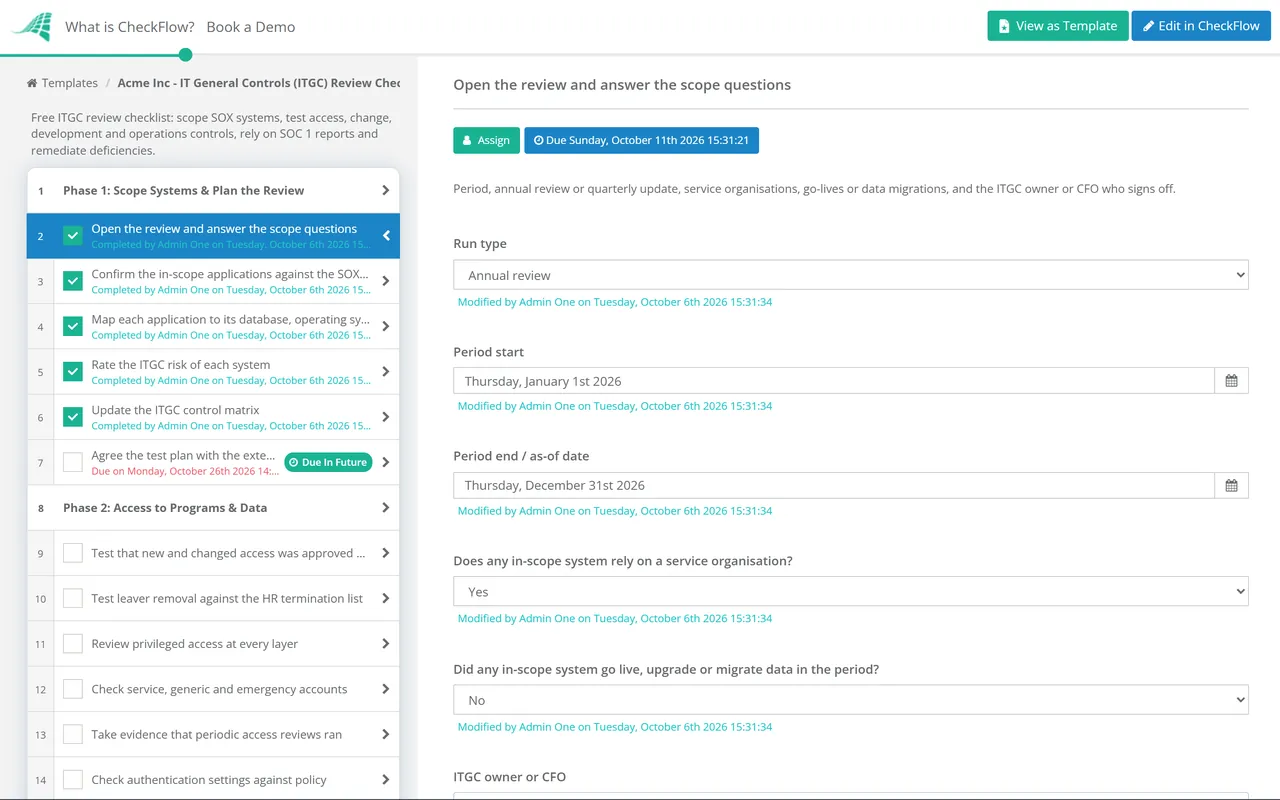
  • Open the review and answer the scope questions — period, annual review or quarterly update, service organisations, go-lives or data migrations, and the ITGC owner or CFO who signs off
  • Confirm the in-scope applications against the SOX scoping — every system that runs an automated control, calculates a reported figure or produces a key report
  • Map each application to its database, operating system and network — a direct database update or a domain admin account bypasses every control in the application above it
  • Rate the ITGC risk of each system — customisation, change volume, who can reach production and how many key controls depend on it
  • Update the ITGC control matrix — each control with its domain, system, layer, owner, frequency and the application controls it supports
  • Agree the test plan with the external auditor — sampling approach, which tests they will use, and the interim and roll-forward dates
Phase 2

Phase 2: Access to Programs & Data

Take each population from the system itself and record how you proved it complete before sampling.

  • Test that new and changed access was approved before it was granted — compare the approval date on the request with the date the account or role was created
  • Test leaver removal against the HR termination list — access removed within your policy deadline, and no sign-in after the leaving date
  • Review privileged access at every layer — application administrators, DBAs, root and domain admins, each named, justified and kept to a minimum
  • Check service, generic and emergency accounts — an owner, a purpose, credentials rotated, and every break-glass use logged and reviewed
  • Take evidence that periodic access reviews ran — the completed recertification for each in-scope system, tested here rather than re-performed
  • Check authentication settings against policy — password rules, MFA and remote access at the application, database and identity provider
Phase 3

Phase 3: Program Change & Development

The last two tasks appear only when a system went live, was upgraded or had data migrated in the period.

  • Build the change population from the system, not the ticket queue — deployment logs, transport logs or object change dates, matched to tickets so unticketed changes surface
  • Test sampled changes for approval, testing and authorised deployment — request, test evidence and business sign-off, all dated before the move to production
  • Test emergency changes as a separate population — retrospective approval within your policy window, with the same test evidence after the fact
  • Check who can deploy to production — developers should not move their own code; where they can, a reviewed deployment log has to compensate
  • Test that direct data fixes and configuration changes follow the process — a changed tolerance or rate table alters results as much as code
  • Test the implementation of any new or upgraded system — user acceptance testing, go-live approval and a post-implementation review before key controls rely on it
  • Reconcile migrated data to the source system — record counts, control totals and key fields, signed off by the data owner
Phase 4

Phase 4: Computer Operations & Key Reports

Key reports are tested once here, so the business-process testers can rely on them.

  • Test monitoring of scheduled jobs and interfaces — failed or incomplete runs detected, investigated and rerun, with evidence for a sample of failures
  • Test changes to the job schedule — new or altered jobs approved, and write access to the scheduler restricted
  • Test backups and at least one restore — backups of in-scope data completed as scheduled, and a restore proven to work in the period
  • Test incident handling for in-scope systems — incidents that could affect financial data logged, resolved and reviewed for root cause
  • List the key reports and spreadsheets that controls rely on — the information produced by the entity (IPE) behind reviews, reconciliations and estimates
  • Test the completeness and accuracy of each key report — source data, report logic or query, parameters and any manual handling, or the ITGCs that protect them
Phase 5

Phase 5: Service Organisations & Conclusions

The four SOC 1 tasks appear only when a service organisation supports an in-scope system. The last task’s answer decides whether Phase 6 appears.

  • Obtain a SOC 1 Type 2 report for each service organisation — check that its period, services and control objectives cover what you actually use
  • Read the opinion, the exceptions and the subservice organisations — a qualified opinion or a carved-out data centre leaves a gap your own controls must fill
  • Map and test the complementary user entity controls — each CUEC the report lists, matched to a control you operate and test
  • Obtain a bridge letter for any gap to your year end — the provider’s statement that nothing material changed, backed by your own inquiry
  • Conclude on design and operating effectiveness for every ITGC — effective, or exceptions found and passed to evaluation
Phase 6

Phase 6: Deficiencies & Remediation

Shown only when Phase 5 records at least one exception.

  • Log each exception with its root cause — the control, system, layer, what failed and how long the gap lasted
  • List the application controls and reports that relied on it — every automated control, interface and key report on the affected system
  • Assess whether the gap was exploited — for example, review every change deployed or every action taken by the unauthorised account during the gap
  • Rate the deficiency with the SOX team — deficiency, significant deficiency or material weakness, by likelihood and magnitude, allowing for compensating controls
  • Remediate and retest before the as-of date — the fixed control has to operate long enough to be sampled
Phase 7

Phase 7: Report & Sign-Off

The sign-off is an approval assigned to the ITGC owner or CFO named in Phase 1.

  • Summarise results by system and domain — controls tested, exceptions, deficiencies and remediation status
  • Hand the conclusion to the SOX programme — which systems’ ITGCs are effective, so their automated controls and key reports can be relied on
  • Report significant matters to the CFO and audit committee — significant deficiencies and material weaknesses, with remediation dates
  • ITGC owner or CFO approves the review — reads the summary and evidence, then records Approved or Not approved
  • Schedule the next update and set re-run triggers — a new ERP module, migration or service organisation brings the review forward

Where ITGC Expectations Come From

Sarbanes-Oxley never mentions IT general controls. The expectations come from SEC guidance, your control framework and the PCAOB standards your auditor applies. The table maps each source to the phase that produces the evidence. Your auditor decides what is sufficient for your systems, so treat the table as a starting point, not legal or audit advice.

Expectation Source What it says Evidenced in
Evaluate only the ITGCs that matterSEC Release 33-8810 (2007), ‘Role of IT General Controls’ITGCs needed for the proper and consistent operation of controls over financial reporting risk; others need no evaluationPhase 1
General controls over technologyCOSO 2013, Principle 11Points of focus on technology infrastructure, security management, and acquisition, development and maintenancePhases 1–4
IT risks to understandAS 2110.B1–.B5Unauthorised access or changes, excess IT privileges, inappropriate manual intervention, loss of dataPhases 2–4
Reliance on ITGCs in control riskAS 2201.47An automated control is generally lower risk if the relevant ITGCs are effectivePhase 1
Benchmarking automated controlsAS 2201.B28–.B33Needs effective, tested controls over program changes, access to programs and computer operationsPhases 3 and 7
Information produced by the companyAS 1105.10 and .10ATest accuracy and completeness, or the controls over it, including ITGCs and automated application controlsPhase 4
Service organisationsAS 2201.B17–.B27; SOC 1 under AICPA AT-C section 320Period, scope and results of the service auditor’s tests; user entity controls; changes after the periodPhase 5
Deficiency severityAS 2201.62–.70 and Appendix ALikelihood and magnitude of a misstatement; compensating controls count only if precise enoughPhase 6
IT control vocabularyISACA COBIT 2019Objectives such as BAI06 Managed IT Changes, DSS01 Managed Operations and DSS05 Managed Security ServicesPhases 2–4

One change applies from this year. PCAOB amendments adopted on 12 June 2024 apply to audits of fiscal years beginning on or after 15 December 2025, so a calendar-year company meets them first in its 2026 audit. They added AS 1105.10A on external information the company provides electronically, such as cash receipts or purchase orders: the auditor tests whether the company modified it, or tests the controls over it, including ITGCs. A September 2025 PCAOB policy statement said it will not treat skipping that separate testing as noncompliance where the auditor concludes there is no more than a remote possibility that the data was modified in a way that makes it unreliable. Nothing on this page is legal or audit advice.

Why Run Your ITGC Review in CheckFlow?

1

One template, annual and quarterly

Recurring schedules open the annual review and each quarterly update. In a quarterly run the planning tasks stay hidden, so the team re-tests leavers, privileged access and changes without redoing the scoping.

2

Branches only where the work branches

Conditional logic shows the SOC 1 tasks only where a provider runs an in-scope system, the conversion tasks only after a go-live, and the deficiency phase only when a test records an exception. A clean year stays short.

3

Samples and evidence in one file

Populations, sample tables and screenshots sit on the task they support. The activity trail records who tested what and when, and the sign-off runs as an approval, so every conclusion traces to its samples.

CheckFlow is not a GRC platform, an audit firm or a monitoring tool, and it gives no opinion on your controls. It runs the review, holds the evidence and records the sign-off; extracts arrive by upload or the REST API. The same access and change controls appear in a SOC 2 examination, and CheckFlow for SOC 2 teams shows how one set of evidence serves both.

Results feed the SOX 404 Compliance Checklist and the SOX Internal Control Testing Checklist; access conflicts go to the Segregation of Duties Review Checklist. The controls under test often run on their own templates: the IT Change Management Checklist, the Backup Verification Checklist and the SOC Report Review Checklist.

Frequently Asked Questions

What are IT general controls?

+

They are controls over the IT environment as a whole rather than a single transaction: who can reach systems and data, how programs and configuration change, how new systems are implemented, and how jobs, backups and incidents are run. For financial reporting they matter because automated controls and system reports stay reliable only while these controls work.

What are the four ITGC domains?

+

Most teams use access to programs and data, program changes, program development, and computer operations. The grouping comes from the examples in the SEC’s 2007 guidance for management, which says they will not all apply to every company. AS 2201.B29, on benchmarking automated controls, names three: program changes, access to programs and computer operations. Many teams fold development into change management. What matters is that every risk to your in-scope systems has a control, whatever the heading.

How often should ITGCs be tested?

+

No standard sets a frequency. Management’s SOX conclusion is as of the year end, but ITGCs operate continuously, so samples must cover the whole period. A common pattern is interim testing, quarterly updates for high-volume populations such as leavers and changes, and a roll-forward to the year end, agreed with your auditor.

Can a SOC 1 report replace testing a provider’s IT controls?

+

Often, if it is a Type 2 report, which tests operating effectiveness over a period. AS 2201.B21 has the auditor weigh the period, scope and test results. You still own the complementary user entity controls it lists, and where the period ends well before your year end, AS 2201.B24 calls for inquiry about changes since: hence the bridge letter.

Does a failed ITGC mean the application controls failed too?

+

Not automatically, but you can no longer assume they worked. Identify the automated controls and reports that depend on it, then look for evidence the gap was not used, such as a review of every change deployed during it. Severity is then judged by what could reach the financial statements through those controls, using the same likelihood and magnitude test as any other deficiency.

Is CheckFlow free for this template?

+

14-day free trial, no card required. The Business plan is $10 per user per month after the trial. Full details at checkflow.io/pricing.

IT Controls Your Auditor Can Rely On, System by System

Free trial — no credit card required.