
Generated, unchecked
Source: whatever priorities and statuses technicians set.
Exclusions: applied by status, whether or not they were justified.
Breaches: counted, not explained.
Credits: left for someone to notice at renewal.
No Credit Card Required
Printed from checkflow.io/templates/managed-services/sla-performance-review-checklist
Every PSA will tell you what percentage of last month’s tickets met their SLA. Few MSPs check whether that number is right. A P3 that should have been a P1, a ticket left in “waiting on client” for a week while nobody chased, or a server outage excluded as “planned maintenance” can each move the figure by several points, in either direction. This free SLA performance review checklist gives service managers and service-desk leads a monthly routine for getting the number right and acting on it. It exports the month’s tickets, validates priorities, pauses and exclusions, measures response and resolution by priority, and lists every breach. In a month with breaches, a conditional phase finds the root cause of each one, calculates any service credit the agreement requires and routes it for approval before it reaches the client or the invoice. The month closes with a client SLA summary, improvement actions and a line for the next QBR.
Three processes touch an MSP’s service levels, and they are easy to blur. The agreement defines them: priorities, targets, service hours, clock rules and the credit schedule. Our IT Support Agreement Checklist covers drafting and reviewing those terms. The MSP QBR Checklist sits at the other end, where a quarter of results gets one slide and a conversation about the client’s business. This checklist is the work in between. It runs every month, for every client with SLA commitments, and its job is narrow: produce a figure you can defend and settle any credits it triggers.
The usual failure is not missing targets. It is reporting a number nobody has checked. When the client’s office manager remembers a two-day outage and your report says 98% compliance, the conversation stops being about service and starts being about whether your reporting can be trusted. A short validation step before measurement prevents that, and it also stops you from crediting money you did not owe.
Source: whatever priorities and statuses technicians set.
Exclusions: applied by status, whether or not they were justified.
Breaches: counted, not explained.
Credits: left for someone to notice at renewal.
Source: the same export, with priorities and pauses checked.
Exclusions: each one evidenced against the agreement.
Breaches: root cause recorded and an action raised.
Credits: calculated, approved and passed to billing the same month.
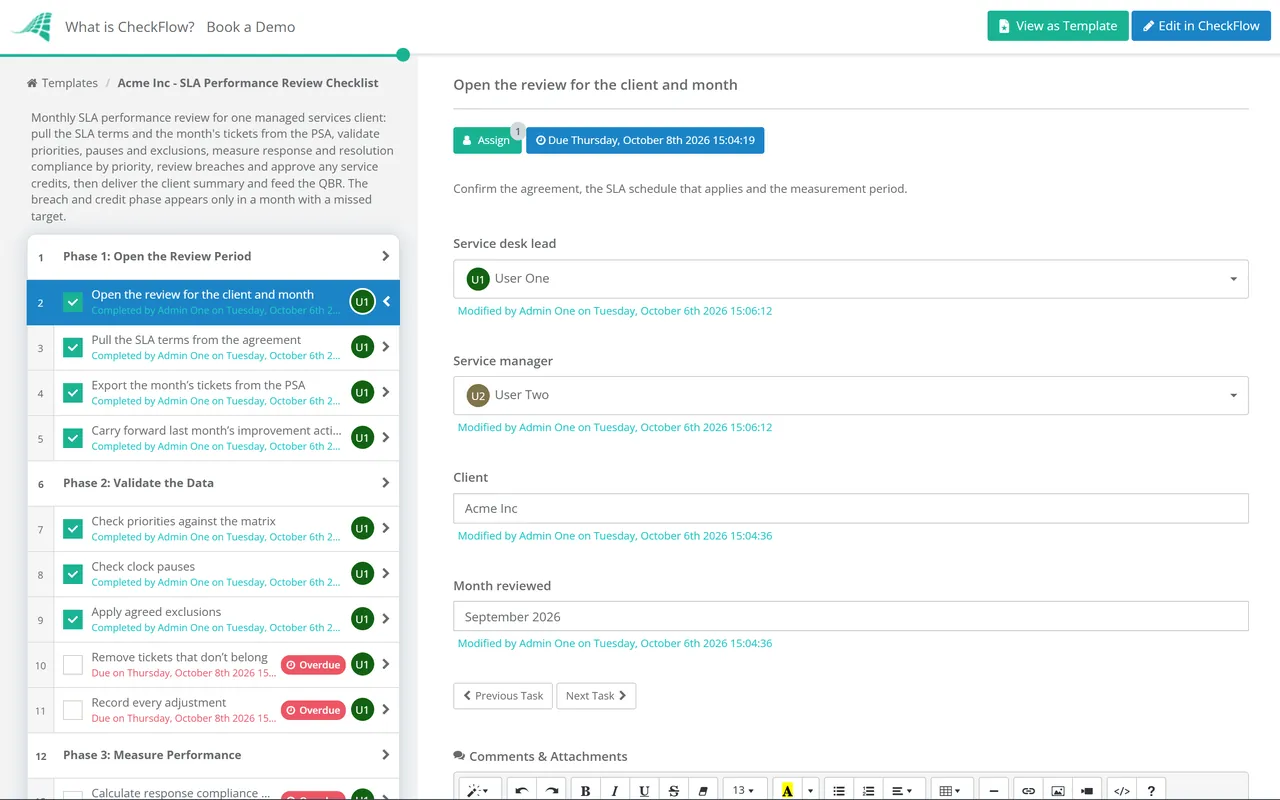
Six phases take each client’s month from ticket export to QBR input. Phase 4 appears only when a target was missed.
Run it in the first week of the month, before the monthly service report is written, so the report uses validated figures.
Every change made here is recorded with a reason. The client should be able to see what was adjusted and why.
Shown only when at least one target was missed. In a clean month the checklist goes straight to the client summary.
Most arguments about SLA performance are really arguments about definitions. The agreement should settle each of the rules below. When it doesn’t, agree the interpretation with the client once, write it down and apply it the same way every month. The middle column shows common practice, not a standard. Your agreement takes precedence.
| Rule | Common practice | What to check each month |
|---|---|---|
| When the clock starts | When the ticket is logged, by email, portal or phone | Phone calls logged late, so the ticket looks younger than the problem |
| What counts as a response | A technician’s first contact, not an automatic acknowledgement | Auto-replies or bulk status updates counted as responses |
| What counts as resolved | Service restored, sometimes by a workaround the client accepts | Tickets closed then reopened within days, counted as two successes |
| Service hours | Business-hours clock for P3 and P4, often round the clock for P1 | Out-of-hours P1s measured on the wrong calendar, or bank holidays missing |
| Clock pauses | Paused while waiting for the client, with the request recorded | Pauses with no request, or tickets parked to protect the figure |
| Exclusions | Planned maintenance, third-party outages, client-caused incidents | Exclusions with no evidence, or outages labelled as maintenance after the event |
| Priority changes | Measured against the corrected priority, with the change logged | Downgrades made after a breach to make it disappear |
Credit schedules vary widely, so treat this as an illustration of the arithmetic, not a recommendation. Suppose the agreement measures P1 and P2 resolution compliance against a 90% target each month and sets three bands: 85% to 89.9% earns a credit of 5% of that month’s managed service fee, 80% to 84.9% earns 10%, and anything lower earns 15%, which is also the cap.
Validation cuts both ways. It removes credits you don’t owe, and it also finds the outage someone excluded as maintenance after the event. Either way the summary can show the client exactly which tickets missed, why, and what is being done, and the credit appears on the next invoice without anyone having to ask for it. Many agreements also make credits the client’s sole financial remedy for missed targets and require them to be claimed within a set period. Read your own terms before you promise anything, and note the claim period in the review.
A recurring schedule creates the review for each client on the first working day of the month, with the export and validation assigned to the service-desk lead. Priority checks and pause checks happen because they are tasks, not because someone remembered them.
The breach phase appears only in months that need it, and the credit task asks the service manager for an Approved or Not approved answer before billing sees a figure. The approval is recorded with the name, the date and the workings attached.
Every adjustment, exclusion and breach cause is kept against the client and the month. When a client disputes a figure at renewal, you can show the export, what was changed and why, rather than rebuilding a month from memory.
SLA reviews are one of the monthly processes the MSP process management guide recommends standardising first. CheckFlow for MSPs runs them alongside onboarding, reporting and QBRs across every client.
Approved credits flow into the MSP Billing Reconciliation Checklist, so they appear on the right invoice. The validated figures then go into the Monthly Managed Services Report, which explains them to the client in plain language.

IT Support Agreement Template

MSP Quarterly Business Review (QBR) Checklist

Monthly Managed Services Report Checklist

MSP Monthly Billing Reconciliation Checklist

Problem Management Checklist
Describe the process in a sentence and the AI checklist generator drafts the phases and tasks for you.
It is a monthly check of how a managed services provider performed against the service levels in a client’s agreement. The review exports the month’s tickets, checks that priorities, clock pauses and exclusions were applied correctly, measures response and resolution compliance by priority and explains every breach. Where the agreement provides for service credits, the review calculates them and passes approved credits to billing.
For each priority, divide the number of tickets that met the target by the number of tickets measured, after removing valid exclusions. Calculate response and resolution separately. Avoid reporting a single blended figure across all priorities: thirty quick P4s can hide two missed P1s, and the P1s are the ones the client remembers. Agree with the client whether a ticket is counted in the month it was raised or the month it was resolved, and keep to it.
Usually not, if the agreement allows the clock to pause and the pause is genuine. That means a recorded request for information or access, and a follow-up if the client doesn’t reply. Pauses with no request behind them are the most common way SLA figures become unreliable. The validation phase checks every paused ticket for exactly this reason.
It depends entirely on the agreement. Common structures include a fixed credit per breached P1 or P2 ticket, a percentage of the monthly fee when compliance falls below a threshold, or bands that increase the percentage as performance drops. Most schedules cap the total credit in a month. Calculate exactly as the agreement says, keep the workings with the review and have the service manager approve the figure before it reaches an invoice.
If the agreement says the credit is due, applying it unprompted is usually the better commercial decision, even when the contract requires the client to claim. A credit the client discovers for themselves at renewal costs far more in trust than it saves in cash. Check your own terms first. Some agreements require a claim within a fixed period, and the review should record when that period ends.
Find out which it is: a capacity problem, a process problem or a target that was never realistic. Root causes from Phase 4 usually make that clear within two or three months. Fix process problems with a problem record and a change. If the target itself is wrong for the service the client pays for, take it to the agreement review rather than letting compliance quietly erode.
14-day free trial, no card required. The Business plan is $10 per user per month after the trial. Full details at checkflow.io/pricing.
14-day free trial, no credit cardFull refund in your first 30 daysUS hosting, EU on request