
Operational, backward-looking
Audience: the client’s day-to-day contact.
Content: tickets, SLAs, patching, backups, exceptions.
Owner: service coordinator and account manager.
Output: a report and a list of recommendations.
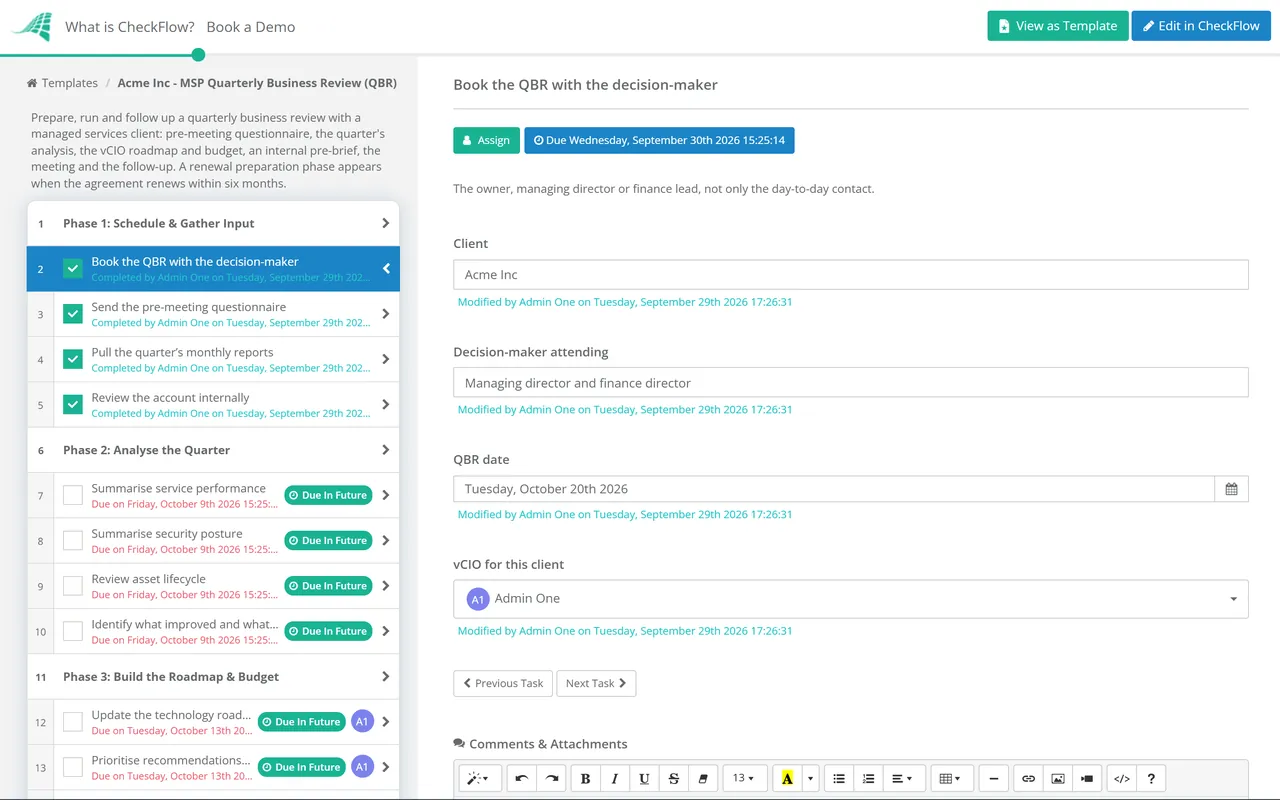
The quarterly business review is where a managed services relationship either becomes strategic or stays transactional. Run well, it is the meeting where the client’s decision-maker hears what their technology is doing for the business, agrees a roadmap and approves the projects that keep them secure and productive. Run badly, it is a slide deck of the monthly report, presented to the office manager, and it is cancelled the following quarter. This free MSP QBR checklist gives account managers and vCIOs a repeatable way to prepare, run and follow up every QBR. It covers the pre-meeting questionnaire, the analysis of the quarter, the technology roadmap and budget, an internal pre-brief, the meeting itself and a follow-up that turns decisions into quotes and projects. A conditional phase adds renewal preparation when the agreement is due for renewal within six months.
The most common QBR mistake is to present the service desk’s performance for the whole meeting. The client already had that in three monthly reports. If the QBR repeats them with bigger charts, the decision-maker learns that the meeting is optional, and delegates it.
A business review earns its hour by asking about the client’s plans before talking about yours. Are they hiring, opening a site, changing a line-of-business system, facing a contract that asks about their security? It then connects those plans to a technology roadmap with a budget, and it ends with decisions. Operational performance still gets a slide, usually one. The rest of the time goes on risk, roadmap and what the client needs to decide this quarter.
Audience: the client’s day-to-day contact.
Content: tickets, SLAs, patching, backups, exceptions.
Owner: service coordinator and account manager.
Output: a report and a list of recommendations.
Audience: the owner, managing director or finance lead.
Content: business changes, risk, roadmap, budget.
Owner: vCIO or account manager.
Output: decisions, approved projects and an updated roadmap.
Six phases take each QBR from booking to follow-up. Phase 7 appears when the client’s agreement renews within the next six months.
Start three to four weeks before the meeting. The questionnaire answers shape everything that follows.
Assign this phase to the vCIO. It is the part of the QBR the client can’t get from a report.
Shown only when the agreement renews within six months. Conditional logic keeps it out of the other QBRs.
An hour is enough for most small and mid-sized clients. The agenda below spends less than a quarter of it on operations and more than half on the client’s business, risk and roadmap. Send it with the calendar invitation, so the client arrives expecting to make decisions.
| Minutes | Agenda item | Led by | Goal |
|---|---|---|---|
| 0–5 | Last quarter’s actions | Account manager | Show that what was agreed got done |
| 5–20 | The client’s business: changes, plans, frustrations | Client | Learn what the roadmap has to support |
| 20–30 | Service performance and security posture | vCIO | Confirm what is working and explain any exceptions |
| 30–50 | Roadmap, recommendations and budget | vCIO | Agree priorities and approve work |
| 50–60 | Decisions, actions and next QBR | Account manager | Leave with owners, dates and the next meeting booked |
The questionnaire is what turns a service review into a business review. Send it three weeks ahead, keep it short enough to answer in ten minutes, and bring the answers into the roadmap before the meeting.
Question four often matters most. A security questionnaire from a customer, an insurer or a lender gives a long-deferred project a deadline the client already accepts, and gives the roadmap a reason the decision-maker can repeat to their own board.
Not every client needs a quarterly meeting. Many MSPs tier the cadence: quarterly for their largest or fastest-changing clients, twice a year for mid-sized ones and annually for the smallest. The checklist works the same way at any cadence. Only the schedule changes.
The same six phases run for every client, whichever account manager owns the relationship. New account managers follow the process your best vCIO designed, and nothing depends on remembering to send the questionnaire three weeks ahead.
Set a recurring schedule per client, quarterly, twice a year or annually, and each QBR checklist is created with preparation assigned three to four weeks before the meeting. The grid view shows which clients are overdue a review.
Approved, deferred and declined recommendations are recorded against the client with names and dates. When a declined recommendation later turns into an incident, you can show exactly when it was raised and who decided not to go ahead.
The QBR is one of the recurring processes the MSP process management guide recommends standardising, alongside onboarding and monthly reviews. See how CheckFlow for MSPs runs them across every client from one place.
The QBR draws on three months of service reporting. The Monthly Managed Services Report Checklist produces the recommendation log that feeds it, and the annual Client Cybersecurity Risk Assessment gives the roadmap its security priorities.

vCIO Technology Roadmap Review Checklist

SLA Performance Review Checklist
Managed Services Agreement Renewal Checklist

Monthly Client Health Check Checklist (MSP)

Quarterly Business Review (QBR) Checklist
Describe the process in a sentence and the AI checklist generator drafts the phases and tasks for you.
A QBR is a scheduled meeting between a managed services provider and a client’s decision-maker to review the past quarter and plan the next. A good QBR spends most of its time on the client’s business plans, security risk and technology roadmap, and ends with decisions on budget and projects. Service performance is covered, but briefly, because the monthly reports already show it.
The account manager and, where you have one, the vCIO or technical account manager. The account manager owns the relationship and the commercial follow-up, and the vCIO owns the roadmap and the recommendations. Bring an engineer only if a specific technical topic needs one. On the client’s side, the person who can approve budget must be there, or the meeting can’t produce decisions.
About an hour for most small and mid-sized clients, with three to four weeks of preparation beforehand. Larger clients with more complex roadmaps may need 90 minutes. If a QBR regularly runs over, it probably contains too much operational detail. Move that into an appendix or back into the monthly report.
No. Many MSPs tier the cadence by client size and complexity: quarterly for the largest clients, twice a year for mid-sized ones and annually for the smallest. What matters is that every client gets a scheduled, forward-looking review with a decision-maker, and that the cadence is agreed rather than left to chance.
Record it. The template has a task for logging declined recommendations as accepted risks, with the client’s name, the date and their reason. That protects both sides. The client has made an informed decision, and if the risk later materialises, you can show it was raised. Bring declined items back at a later QBR if circumstances change.
In many MSPs they are the same meeting. The QBR is the scheduled event, and the vCIO is the role that makes it strategic. Where they differ, a vCIO meeting might focus purely on roadmap and budget, while the QBR also covers service performance and the commercial relationship. The checklist covers both. Assign Phase 3 to whoever acts as vCIO for the client.
14-day free trial, no card required. The Business plan is $10 per user per month after the trial. Full details at checkflow.io/pricing.
14-day free trial, no credit cardFull refund in your first 30 daysUS hosting, EU on request