How you leave a client is the last thing they remember about you, and the first thing the next provider hears about. Leave every account in their hands and every access route closed, with the proof in writing.
Nobody enjoys offboarding a client, so it tends to be rushed. The notice arrives, the account manager is disappointed, and the work is handed to whichever engineer is free. That is when things go wrong: a global admin password that only your team knew, a domain registered in your name, an EDR agent removed a week before the new provider’s arrived, or a delegated admin relationship still open months after the contract ended. Each one is a security risk for the client and a liability for you. This free MSP client offboarding checklist gives service managers and account managers a professional exit for every client. It covers the notice and termination terms, a written transition plan, documentation and credential handover, transfer of admin roles and domains, licences and the final invoice, removing your tools without leaving devices unprotected, ending GDAP relationships, written confirmation of access removal and archiving under your retention rules. A conditional phase adds joint handover tasks when an incoming provider is taking over.
The Contract Ends on a Date. Your Access Should End the Same Day.
Offboarding is onboarding in reverse, with less goodwill and a fixed deadline. Our MSP Client Onboarding Checklist includes a phase for taking over from an outgoing provider: requesting the handover pack, confirming the client owns its tenant and registrar, and revoking the old provider’s access. This checklist is the other side of that phase. Run it well and the incoming MSP’s onboarding is quick, the client’s staff notice nothing, and the client remembers you as the provider who left properly.
There is a selfish reason to do it carefully, too. Until access is removed, you are still able to reach the client’s systems, and if something goes wrong in that period the first question will be whether it was you. A written list of every access route, closed on an agreed date and confirmed to the client in writing, is what answers that question. It also means you stop paying for licences, agents and backup storage for a client who no longer pays you.
Walking away
Agents removed, passwords emailed
Credentials: a spreadsheet sent to whoever asked.
Tooling: uninstalled on the last day, ready or not.
Access: partner relationships and accounts left to expire.
Risk: an unprotected network and an open door with your name on it.
Professional exit
Planned, handed over, confirmed
Credentials: handed over through a secure channel, receipt confirmed.
Tooling: removed only once replacement cover is confirmed.
Access: every route listed, closed and signed off.
Risk: none left behind, and a letter that proves it.
What the MSP Client Offboarding Checklist Covers
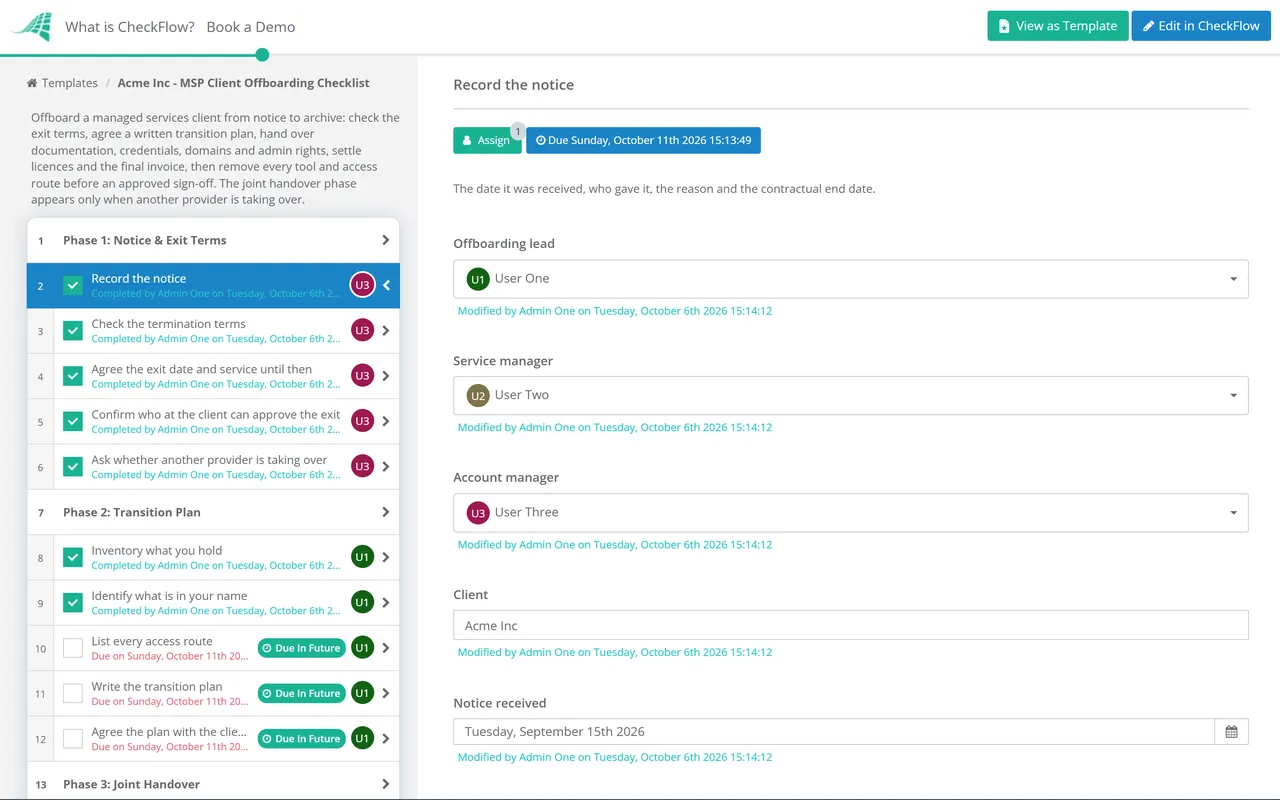
Seven phases take a departing client from notice to archive. Phase 3 appears only when another provider is taking over.
Phase 1
Phase 1: Notice & Exit Terms
Record the notice — the date it was received, who gave it, the reason and the contractual end date
Check the termination terms — notice period, minimum term, exit fees, data return and any handover obligations in the agreement
Agree the exit date and service until then — support continues at the contracted level until the end date, and both sides know it
Confirm who at the client can approve the exit — the contact who signs off the handover and receives credentials
Ask whether another provider is taking over — and, if so, get the client’s written permission to work with them
Phase 2
Phase 2: Transition Plan
List everything before anything is removed. The plan is what the access-removal letter is checked against at the end.
Inventory what you hold — credentials, documentation, licences, agents, backups, client data in your systems and hardware on loan
Identify what is in your name — domains, DNS hosting, certificates, CSP subscriptions, vendor accounts and any portal registered to your email
List every access route — named admin accounts, delegated admin relationships, remote access, VPN, firewall and vendor consoles
Write the transition plan — each item with an owner, a handover date and the order it happens in
Agree the plan with the client in writing — including what is handed over, what is deleted and when access ends
Phase 3 — If a New Provider Is Taking Over
Phase 3: Joint Handover
Shown only when an incoming provider is taking over. The client stays in charge of what is shared and when.
Hold a handover meeting with the incoming provider — walk through the environment, known issues and anything unusual
Agree the tooling cutover sequence — their RMM, EDR and backup in place and confirmed before yours come out
Hand over open tickets and projects — status, next steps and anything promised to users
Coordinate the CSP subscription transfer — the incoming partner sends the transfer request in Partner Center and you approve the subscriptions it covers
Phase 4
Phase 4: Documentation & Admin Handover
Credentials never go by email or spreadsheet. Use a secure share and get receipt confirmed.
Export the client’s documentation — network diagrams, configurations, asset list, procedures and vendor contacts
Hand over credentials securely — through an expiring secure share or a password manager transfer, and confirm receipt
Transfer administrative ownership — Microsoft 365 or Google Workspace super admin, firewall, Wi-Fi, ISP and line-of-business admin held by named client accounts
Move domains and DNS into the client’s control — into the client’s own registrar account, or provide the transfer authorisation code
Get written confirmation of receipt — the client’s contact confirms they hold everything on the handover list
Phase 5
Phase 5: Licences & Final Invoice
Decide each subscription’s future — transfer to the new partner, move to the client directly, or cancel at the end of its term
Recover hardware and loan equipment — or agree a purchase price for anything the client keeps
Reconcile final time and usage — billable work, licences and seats up to the exit date
Raise the final invoice — remaining fees, agreed exit charges, any outstanding licence commitment and credits due
Phase 6
Phase 6: Tool Removal & Access Revocation
Remove protection only when the client or the incoming provider confirms cover is in place.
Remove RMM and remote access agents — from every device, and reconcile the RMM list against the asset list so nothing is left behind
Remove EDR and backup — once replacement protection and backups are confirmed, then delete or return backup data as agreed
End GDAP relationships — terminate them in Partner Center rather than waiting for them to expire
Remove your accounts and app consents — named admin accounts, service accounts and enterprise applications your tools added to the tenant
Remove the reseller relationship — once no active subscriptions remain on it
Approve the access-removal sign-off — the service manager answers Approved or Not approved after checking every route on the plan is closed
Phase 7
Phase 7: Confirm & Archive
Send written confirmation of access removal — every account, relationship and tool removed, with dates
Return or delete client data — as the agreement and data processing terms require, and record which
Archive the client record — tickets, documentation and agreement kept for your retention period, then marked inactive
Hold an internal exit review — why the client left, what the handover revealed and what to change
Every Route Into the Client’s Systems, and How It Ends
Most MSPs can name their RMM agent and their admin accounts. The routes that get missed are the ones created once, years ago, by an integration or a vendor portal. Build this list during the transition plan, not on the last day, and use it to check the access-removal letter before it is sent.
Access route
How it ends
Evidence to keep
GDAP relationships
Terminated by you in Partner Center, or by the client under Partner relationships in the Microsoft 365 admin center
Termination notification and date
Reseller relationship
Removed in Partner Center once no subscriptions are active
Screenshot or audit log entry
Named admin and service accounts
Deleted or disabled in the tenant, firewall and each vendor console
List of accounts removed
Enterprise applications
Deleted from Microsoft Entra ID, which revokes the consent your tools were given
Application names and dates
RMM and remote access agents
Uninstalled and removed from your console, with the device list reconciled
Device count before and after
EDR and backup
Uninstalled after replacement cover is confirmed, then the client removed from your console
Client or new provider’s confirmation
VPN, firewall and Wi-Fi
Your accounts and certificates removed, shared secrets changed by the client
Change confirmation
Registrar and DNS
Domains and DNS hosting moved to an account the client controls
Transfer confirmation
Four facts that shape the timeline
Removing admin roles doesn’t end the reseller relationship. Microsoft is clear that removing GDAP leaves the reseller relationship in place, and a partner can remove the reseller relationship only after the customer’s subscriptions are cancelled or transferred. Plan both steps.
Subscription transfers take time. In Partner Center, the incoming partner creates the transfer request and the current partner selects and submits the subscriptions. Requests left unanswered expire after 30 days, and transfers can take up to 72 hours to complete.
Domains can be locked. Under ICANN’s transfer policy, a registrar must provide the transfer code within five calendar days of the registrant’s request, but may refuse a transfer within 60 days of registration or a previous transfer. Check the dates early.
Leftover remote access is a known attack route. CISA has warned that threat actors use legitimate remote monitoring and management software for persistence, and recommends auditing the remote access tools on a network. An agent nobody owns is exactly what that audit looks for.
Why Offboard Clients in CheckFlow?
1
Every exit run the same way
Notice, plan, handover, tool removal and sign-off follow the same sequence whoever handles the client. Conditional logic adds the joint handover tasks only when a new provider is taking over, so the same template covers every kind of exit.
2
No letter without a sign-off
The confirmation of access removal goes to the client only after the service manager has checked every route on the plan and answered Approved. The approval, the dates and the evidence attached to each task are kept against the client.
3
Proof when you need it
If a former client later suffers an incident, the completed checklist shows when each account, relationship and agent was removed, who did it and what the client confirmed receiving. That record is worth more than any memory of a hurried last week.
Offboarding is one of the processes most MSPs never write down until a messy exit forces it. The MSP process management guide covers the full client lifecycle, and CheckFlow for MSPs runs it across every client from one place.
It is the process a managed services provider follows when a client leaves. It covers the termination terms, a transition plan, handing over documentation and credentials, transferring admin roles and domains to the client, settling licences and the final invoice, removing the MSP’s tools and access without leaving devices unprotected, and confirming in writing that every access route has been closed.
Do we have to hand over documentation we created?
+
Check the agreement first, because some contracts say exactly what is returned at exit. In practice, information about the client’s own systems, such as credentials, network diagrams, configurations and asset lists, should go to the client. Your internal procedures and templates usually remain yours. Refusing to hand over the client’s own information rarely protects you and often ends up in a dispute you lose.
How do we end a GDAP relationship?
+
Terminate it in Partner Center, or ask the client to remove your roles in the Microsoft 365 admin center under Settings and Partner relationships. Either way, your security groups lose access to that customer. Don’t rely on expiry: relationships can last up to two years and some auto-extend. Ending GDAP doesn’t remove the reseller relationship, which is a separate step once no subscriptions remain.
What happens to the Microsoft licences we sold the client?
+
New commerce subscriptions can be transferred to the incoming CSP partner mid-term. The new partner sends a transfer request, you select and submit the subscriptions, and billing responsibility moves from the transfer date. If the client is buying elsewhere or directly, subscriptions you can’t cancel run until their term ends, so agree in writing who pays for that remaining commitment.
Should we remove our tools before the new provider is ready?
+
No, unless the client tells you to in writing. Removing EDR or backup before replacement cover is confirmed leaves the client unprotected, and a ransomware incident in that gap will be blamed on whoever left it. Agree a cutover sequence: the new tools go in and are confirmed, then yours come out. If the client delays, record it and confirm your exit date.
How long should we keep a former client’s data?
+
Only as long as your agreement and the law allow. Under UK and EU GDPR, a processor must delete or return personal data at the end of the service, at the controller’s choice, unless law requires it to be kept. Return or delete backups and client data as agreed, and keep your own business records, such as invoices and tickets, for your stated retention period.
Is CheckFlow free for this template?
+
14-day free trial, no card required. The Business plan is $10 per user per month after the trial. Full details at checkflow.io/pricing.
Leave Every Client Better Than You Found Them
Free trial — no credit card required.
Do you like cookies? 🍪 We use cookies to ensure you get the best experience on our website. Learn more