
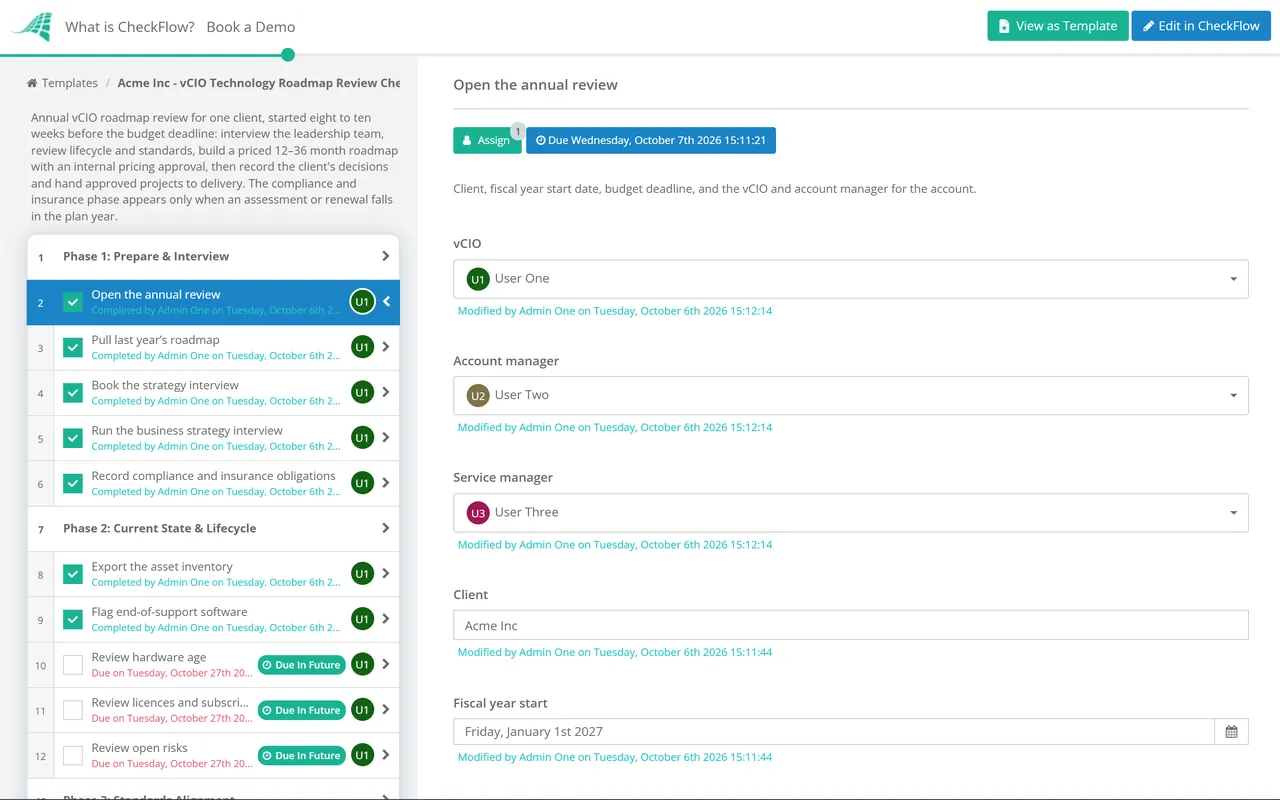
Progress against the plan
Horizon: the last quarter and the next one.
Inputs: monthly reports, open recommendations, account health.
Decisions: the next few projects and any changes of priority.
Output: an updated roadmap and a list of actions.
No Credit Card Required
Printed from checkflow.io/templates/managed-services/vcio-technology-roadmap-review-checklist
Most MSPs say they offer vCIO services. Fewer can show a client a technology roadmap that was built from the client’s own business plans, priced before their budget was set and still accurate six months later. The difference is usually process, not talent. The annual roadmap review is the one meeting a year where the vCIO sits down with the owner or managing director, learns where the business is going, checks the estate against your standards and agrees a funded plan for the next one to three years. This free vCIO technology roadmap review checklist gives that cycle a fixed structure: a strategy interview, a current-state and lifecycle review, a standards alignment score, a priced roadmap reviewed internally before anyone shows it to the client, a recorded decision on every project and a clean handover of approved work to the PSA. A conditional phase adds compliance and cyber insurance deadlines in the years they apply.
The MSP QBR Checklist covers the quarterly business review: a recurring hour with the decision-maker to look at the last three months, update the roadmap and approve the next round of work. It works because there is already a roadmap to update. This template is where that roadmap comes from.
Once a year, usually a couple of months before the client sets its budget, the vCIO steps back from the quarter and asks bigger questions. Where will the business be in three years? Which servers, operating systems and line-of-business applications reach end of support before then? Where does the estate fall short of the standards you hold every client to? What will it all cost, and in which of the client’s financial years? The answers become a multi-year roadmap that the client approves line by line. The four QBRs that follow check progress against it instead of starting from a blank page each quarter.
Horizon: the last quarter and the next one.
Inputs: monthly reports, open recommendations, account health.
Decisions: the next few projects and any changes of priority.
Output: an updated roadmap and a list of actions.
Horizon: 12 to 36 months, aligned to the client’s fiscal year.
Inputs: business strategy, lifecycle data, standards alignment, obligations.
Decisions: every project approved, deferred or declined, with a budget.
Output: a priced roadmap, a decision record and projects in the PSA.
Seven phases take the review from the strategy interview to approved projects in the PSA. Phase 4 appears only in a year when a compliance assessment or cyber insurance renewal is in scope.
Start eight to ten weeks before the client’s budget is set. A roadmap that arrives after the budget is fixed waits a year.
Shown only when a compliance assessment or cyber insurance renewal falls in the plan year. Conditional logic keeps it out of the other reviews.
The vCIO owns this phase. The internal pricing approval halts the review until someone other than the author has checked the numbers.
Lifecycle dates are the easiest part of a roadmap to justify, because the client doesn’t have to take your word for them. Microsoft publishes them, and once a product reaches end of support it gets no more security updates. The table lists Microsoft dates that fall inside a roadmap drawn up in late 2026. Check the client’s line-of-business vendors as well, since their support often depends on the database or server version underneath.
| Product | End of support | What it means for the roadmap |
|---|---|---|
| Windows 10 | 14 October 2025 (passed) | Paid Extended Security Updates only: $61 per device for the first year, doubling each year, for three years at most. Budget the replacement now. |
| SQL Server 2016 | 14 July 2026 (passed) | Often hidden under a line-of-business application. Ask the vendor which version they support next. |
| Office 2021 and Office LTSC 2021 | 13 October 2026 | Perpetual-licence Office stops receiving security updates. Move to Microsoft 365 Apps or a supported version. |
| Windows 11 Home and Pro 24H2; Enterprise and Education 23H2 | 13 October and 10 November 2026 | Servicing rather than a project: move devices to a current Windows 11 version. |
| Windows Server 2016 | 12 January 2027 | A project for most clients: replace, upgrade or move the workload to the cloud. |
| SQL Server 2017 | 12 October 2027 | Belongs in next year’s horizon, agreed with the application vendor. |
Source: Microsoft Lifecycle, checked October 2026. Dates move occasionally, so confirm each one at the time of the review.
Phase 4 exists because external deadlines change priorities faster than anything else. Two current examples:
Cyber insurance renewals work the same way. When the questionnaire asks about MFA, EDR or tested backups, the renewal date becomes the deadline for those projects.
Set an annual recurring schedule per client, dated from their fiscal year rather than yours, so each review starts eight to ten weeks before their budget is set. The grid view shows which clients are mid-review and which are overdue.
The internal pricing review is an approval step. Until the service manager records an approval, the presentation tasks stay locked, so a roadmap with a missed licence cost or an unworkable project schedule never reaches the client.
Every project ends with approved, deferred or declined, a name and a date. The QBRs that follow work from that record, and a declined recommendation that later becomes an incident has a dated history behind it.
The annual roadmap review is one of the recurring account processes the MSP process management guide recommends standardising. CheckFlow for MSPs runs it alongside onboarding, monthly reporting and QBRs, with every client’s status in one view.
Good roadmaps start from good data. The annual Client Cybersecurity Risk Assessment supplies the security priorities, and the MSP Client Documentation Audit Checklist keeps warranty, lifecycle and licence records accurate enough to plan from.

MSP Quarterly Business Review (QBR) Checklist

Client Cybersecurity Risk Assessment Checklist
Annual Budget Planning Checklist
Hardware Lifecycle Refresh Checklist
IT Budget Planning Checklist
Describe the process in a sentence and the AI checklist generator drafts the phases and tasks for you.
It is an annual planning cycle in which an MSP’s virtual CIO works with a client’s leadership to agree where their technology needs to go over the next one to three years. It combines the client’s business plans with lifecycle data, your technology standards and any compliance deadlines, then produces a priced roadmap. The client decides on each project, and approved work becomes quotes and projects in the PSA.
Most MSPs plan 12 to 36 months ahead. The first year should be detailed and priced firmly enough for the client to put in their budget. The second year is costed as estimates, and the third is directional: known end-of-support dates, likely refreshes and projects that depend on how the business grows. Each annual review moves the window forward a year and firms up the next set of estimates.
Work back from the client’s budget deadline, not from your own calendar. If the client sets next year’s budget in February, interview them in November or December so the priced roadmap is in front of them in January. Clients have different fiscal years, which is why it helps to schedule each review per client rather than running them all in one season.
Give them one. For a ten-person firm the roadmap may be a single page: the devices to replace this year, the server that reaches end of support, the security improvements and a monthly cost range. The discipline is the same. The client still sees costs before they are incurred and still records a decision on each item, which avoids surprise invoices and the “you never told us” conversation.
MSPs handle it in different ways. Many include an annual roadmap review in their higher service tiers and offer it as a paid engagement to clients on lower tiers. Others include a light version for everyone, because the projects it generates are worth more than the time it takes. Whichever you choose, write it into the agreement so the client knows the review is part of the service and expects it each year.
Make it a standing item at every QBR. Phase 7 adds roadmap progress to the next four reviews, so each quarter starts from the approved plan: what was delivered, what slipped and what has changed in the business. Significant changes, such as an acquisition or a new site, justify an interim update rather than waiting for next year’s cycle.
14-day free trial, no card required. The Business plan is $10 per user per month after the trial. Full details at checkflow.io/pricing.
14-day free trial, no credit cardFull refund in your first 30 daysUS hosting, EU on request