Encryption Key & Secrets Rotation Checklist Template

API keys, database passwords and signing keys tend to outlive the people who created them. Nobody rotates them because nobody is sure what will break, so a key that leaked three years ago may still work today.

Machine secrets are the credentials systems use to talk to each other: API keys, service account and application passwords, cloud access keys, database credentials, SSH keys, code signing keys, encryption keys held in a key management service or hardware security module, and the private keys behind certificates. They are copied into configuration files, CI variables and developer laptops, and when one is exposed nothing usually tells you. This free secrets rotation checklist is for security, platform and DevOps engineers who run the recurring routine that keeps them under control: a current inventory with owners and ages, a sweep of code and pipelines for leaked secrets, planned rotation that creates, deploys, verifies and revokes without an outage, emergency rotation after a leak, an incident or a leaver, key rotation in your KMS, and the evidence and sign-off that close each cycle. Staff passwords are out of scope, for reasons the next section explains.

Use This Template Free See Live Example
No Credit Card Required

Why Users Stopped Rotating Passwords but Keys Still Expire

NIST SP 800-63B-4, finalised in 2025, says verifiers shall not require people to change their passwords periodically, and shall force a change when there is evidence of compromise. Forced changes produced predictable patterns, such as a season and a year, and did little against phishing or reuse. That guidance is about memorised secrets that belong to a person. It does not cover the credentials and keys your systems use.

Machine secrets behave differently. Nobody memorises them, they are copied far more widely than a user password, and an exposure in a public repository, a build log or a former contractor’s laptop is often silent. NIST SP 800-57 Part 1 Revision 5 asks for a cryptoperiod for every key: the time it may be used before it is replaced, which limits how much data one key protects and how long a stolen key stays useful. Its suggested periods include up to about two years of use for a symmetric data encryption key and one to three years for a private signature key. PCI DSS v4.0.1 takes the same view of application and system account passwords: requirement 8.6.3 asks for them to be changed at a frequency set by your own targeted risk analysis and whenever compromise is suspected.

User passwords

Change on evidence, not on a timer

Belongs to: a person, who has to remember it.

Guidance: NIST SP 800-63B-4 bars forced periodic changes and requires a change when compromise is suspected.

Handled by: your identity provider and password policy, not this checklist.

Machine secrets

Rotate on a schedule and on exposure

Includes: API keys, service and application account passwords, cloud access keys, database credentials, SSH and deploy keys.

Guidance: PCI DSS 8.6.3 risk-based changes; OWASP: centralise, automate rotation, detect leaks.

Rotation: create, deploy, verify, revoke, ideally with two valid credentials during the switch.

Cryptographic keys

Retire at the end of the cryptoperiod

Includes: encryption keys in a KMS or HSM, signing keys and certificate private keys.

Guidance: NIST SP 800-57 cryptoperiods; PCI DSS 3.7.4 and 3.7.5.

Rotation: new key versions encrypt new data; old versions are kept only to decrypt.

Certificates are being pushed the same way. Under CA/Browser Forum ballot SC-081, the maximum validity of a publicly trusted TLS certificate fell from 398 to 200 days on 15 March 2026, and will fall to 100 days from 15 March 2027 and 47 days from 15 March 2029. At that pace renewal has to be automated, so this checklist confirms the automation works and each renewal uses a new private key.

What the Secrets Rotation Checklist Covers

Seven phases run each cycle from the inventory to signed evidence. Emergency rotation appears only after a leak, an incident or a leaver; the dual-key steps only where a secret cannot be swapped in one go.

Phase 1

Phase 1: Trigger & Secrets Inventory

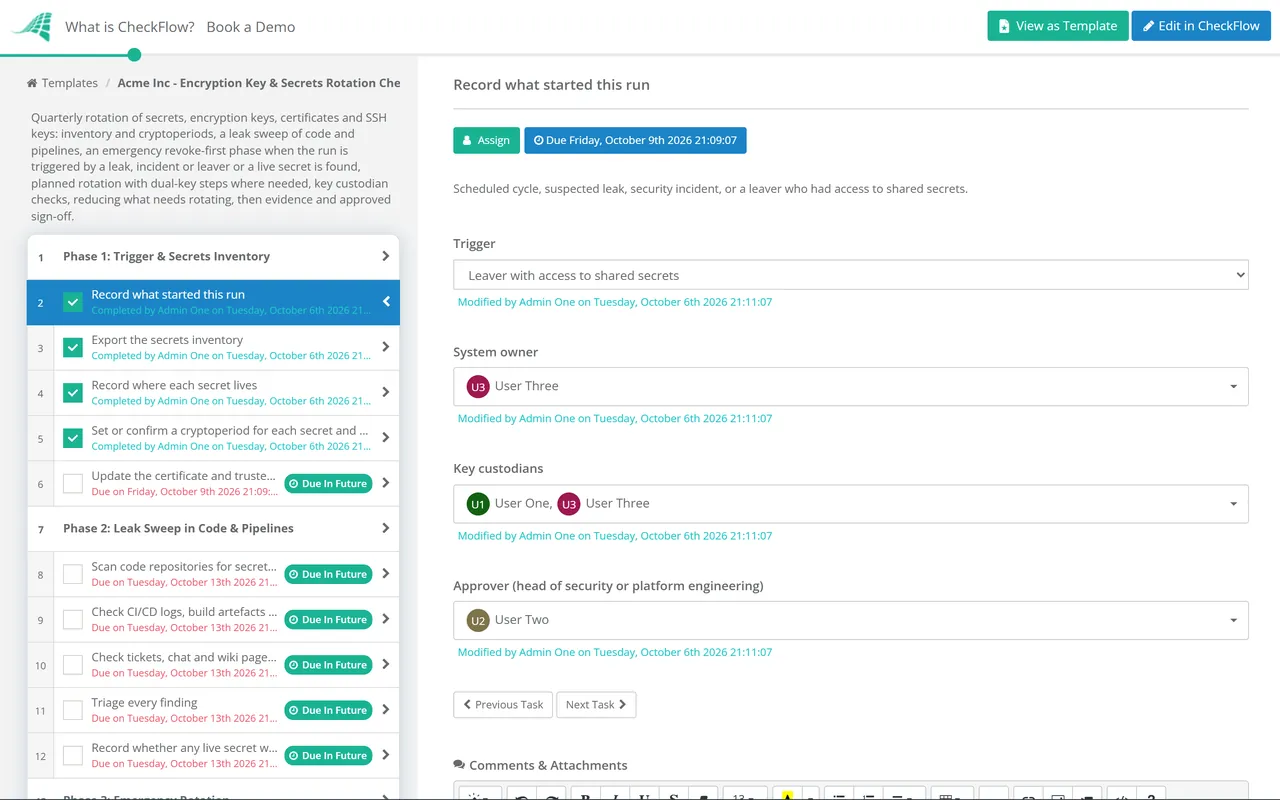
Owned by the security or platform engineering lead. The trigger answer decides whether Phase 3 appears.

  • Record what started this run — scheduled cycle, suspected leak, security incident, or a leaver who had access to shared secrets
  • Export the secrets inventory — each secret with its owner, type, the systems that use it, where it is stored and the date it was created or last rotated
  • Record where each secret lives — secrets vault, KMS, CI/CD variable, configuration file or hard-coded in source; anything outside the vault is flagged
  • Set or confirm a cryptoperiod for each secret and key type — flag everything past its period or with no owner, and add both to the rotation list
  • Update the certificate and trusted key inventory — issuing CA, expiry date, where each certificate is used and how it renews
Phase 2

Phase 2: Leak Sweep in Code & Pipelines

A Yes on the live exposure task switches on Phase 3 even when the run was scheduled.

  • Scan code repositories for secrets, including history — a key deleted in a later commit is still in every clone; record the tool and scope used
  • Check CI/CD logs, build artefacts and container images — secrets printed by a debug step or baked into an image layer are a common source
  • Check tickets, chat and wiki pages for pasted credentials — search for known key prefixes and connection strings
  • Triage every finding — is the secret still valid, what does it grant, and was it ever in a public location
  • Record whether any live secret was exposed — yes or no; a yes moves it straight to emergency rotation
Phase 3

Phase 3: Emergency Rotation

Appears only when Phase 1 records a leak, incident or leaver, or Phase 2 finds a live exposed secret. The decision to accept an outage needs approval from the system owner.

  • Link or open the incident record — the security incident response checklist holds the timeline and any notification decisions
  • Revoke or disable the exposed secret now — if revoking will cause an outage, the system owner approves the trade-off and it is recorded
  • Review the provider’s access logs for use of the secret since the exposure — unknown IP addresses, new resources or data reads go to the incident lead
  • Rotate everything the exposed secret could reach — other credentials stored on the same host, in the same vault path or readable with the same role
  • For a leaver, rotate the shared secrets they could read — use vault access logs and group membership, not memory, to build the list
  • Clean the secret out of repository history only after it is revoked — rewriting history does not undo copies already made
Phase 4

Phase 4: Planned Rotation

The method answer in task 1 shows the matching tasks: dual-key tasks appear only for secrets that cannot be swapped in one step. Rotation of a production secret is raised as a standard change.

  • Record the rotation method for each secret on the list — automatic in the vault or KMS, dual-key, or a single cut-over in a maintenance window
  • Create the new secret or key version in the vault or KMS — never in a ticket, chat message or email; use the approved algorithm and length
  • Dual-key: add the new credential alongside the old one — most cloud access keys, API platforms and database users allow two to be valid at once
  • Dual-key: move consumers to the new credential one at a time — confirm each service authenticates with it before moving the next
  • Deactivate the old credential, then delete it after the observation period — deactivating first gives you a fast way back if something breaks
  • Watch for authentication failures for the agreed period — any consumer still using the old credential is a gap in the inventory
Phase 5

Phase 5: Encryption Keys, Certificates & SSH Keys

Assigned to the key custodians named in the key management procedure.

  • Confirm automatic rotation is on for KMS keys that support it — and that the period matches the cryptoperiod; AWS KMS, for example, allows 90 to 2,560 days for customer managed keys
  • Keep old key versions available for decryption — rotation changes the key used for new data; destroying an old version makes everything it encrypted unreadable
  • Rotate manually managed keys by the documented procedure — HSM keys, imported key material and signing keys, with split knowledge where a person handles cleartext key components
  • Review who can use, disable, export or schedule deletion of each key — key administrators and key users should be different people or roles
  • Check certificate renewal automation and use a new key pair on each renewal — list certificates due within the next 30 days and any renewal that failed
  • Review SSH authorised keys and repository deploy keys — remove keys with no current owner and replace any older than your SSH key cryptoperiod
Phase 6

Phase 6: Reduce What Needs Rotating

  • Move hard-coded secrets into the vault — every secret flagged in Phase 1 or found in Phase 2 gets an owner and a date
  • Replace long-lived secrets with short-lived credentials where the platform supports it — workload identity, federated CI/CD tokens or dynamic database credentials
  • Narrow the scope of each remaining secret — one secret per service and environment, with only the permissions that service needs
  • Review who can read each vault path — people and pipelines with read access to production secrets need a current reason
Phase 7

Phase 7: Evidence & Sign-off

Sign-off is an approval task for the head of security or platform engineering. The checklist halts until it is approved.

  • Update the inventory with new rotation dates and the next due date — the next cycle starts from this list
  • Attach evidence of rotation and revocation — vault version history, KMS rotation history and revocation confirmations; never attach a secret value
  • Log exceptions with an owner, a compensating control and an expiry date — for example, a vendor appliance whose key cannot be changed without a site visit
  • Confirm key custodians have acknowledged their responsibilities — new custodians since the last cycle sign the acknowledgement
  • Approve the cycle and confirm the next scheduled run — quarterly for most estates, with emergency runs started as needed

What Auditors Expect from Key and Secrets Rotation

Most frameworks do not set one rotation interval. They ask you to define a cryptoperiod or a risk-based frequency, follow it, rotate on suspected compromise and prove it. The table maps each reference to the phase that produces the evidence.

FrameworkReferenceWhat it expectsEvidenced in
NIST SP 800-57 Part 1 Rev. 5CryptoperiodsA defined cryptoperiod for each key type, based on algorithm, use, volume of data and the risk of exposurePhases 1, 5
NIST SP 800-63B-4Password verifiersNo forced periodic change of user passwords; a forced change on evidence of compromiseScope (user passwords excluded)
PCI DSS v4.0.13.6.1, 3.7.1–3.7.8Keys protecting stored account data are protected and managed through their life cycle, changed at the end of the cryptoperiod (3.7.4), retired or replaced when weakened or suspected compromised (3.7.5), with custodian acknowledgement (3.7.8)Phases 3, 5, 7
PCI DSS v4.0.14.2.1.1An inventory of trusted keys and certificates used to protect cardholder data in transitPhase 1
PCI DSS v4.0.18.6.2, 8.6.3No hard-coded passwords for interactive application and system accounts; their passwords changed at a risk-based frequency and on suspected compromisePhases 2, 4, 6
ISO/IEC 27001:2022 Annex A8.24, 5.17Rules for the use of cryptography, including key management across the key life cycle; authentication information allocated and managedPhases 1, 4–5
SOC 2 Trust Services CriteriaCC6.1Logical access security over protected information assets; points of focus include managing credentials for infrastructure and software and protecting encryption keysPhases 4–5
OWASP Secrets Management Cheat SheetGuidanceCentralise secrets, automate rotation, detect secrets in code and pipelines, and plan for a leaked secretPhases 2–4, 6

Treat the table as a starting point, not audit advice. Your assessor decides what counts as sufficient evidence for your scope, and PCI DSS 8.6.3 in particular expects the targeted risk analysis behind your chosen frequency to be written down. Most key management procedures cite SP 800-57 Part 1 Revision 5, published in May 2020. NIST published an initial public draft of Revision 6 in December 2025 that adds the new post-quantum algorithms, so check whether it has been finalised before you update your procedure.

Why Run Secrets Rotation in CheckFlow?

1

Rotation becomes a routine, not a project

A quarterly schedule opens the cycle on time with the inventory, leak sweep and rotation tasks assigned to named engineers.

2

The emergency path is already written

Conditional logic adds the emergency phase when a run is triggered by a leak, an incident or a leaver, or when the sweep finds a live secret. The revoke-first order and the outage approval are decided in advance, not on a call at midnight.

3

Proof without exposing the secret

Vault and KMS history, revocation confirmations and exceptions are attached to the task they support, never the secret itself. The audit trail shows who rotated what and when, and the final approval records sign-off.

CheckFlow is not a secrets vault, a KMS or a secret scanner. It runs the human side around those tools: who owns each secret, who rotated it, what was revoked and who approved the cycle. CheckFlow for recurring checklists shows how scheduled runs and conditional phases work, and the guide to recurring compliance checklists for IT teams covers how to keep routines like this one on time.

Two related routines catch what this one misses. The Active Directory & Entra ID Account Cleanup Checklist finds stale app registrations and expired client secrets, and when a secret has been used by someone else the Cybersecurity Incident Response Checklist takes over. For leavers, the IT offboarding security checklist lists the shared credentials to rotate on the way out.

Frequently Asked Questions

How often should API keys and secrets be rotated?

+

There is no single interval that every framework sets. NIST SP 800-57 asks for a cryptoperiod per key type, and PCI DSS v4.0.1 lets you set the frequency for application and system account passwords through a targeted risk analysis. Many organisations choose 90 days for high-privilege static credentials and up to a year for lower-risk ones. Whatever the schedule, rotate immediately when a secret may have been exposed or someone who could read it leaves.

Does NIST still say to change passwords every 90 days?

+

Not for people. NIST SP 800-63B-4 says verifiers shall not require users to change passwords periodically, and shall force a change when there is evidence of compromise. That applies to memorised passwords belonging to users. Machine secrets, service account passwords and cryptographic keys are a separate case: NIST SP 800-57 still expects keys to have a defined cryptoperiod, and PCI DSS still expects application and system account passwords to be changed at a risk-based frequency.

What is a cryptoperiod?

+

It is the length of time a cryptographic key is authorised for use before it must be replaced. NIST SP 800-57 Part 1 sets out the factors that shorten or lengthen it, such as the strength of the algorithm, how much data the key protects, how it is stored and the cost of a compromise.

What happens to encrypted data when a KMS key is rotated?

+

Usually nothing you can see. In a cloud KMS, automatic rotation creates new key material for new encryption operations and keeps the earlier versions so existing data can still be decrypted. AWS KMS, for example, retains all key material for a key until the key itself is deleted and picks the right version automatically. The danger is deleting or destroying an old key version, which makes the data it protected unrecoverable.

What should we do if a secret is committed to Git?

+

Revoke or rotate it first, then clean it up. Assume it has been copied the moment it was pushed, especially to a public repository. Check the provider’s logs for use of the secret since the commit, rotate anything else the secret could reach, and treat any unexplained use as a security incident. Cleaning the history afterwards does not make the old secret safe to keep.

What is zero-downtime secret rotation?

+

It is rotation in which the old and new credentials are both valid for a short overlap. You create the new credential, move each consuming service to it, confirm they all work, then deactivate and delete the old one. Where a system accepts only one, plan a short cut-over in a maintenance window instead.

Is CheckFlow free for this template?

+

14-day free trial, no card required. The Business plan is $10 per user per month after the trial. Full details at checkflow.io/pricing.

Rotate Your Secrets Before Someone Else Uses Them

Free trial — no credit card required.