
Continuous, but partial
Done by: whichever engineer worked the ticket.
Catches: changes the team made and remembered to record.
Misses: changes made by the client, vendors or nobody in particular.
No Credit Card Required
Printed from checkflow.io/templates/managed-services/msp-documentation-audit-checklist
Every MSP depends on its documentation platform. It is how a technician who has never visited a client can fix their firewall at 7am, how a new hire learns the estate and how the service desk knows who is allowed to ask for a new admin account. It is also the system most likely to be quietly wrong. Records are created carefully during onboarding and then updated only when someone remembers. This free MSP client documentation audit checklist tests one client’s records against your documentation standard, section by section: credentials and the password vault, network and infrastructure, configurations and assets compared with the RMM, applications and vendors, and contacts and procedures. Each section is scored, gaps become tickets in the PSA and the service manager signs off the result. When the overall score falls below your threshold, a remediation phase sets a deadline and a re-audit, so a poor result is fixed rather than just filed.
Most MSPs already ask engineers to update documentation as part of closing a ticket. That catches changes someone knew they had made. It does not catch the switch a client’s office manager added, the laptop that was retired without anyone telling you, the contact who left, or the password that was changed by a vendor during a support call. Those gaps only show up when somebody deliberately compares the record with the real environment.
A documentation audit is that comparison, done on a schedule by someone who doesn’t work on the account every day. The auditor works from evidence rather than memory: the RMM device list, the directory, the PSA contacts, a login test. Because every client is scored against the same standard, the result can be compared across clients and over time, which shows where the documentation process itself needs fixing.
Done by: whichever engineer worked the ticket.
Catches: changes the team made and remembered to record.
Misses: changes made by the client, vendors or nobody in particular.
Done by: an auditor who is not the client’s primary engineer.
Catches: missing, stale and orphaned records, tested against live data.
Produces: a score, remediation tickets and a signed-off result.
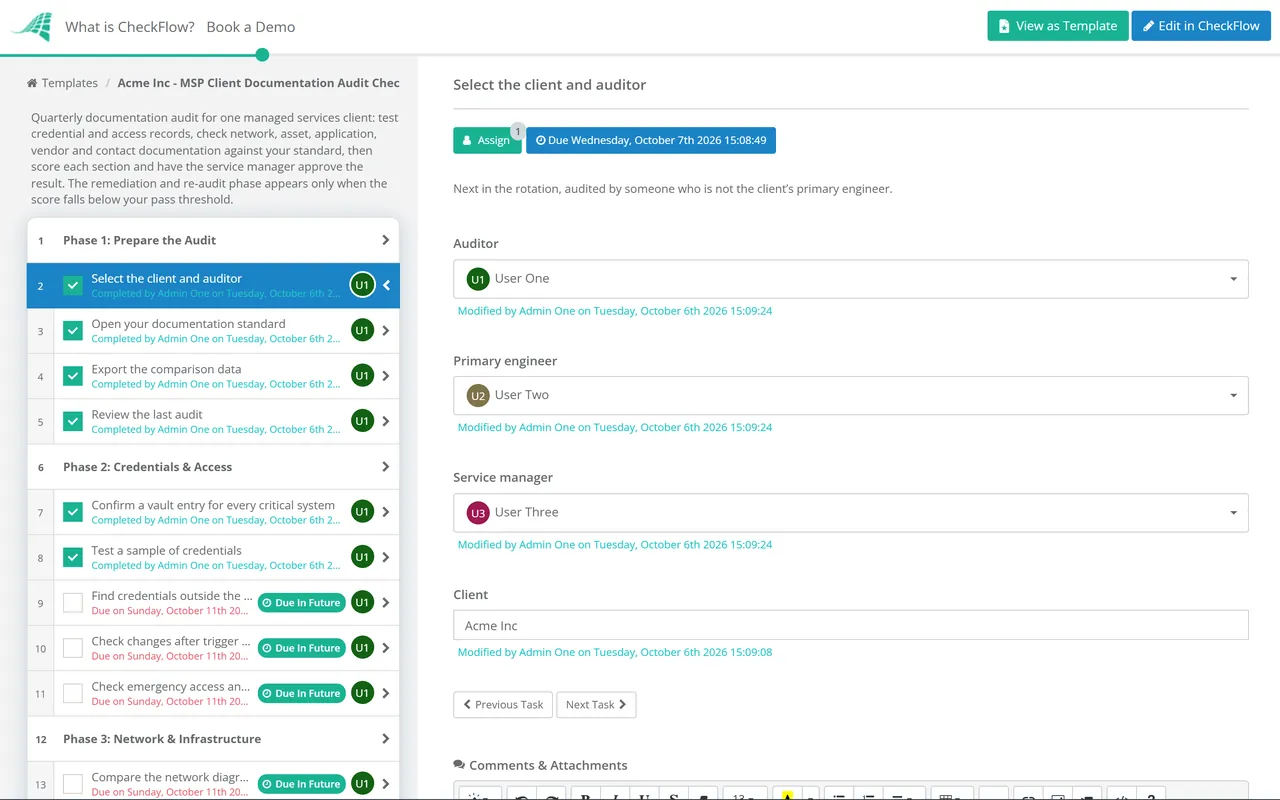
Six phases audit one client from preparation to a signed-off score. Phase 7 appears only when the overall score falls below your pass threshold.
The sign-off is an approval step. Remediation tasks stay locked until the service manager approves the score.
Shown only when the overall score is below your pass threshold. Conditional logic keeps it out of audits that pass.
An audit is only comparable if every auditor scores the same way. The model below weights the sections by what it costs when they are wrong. A missing registrar login can take a client’s email offline for days; an out-of-date printer record costs a few minutes. Score each item 2 (complete and verified), 1 (present but incomplete or unverified) or 0 (missing or wrong), then weight the section totals.
| Section | Minimum standard | Evidence the auditor checks | Weight |
|---|---|---|---|
| Credentials & access | Every critical system in the vault, owned, working | Sample logins, trigger-event history | 30% |
| Network & infrastructure | Diagram, addressing, circuits and renewals current | RMM data, a scan, registrar and DNS records | 25% |
| Configurations & assets | Records match managed devices in both directions | RMM export compared with asset records | 20% |
| Applications & vendors | Owner, support contact and renewal for each | Vendor portals, contracts, client confirmation | 15% |
| Contacts & procedures | Authorised contacts current; procedures tested | Directory, PSA contacts, a procedure walkthrough | 10% |
Pick a pass threshold and keep it stable, so scores mean the same thing from quarter to quarter. Many MSPs start around 80% and raise it as their documentation matures. Treat any zero on a critical credential as a fail for that section, whatever the overall percentage says. Then watch the trend as well as the number. A client whose score falls at two audits in a row usually has a process problem, such as a new engineer who was never shown the standard or a project that closed without updating the records.
The joint MSP advisory from CISA, the NCSC and their partners also tells MSPs to treat every account with access to customer environments as privileged and protect it with MFA. The audit is a regular point to confirm that is still true for each client.
Set a quarterly recurring schedule and assign each run to an auditor from a group, so every client is audited at least once a year and larger or fast-changing clients more often. The grid view shows who is due.
Exports, login test results and scan output are uploaded to the task they support. When the service manager reviews the score, or a client asks how well their estate is documented, the evidence is there with dates.
When the score falls below your threshold, conditional logic adds the remediation phase, with a deadline, a root-cause task and a re-audit. Low scores get worked on, not just filed.
Documentation is where many MSP processes either hold or fall apart. The MSP process management guide explains how process management sits between documentation and execution, and CheckFlow for MSPs runs audits like this one alongside onboarding and client reviews.
The first documentation for a client is built during the MSP Client Onboarding Checklist, and this audit keeps it accurate afterwards. The lifecycle data it checks feeds the vCIO Technology Roadmap Review, and for writing procedures that hold up when tested, see our IT runbook guide.
MSP Client Onboarding Checklist

Client Cybersecurity Risk Assessment Checklist

IT Asset Management Checklist
User Access Review Template
Software License Audit Checklist
Describe the process in a sentence and the AI checklist generator drafts the phases and tasks for you.
It is a scheduled check of one client’s records in your documentation platform against your documentation standard. The auditor compares the records with live data from the RMM, the directory and the PSA, tests a sample of credentials and one procedure, and scores each section. Gaps become tickets, and the service manager signs off the result. Over time the scores show which clients, and which parts of your process, need attention.
At least once a year for every client, and more often for large or fast-changing ones. A common pattern is a quarterly schedule that works through a rotation, so a quarter of your clients are audited each quarter. Audit sooner after anything that disturbs the records: a major project, a change of primary engineer or a failed audit.
Someone who knows your documentation standard but does not work on the client every day. The primary engineer reads the records through their own memory and fills gaps without noticing them. A peer from another team, a service desk lead or a dedicated documentation owner will follow the records as written, which is exactly how a stranger would use them during an outage.
It is your choice, but make it explicit and keep it stable so scores are comparable. Many MSPs start around 80% and raise the bar as their documentation matures. Weight the sections by risk, and treat a missing or broken credential for a critical system, such as the domain registrar or global admin, as a failure regardless of the overall score.
Not on age alone. NIST’s current guidance says passwords should not be changed on a fixed schedule, but must be changed when there is evidence of compromise. The audit checks that credentials were changed after the events that matter: a leaver in your team or the client’s, a previous provider’s departure or a suspected breach. Any credential found outside the vault should be treated as exposed and changed.
They help. Some platforms flag empty fields, records that haven’t been updated for a long time and devices without a matching record. They can’t tell whether a password still works, whether a diagram matches the comms cabinet or whether a procedure still produces the right result. Use the reports as the starting point and the audit to test what the reports can’t.
14-day free trial, no card required. The Business plan is $10 per user per month after the trial. Full details at checkflow.io/pricing.
14-day free trial, no credit cardFull refund in your first 30 daysUS hosting, EU on request