When you patch for fifty clients, one bad update can become fifty outages by Thursday. The ring plan exists so that your own laptops and a few chosen pilot machines meet the problem first.
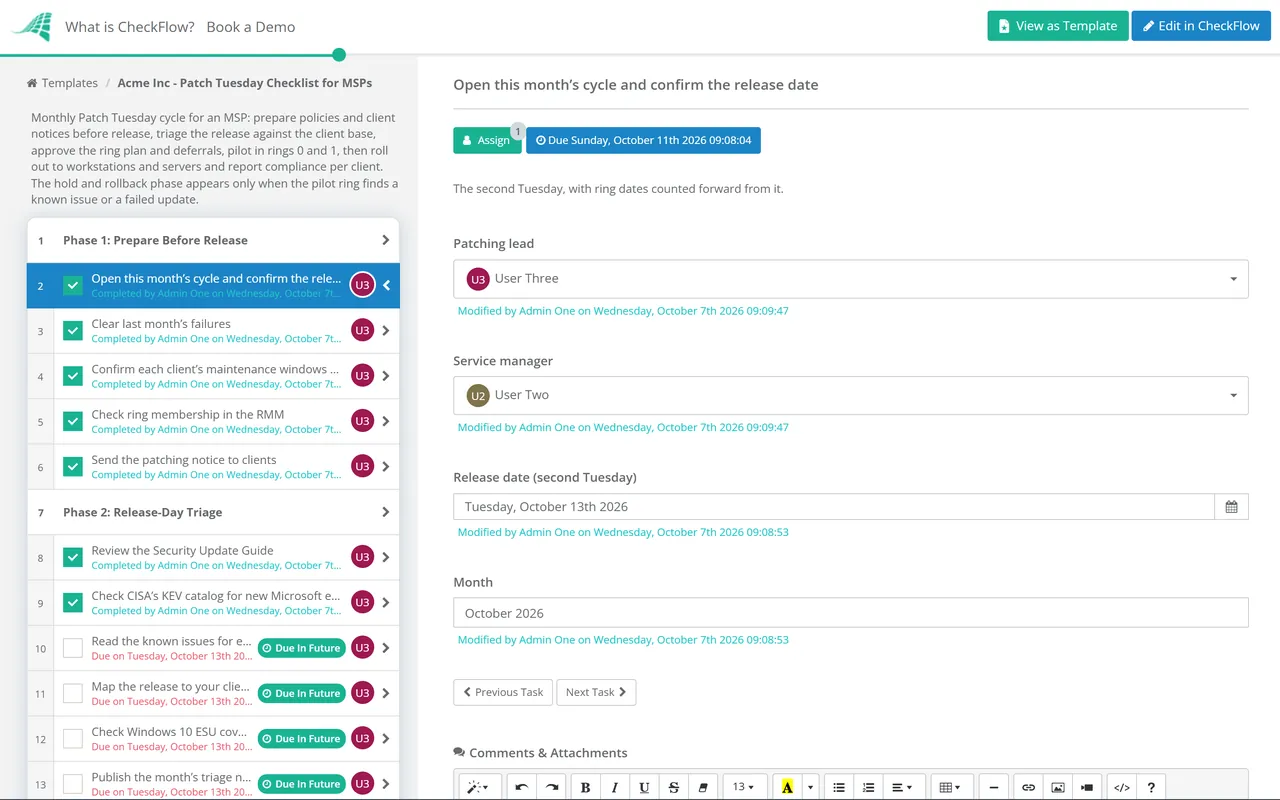
Microsoft publishes its monthly security updates on the second Tuesday of every month, and every MSP then has the same few days to decide what goes where. Your RMM will deploy whatever its policies allow. It will not read the release notes, check which fixes are already being exploited, notice a known issue that breaks printing, or tell forty clients what to expect. This free Patch Tuesday checklist runs that month for MSP service managers, patching leads and NOC teams. It prepares the ground the week before, triages the release within a day, and moves the updates through rings across your whole client base: your own devices, pilot devices at selected clients, broad workstations, then servers in each client’s maintenance window. Policy approvals and deferrals are signed off by the service manager. If the pilot ring finds a problem, a conditional phase pauses the rings and handles rollback. The month closes with third-party patching and per-client compliance for the monthly report.
The Same Monthly Release, Run Across Every Client at Once
Our Patch Management Checklist covers one organisation’s monthly cycle: its own asset inventory, its own test and pilot rings, its change approval and an emergency out-of-band path. This page is the MSP’s multi-tenant version. The release, the sources and the logic of rings are the same. What changes is the scale and the shape of the risk. A faulty update reaches every client whose policy approves it, so the rings have to cut across clients rather than within one, and every client has its own maintenance windows, exclusions and people who need telling.
Emergency patches are deliberately left out. When an actively exploited flaw cannot wait for the next cycle, follow the emergency out-of-band path in the Patch Management Checklist, client by client, and pick the monthly cycle back up here once it is done.
One organisation
Patch Management Checklist
Scope: one estate, one inventory, one change process.
Rings: test and pilot servers inside the organisation, then production.
Approval: the organisation’s own change board or standard change.
Also covers: the emergency out-of-band path.
MSP, many clients
Patch Tuesday Checklist for MSPs
Scope: every managed client, through the RMM’s patch policies.
Rings: your own devices, pilot devices at chosen clients, workstations, then servers.
Approval: the service manager signs off policy approvals and every deferral.
Output: per-client compliance figures for the monthly report.
What the Patch Tuesday Checklist Covers
Six phases run every month. Phase 5 appears only when the pilot ring finds a known issue or a failed update.
Phase 1
Phase 1: Prepare Before Release
Done in the week before the second Tuesday, so release day starts with clean policies and informed clients.
Open this month’s cycle and confirm the release date — the second Tuesday, with ring dates counted forward from it
Clear last month’s failures — devices still missing last month’s updates are fixed or ticketed before new ones arrive
Confirm each client’s maintenance windows and exclusions — server windows, month-end freezes and line-of-business systems that must not restart
Check ring membership in the RMM — new devices placed in a ring, and pilot devices still representative of each client
Send the patching notice to clients — the dates for each ring, the restarts users should expect and how to report a problem
Phase 2
Phase 2: Release-Day Triage
Done within a working day of the release. Microsoft publishes at about 10:00 Pacific time, which is early evening in the UK.
Review the Security Update Guide — this month’s CVEs, their severity, and any marked Exploitation Detected or publicly disclosed
Check CISA’s KEV catalog for new Microsoft entries — a CVE added this week is being exploited, whatever its score
Read the known issues for each update — Windows release health and the Known issues section of each KB article
Map the release to your client base — which affected products you manage, by client: Windows versions, Windows Server, Office and server applications
Check Windows 10 ESU coverage by client — enrolled devices receive security updates; unenrolled ones receive nothing and need a plan
Publish the month’s triage note to the team — priorities, known issues, anything held and the ring dates
Phase 3
Phase 3: Ring Plan & Approvals
Set this month’s ring dates — ring 0 and ring 1 first, then ring 2 workstations and ring 3 servers in each client’s window
Configure the RMM patch policy approvals — which categories and products are approved for each ring this month
Record every deferral and exclusion — the client, the update, the reason and a date to review it
Approve the patch policy and deferrals — the service manager answers Approved or Not approved before ring 1 starts
Tell account managers about client-specific holds — so nobody hears about a deferred fix for the first time in a QBR
Phase 4
Phase 4: Ring 0 & Ring 1 Pilot
The last task holds the decision that shows or hides Phase 5.
Deploy to ring 0 — the MSP’s own laptops, desktops and internal servers, patched first
Deploy to ring 1 pilot devices at selected clients — a few devices per client, chosen to cover the common applications and hardware
Watch the pilot through the soak period — install results, restarts, application errors and service desk tickets from pilot users
Review the pilot ring and record the result — known issue or failed update found in the pilot ring: Yes or No
Phase 5 — Pilot Problems Only
Phase 5: Hold & Rollback
Shown only when the pilot ring found a known issue or a failed update. Rings 2 and 3 wait until this phase is complete.
Pause the later rings — defer the affected update in every client policy, not only the clients where it failed
Remove the update or apply Known Issue Rollback — KIR covers non-security changes only; uninstalling removes security fixes too, so record the exposure
Notify affected clients — what broke, what you have done and when you expect to release the update again
Track Microsoft’s fix — release health status, any out-of-band update or the next month’s cumulative update
Re-release to the pilot ring — once the fix or workaround is confirmed, then resume the ring plan
Phase 6
Phase 6: Broad Rollout & Compliance
Deploy ring 2 to workstations across all clients — only after the pilot has passed its hold point
Check ring 2 results before any server is touched — failure rate by client and new tickets since deployment
Patch ring 3 servers in each client’s maintenance window — confirm a recent good backup, restart in dependency order and check services after
Patch third-party applications — browsers, PDF readers, runtimes and remote-access tools, through the RMM’s third-party catalogue
Chase devices offline or awaiting a restart — ticket each one against its client with an owner
Report compliance per client and close the cycle — operating system and third-party figures for the monthly report, and lessons for next month
Rings only protect you if each one is different enough from the next to catch a problem first. The timings below are common practice for MSPs, not a standard. Set your own, write them down and apply them every month.
Ring
Who is in it
Typical timing
Hold point before the next ring
Ring 0
The MSP’s own devices and internal servers
Release day or the day after
No failed installs and no new issues among your own staff
Ring 1 (pilot)
A few devices at selected clients, covering common applications and hardware models
Two to three days after release
Pilot users report no problems; known issues checked again
Ring 2 (broad)
All remaining workstations at every client
About a week after release
Failure rate within your threshold for every client
Ring 3 (servers)
Servers, in each client’s own maintenance window
Second or third week after release
Services checked after each restart; cycle reported
Where to look on release day
Microsoft’s Security Update Guide. Every CVE in the release, with its severity, whether it was publicly disclosed and its exploitability rating. “Exploitation Detected” means Microsoft knows of an instance of the vulnerability being exploited.
CISA’s Known Exploited Vulnerabilities catalog. CVEs with reliable evidence of exploitation in the wild and a clear fix. It is available as CSV and JSON and has an email subscription.
Windows release health. Known issues for each Windows version, with workarounds and status. The same information appears in the Microsoft 365 admin center, which can email you when a known issue changes.
The KB article for each cumulative update. Its Known issues section is often the first place a regression is documented.
Microsoft also releases an optional non-security preview update in the fourth week of each month. Installing it on ring 0 gives you an early look at the non-security changes that will arrive in the next month’s release.
Windows 10 in October 2026
Windows 10 reached end of support on 14 October 2025. Devices on version 22H2 enrolled in Extended Security Updates still receive critical and important security updates each month. Commercial ESU is sold a year at a time for up to three years, and each year has its own activation on the device. The first year ends with the October 2026 release, so check that every client device you are keeping on Windows 10 has the Year 2 licence activated before November’s Patch Tuesday. Consumer ESU, which is for personal devices rather than business fleets, now runs to 12 October 2027. A device with no ESU coverage gets nothing on Patch Tuesday, which is the point to raise it with the client, not when it is compromised.
Why Run Patch Tuesday in CheckFlow?
1
The month starts itself
A recurring schedule creates the cycle every month, and relative due dates set each ring from the release date. The preparation tasks are due the week before and the triage note the day after, so a slipping month shows as overdue tasks.
2
No deferral without a name on it
Policy approvals and deferrals go to the service manager, who answers Approved or Not approved before ring 1 starts. Every client-specific hold is recorded with a reason and a review date, so deferrals are reviewed rather than left to drift. Approvals keep the decision and the reason together.
3
A known issue changes the plan, not just the chat
One answer on the pilot review decides whether conditional logic adds the hold-and-rollback phase. Rings 2 and 3 stay waiting until it is done, and the client notices and re-release are tasks with owners.
The MSP process management guide makes the point that RMM tools automate patching but not the human process around it. Patch Tuesday is that process for every client at once, and CheckFlow for MSPs runs it next to your onboarding, reporting and QBR routines.
The second Tuesday of every month. Microsoft publishes its monthly security update for Windows, along with security fixes for its other products, typically at 10:00 AM Pacific time. In the UK that is early evening, so most MSPs here triage the release on Wednesday morning. Microsoft also publishes out-of-band updates when an issue cannot wait, and an optional non-security preview update in the fourth week of each month.
How should an MSP set up patching rings across clients?
+
Start with your own devices, so your staff find problems before any client does. Then pick a small pilot group at selected clients that covers the applications and hardware you see most often. After the pilot, roll out to all workstations, then patch servers in each client’s maintenance window. The rings only work if each one waits for the previous ring’s results, and if the pilot devices are used by people who will report problems.
What is Known Issue Rollback?
+
Known Issue Rollback (KIR) is a Microsoft mechanism that switches off one problem change in a Windows update while leaving the rest of the update installed. Devices that take updates straight from Windows Update get it automatically. Managed devices need a Group Policy template that Microsoft publishes for the issue. KIR applies only to non-security changes, so it cannot roll back a security fix.
Should an MSP ever skip a month’s updates?
+
Rarely, and never silently. A known issue may justify deferring one update for some clients for a short time, but the security fixes in that update stay missing until it is installed. Record every deferral with the client, the reason and a review date, get it approved, and tell the client. The longer a deferral runs, the more exposed the devices become, so review it at the next release at the latest.
Do Windows 10 devices still get Patch Tuesday updates?
+
Only if they are enrolled in Extended Security Updates. Windows 10 support ended on 14 October 2025. Enrolled devices on version 22H2 still receive critical and important security updates each month: commercial ESU is bought a year at a time for up to three years, and consumer ESU now runs to 12 October 2027. A device with no ESU receives nothing, so list those devices by client and plan their upgrade or replacement.
Is CheckFlow free for this template?
+
14-day free trial, no card required. The Business plan is $10 per user per month after the trial. Full details at checkflow.io/pricing.
Patch Every Client on One Plan, and Prove It
Free trial — no credit card required.
Do you like cookies? 🍪 We use cookies to ensure you get the best experience on our website. Learn more