
Before the contract
Who asks: your sales team, with the prospect’s agreement.
Access: temporary and read-only, under a signed authorisation.
Ends with: a findings meeting and a proposal.
No Credit Card Required
Printed from checkflow.io/templates/managed-services/it-network-assessment-checklist
A network assessment is how most MSPs turn an interested prospect into a proposal. You scan the network, look at the Microsoft 365 tenant, walk the office and come back with findings that show what the current setup is costing in risk and lost time. Done carefully, it is the strongest sales tool an MSP has, because it is evidence about the prospect’s own business rather than a brochure. Done carelessly, it creates problems: a scan run without proper written consent, a report full of tool output nobody can read, or a prospect’s data still sitting on your laptop months after they said no. This free IT network assessment checklist covers pre-sale discovery from qualification to proposal: scope and written authorisation, the discovery scan and site walk, a cloud tenant review, a findings report checked internally before it goes out, the findings meeting and, when the prospect signs, a clean handover to onboarding.
“Assessment” covers several pieces of work, and mixing them up leads to the wrong depth, the wrong report and sometimes the wrong permissions. This template is the first of the three below: a pre-sale engagement with an organisation that is not yet your client. You have no contract, no admin access and no history with the environment, so everything rests on a narrow, agreed scope and a signed authorisation.
Once the prospect signs, the work changes hands. The MSP Client Onboarding Checklist takes over the environment, and a year later the Client Cybersecurity Risk Assessment Checklist reviews it in depth as part of the managed service. Organisations auditing their own network against policy would use the Network Security Audit Checklist instead.
Who asks: your sales team, with the prospect’s agreement.
Access: temporary and read-only, under a signed authorisation.
Ends with: a findings meeting and a proposal.
Who asks: your vCIO, once a year.
Access: the full admin access you already hold.
Ends with: a risk register and recorded client decisions.
Who asks: the organisation’s own security or audit lead.
Access: whatever the auditor is granted internally.
Ends with: a rated report with owners and due dates.
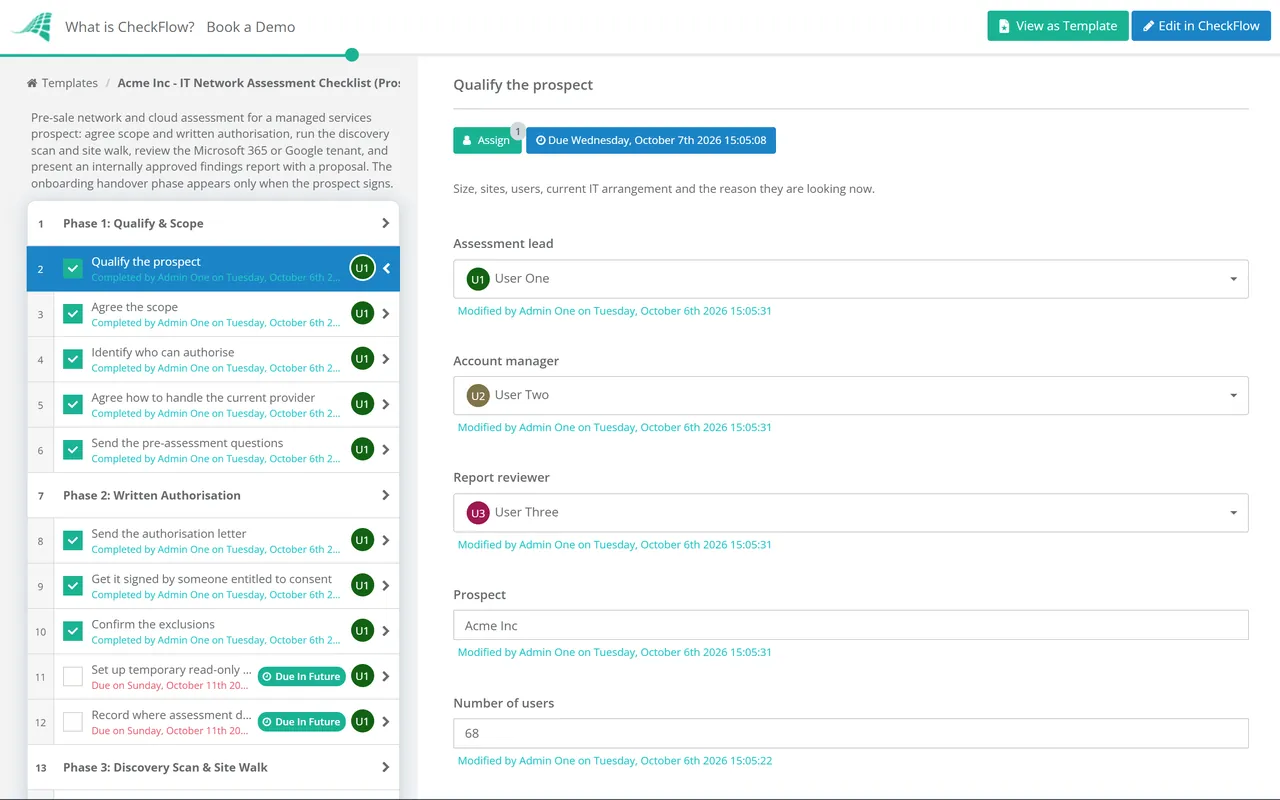
Six phases take a prospect from qualification to a findings meeting and proposal. Phase 7 appears only when the prospect signs, and hands the assessment to onboarding.
No scan, login or collector install happens until the signed authorisation is attached to this phase.
The internal review is an approval step. The findings meeting stays locked until a second person has approved the report.
Shown only when the prospect signs. Conditional logic keeps it out of assessments that end without a contract.
Scanning a network you don’t manage is only legitimate because someone with the right to say yes has said yes, in writing, to a defined piece of work. Security testers call this the rules of engagement, and NIST’s technical guide to security testing (SP 800-115) includes a template for them. A pre-sale assessment needs a shorter version, but the same elements.
| Element | What to write | Why it matters |
|---|---|---|
| Signatory | Name and role of the person consenting, and their authority to do so | Consent has to come from someone entitled to give it |
| Scope | Sites, IP ranges, domains and the cloud tenant, listed explicitly | Anything not listed is out of scope by default |
| Exclusions | Hosted servers, third-party managed devices, shared or landlord networks | The prospect cannot consent on another owner’s behalf |
| Methods | Discovery and vulnerability scanning, read-only tenant review; no exploitation or password attacks | Sets the limit of what you will do on the day |
| Timing | Dates and hours for active scanning | Lets the prospect warn staff and avoid busy periods |
| Contacts | Emergency contact on each side, and a stop instruction | Someone can halt the work if anything misbehaves |
| Data handling | Where results are stored, who sees them, deletion date if no contract | Assessment data is a map of the prospect’s weaknesses |
In the UK, the Computer Misuse Act 1990 treats access to a computer as unauthorised when the person is neither entitled to control that access nor has consent from someone who is. In the US, the Computer Fraud and Abuse Act makes accessing a computer without authorisation, or exceeding authorised access, a federal offence and grounds for a civil claim, and many states have their own computer crime laws. A signed letter from the right person, matching what you actually did, is your evidence of consent. This is not legal advice, and it is worth having your own solicitor or attorney review the letter template once.
Two practical traps catch MSPs most often. The first is the prospect’s current provider: their monitoring may flag your scan as an attack, and their contract may cover equipment the prospect assumes it owns. The second is the cloud tenant. Microsoft now requires MFA to sign in to its admin portals, but that says nothing about whether ordinary users have it. Check the users, not the portal prompt.
The authorisation phase comes first, and the signed letter is uploaded to the task before discovery starts. Every assessment follows the same order, whichever salesperson or engineer runs it, and the record shows who consented and when.
The internal report review is an approval step. The findings meeting tasks stay locked until a second reviewer approves, which catches overstated findings, unreadable tool output and anything that should never have left the building.
When the outcome is recorded as signed, conditional logic adds the handover phase, and the assessment pack travels with it. The onboarding engineer starts with the inventory and findings instead of rediscovering them.
Prospect assessments are where the MSP sales process meets operations. The MSP process management guide covers how to standardise the handoffs between them, and CheckFlow for MSPs runs assessments, onboarding and reviews from one place.
Want the prospect to answer the pre-assessment questions without another email thread? Put the questions in a short checklist of their own and share it under your brand. The prospect completes it through a link, without an account, and you see each answer as it arrives. Keep the assessment itself internal.

Client Cybersecurity Risk Assessment Checklist
MSP Client Onboarding Checklist
Network Security Audit Template
Cloud Security Review Template
MSP Sales-to-Onboarding Handoff Checklist
Describe the process in a sentence and the AI checklist generator drafts the phases and tasks for you.
It is a short, pre-sale review of a potential client’s IT, run by an MSP to understand the environment and show the prospect where the risks and inefficiencies are. It usually combines a discovery scan, an external scan, a review of the Microsoft 365 or Google Workspace tenant and a site walk. The result is a findings report presented with a proposal, so the decision-maker can see what the managed service would change.
Yes. Get a signed authorisation before any scan or login, from someone entitled to consent for the systems in scope. It should list the sites, IP ranges and tenant, the methods you will use, the timing, the exclusions and how you will handle the data. Systems run by a third party, such as a hosting provider, need that owner’s permission, so leave them out of active scanning unless you have it.
Read-only access is enough for most of the review. The Global Reader role can read everything a Global Administrator can but cannot change anything. Ask the prospect to create a named Global Reader account protected by MFA, agree a removal date and disable it when the assessment ends. Some configuration tools need an extra admin role for a few services, so check before the scan window.
MSPs differ. Some offer a free assessment to qualified prospects as a sales cost. Others charge a fixed fee and credit it against onboarding if the prospect signs, which filters out people who only want a free audit to hand to their current provider. Either way, qualify first: an assessment takes real engineering time and should go to prospects with a genuine reason to change.
Agree with the prospect, before scanning, whether the current provider will be told. Their monitoring may flag your scan, and their contract may own or manage equipment the prospect thinks is theirs, which affects who can authorise what. Keep your findings factual and avoid commenting on the provider’s competence. The prospect will judge the evidence, and the current provider may yet see the report.
For a small or mid-sized single-site business, expect a few hours on site or remote for scanning and the tenant review, a day or two to analyse and write the report, and an hour for the findings meeting. Multi-site prospects take longer. The elapsed time is usually set by getting the authorisation signed and the tenant account created, so start those tasks first.
14-day free trial, no card required. The Business plan is $10 per user per month after the trial. Full details at checkflow.io/pricing.
14-day free trial, no credit cardFull refund in your first 30 daysUS hosting, EU on request