
Something new, from the catalogue
Example: access to the finance team’s shared mailbox.
Route: entitlement, approval if the item needs it, the documented procedure.
Measured by: fulfilment time against the item’s target.
Last reviewed: October 2026
No Credit Card Required
Printed from checkflow.io/templates/information-technology/service-request-fulfillment-checklist
This free service request fulfilment checklist is for service desk leads, IT support teams and MSPs handling standard requests from a catalogue: a software install, access to a shared mailbox or application, new or replacement equipment, or a permission change. Each request is logged against its catalogue item, checked for entitlement, approved where the item is not pre-approved, fulfilled by the documented procedure, confirmed by the requester and closed with a record of what changed. The request type shows only the steps that item needs, and every closed request feeds a quarterly review of the catalogue itself.
The ITIL 4 practice guides describe service request management as handling all predefined, user-initiated service requests in an effective and user-friendly manner. Two words in that sentence do the work. Predefined means the request matches an item in the catalogue, with a known procedure, a known approval route and a fulfilment target. User-initiated means someone asked for something new, not that something stopped working.
Most queues mix three kinds of ticket, and each needs a different route. ITIL 4’s change enablement practice calls the low-risk, pre-authorised and fully documented kind of change a standard change, and notes that many start life as service requests. Anything that needs an assessment no catalogue item can give in advance is a normal change. That boundary is the one this checklist works inside.
Example: access to the finance team’s shared mailbox.
Route: entitlement, approval if the item needs it, the documented procedure.
Measured by: fulfilment time against the item’s target.
Example: the shared mailbox will not open.
Route: triage, diagnosis and restoring service, through the Support Ticket Response Checklist.
Measured by: time to restore service.
Example: a new shared mailbox that forwards to an outside supplier.
Route: assessment and authorisation in the IT Change Management Checklist.
Measured by: changes that succeed without causing an incident.
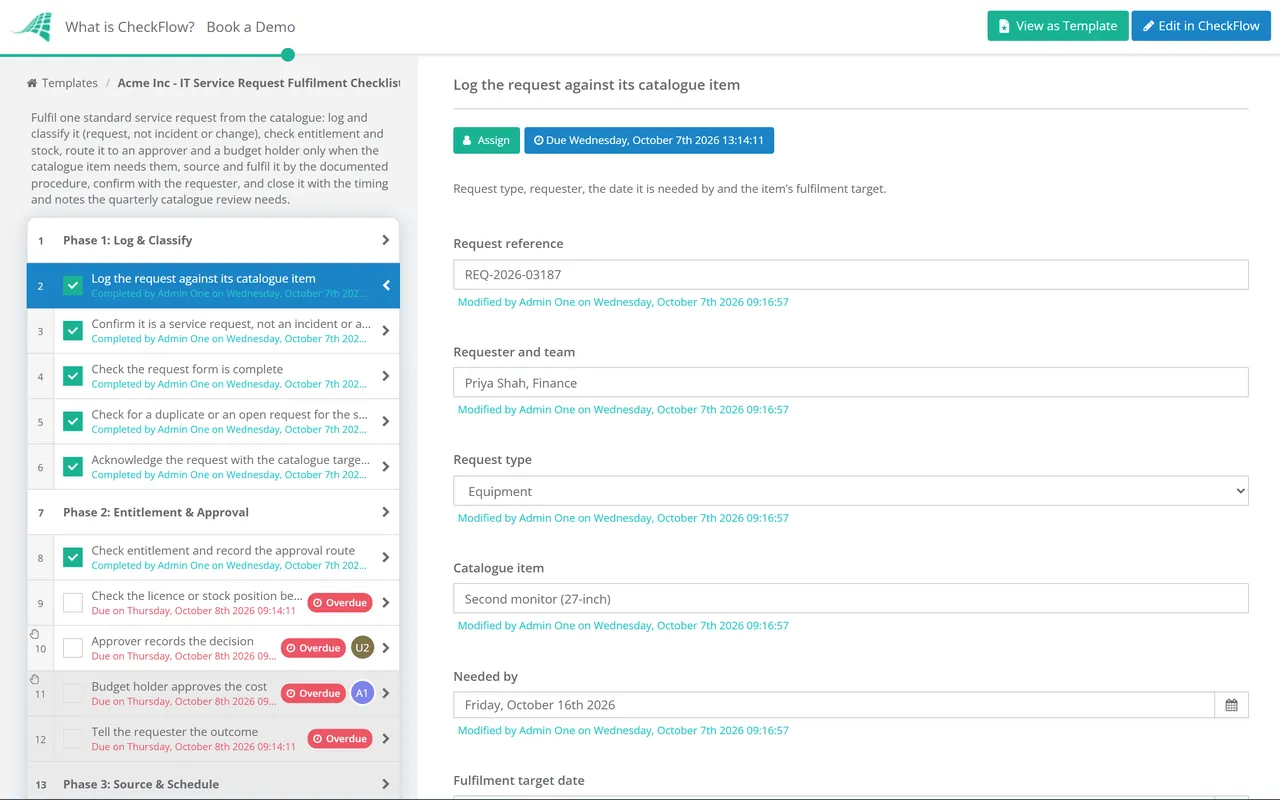
Six phases take one request from the portal to a closed fulfilment record. The request type on the first task shows only the sourcing, fulfilment and verification steps that item needs. The approval route decides whether one approval, two or none appear, and each approval halts the checklist until a decision is recorded. Run it once per request; it has no recurring schedule.
The request type and the fulfiller are recorded on the first task. The request type decides which tasks appear in Phases 3, 4 and 5.
The approval route, approver and budget holder are recorded on the first task. Pre-approved items show neither approval. Each approval halts the checklist until it is recorded as Approved or Not approved.
The licence task appears only for software installs, the stock task only for equipment, and the group task only for access and permission changes. The change task stays visible for every request, because any of them can turn out to be non-standard.
One fulfilment task appears for the request type, between the procedure task and the record task that every request gets.
The device receipt task appears only for equipment requests.
These tasks give the quarterly catalogue review its data. The flag on the last task is what the review sorts by.
Each request checklist shows whether one request was handled well. The catalogue review asks a different question: are these the right items, with the right approvals, procedures and targets? It runs on its own quarterly schedule and reads the records Phase 6 leaves behind. The thresholds below are sensible starting points to tune, not a standard.
| Signal in a quarter’s records | What it usually means | Decision to consider |
|---|---|---|
| An item approved almost every time, say 95% or more | The approval adds waiting, not control | Pre-approve it for the roles that always get it |
| The same console steps, many times a month | A person is doing work a script or group rule could do | Automate it, or make it self-service through group membership |
| Fulfilment time regularly over target | The target is unrealistic, or the procedure has a bottleneck | Fix the bottleneck first; change the target only if it cannot be fixed |
| Approval wait longer than the work itself | Approvers are hard to reach, or the wrong people | Change the approver, add a deputy or send a reminder before the target |
| Incomplete forms, or requests rerouted as incidents | The form or the item description is unclear | Rewrite both in the requester’s words |
| Frequent refusals on entitlement | People can see items they cannot have | Show the item only to entitled roles |
| No requests for two quarters | Nobody needs it, or nobody can find it | Retire it or rename it |
| Repeated requests for something not in the catalogue | A missing item | Write its procedure, approval route and target, then add it |
Treat a new or changed item as a change in its own right. The first time a procedure is written, someone assesses the risk and authorises it; from then on each request under it runs as standard, with no assessment of its own. That is what makes pre-approval safe rather than a shortcut.
Keep the review small. An hour a quarter with the service desk lead, the catalogue owner and one approver from the business is usually enough to act on the flags. Running it from a recurring checklist means it happens in the quarters when the queue is busy, which are the quarters it matters most.
The REST API or a webhook from your request form can start a run as each request arrives, and Zapier covers forms without a developer. Conditional logic reads the request type and shows only the licence, device, access or permission tasks, so a software install runs in a handful of steps.
The approver and budget holder are picked in members fields, and the approval tasks are assigned to them. The checklist halts until they record a decision, so nothing is installed, ordered or granted on an assumed yes, and the decision sits on the request.
Keep catalogue items in a data set with their approval route, procedure and target, so each run fills from the current entry. Fulfilment times, refusal reasons and review flags sit in fields, and the activity trail shows who approved and who fulfilled each request.
This checklist starts once triage has put a ticket in the request pile. The IT Support Checklist sets up the desk, its tiers and SLAs, and the IT Help Desk Daily Checklist keeps the whole queue moving each day, including requests stuck waiting on a decision. Remote staff asking for kit at home follow the IT Equipment Request Process Checklist, which adds shipping and home setup.
A stock laptop is only as good as the build it was prepared to, and that standard lives in the Laptop Provisioning & Imaging Checklist. CheckFlow’s approval software shows how named approvers and halting approvals work for other requests, from purchases to policy exceptions.

IT Support Template
Support Ticket Response Template

IT Help Desk Daily Checklist

IT Change Management Process Template

Laptop Provisioning & Imaging Checklist
Describe the process in a sentence and the AI checklist generator drafts the phases and tasks for you.
It is the work of delivering a standard, catalogued request: installing software, granting access, issuing equipment or changing a permission by a documented procedure, after any approval the item needs, then confirming with the requester and closing with a record. ITIL 4 places it inside the service request management practice, which also covers the catalogue, approval routes and how requests are logged and tracked.
An incident is an unplanned interruption to a service, or a drop in its quality: something that worked has stopped working. A service request is a normal, agreed part of service delivery that a user asks for, such as access or a new device. Keep them in separate categories, because they are measured against different targets and handled by different procedures.
They overlap. In ITIL 4 a standard change is low-risk, pre-authorised, well understood and fully documented, and many are started as service requests. Plenty of requests change nothing in the infrastructure, such as a loan laptop or a how-to question. A request that needs work outside its documented procedure is no longer standard: raise a change record and have it assessed.
Items that are low cost, low risk and granted nearly every time someone in an eligible role asks: software from an approved list, peripherals within an allowance, access to resources every member of a team has. Keep approval for anything above a set cost, anything that opens sensitive data, and anything that needs a business judgement. Revisit the split each quarter using your approval rates.
Measure fulfilment time against each item’s target, with time spent waiting for approval reported separately, so slow approvers do not look like slow fulfillers. Add the share fulfilled right first time, requests reopened, forms returned as incomplete and requester satisfaction. Report per catalogue item, because an average across every item hides the few that are struggling.
A plain description in the requester’s language, who is entitled to it, whether it is pre-approved or who approves it, the form fields needed to fulfil it, the documented procedure, a fulfilment target and a named owner. Without the procedure and the owner, the item is a promise nobody is responsible for keeping.
14-day free trial, no card required. The Business plan is $10 per user per month after the trial. Full details at checkflow.io/pricing.
14-day free trial, no credit cardFull refund in your first 30 daysUS hosting, EU on request