IT Support Checklist Template

A structured IT support process framework — from triage and routing to escalation, resolution, and the metrics that show whether support is actually working.

An IT support function without a defined process is a series of reactive conversations. Someone emails a technician directly — bypassing the ticketing system. The most urgent ticket is not the one getting worked because priority is not visible. A recurring issue is resolved again and again by different technicians because no one wrote up the solution the first time. A user waits three days without acknowledgement because the SLA is aspirational rather than enforced. These are not capability problems — they are structure problems. A defined IT support process establishes the single point of contact, the triage and routing logic, the escalation paths, the SLAs, and the feedback loops that convert a reactive team into a reliable, measurable IT support function. This free IT support checklist gives IT managers, service desk team leads, and MSP operations teams a structured framework for the full IT support operational process.

Use This Template Free See Live Example
No Credit Card Required

The Tiered Support Model — How Effective IT Support Functions Are Structured

Tier 1

Service Desk / First Contact

Role: Single point of contact for all user requests. Handles common, well-defined issues — password resets, software installations, account unlocks, how-to queries, known errors with documented fixes.

Scope: Issues resolvable using knowledge base articles, documented runbooks, or standard procedures without specialist knowledge.

Target first-call resolution: 70–80% of all tickets.

Escalates to: Tier 2 when the issue is not in the knowledge base, requires specialist knowledge, or is not resolved within the Tier 1 SLA.

Tier 2

Technical Support

Role: Specialist technical investigation for issues that cannot be resolved at Tier 1. Covers system administration, network issues, application troubleshooting, and hardware faults.

Scope: Issues requiring specialist technical knowledge, system access, or investigation beyond standard procedures.

Target resolution: Issues escalated by Tier 1 and resolved without vendor involvement.

Escalates to: Tier 3 when resolution requires vendor support, significant infrastructure change, or vendor-held expertise.

Tier 3

Engineering / Vendor Escalation

Role: Highest technical expertise within the organisation (infrastructure engineers, architects) plus vendor and third-party support relationships.

Scope: Complex infrastructure issues, vendor bugs, configuration changes requiring expert knowledge, and escalations requiring vendor involvement.

Target resolution: Issues that require engineering-level intervention or vendor resolution.

Escalates to: Vendor or specialist third party for issues beyond internal capability.

What the IT Support Checklist Covers

This checklist covers the full IT support operational framework in six phases — from establishing the support function through to continuous improvement. Run it to set up a new IT support function or to assess and improve an existing one.

Phase 1

Phase 1: Support Function Setup & Governance

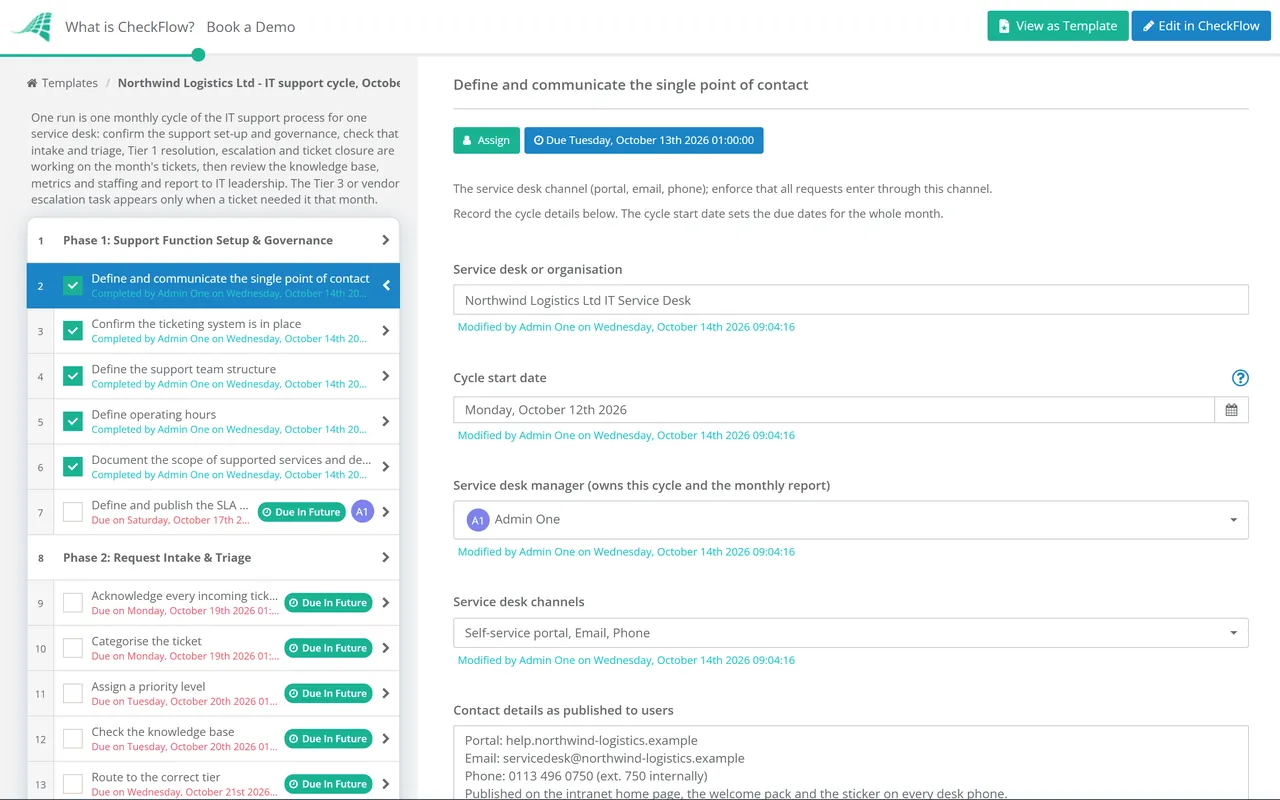
The foundation of an effective IT support function is a single, well-known point of contact. An IT team that accepts requests by email, Teams message, phone, hallway conversation, and ticketing system simultaneously cannot measure, prioritise, or improve its performance.

  • Define and communicate the single point of contact — the service desk channel (portal, email, phone); enforce that all requests enter through this channel
  • Confirm the ticketing system is in place — every request creates a ticket; no request is worked without a ticket number
  • Define the support team structure — Tier 1, Tier 2, Tier 3 roles; who covers each tier; out-of-hours coverage arrangements
  • Define operating hours — supported hours, on-call arrangements, and any 24/7 monitoring coverage; communicated clearly to all users
  • Document the scope of supported services and devices — what is in scope for IT support; what is not; communicated to users and referenced in the support agreement
  • Define and publish the SLA matrix — response and resolution time commitments by ticket priority; accessible to users and the support team

Phase 2

Phase 2: Request Intake & Triage

  • Acknowledge every incoming ticket — an automated acknowledgement within minutes; a human review within the Tier 1 response SLA
  • Categorise the ticket — hardware, software, network, access management, how-to, or other; category determines routing and is required for trend analysis
  • Assign a priority level — P1 (critical, service down), P2 (high, significant impact), P3 (medium, limited impact), P4 (low, no immediate impact); based on impact and urgency
  • Check the knowledge base — is there a documented solution for this issue? If yes, apply and confirm resolution
  • Route to the correct tier — Tier 1 if resolvable with known procedures; Tier 2 if specialist technical knowledge is required; directly to Tier 3 for known infrastructure/engineering issues
  • Set the SLA clock — confirm response and resolution targets are visible to the assignee and monitored
Phase 3

Phase 3: Tier 1 Resolution

  • Contact the user within the Tier 1 response SLA — confirm the issue, gather any additional information needed
  • Apply the documented fix — from the knowledge base or runbook where one exists; do not diagnose from scratch if the solution is documented
  • Communicate progress to the user — within the SLA-defined update intervals; user should not need to chase for an update
  • Confirm resolution with the user — before closing the ticket; a ticket is not resolved until the user confirms it
  • If not resolved within Tier 1 SLA — escalate to Tier 2; do not hold tickets beyond the escalation trigger
Phase 4

Phase 4: Escalation & Specialist Resolution

  • Complete the escalation handover — all investigation steps already taken, steps not tried, and relevant system information documented in the ticket before escalating
  • Confirm the user is notified of escalation — and provided with an updated resolution estimate
  • Tier 2 investigation and resolution — specialist technical diagnosis; solution documented in the ticket as it is developed
  • For Tier 3 or vendor escalation — all relevant diagnostic information, error logs, and previous steps documented for the vendor; a named internal owner maintains oversight
  • Confirm Tier 1 knowledge base is updated — if the Tier 2/3 resolution reveals a fix that Tier 1 could apply in future; document before closing
Phase 5

Phase 5: Ticket Closure & User Satisfaction

  • Confirm resolution with the user before closing — automated confirmation request sent; ticket remains in “pending confirmation” for a defined period before auto-close
  • Provide a CSAT survey — a brief satisfaction survey triggered on ticket closure; optional but recommended for all priority tickets
  • Document the resolution — what the issue was, what caused it, and what fixed it; structured fields, not free text
  • Close the ticket — with all fields completed; incomplete ticket records produce unreliable trend data
  • Identify whether this is a recurring issue — same root cause appearing multiple times; flag for problem management
Phase 6

Phase 6: Knowledge Base Management & Continuous Improvement

  • Review the knowledge base monthly — articles that have not been used in 90 days reviewed for currency; outdated articles archived
  • Add new knowledge base articles after any Tier 2/3 resolution — that reveals a solution applicable to future Tier 1 tickets
  • Review support metrics monthly — ticket volume, first-contact resolution rate, mean time to resolve (MTTR), SLA compliance rate, and CSAT score
  • Identify recurring issues — multiple tickets with the same root cause; escalate for problem management review
  • Review staffing against demand — is the team resourced adequately for current ticket volume? Are SLAs being met consistently?
  • Report to IT leadership monthly — support performance summary, trend analysis, and any capacity or recurring issue recommendations

The Metrics That Tell You Whether IT Support Is Working

These six metrics, tracked consistently, show where the support function is performing and where it needs attention.

Resolution quality

First Contact Resolution (FCR)

Definition: % of tickets resolved at Tier 1 without escalation.

Benchmark: 70–80% is good; below 60% suggests knowledge base gaps or Tier 1 skill gaps.

Efficiency

Mean Time to Resolve (MTTR)

Definition: Average time from ticket creation to resolution, by priority level.

Why: Trend over time reveals whether process improvements are working; by priority shows where focus is needed.

Commitment

SLA Compliance Rate

Definition: % of tickets resolved within the committed SLA timeframe.

Benchmark: 95%+ for P1/P2; 90%+ overall is the minimum for a well-functioning service desk.

User experience

Customer Satisfaction Score (CSAT)

Definition: Average score from user satisfaction surveys following ticket closure.

Why: The quality metric that complements the efficiency metrics; fast resolution that satisfies the user is the goal.

Capacity

Ticket Backlog

Definition: Number of open tickets beyond their target resolution date.

Why: A growing backlog is the earliest visible indicator of capacity or process problems.

Fix quality

Repeat Ticket Rate

Definition: % of tickets that are for the same issue that was previously resolved.

Why: High repeat rates indicate workarounds rather than fixes; input to problem management.

Why Use CheckFlow for IT Support?

1

Consistent process for every support request

CheckFlow’s IT support checklist runs the same triage, routing, and escalation sequence for every ticket — ensuring priority is visible, SLA clocks are set, and escalation paths are followed regardless of who is on shift. A consistent process produces consistent service quality.

2

Knowledge base update tasks embedded in every resolution

The most common knowledge management failure in IT support is that Tier 2/3 resolutions are never written back to the Tier 1 knowledge base — so the same issue is escalated again next week. CheckFlow’s ticket closure phase includes a knowledge base update task, making continuous improvement a structural part of the process rather than an intention.

3

Metrics tracked automatically as the process runs

Every ticket processed through CheckFlow generates timestamped data on triage time, escalation time, and resolution time. The MTTR, SLA compliance, and escalation rate metrics that IT managers need are built from this data automatically — without separate tracking spreadsheets.

The IT support process covers the operational framework. For the individual ticket handling workflow in detail, CheckFlow’s Support Ticket Response Template covers the step-by-step process for each ticket from intake to closure. See the Support Ticket Response Template →

For MSPs managing IT support across multiple client environments simultaneously, CheckFlow’s MSP Process Management page covers the multi-client process visibility that MSP operations require. See CheckFlow for MSPs →

Frequently Asked Questions

What should an IT support process include?

+

An IT support process covers six areas: support function setup and governance (single point of contact, ticketing system, team structure, operating hours, scope, SLA matrix), request intake and triage (acknowledgement, categorisation, priority assignment, and routing), Tier 1 resolution (known issue resolution using knowledge base, user communication, and escalation trigger), Tier 2 and 3 escalation (structured handover, vendor escalation, and knowledge base update), ticket closure and satisfaction (user confirmation and CSAT), and continuous improvement (knowledge base maintenance, metrics review, and recurring issue identification). The tiered model — Tier 1 for common issues, Tier 2 for specialist investigation, Tier 3 for engineering and vendor escalation — is the standard structure for effective IT support functions.

What is a good first contact resolution rate?

+

A first contact resolution (FCR) rate of 70–80% is generally considered strong for a well-resourced IT service desk. FCR measures the percentage of tickets resolved at Tier 1 without escalation to a specialist team. Rates below 60% typically indicate one of three problems: insufficient knowledge base coverage (solutions that Tier 1 should be able to apply are not documented), Tier 1 skill gaps (technicians who lack confidence or training to apply known solutions independently), or incorrect triage (tickets routed to Tier 1 that genuinely require Tier 2 involvement). Tracking FCR by category reveals which of these is the primary driver.

What is the difference between a service desk and a help desk?

+

The terms are often used interchangeably but historically refer to different scope levels. A help desk is primarily reactive — it handles break-fix incidents and user requests, focusing on returning users to normal operation. A service desk is broader in scope, covering the full range of IT service interactions including incidents, service requests, access management, and change support. ITIL defines the service desk as the single point of contact between the IT department and users for all service interactions. Most modern IT support functions operate as service desks rather than help desks, handling both reactive incidents and proactive service requests.

What priority levels should IT support use?

+

A four-level priority matrix is the ITIL-aligned standard: P1 (Critical) for complete service outages or major security incidents affecting multiple users — immediate response, hours-level resolution. P2 (High) for significant degradation or issues affecting key business functions — response within one hour, resolution within four hours. P3 (Medium) for single-user issues with a workaround available — response within four hours, resolution within one business day. P4 (Low) for requests, minor issues, and questions — response within one business day, resolution within three to five business days. Priority should be assigned based on both impact (how many users affected and how critical) and urgency (how time-sensitive the resolution is).

Is CheckFlow free for this template?

+

14-day free trial, no card required. The Business plan is $10 per user per month after the trial. Full details at checkflow.io/pricing.

Build an IT Support Process That Runs Consistently — Not Just When the Right Person Is Available

Free trial — no credit card required.