Engagement surveys rarely fail on the questions. They fail afterwards, when the results sit in a slide deck and staff are asked to fill in the next one without seeing anything change.
Printed from checkflow.io/templates/human-resources/employee-engagement-survey-checklist
This free employee engagement survey checklist runs one complete survey cycle, from agreeing what the survey is for to checking, a few months later, whether the actions made a difference. It covers question design, the anonymity threshold, data protection and any survey vendor, a leadership sign-off, launch and reminders, analysis by team and action planning with managers. It is about the survey itself. For the day-to-day activities that build engagement in distributed teams, such as one-to-ones, recognition and social time, use the Remote Team Engagement Checklist.
Why Engagement Surveys Lose Trust
Nothing visibly changes. Staff will answer honestly once or twice. If they never hear what was found or what was done, response rates fall and the comments get shorter. Gallup, which defines engagement as the involvement and enthusiasm of employees in their work and workplace, makes the same point: measuring it is only useful if follow-up action comes next. The template treats action planning as part of the survey, not an optional extra.
The anonymity promise is broken by the reports. A survey can collect no names and still identify people. A team of three, split by gender and length of service, points to individuals. Agreeing a minimum group size before launch, and sticking to it when a senior manager asks for a breakdown, is what makes the promise real.
The questions change every time. Rewording a question each year makes trends meaningless. Validated items, kept the same from cycle to cycle, let you see whether last year’s actions moved anything.
It runs on memory. Most organisations survey once or twice a year, so the person running it has often forgotten what worked last time. A checklist that repeats on a schedule carries the steps, the dates and the lessons from one cycle to the next.
Full survey
Once or twice a year
A broad set of validated items covering the main drivers of engagement
The eNPS question and a few open questions
Results broken down by team and a small number of demographic groups
Piloted with a small group before launch
Sets the priorities for the year’s action plans
Pulse survey
Short and focused
A handful of items taken from the last full survey
Targets the areas teams chose to act on
Quick to answer, so it can run between full surveys
The same anonymity threshold still applies
Shows whether the actions are working before the next full survey
In the UK, survey responses are usually personal data under the UK GDPR even when no names are collected, because combining them with HR records can identify people. In the US there is no single federal law that plays the same role for employee survey data, and state privacy laws vary, so check the states where your staff work. If you plan to ask about health, disability or ethnicity, or to link responses to HR records, take advice from your data protection officer or an employment lawyer before the survey goes out.
What the Engagement Survey Checklist Covers
Seven phases, from setting objectives to the follow-up pulse. Two questions at the start shape the checklist: full survey or pulse, and whether an external survey vendor is used.
1
Phase 1
Phase 1: Objectives & Scope
5 tasks
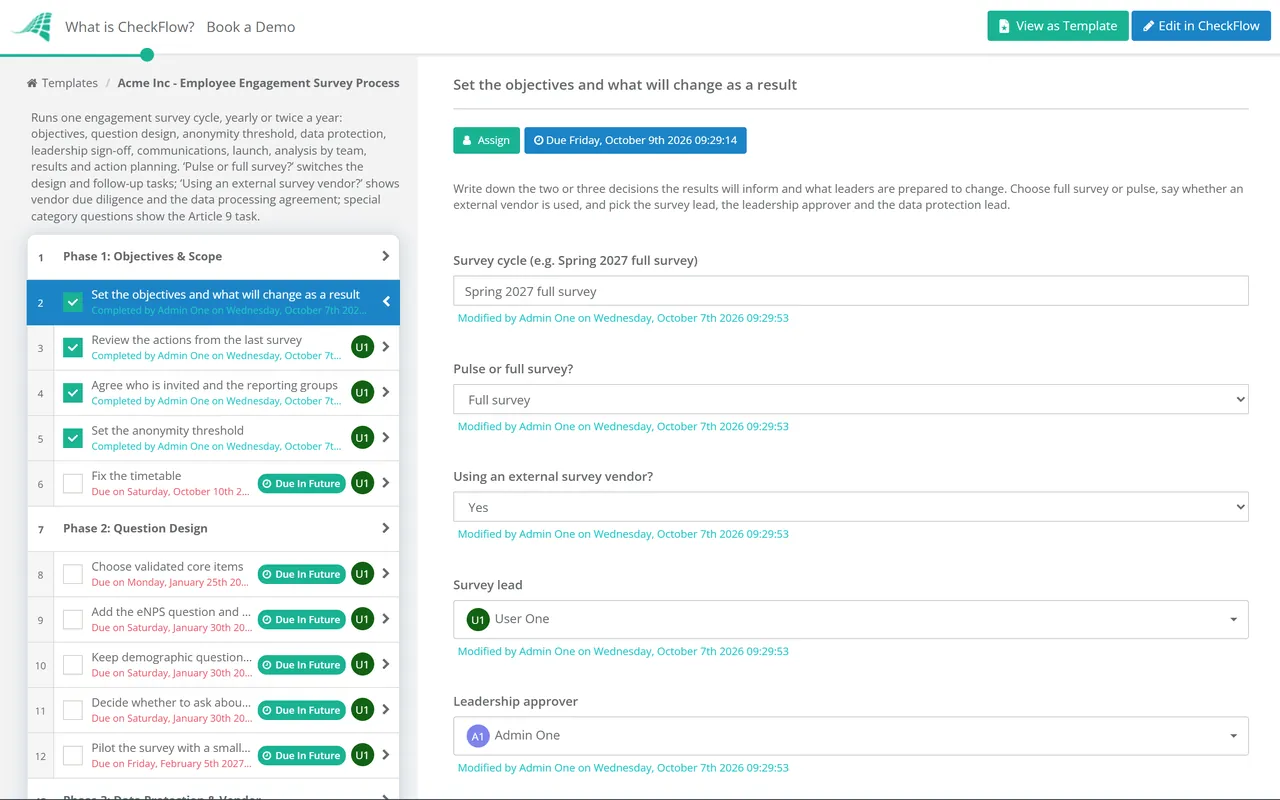
Set the objectives and what will change as a result — the two or three decisions the results will inform
Review the actions from the last survey — what was promised, done and dropped
Agree who is invited and the reporting groups — headcount per team, and where small teams roll up
Set the anonymity threshold — the minimum number of responses before a group’s results are shown; five or more is common practice
Fix the timetable — launch, close, results and action-planning dates
2
Phase 2
Phase 2: Question Design
6 tasks
The core-items and pilot tasks are shown for a full survey; the pulse-items task for a pulse.
Choose validated core items — worded the same every cycle so trends compare
Pick the pulse items — a short set from the last full survey, weighted to the action areas
Add the eNPS question and two or three open questions
Keep demographic questions to the minimum — every extra one makes the groups smaller
Decide whether to ask about health, disability or ethnicity — special category data under the UK GDPR
Pilot the survey with a small group — timing, unclear wording and mobile access
3
Phase 3
Phase 3: Data Protection & Vendor
6 tasks
The vendor tasks are shown when an external survey vendor is used, and the Article 9 task when special category questions are asked.
Record the lawful basis — often legitimate interests, with a short written assessment
Record the Article 9 condition for special category questions
Check whether a DPIA is needed — the ICO recommends one if in any doubt
Write the survey privacy information — purpose, who sees what, how long data is kept and what reports will show
Run due diligence on the survey vendor — security, where data is held, sub-processors and how the threshold is enforced
Sign a data processing agreement with the vendor — including return or deletion of data at the end
4
Phase 4
Phase 4: Sign-Off & Communications
4 tasks
Draft the communications plan — announcement, reminders, results date and how results will be used
Leadership signs off the survey and communications plan — nothing launches until it is approved
Brief managers before launch — what to say, what not to do, and the action-planning dates
Announce the survey — why it is running, what changed last time, the anonymity rules and the closing date
5
Phase 5
Phase 5: Launch & Response Tracking
5 tasks
Set up the survey and test the reporting threshold — then delete the test responses
Launch the survey
Send reminders — to everyone invited, never to named individuals
Track response rates by group — share rates, never who has or has not responded
Close the survey and lock the data
6
Phase 6
Phase 6: Analysis & Results
5 tasks
Analyse results by team with the threshold applied — groups below it roll up into the next level
Read the open comments and remove identifying details
Brief leadership on the themes and priorities
Share the company results with all staff — on the date promised in the announcement
Give each manager their team report — only for teams at or above the threshold
7
Phase 7
Phase 7: Action Planning & Follow-Up
6 tasks
After a full survey, the follow-up pulse task is shown; after a pulse, the results feed into the next full survey.
Hold a results conversation in every team — the manager presents, the team interprets
Agree one to three actions per team — each with an owner and a date
Log the actions and report back to staff — a short ‘you said, we did’ update
Run a follow-up pulse on the action areas — a few months after the full survey
Many surveys promise anonymity when what they offer is confidentiality. The ICO’s answer to an employer planning a staff diversity survey is a useful test: if you can identify someone by combining their answers with other information you hold, the data is pseudonymous, not anonymous, and data protection law still applies. Removing names is not enough on its own. Tell staff exactly which of the set-ups below you are using.
Set-up
What it really is
What to tell staff
Personal links tied to HR data
Pseudonymous: someone, usually the vendor, can link answers to a person
Who holds the link, that you only see grouped results, and the minimum group size
One open link, a few demographic questions
Often still pseudonymous: answers can be matched to HR records in small groups
Which demographic questions are asked, that they are optional, and how small groups are rolled up
One open link, no demographics, organisation-wide results only
Closest to anonymous, but open comments can still identify the writer
That comments are read and edited for identifying details before anyone else sees them
The more pseudonymous the set-up, the more the privacy information has to say, and the ICO recommends considering encryption and other privacy-enhancing techniques. On lawful basis, it notes that the power imbalance between employer and employee makes consent hard to rely on, and points to legitimate interests, documented in an assessment, as the alternative. Health, disability and ethnicity are special category data, which also needs an Article 9 condition. The ICO’s guidance on these points is under review following the Data (Use and Access) Act, so check it again before each full survey.
Apply the same care to response tracking. Sharing a team’s response rate during the survey helps managers encourage people to take part. Telling a manager which individuals have not yet answered does the opposite: it shows that someone can see who responded, which undermines every assurance in the announcement. If your survey tool can show named non-responders, switch that view off or limit it to the survey lead, and say so in the privacy information.
Before launch
Reporting rules to write down
The minimum responses per group, the same for every report
Where a group below the threshold rolls up to
No cross-cuts that create a smaller group, such as team by age band
No comparing two reports to work out a small group by subtraction
Who can see raw data, and who sees grouped reports only
How long raw responses are kept, and when they are deleted
After close
Handling open comments
One named person reads every comment first
Names, roles and specific incidents are removed or reworded
Comments go to managers only when the team meets the threshold
Allegations of harassment or wrongdoing go to the right procedure, not the report
Themes are summarised rather than quoted where quoting could identify someone
Why Run Engagement Surveys in CheckFlow?
1
Every cycle starts on time
Put the checklist on a recurring schedule, yearly or twice a year, and the next cycle starts on its own. Due dates are set from the launch, close and results dates, so the whole timetable moves if launch slips by a week.
2
Only the steps that apply
Dropdowns on the first tasks show the full-survey or pulse steps, the vendor due diligence and data processing agreement when a vendor is used, and the Article 9 task only when special category questions are asked.
3
A sign-off and a record of action
Leadership approval of the survey and communications plan halts the checklist until it is given. Comments, file uploads and an audit trail record who did what and when, and reports show which teams have agreed their actions.
An engagement survey is one of several recurring HR cycles. CheckFlow’s HR checklist software runs surveys, performance reviews, onboarding and departures from templates, with assignments, due dates and approvals shared between HR and line managers.
Describe the process in a sentence and the AI checklist generator drafts the phases and tasks for you.
Frequently Asked Questions
What is an employee engagement survey?
It is a questionnaire that asks staff how they feel about their work, their manager and the organisation, so that leaders and managers can decide what to change. Definitions of engagement vary. The CIPD favours the idea of work engagement as a state of vigour, dedication and absorption, and recommends validated measures such as the Utrecht Work Engagement Scale over a single composite score. Whatever you measure, the survey is only the start of a cycle that ends in action.
How often should we run an engagement survey?
Most organisations run a full survey once or twice a year, with a short pulse in between to check progress on the actions. Run it more often than you can act on the results and people stop answering. Whatever cadence you choose, keep the timing consistent so that results from one cycle compare fairly with the next.
What is eNPS and how is it calculated?
The employee Net Promoter Score adapts Bain’s Net Promoter Score to staff. People rate, from 0 to 10, how likely they are to recommend the organisation as a place to work. Those who answer 9 or 10 are promoters and those who answer 0 to 6 are detractors. The score is the percentage of promoters minus the percentage of detractors, so it runs from −100 to +100. It is a useful headline, but it does not say why people feel as they do, which is what the other items and the open questions are for.
What minimum group size should we use for reporting?
There is no legal figure. A minimum of five responses is a common choice, and many organisations use a higher number for demographic breakdowns or for open comments. What matters more is that the threshold is set before launch, written into the survey announcement and applied to every report, including the ones a senior manager asks for after the results are in.
Is an anonymous survey outside the UK GDPR?
Truly anonymous information is outside the UK GDPR, but most staff surveys do not meet that standard. The ICO says that if an employer can identify someone by combining survey answers with other data it holds, the answers are pseudonymous, and data protection law applies. That means a lawful basis, privacy information given when the data is collected, a contract with any vendor that processes the data for you, and an Article 9 condition if you ask about health, ethnicity or other special category data.
Is CheckFlow free for this template?
14-day free trial, no card required. The Business plan is $10 per user per month after the trial. Full details at checkflow.io/pricing.