Annual, on profit
- One federal return plus state returns, once a year
- Based on the year’s profit, with estimated payments
- Covered by the Tax Preparation Checklist
Last reviewed: October 2026
No Credit Card Required
Printed from checkflow.io/templates/finance-accounting/sales-tax-filing-checklist
This checklist is written for US sales and use tax. It is for controllers, tax managers and finance managers at businesses that sell into several states, whether they file themselves or through a provider. It runs every filing period and covers the nexus check, registration, transaction data by jurisdiction, reconciliation of tax collected, use tax, review, filing and payment, and the annual clean-up. A new-state registration phase appears only when a state crosses its threshold, a notices phase only when a letter arrives, and the annual review only in the last period of the year. For UK VAT, use the VAT Return Checklist instead.
There is no federal sales tax in the US. Forty-five states and the District of Columbia impose one, each with its own rates, taxability rules, forms, due dates and filing frequency, and thousands of local jurisdictions add their own rates on top. A business selling across the country can file dozens of returns a month.
Since the Supreme Court’s decision in South Dakota v. Wayfair on 21 June 2018, a state can require you to collect its tax without any office, staff or stock there. Every state with a sales tax now has an economic nexus rule based on your sales into it, and a marketplace facilitator rule that makes marketplaces collect on the sales they handle. For a growing business, crossing a threshold is a monthly question.
The tax you collect is not your money: you hold it for the state, and many states can pursue responsible officers personally for tax collected and not paid over. Accept an invalid exemption and the tax becomes yours to pay.
Seven phases take each filing period from the nexus check to a reconciled liability account. Phase 2 appears only when a new state has crossed its threshold, Phase 6 only when a notice or audit letter has arrived, and Phase 7 only in the last period of the calendar year.
Owned by the tax preparer. The three scope questions decide which of Phases 2, 6 and 7 this period’s checklist shows.
Shown only when the nexus tracker shows a state over its threshold where you are not yet registered.
Shown only when a notice, audit letter or certificate request has arrived.
Shown only in the last filing period of the calendar year.
Most states require a remote seller to register once its sales into the state exceed $100,000 in the current or previous calendar year, but definitions vary. The table shows some of the largest states as at October 2026. Check each state’s own guidance before relying on a threshold.
| State | Economic nexus threshold | Filing points to know |
|---|---|---|
| California | $500,000 of sales of tangible personal property, no transaction count | Quarterly filers with average taxable sales of $17,000 or more a month make prepayments by the 24th of the two months in which no return is due; the return is due by the last day of the month after the quarter |
| Texas | $500,000 of revenue from Texas in the preceding 12 months | Returns due on the 20th of the month after the period; 0.5% timely filing discount, plus 1.25% for qualifying prepayments |
| New York | More than $500,000 of sales of tangible personal property and more than 100 sales, in the preceding four sales tax quarters | Sales tax quarters run March to May, June to August, September to November and December to February; returns due on the 20th after the period |
| Florida | More than $100,000 of taxable remote sales in the previous calendar year | Due on the 1st, late after the 20th; a return is required even when no tax is due, and the late penalty is 10% of the tax, minimum $50; timely electronic filers keep 2.5% of the first $1,200 of tax, up to $30 |
| Alabama | $250,000 of retail sales in the previous calendar year | Remote sellers can join the Simplified Sellers Use Tax programme and collect a flat 8% on all sales into the state, filed by the 20th of the following month |
| Illinois and Kentucky | $100,000 of sales; the 200-transaction test was removed in Illinois from 1 January 2026 and in Kentucky from 1 August 2026 | Re-test any state you registered in only because of the transaction count |
The transaction count is disappearing. South Dakota’s original law used $100,000 of sales or 200 transactions, and most states copied both. Many have since dropped the transaction count. As at October 2026 they include Alaska’s Remote Seller Sales Tax Commission (from 1 January 2025), Illinois (from 1 January 2026) and Kentucky (from 1 August 2026), alongside earlier movers such as South Dakota, North Carolina, Indiana, Utah, Wyoming and Washington. Others still apply it.
More is becoming taxable. Washington extended retail sales tax to services including IT services, custom software, temporary staffing and advertising from 1 October 2025. California (SB 122, signed on 29 June 2026) and Colorado (HB26-1223, signed on 4 June 2026) both begin taxing software as a service and electronically delivered prewritten software on 1 January 2027, with custom software still exempt. Software sellers should update taxability settings before January 2027.
Certificates and disclosures. In the 24 states in the Streamlined Sales and Use Tax Agreement, a seller holding a fully completed exemption certificate obtained within 90 days of the sale is generally relieved of liability. For past exposure, a voluntary disclosure agreement typically limits the look-back to three or four years and waives penalties, but rarely for tax you collected and did not pay over.
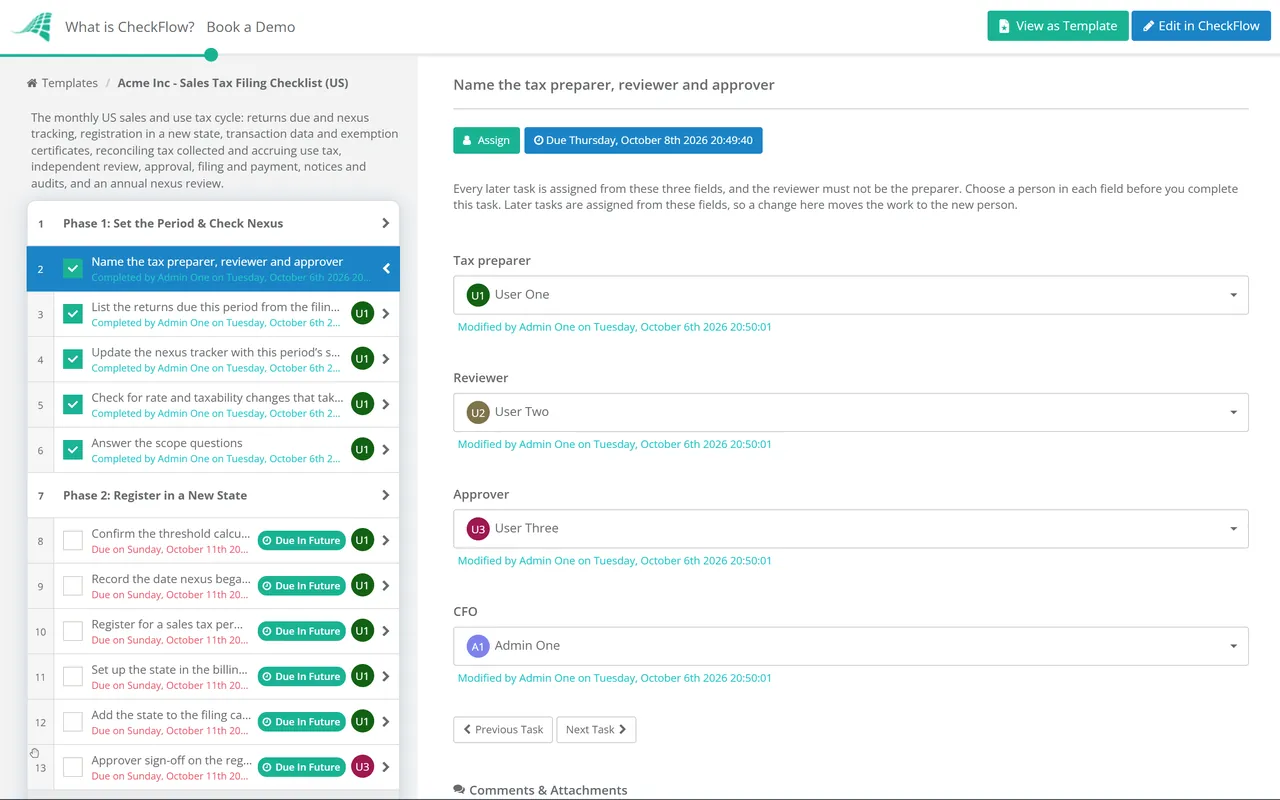
Keep registered states, permit numbers, frequencies and due dates in a data set and pick the state on each task from a live dropdown. A monthly schedule starts the checklist on the first working day with everyone assigned.
Three questions in Phase 1 decide the rest: no new nexus hides registration, no notice hides the audit phase, and the annual review appears once a year. Returns wait until the approver approves them.
Reconciliations, filed returns, confirmation numbers and certificate chases sit on the tasks that produced them, with a timestamped record of who did each. When an auditor asks for a return and its support years later, it is one export away.
CheckFlow is not a tax engine or a filing service. It does not calculate rates, determine nexus or file returns. It runs the workflow around the billing system, tax engine and state portals you already use, so every period is prepared, reviewed and signed off the same way. See how conditional logic keeps a monthly checklist short when nothing unusual has happened.
The Monthly Invoicing & Billing Run Checklist gets tax right on the invoice, the Accounts Payable Process Checklist catches untaxed purchases for use tax, and the Month-End Close Checklist reconciles the liability account with everything else.
Describe the process in a sentence and the AI checklist generator drafts the phases and tasks for you.
It is the obligation to collect a state’s sales tax because of how much you sell into it, even with no physical presence there, following South Dakota v. Wayfair (2018). Most states set the threshold at $100,000 of sales in the current or previous calendar year; California, New York and Texas use $500,000, and Alabama and Mississippi $250,000. Some states also count transactions, usually 200, though several have dropped that test.
Generally yes. Once you hold a permit, most states expect a return for every period on your assigned frequency, even if you owe nothing, and a missed zero return can bring a penalty. Florida, for example, can charge a minimum $50 late penalty when no tax is due. If you no longer need a registration, close it under that state’s rules rather than letting returns lapse.
Sales tax is collected by the seller on a taxable sale. Use tax is the matching tax on taxable items bought without sales tax, usually from an out-of-state vendor that was not registered, and it is owed by the buyer. Businesses accrue it on their own purchases, such as equipment, software and supplies, and report it on their sales tax return or a separate use tax return.
It depends on the state. Every state with a sales tax has a marketplace facilitator law, so the marketplace collects and remits the tax on sales it facilitates. Some states still count those sales towards your own threshold and others exclude them, and some expect a registered seller to report them on its return. Record them separately so you can apply each state’s rule.
14-day free trial, no card required. The Business plan is $10 per user per month after the trial. Full details at checkflow.io/pricing.
14-day free trial, no credit cardFull refund in your first 30 daysUS hosting, EU on request