
Account access only after approval
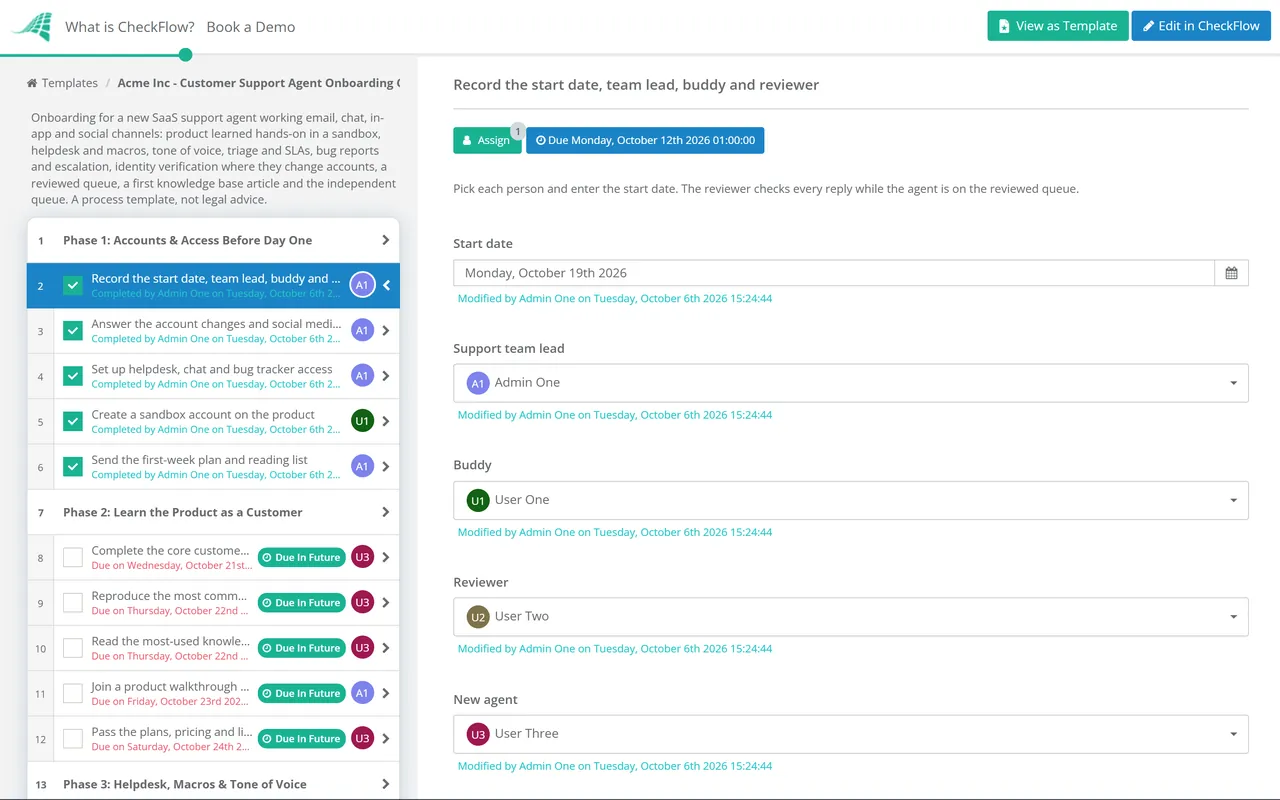
One answer on the first phase decides whether the identity verification phase appears at all. When it does, it ends in the team lead’s approval, and nothing after that task opens until the approval is in.
Last reviewed: October 2026
No Credit Card Required
Printed from checkflow.io/templates/employee-onboarding/support-agent-onboarding-checklist
This free customer support agent onboarding checklist is for support leads at SaaS and software companies hiring agents to work email, chat, in-app messages and social channels. It starts with the product, used hands-on in a sandbox the way a customer would use it, before the agent touches the helpdesk. Then come macros and tone of voice, triage against your SLAs, bug reports engineering can act on, and the privacy and security requests that must never be handled alone. Agents work a reviewed queue before an independent one, and write their first knowledge base article on the way. For voice agents working scripts, telephony and live-call nesting, use the Call Centre Agent Onboarding Checklist. HR paperwork and payroll sit in the Employee Onboarding Checklist.
The usual first week in SaaS support is a tour of the helpdesk, a folder of macros and a pile of tickets to read. The agent learns how to answer before they know what the product does, so they lean on macros and send replies that are polite, fast and slightly off. Customers notice, and the senior agents spend their time correcting drafts instead of handling the hard tickets.
A better order is to make the new agent a customer first. They sign up on a sandbox account, complete the jobs most tickets are about, and reproduce the problems customers report. Once they have broken the product themselves, the knowledge base reads differently and the macros make sense. Because written support is mostly asynchronous, there is also room for a reviewed queue: the agent drafts real replies, a reviewer checks them before they are sent, and nothing wrong reaches a customer while they learn. Each channel then asks for something slightly different.
| Channel | What the new agent has to learn |
|---|---|
| A complete answer in one reply, with the steps numbered and the right article linked | |
| Live chat | Short messages, how many chats to hold at once, and when to move a chat to a ticket |
| In-app messages | Using what the customer was doing on screen when they wrote in, without asking them to repeat it |
| Social media | Replying in public without account details, then moving the conversation to a private channel |
Seven phases run from a sandbox account to the independent queue. Identity verification appears only for agents who will change customer accounts, and the social media task only for agents who reply in public.
No tickets yet. The agent uses the product before reading about it.
Shown only for agents who will change customer accounts. It closes with the team lead’s sign-off, which holds the checklist until given.
The move to the independent queue is an approval, given when the review log shows few corrections, not when a set number of days has passed.
Spot checks carry on until the reviewer is satisfied. The 30-day review is due a month after the start date, whichever day the agent left the reviewed queue.
Most tickets are questions about the product. A few look the same in the queue but carry a legal deadline or a security risk, and the new agent is often the first person to read them. Training should focus on spotting these four and passing them on fast. This is process guidance, not legal advice; your privacy and security leads own the rules.
California’s rules apply only to businesses that meet the CCPA thresholds, and several other US states have their own privacy laws with different deadlines. In the UK, the Data (Use and Access) Act 2025 amends parts of the subject access rules, so check the ICO’s current guidance before you write the training. Sources: the ICO on recognising a subject access request, the California Privacy Protection Agency regulations, the CISA Scattered Spider advisory and the ICO on reporting a breach.
One answer on the first phase decides whether the identity verification phase appears at all. When it does, it ends in the team lead’s approval, and nothing after that task opens until the approval is in.
The buddy and reviewer are picked once, so drafts and reviewed replies go to the right person. The feedback log sits on the checklist as a table, and the move to the independent queue is an approval based on that log rather than a date on the calendar.
Every due date is set from the agent’s start date, which lets a support lead hiring several agents at once see who is behind. Quiz scores, the first article link and the 30-day review notes are recorded with names and timestamps, and the reports compare one hire with the next.
Support teams grow in bursts after a launch or a funding round. CheckFlow’s onboarding software keeps a separate template for each role, with conditional phases, approvals and reports showing which new agents are still on the reviewed queue.
Support Ticket Response Checklist
IT Support Checklist

Call Centre Agent Onboarding Checklist
Customer Success Strategy Checklist
SaaS Customer Onboarding Checklist
Describe the process in a sentence and the AI checklist generator drafts the phases and tasks for you.
When the reviewed queue shows they no longer need it. Count the corrections in the review log: once replies go out with only minor edits across the ticket types they will handle, the team lead can approve the move. A complex product takes longer than a simple one, so a fixed number of days tends to be wrong in both directions. Keep spot checks going for the first weeks on the independent queue.
Yes, as a starting point. Macros keep facts, links and policy wording consistent, which matters most when someone is new. The risk is sending a macro that answers a slightly different question from the one the customer asked. Train agents to read the ticket twice, pick the macro, then edit it so the first line responds to what the customer actually wrote. Reviewers should flag unedited macros in the reviewed queue.
Use something the requester cannot simply know or invent. The safest checks run through a channel already linked to the account, such as a request made from the signed-in app or a confirmation sent to the registered email address. Details found in a signature, on LinkedIn or in an old invoice prove little. Write down which check each type of change needs, and require a second person for the riskiest ones, such as removing two-factor authentication.
Acknowledge it, tell the customer who will handle it, and route it to the privacy team the same day using your agreed process. The agent should not delete anything or promise a timescale themselves. Requests for a copy of personal data work the same way. Under UK data protection law these requests can arrive in any channel and in any wording, so agents need to recognise them even when the customer never uses a legal term.
This checklist is for written support, mostly asynchronous, where the agent can draft and have a reply checked before it is sent. It puts product knowledge, the knowledge base and engineering escalation at the centre. Teams that answer the phone in real time need something else. The Call Centre Agent Onboarding Checklist is built around the softphone and dialler, fixed script lines, taking payments without recording them, calling rules, and a supported first period on real calls.
14-day free trial, no card required. The Business plan is $10 per user per month after the trial. Full details at checkflow.io/pricing.
14-day free trial, no credit cardFull refund in your first 30 daysUS hosting, EU on request