User access review
Population: every account on in-scope systems, privileged or not.
Reviewer: line managers and system owners.
Question: does this person still need this access?
Cadence: quarterly or six-monthly.
No Credit Card Required
Printed from checkflow.io/templates/cybersecurity/privileged-access-review-checklist
A privileged access review looks only at the accounts that can change systems, read everything or switch security controls off, and asks harder questions of each than a normal access review would. Who owns it? Does it need the access all the time, or only when a change is approved? Is it a dedicated admin account protected by phishing-resistant MFA? When was its key last rotated, and can it log on interactively? Was every use of the break-glass account explained? This free privileged access review checklist runs that cycle every quarter for security, IAM and GRC teams preparing for SOC 2, ISO 27001 or PCI DSS assessments: inventory privileged accounts across every platform, justify standing access, check admin and service account controls, test break-glass, reconcile vault and session evidence, remove what is not needed with proof, and record management approval.
Most organisations already run a user access review: managers and system owners certify every account in scope as keep, modify or remove. That review includes administrators, but it treats them as one category among many, and the reviewer is usually asked a single question: does this person still need this access? For privileged accounts that is not enough. A domain admin who still needs the role can still be a finding if the role is standing rather than just-in-time, if they use the same account for email, if MFA can be satisfied by an SMS code, or if a service account with the same rights has not had its secret changed in four years.
Privileged accounts are also spread more widely than user accounts. Cloud IAM roles in AWS, Azure and Google Cloud, database owner rights, local administrator on servers, root on network devices, hypervisor management consoles, SaaS admin panels and the backup console all grant control, and few of them are governed by the main identity provider. Attackers know this, and ransomware groups routinely go after the backup console before they encrypt anything. The privileged review pulls all of these into one inventory and checks them against the same standard.
Population: every account on in-scope systems, privileged or not.
Reviewer: line managers and system owners.
Question: does this person still need this access?
Cadence: quarterly or six-monthly.
Population: admin, root, service, machine and break-glass accounts across every platform.
Reviewer: system owners and security, with the CISO approving.
Questions: standing or just-in-time, dedicated account, phishing-resistant MFA, secret age, vault and session evidence, segregation of duties.
Cadence: quarterly, or monthly for the highest-risk platforms.
Run both. The user access review’s privileged phase becomes a cross-check: anything it finds that is not in this review’s inventory means the inventory is incomplete.
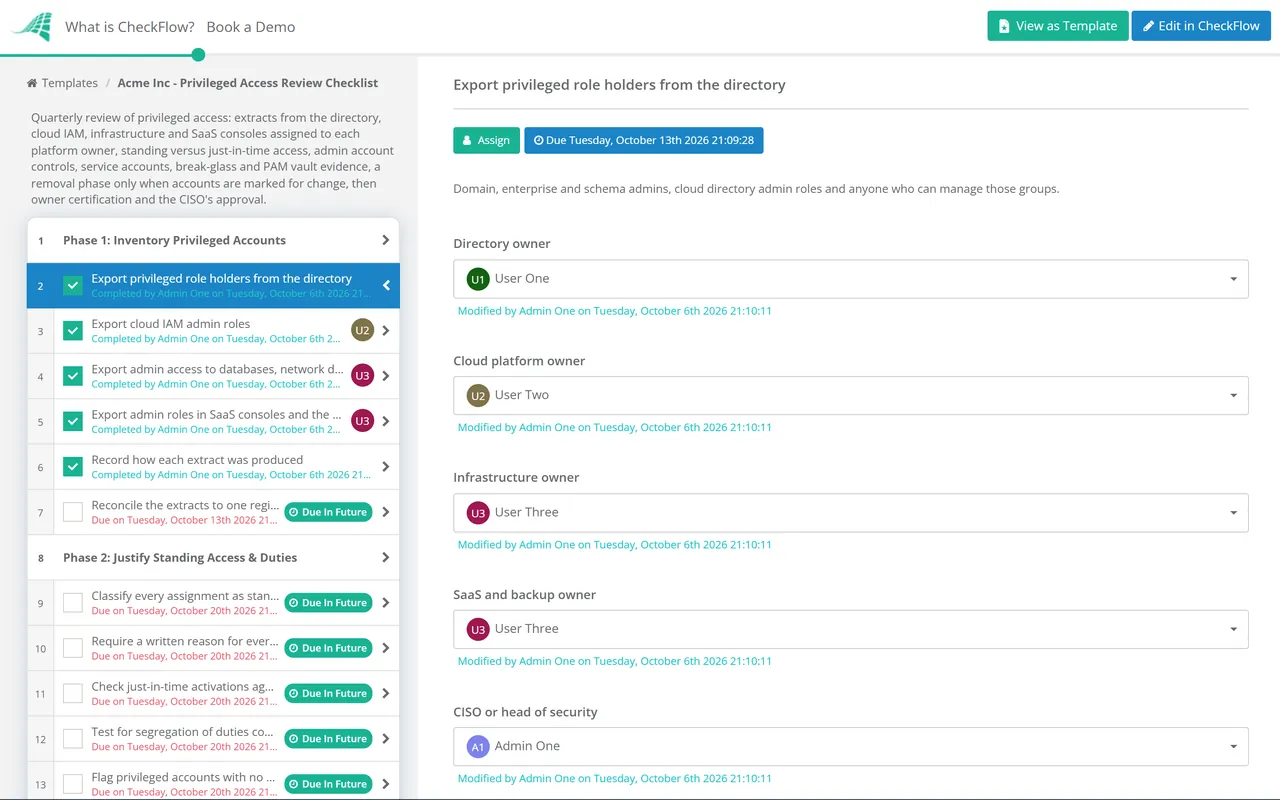
Seven phases take each cycle from a complete privileged inventory to an approved record. The removal phase appears only when an account is marked for change, and closure needs approval from the CISO or head of security.
Owned by the IAM or security lead. Each platform’s extract is assigned to its system owner with a due date. Phase 1 also records whether a PAM vault or session recording is in use (Yes/No).
Each service account is reviewed by its named owner. Any account without one is escalated to the system owner within the review period.
The vault and session tasks appear only when Phase 1 records that a PAM vault or session recording is in use (Yes/No).
Appears only when any account in Phases 1–5 is marked modify or remove.
System owners certify their platforms; the final task is an approval for the CISO or head of security. The cycle is not closed until it is Approved.
Every major framework expects privileged access to be restricted and reviewed, and several are specific about how. PCI DSS v4.0.1 is the most prescriptive: user accounts and their privileges reviewed at least every six months, system and application accounts reviewed at a frequency your targeted risk analysis sets, and interactive use of those accounts controlled. Quarterly is a common choice for privileged access because the risk is higher and the population is small enough to do properly. Each row names a reference and the phase whose output you would hand an assessor.
| Framework | Reference | What it expects | Evidenced in |
|---|---|---|---|
| PCI DSS v4.0.1 | 7.2.4 | All user accounts and related access privileges, including third-party accounts, reviewed at least once every six months, with management acknowledgement | Phases 1 and 7 |
| PCI DSS v4.0.1 | 7.2.5, 7.2.5.1 | System and application accounts assigned least privilege; their access reviewed periodically at the frequency set by a targeted risk analysis | Phase 4 |
| PCI DSS v4.0.1 | 8.6.1, 8.6.2, 8.6.3 | Interactive use of system accounts prevented except when exceptional, time-limited and justified; no hard-coded passwords; passwords changed periodically and on suspected compromise | Phase 4 |
| ISO/IEC 27001:2022 Annex A | 8.2, 5.18 | Privileged access rights restricted and managed; access rights provided, reviewed, modified and removed | Phases 1, 2 and 6 |
| SOC 2 (2017 TSC) | CC6.1, CC6.2, CC6.3 | Logical access protections over infrastructure; credentials issued and removed under authorisation; access based on roles, least privilege and segregation of duties | Phases 2, 3, 6 and 7 |
| NIST SP 800-53 Rev. 5 | AC-2(7), AC-6(7) | Privileged accounts run under a role-based scheme, with role assignments monitored and revoked when no longer appropriate; privileges reviewed at a set frequency | Phases 1, 2 and 6 |
| CIS Controls v8.1 | 5.4, 6.5, 6.8 | Admin privileges restricted to dedicated admin accounts; MFA for all administrative access; role-based access defined and reviewed at least annually | Phases 2 and 3 |
Your auditor, assessor or certification body decides what counts as sufficient evidence for your scope, so treat the table as a starting point, not legal or audit advice. Phishing-resistant MFA goes further than most frameworks strictly require; it is in the checklist because CISA recommends it for administrators and other high-value accounts, and it blocks the phishing kits that defeat app codes. For the wider programmes, see the SOC 2 Readiness Checklist and the PCI DSS 4.0 Compliance Checklist.
Each extract and each certification is a task assigned to the owner of that platform with a due date, so the hypervisor and the backup console are reviewed as carefully as the directory, and a missing platform is visible before the deadline.
Conditional logic opens the removal phase only when an account is marked for change, and shows the vault and session checks only where a PAM tool exists. A clean quarter stays short; a messy one cannot skip the proof.
Extracts, break-glass test results, ticket references and post-change exports sit on the task they support, and the audit trail records who certified what and when. The CISO’s approval is the management acknowledgement PCI DSS and SOC 2 auditors ask for.
CheckFlow is not a PAM vault or identity governance platform. It runs the human side around those tools: scoping, chasing owners, recording decisions and proving removals. CheckFlow for SOC 2 compliance shows how this review sits alongside the other recurring CC6 controls, and the SOC 2 compliance checklist guide explains what auditors typically test.
Run this review alongside the broader User Access Review Checklist, which certifies every account in scope. If admin MFA is not yet phishing-resistant, plan it with the MFA Rollout Checklist, and use the Segregation of Duties Review Checklist where conflicts extend into finance systems.
Describe the process in a sentence and the AI checklist generator drafts the phases and tasks for you.
It is a scheduled check of every account that holds administrative or other elevated rights, across every platform, to confirm each one still needs that access and is protected properly. Beyond the keep-or-remove decision, it checks whether access is standing or just-in-time, whether admins use dedicated accounts with phishing-resistant MFA, how service account secrets are managed, and whether break-glass and vault use is explained. The result is approved by management.
PCI DSS v4.0.1 sets a minimum of every six months for user accounts and privileges, and lets a targeted risk analysis set the frequency for system and application accounts. CIS Controls v8.1 asks for access control reviews at least annually. SOC 2 and ISO 27001 leave it to your risk assessment. Many organisations review privileged access quarterly, and monthly for the most sensitive platforms such as the directory, cloud root accounts and backups.
Any account that can change system configuration, manage other accounts, read data beyond a normal user’s reach, or turn security controls off. That includes directory and cloud administrators, root and owner roles, database administrators, network device and hypervisor admins, SaaS admin roles, backup system admins, local administrator accounts, service accounts with elevated rights, and break-glass accounts.
Standing access is permanent: the person holds the admin role all the time, whether or not they are using it. Just-in-time access is eligible rather than active: the person requests the role when they need it, usually with MFA and a reason, and it expires after a set period. Just-in-time access shrinks the window in which a stolen admin session is useful and leaves a record of every elevation to review.
Give every service account a named human owner and a written purpose, check its rights against what the application actually needs, block interactive logon unless there is a documented exceptional reason, and check that its password or key has been changed in line with policy and is not stored in scripts or source code. Where the platform supports it, move to managed or workload identities that do not rely on long-lived secrets.
A user access review certifies every account on in-scope systems and includes administrators as one phase. A privileged access review looks only at elevated accounts but goes deeper: standing versus just-in-time access, dedicated admin accounts, phishing-resistant MFA, service account secrets, break-glass testing, vault check-outs and session recordings. Most organisations need both, and the overlap is a useful cross-check.
14-day free trial, no card required. The Business plan is $10 per user per month after the trial. Full details at checkflow.io/pricing.
14-day free trial, no credit cardFull refund in your first 30 daysUS hosting, EU on request