
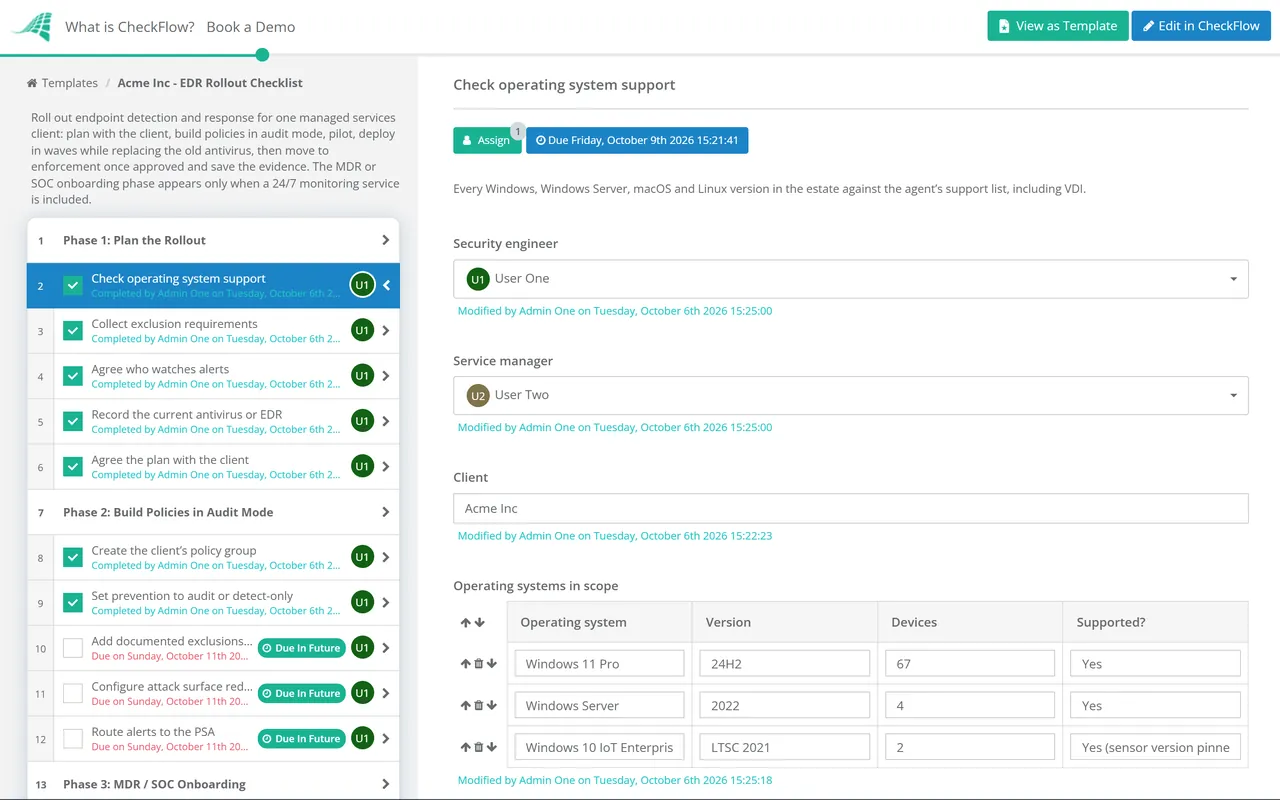
Watching, not stopping
Purpose: learn the estate and tune exclusions before anything is blocked.
Output: detections, false positives and a reviewed exclusion list.
Risk if it lasts: attacks are recorded rather than prevented.
No Credit Card Required
Printed from checkflow.io/templates/managed-services/edr-deployment-checklist
Endpoint detection and response is now one of the first controls a cyber insurer, a customer questionnaire or an auditor asks about. Getting the agent onto devices is the straightforward part. The work that decides whether it protects the client is everything around the install: knowing which line-of-business applications need exclusions, running policies in audit mode long enough to learn what normal looks like, replacing the old antivirus without leaving a device unprotected, and then making a deliberate, recorded decision to move to enforcement. This free EDR rollout checklist gives MSP service managers and security engineers that sequence for one client. It covers planning, audit-mode policies, a pilot, deployment waves with the antivirus handover, an approved switch to enforcement and verification that ends with evidence the client can give its insurer. A conditional phase onboards the client to a 24/7 MDR or SOC service when one is included.
Most EDR platforms can run in a detect-only or audit mode, where they record what they would have blocked without blocking it. That is the right place to start. A line-of-business application that injects into another process, or an accounts package that runs macros, can look exactly like an attack, and finding that out on a pilot group is far cheaper than finding it on the finance team at month end.
The risk is that audit mode becomes permanent. Nobody owns the decision to enforce, so the client pays for prevention it isn’t getting, and its insurance application says EDR is deployed. Microsoft’s own guidance for attack surface reduction rules follows the same pattern: plan, test in audit mode, enable, then maintain, with only the standard protection rules typically safe to switch straight to block or warn. This checklist makes the move to enforcement a dated approval with a named approver, so it happens on purpose and on time.
Purpose: learn the estate and tune exclusions before anything is blocked.
Output: detections, false positives and a reviewed exclusion list.
Risk if it lasts: attacks are recorded rather than prevented.
Trigger: an approved decision after the audit period has been reviewed.
Includes: prevention on, tamper protection on and isolation tested.
Outcome: protection the client can describe accurately on an insurance form.
Seven phases take one client from planning to verified, evidenced enforcement. Phase 3 appears only when a 24/7 MDR or SOC service is part of the arrangement.
Shown only when a 24/7 MDR or SOC service is included. Complete it before the pilot, so the service is watching from the first device.
Nothing moves to enforcement until the switch is approved. Approval halts the tasks that follow.
The moment of greatest risk in an EDR rollout is the handover from the old product. Install first, confirm the new agent reports, then remove the old one. How Windows behaves in between depends on whether the device is a client or a server, and Microsoft documents the difference.
| Device | What happens by default | What to check |
|---|---|---|
| Windows 10 and 11 | Microsoft Defender Antivirus disables itself when another antivirus is installed, and can re-enable automatically when that product is removed or stops protecting | Windows Security shows the expected product as the active antivirus after each step |
| Windows Server | Defender does not change mode automatically. It must be set to passive or disabled by hand, and re-enabled by hand if the other product is removed | Run Get-MpComputerStatus and read AMRunningMode on every server before and after the swap |
| macOS | No built-in fallback takes over when an agent is removed | The new agent’s privacy permissions, such as full disk access, are approved through MDM before the old agent comes off |
| Linux servers | No built-in fallback | Agent health in the console and the application owner’s sign-off after install |
Two problems catch MSPs out most often. The first is an uninstall password for the old product that only the outgoing provider holds, which is why Phase 1 records it before anything else happens. The second is a server where two products end up scanning at once. Microsoft advises putting Defender into passive mode, or disabling it, on servers where another antivirus is primary, to prevent the problems that multiple products cause.
Applications and renewal questionnaires commonly ask whether EDR is on every endpoint and server and whether alerts are monitored around the clock. Phase 7 produces the answer and the proof, dated, so nobody has to reconstruct it at renewal:
The switch to enforcement is an approval task. It names the approver, the date and the client’s agreement, and later tasks stay locked until it is given, so audit mode can’t quietly become the permanent setting.
When several clients are mid-rollout, the grid view shows who is still in audit mode, whose servers are waiting for a window and which enforcement approvals are overdue.
The coverage export, policy screenshots and test detection record are uploaded to the tasks that produced them. When the insurer or the client’s auditor asks, the dated evidence is already filed.
EDR coverage can only be as good as the inventory you measure it against. The RMM Agent Deployment Checklist produces that reconciled inventory, and most MSPs run the two rollouts in the same waves. For a brand-new client, both sit inside the wider MSP Client Onboarding Checklist.
EDR is near the top of every cyber insurance questionnaire. The Cyber Insurance Readiness Checklist uses the evidence from Phase 7 alongside MFA, backup and patching evidence before the client signs. See how CheckFlow for MSPs runs security rollouts and reviews across every client.
RMM Agent Deployment Checklist
Cyber Insurance Readiness Checklist
MSP Client Onboarding Checklist

Cybersecurity Incident Response Template

Vulnerability Management Template
Describe the process in a sentence and the AI checklist generator drafts the phases and tasks for you.
Traditional antivirus looks for known malicious files and blocks them. EDR records activity on the device, such as processes, network connections and changes, detects suspicious behaviour even when no known file is involved, and lets an analyst investigate and respond, for example by isolating the device. Many products now combine both, which is why the antivirus handover needs care: the new agent may be replacing both roles at once.
Long enough to see a normal working cycle for the pilot users, including month-end or other periodic jobs that only run occasionally. For many small and mid-sized clients that is one to four weeks. Set the review date when you start, not when you remember. The point of audit mode is to tune exclusions, and once detections are reviewed and stable, staying in it only delays protection.
Install the EDR agent first and confirm it reports healthy, then remove the old product, one device at a time. On Windows 10 and 11, Microsoft Defender Antivirus steps aside and can re-enable automatically, but on Windows Server it does not change mode by itself, so check every server by hand. Track coverage after each wave, so a failed install is found that day rather than at the next audit.
Use a test designed for the purpose. The EICAR test file is a harmless 68-character file that anti-malware products deliberately detect, and most EDR vendors document their own safe test detections. Run the test on one device per policy group and time how long it takes for the alert to reach a ticket and, where an MDR service is included, a person. Never use real malware to test.
Agree it in writing before enforcement. A common arrangement lets the MDR or SOC service, or your on-call engineer, isolate workstations immediately when an attack is suspected, because minutes matter, while isolating a server needs a call to the client first because it can stop the business. Record the agreed contacts and the exceptions in Phase 3, and test isolation on a pilot device before you rely on it.
Usually not. Start with IT’s own devices and a representative pilot, then workstations, and bring servers in last, in their own maintenance window, with the application owner available. Servers are where exclusions matter most and where an over-zealous block costs the most. They are also where the antivirus handover needs checking by hand, because Windows Server does not switch Defender on or off automatically.
14-day free trial, no card required. The Business plan is $10 per user per month after the trial. Full details at checkflow.io/pricing.
14-day free trial, no credit cardFull refund in your first 30 daysUS hosting, EU on request