Form I-9 mistakes are rarely dramatic. A Section 2 signed on day five, a box left blank, or a manager who asked for a green card instead of letting the employee choose. Each one can be a violation, and each form is counted on its own.
This free Form I-9 and E-Verify checklist takes one new hire from the accepted offer to a filed, retained and audited form. It sets the Section 1 and Section 2 deadlines from the first day of work, lets the employee choose their own documents, and asks a second reviewer to approve the form before it is filed. Three questions switch on the extra steps: the remote examination procedure, the E-Verify case, and reverification on Supplement B when work authorisation is temporary.
This checklist is for US employers. Every employer in the United States must complete Form I-9, Employment Eligibility Verification, for each person it hires, citizens included. E-Verify is a separate online system run by USCIS that checks the details from the form against government records. Some employers must use it and others choose to. Hiring in the United Kingdom works differently: use the Right to Work Check Checklist (UK) instead.
Most problems are timing and consistency. Section 1 and Section 2 have fixed deadlines counted from the first day of work for pay. The employee, not the employer, chooses which acceptable documents to show. Any policy you adopt, such as copying documents or examining them remotely, has to apply the same way to everyone it covers. The template turns each of those rules into a task with a due date and an owner.
Start before day one. An employee can complete Section 1 at any time after accepting the offer. Building the form into your New Hire Preboarding Checklist means day one is spent on the job, not on paperwork.
Every employer
Form I-9
Edition: the current USCIS edition is dated 01/20/25 and expires on 05/31/2027. Check uscis.gov/i-9 before you print or update an electronic system.
Deadlines: Section 1 by the first day of employment, and Section 2 within three business days of the first day of work for pay. If the job lasts less than three business days, both are due on the first day.
Retention: keep each form until three years after the date of hire or one year after employment ends, whichever is later.
Some employers
E-Verify
Who: voluntary under federal law for most employers, but required by some states and by federal contracts that carry FAR clause 52.222-54. Arizona and South Carolina require it of every private employer; Florida requires it of private employers with 25 or more employees.
Timing: create the case no later than the third business day after the employee starts work for pay, and never before the offer is accepted and the form is complete.
Extras: the Social Security number becomes mandatory in Section 1, and List B documents must carry a photo.
State rules change, so check the law in each state where you hire. This template turns USCIS, E-Verify and Department of Justice guidance into process steps; it is not legal advice. If an inspection notice arrives, or an audit turns up missing forms, take advice from an employment or immigration lawyer before you correct anything.
What the Form I-9 & E-Verify Checklist Covers
Seven phases for each new hire. The remote examination phase appears only when documents are examined by video, the E-Verify phase only at sites enrolled in E-Verify, and the reverification phase only when work authorisation has an end date.
Phase 1
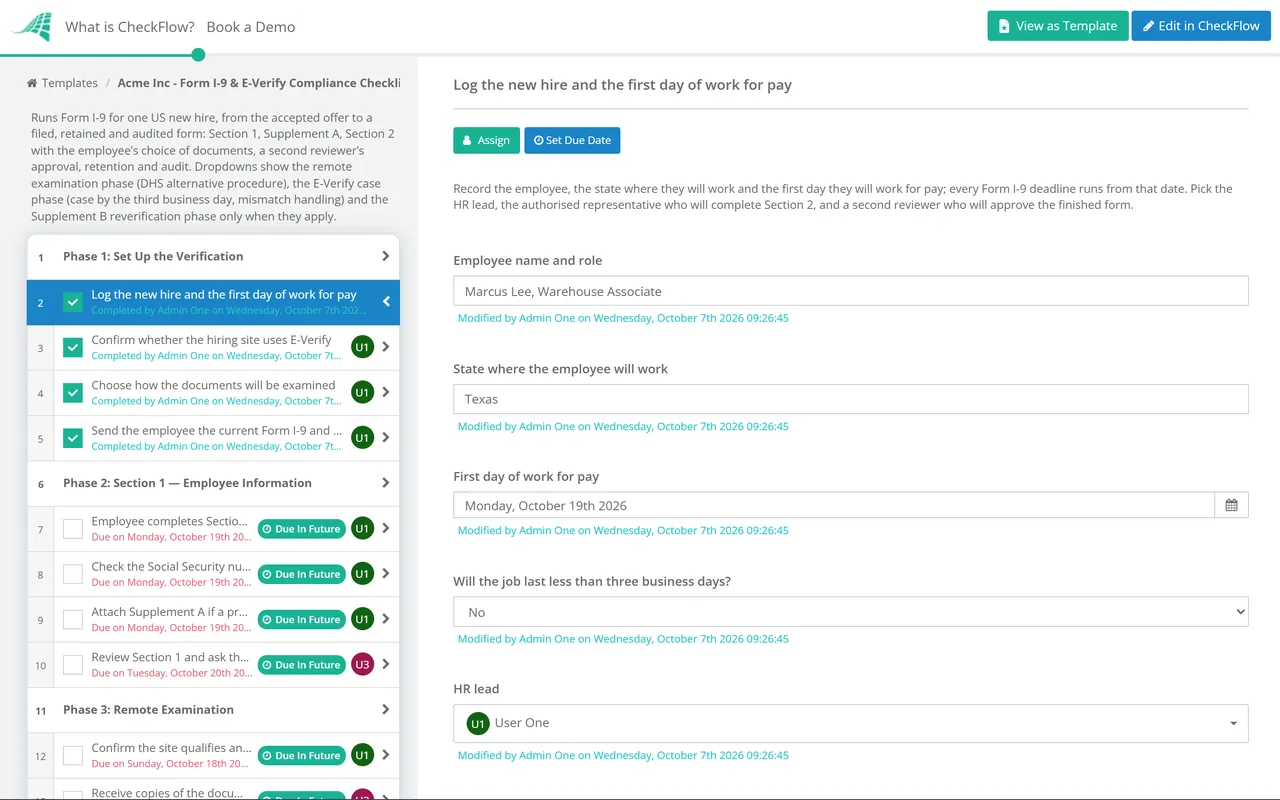
Phase 1: Set Up the Verification
Log the new hire and the first day of work for pay — the work state, the start date and who does what
Confirm whether the hiring site uses E-Verify — required by state law, a federal contract, or by choice
Choose how the documents will be examined — in person, or remotely under the DHS alternative procedure
Send the employee the current Form I-9 and the document lists — after the offer is accepted, without naming documents
Phase 2
Phase 2: Section 1 — Employee Information
The Social Security number check appears only at E-Verify sites.
Employee completes Section 1 by the first day of employment — any time after accepting the offer
Check the Social Security number is entered (E-Verify sites)
Attach Supplement A if a preparer or translator helped
Review Section 1 and ask the employee to correct any error — only the employee changes their own section
Phase 3 — If Remote
Phase 3: Remote Examination
Shown when documents are examined remotely. Only E-Verify employers in good standing may use this procedure.
Confirm the site qualifies and offers the procedure consistently — the same way for every remote hire there
Receive copies of the documents, front and back
Hold a live video call with the employee — the same documents, shown on camera
Tick the alternative procedure box on the form
Keep clear copies of every document examined
Phase 4
Phase 4: Section 2 — Documents & Employer Review
The in-person examination task appears only when documents are examined in person.
Let the employee choose their documents — one from List A, or one from List B plus one from List C
Examine the original documents in person — they reasonably appear genuine and relate to the employee
Complete and sign Section 2 within three business days — or on the first day if the job lasts less than three
Copy documents under one consistent policy
Record whether reverification will be needed — only for temporary work authorisation
Phase 5 — If E-Verify
Phase 5: E-Verify Case
Shown when the hiring site is enrolled in E-Verify.
Check the E-Verify and Right to Work posters are on display — in English and Spanish, and shared with remote hires
Create the E-Verify case by the third business day — never before the offer is accepted and the form is complete
Handle a mismatch privately and on time — notice, the employee’s decision, referral and no adverse action
Close the case — whatever the result
Phase 6
Phase 6: File, Retain & Audit
Second reviewer approves the completed Form I-9 — before it is filed
File the form and any copies securely — paper, or an electronic system with an audit trail
Record the retention rule for when employment ends — three years after hire or one year after leaving, whichever is later
Include the form in the next internal audit — corrections lined through, initialled and dated, never hidden
Phase 7 — If Temporary
Phase 7: Reverification (Supplement B)
Shown when the employee’s work authorisation has an expiry date.
Remind the employee before the authorisation expires — without naming the document to bring
Reverify on Supplement B no later than the expiry date — any unexpired List A or List C document
Check the E-Verify Status Change Report (E-Verify sites) — reverify if an EAD has been revoked
Record the next expiry date or close the reverification
Every Form I-9 deadline runs from one date: the first day of work for pay. Business days skip the weekend, so a Thursday start normally puts the Section 2 deadline on the following Tuesday. E-Verify uses a different measure for mismatches, federal government working days: Monday to Friday, excluding federal holidays.
Offer
The offer is accepted
Section 1 can be completed from now on. Until the offer is accepted, do not ask for the form, the documents or an E-Verify case; using E-Verify to screen applicants is prohibited.
Day 1
First day of employment
Section 1 must be complete. For a job lasting less than three business days, Section 2 is due today too, and a receipt for a lost or stolen document is not acceptable.
Day 3
Third business day
Section 2 is signed, any remote examination is finished, and E-Verify employers have created the case. Start on a Monday, finish by Thursday.
10 days
Mismatch window
After a Tentative Nonconfirmation (Mismatch), the employer has ten federal government working days to notify the employee and record their decision. A referred employee then has eight federal government working days to contact DHS or visit an SSA office.
Expiry
Work authorisation expires
Reverify on Supplement B no later than this date. Never reverify US citizens, noncitizen nationals or permanent residents who showed a Permanent Resident Card.
Exit
Employment ends
Keep the form until three years after the hire date or one year after the last day, whichever is later, and be ready to produce it within three business days of an official request.
The penalties below are the inflation-adjusted civil ranges set by the Department of Justice in 2025 for violations after 2 November 2015. The Department confirmed that the 2025 levels continue through 2026. Paperwork penalties are counted per form, which is why a small error repeated across a workforce becomes expensive.
Violation
Counted per
Civil penalty range
Paperwork violation
Relevant individual
$288 to $2,861
Knowingly hiring or continuing to employ, first order
Unauthorised worker
$716 to $5,724
Knowingly hiring or continuing to employ, second order
Unauthorised worker
$5,724 to $14,308
Knowingly hiring or continuing to employ, later orders
Unauthorised worker
$8,586 to $28,619
Unfair documentary practices
Person discriminated against
$236 to $2,364
Do
What fair verification looks like
Give every new hire the full Lists of Acceptable Documents
Accept any valid combination that reasonably appears genuine
Apply copying and remote examination policies the same way across each site
Use the same reminder for every reverification
Call the IER employer hotline before rejecting an unfamiliar document
Don’t
What can count as discrimination
Asking for a specific document, such as a green card
Asking for more documents than the form requires
Rejecting documents that reasonably appear genuine
Reverifying citizens or permanent residents
Treating people differently because of citizenship, immigration status or national origin
Why Run Form I-9 Compliance in CheckFlow?
1
Deadlines from the start date
Enter the first day of work for pay and every task is dated from it: Section 1, Section 2, the E-Verify case and the reverification reminder. A form that is running late shows as overdue on the day, not at the next audit.
2
Only the steps that apply
Three dropdowns decide what each hire needs. Remote examination, the E-Verify case and reverification appear only when they apply, so an onsite hire at a non-E-Verify site sees a short list and nobody skips a step that matters.
3
A second pair of eyes
The completed form is an approval task for the reviewer picked at the start, and the checklist halts until it is approved. The audit trail records who completed each step and when, and reports show where forms run late.
Form I-9 is one step in hiring a new employee. CheckFlow’s HR checklist software runs recruitment, onboarding, compliance checks and departures from templates, with assignments, due dates and approvals shared between HR and hiring managers.
The employee completes and signs Section 1 no later than their first day of employment, and can do it at any time after accepting the offer. The employer, or an authorised representative, completes Section 2 within three business days of the first day of work for pay. If the job will last less than three business days, Section 2 must be completed on the first day. An employee cannot act as the authorised representative for their own form.
Which edition of Form I-9 should we use?
+
As of October 2026, the current edition is dated 01/20/25 and expires on 05/31/2027; the edition date is printed at the bottom of each page. USCIS also accepts the 08/01/23 edition that carries the 05/31/2027 expiry. The 08/01/23 version that expired on 07/31/2026 has lapsed, and electronic systems had to be updated by that date. Check uscis.gov/i-9 before each print run and before 05/31/2027, when the current edition expires.
Can we examine I-9 documents remotely?
+
Only if the hiring site participates in E-Verify and is in good standing. The DHS alternative procedure, available since 1 August 2023, means examining copies of the documents, front and back, then holding a live video call with the employee and the same documents, ticking the alternative procedure box, and keeping clear copies. You may limit it to remote hires, but if you offer it at a site you must offer it consistently and not on the basis of citizenship, immigration status or national origin. Other employers must examine original documents in person.
Is E-Verify mandatory?
+
Not under federal law for most private employers, but it is for many. Federal contracts that include FAR clause 52.222-54 require contractors to enrol and verify new hires and employees assigned to the contract. Several states require it too: Arizona and South Carolina for every private employer, and Florida for private employers with 25 or more employees, for example. Rules differ on size thresholds and public contracts, so check each state where you hire.
What happens if E-Verify returns a mismatch?
+
A Tentative Nonconfirmation (Mismatch) is not a finding that the person cannot work. Tell the employee in private, give them the Further Action Notice, and record whether they will take action, all within ten federal government working days. If they act, refer the case; they then have eight federal government working days to contact DHS or visit an SSA office. Until a Final Nonconfirmation, you may not terminate, suspend, delay training, cut pay or take any other adverse action because of the mismatch.
How long must we keep Form I-9?
+
For as long as the person works for you, then until three years after the date of hire or one year after employment ends, whichever is later. In practice, someone who leaves within two years of starting is kept for three years from hire; anyone longer is kept for one year after leaving. Keep any document copies with the form, and be able to produce both within three business days of an official request.
Is CheckFlow free for this template?
+
14-day free trial, no card required. The Business plan is $10 per user per month after the trial. Full details at checkflow.io/pricing.
Complete Every Form I-9 on Time, the Same Way
Free trial — no credit card required.
Do you like cookies? 🍪 We use cookies to ensure you get the best experience on our website. Learn more