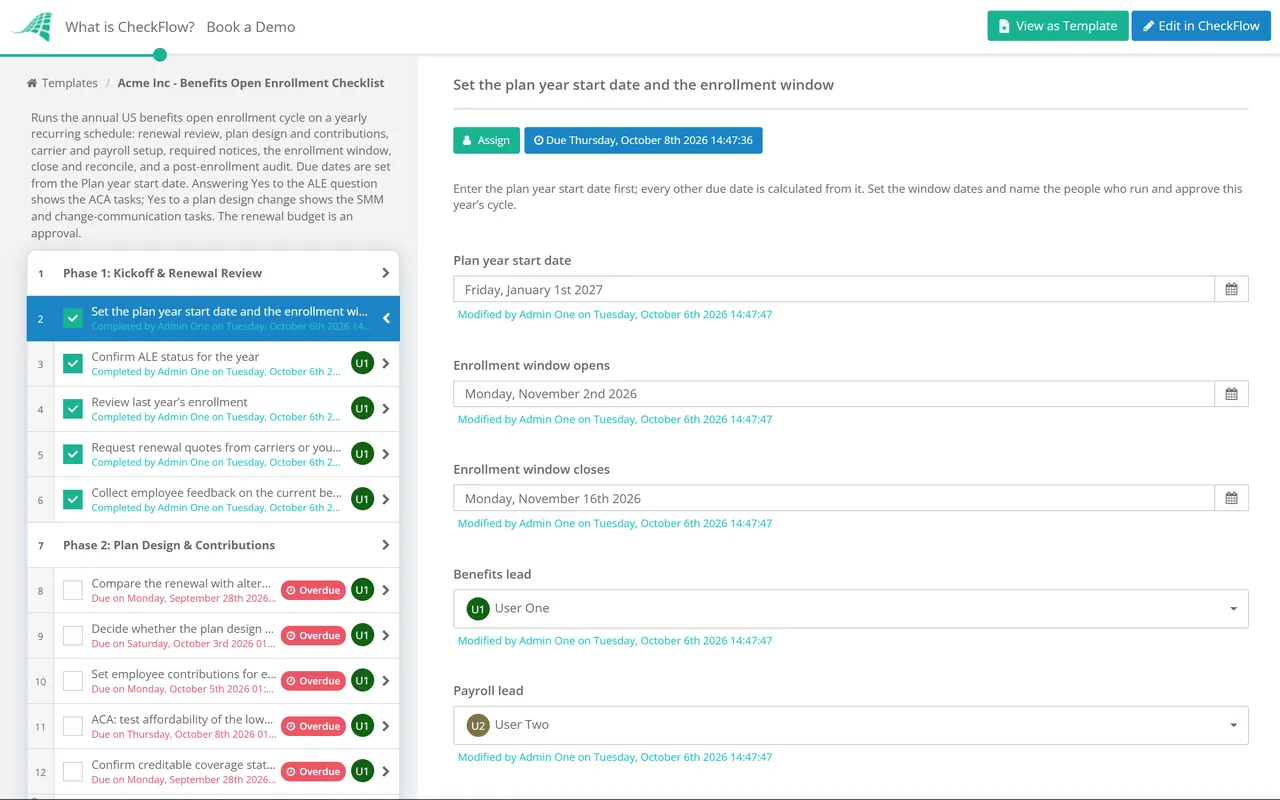
Benefits Open Enrollment Checklist

Open enrollment happens once a year, which is exactly why it goes wrong. Nobody remembers which notice went out late last time, which carrier file failed or which deduction was wrong on the first January payroll.

This free benefits open enrollment checklist runs the annual cycle for a US employer-sponsored health plan, from the renewal review four months out to the audit after the new plan year starts. It covers plan design and contributions, the Affordable Care Act (ACA) checks for larger employers, the notices federal law requires, the enrollment window itself, and the carrier files and payroll deductions that have to match afterwards. Every due date is set from one field, the plan year start date, so the same template works for a January plan year or any other. This checklist is US-specific by design. UK employers do not run an annual open enrollment in the same way; if you have a yearly flexible benefits or salary sacrifice selection window, the communications and payroll phases will still help, but the ACA and notice tasks will not apply.

Use This Template Free See Live Example
No Credit Card Required

Last reviewed: October 2026

Why Open Enrollment Needs a Checklist

Elections are locked for a year. Where employees pay their share of premiums before tax through a Section 125 cafeteria plan, the IRS rules allow an election to change during the plan year only for a permitted reason, such as marriage, a birth or adoption, or a loss of other coverage. An employee who misses the window, or picks the wrong plan because the guide was unclear, usually has to live with it until next year.

The notices have fixed deadlines. Some go out with the enrollment materials, some must arrive before a fixed calendar date and some have to be filed after the plan year starts. Missing one rarely causes a crisis, but it is exactly what a Department of Labor audit asks about.

The real errors happen after the window closes. A carrier file that drops a dependant, or a deduction set up at last year’s rate, can run for months before anyone notices. The close and reconcile phase is where most of the effort pays off.

Size changes the rules. Under the ACA, an applicable large employer (ALE) is one with at least 50 full-time employees, including full-time equivalents, on average in the previous year. ALEs must offer affordable coverage to full-time employees or risk a penalty, and must report offers on Forms 1094-C and 1095-C. The checklist shows the ACA tasks only when you answer Yes to the ALE question.

Every employer with a group health plan

The core cycle

Renewal: quotes, plan design and employee contributions.

Notices: SBCs, the Medicare Part D notice, CHIP, WHCRA and special enrollment rights.

Enrollment: the guide, the window, reminders and the election lock.

Close: carrier files, payroll deductions and the CMS disclosure.
Applicable large employers only

The ACA layer

Who: 50 or more full-time employees, including full-time equivalents, in the prior year.

Affordability: the lowest-cost self-only plan tested against the IRS percentage for the plan year.

Reporting: offers of coverage tracked month by month for Forms 1094-C and 1095-C.

Shown when: the ALE question is answered Yes.

What the Open Enrollment Checklist Covers

Seven phases, each timed from the plan year start date. ACA tasks appear for applicable large employers, and the plan-change tasks appear when the plan design changes.

Phase 1 — 120 Days Out

Phase 1: Kickoff & Renewal Review

  • Set the plan year start date and the enrollment window — every other due date is calculated from it
  • Confirm ALE status for the year — 50 or more full-time employees, including full-time equivalents, in the prior year
  • Review last year’s enrollment — take-up by plan, errors, late changes and employee questions
  • Request renewal quotes from carriers or your broker
  • Collect employee feedback on the current benefits
Phase 2 — 90 Days Out

Phase 2: Plan Design & Contributions

  • Compare the renewal with alternative plans and carriers
  • Decide whether the plan design changes — deductibles, networks, plan options or eligibility
  • Set employee contributions for each plan and coverage tier
  • ACA: test affordability of the lowest-cost self-only plan — against the IRS percentage for the plan year
  • Confirm creditable coverage status with your carrier or actuary — it drives the Medicare Part D notice
  • Approve the renewal and contribution budget
Phase 3 — 75 to 60 Days Out

Phase 3: Carriers, Systems & Payroll Setup

  • Sign the renewal paperwork with each carrier
  • Update the benefits administration system — plans, rates, tiers and eligibility rules
  • Set up the new deduction amounts in payroll — effective from the first payroll of the plan year
  • Agree the carrier file format and send a test file
  • Test the enrollment flow end to end as an employee would
Phase 4 — Required Notices

Phase 4: Required Notices

A process step, not legal advice. Check the full list with your broker or benefits counsel each year.

  • Send the Medicare Part D creditable coverage notice — before 15 October every year, whatever your plan year
  • Prepare the Summary of Benefits and Coverage for every plan option — delivered with the enrollment materials
  • Include the annual CHIP premium assistance notice
  • Include the annual Women’s Health and Cancer Rights Act notice
  • Include the special enrollment rights notice
  • Plan design changed: prepare the summary of material modifications — or an updated summary plan description
Phase 5 — 45 to 30 Days Out

Phase 5: Communications & the Enrollment Window

  • Publish the enrollment guide — plans, costs per pay period, deadlines and how to enroll
  • Plan design changed: explain what is changing and who it affects
  • Run information sessions and answer questions
  • Open the enrollment window and send reminders — at the halfway point and two days before close
  • Chase employees who have not made an election
  • Close the window and lock elections
Phase 6 — Close & Reconcile

Phase 6: Close & Reconcile

  • Send the final election files to each carrier
  • Reconcile carrier enrollment with the benefits system — every employee, dependant and tier
  • Send each employee a confirmation of their elections
  • Check deductions on the first payroll of the plan year
  • Complete the CMS creditable coverage disclosure — within 60 days of the plan year start
Phase 7 — After the Plan Year Starts

Phase 7: Post-Enrollment Audit

  • Audit a sample of elections against carrier records and pay slips
  • Fix errors and record each one, with its cause
  • ACA: track offers of coverage month by month for Forms 1094-C and 1095-C
  • File the notices, SBCs and proof of delivery for the plan year
  • Record lessons learned for next year’s checklist

The Open Enrollment Countdown and the Required Notices

The countdown below is what the template’s due dates look like for a plan year starting on 1 January. Change the start date and every row moves with it. The one exception is the Medicare Part D notice, which is due before 15 October whatever your plan year.

Days to plan year start For a 1 January plan year What should be done
120Early SeptemberKickoff, ALE count, review of last year, renewal quotes requested
90Early OctoberPlan design and contributions decided, affordability tested, budget approved
Before 15 OctoberMid-OctoberMedicare Part D creditable coverage notice delivered
60Early NovemberCarrier paperwork signed, systems and payroll set up, test file sent
45Mid-NovemberEnrollment guide, SBCs and annual notices published; window opens
30Early DecemberWindow closes; latest date for SBCs if coverage renews automatically
0 to +60January to MarchCarrier reconciliation, first payroll check, CMS disclosure, audit

The notices table lists the federal disclosures that usually travel with open enrollment. Your plan may have more, for example COBRA, wellness programme or state continuation notices, and an insured plan’s carrier often prepares some of them for you. Confirm who is responsible for each one.

Notice Who receives it When
Summary of Benefits and Coverage (SBC)Participants and beneficiaries, for each plan optionWith enrollment materials; if coverage renews automatically, at least 30 days before the plan year
SBC notice of modificationEnrolleesAt least 60 days before a mid-year change that affects the SBC
Medicare Part D creditable coverage noticeMedicare-eligible participants and dependantsBefore 15 October each year, and when someone joins the plan
CMS creditable coverage disclosureCenters for Medicare & Medicaid Services, onlineWithin 60 days of the start of the plan year
CHIP premium assistance noticeAll employeesAnnually
Women’s Health and Cancer Rights Act noticeParticipantsOn enrollment and annually
Special enrollment rights noticeEmployees eligible to enrollAt or before the time they are first offered the chance to enroll
Summary of material modificationsParticipantsWithin 210 days after the end of the plan year in which a change is adopted; generally within 60 days for a material reduction in group health benefits
Form 1095-C (ALEs only)Full-time employeesBy 31 January after the year, automatically extended by 30 days; 2 March in 2026

Figures to check each year. For plan years starting in 2026, ACA affordability is measured against 9.96% of household income; for 2027 plan years the IRS has set 10.22%. For 2027, the HSA contribution limit is $4,500 for self-only and $9,000 for family coverage. The 2027 health FSA limit had not been published at the time of review; it was $3,400 for 2026, so check the IRS figures for your plan year before printing the guide. The Employee Benefits Security Administration publishes model notices for CHIP and special enrollment rights.

Why Run Open Enrollment in CheckFlow?

1

It starts itself every year

Put the checklist on a recurring schedule and it starts four months before the plan year, with tasks assigned to HR, finance and payroll. Last year’s lessons learned sit on last year’s checklist, ready to read on day one.

2

One date drives every deadline

Every task is due a set number of days before or after the plan year start date. Move the start date and the renewal review, the notices, the enrollment window and the payroll check all move with it.

3

Proof of what went out

Upload each SBC, notice and enrollment guide to its task. The audit trail records who completed it and when, so a question from the Department of Labor or an employee is answered from the checklist, not from someone’s inbox.

Open enrollment is one of several fixed points in the HR year. CheckFlow’s HR checklist software runs it alongside onboarding, leave and reviews, and benefit changes after a birth or adoption can be handled in the Parental Leave Checklist.

The contribution budget is signed off as an approval that holds the checklist until the approver decides. CheckFlow’s approval software explains how that works, and the Payroll Year-End Checklist picks up the deductions and Form W-2 reporting at the end of the year.

Frequently Asked Questions

When should open enrollment planning start?

+

About four months before the plan year starts. Renewal quotes, plan design decisions and the contribution budget take most of that time, and the carriers and your benefits system need the final decisions roughly two months out. For a 1 January plan year, that means starting in early September, with the window itself usually open for two to three weeks from mid-November.

What notices are required for open enrollment?

+

For most group health plans: a Summary of Benefits and Coverage for each plan option, the annual CHIP premium assistance notice, the annual Women’s Health and Cancer Rights Act notice and the special enrollment rights notice. The Medicare Part D creditable coverage notice has to reach Medicare-eligible individuals before 15 October each year, so many employers send it with the enrollment materials. If the plan design changes, participants also need a summary of material modifications. The notices table above lists the timing for each.

What is the ACA affordability percentage for 2027?

+

For plan years beginning in 2027, the IRS has set the percentage at 10.22% of household income, up from 9.96% for 2026 plan years. It applies by plan year, so a plan year starting in, say, July 2026 still uses the 2026 figure. Employers do not know household income, which is why most test affordability using one of the IRS safe harbours. The ACA employer rules apply only to applicable large employers.

Can employees change their elections after open enrollment?

+

Only for a reason the plan and the IRS cafeteria plan rules allow. Elections made through a Section 125 plan are fixed for the plan year unless there is a permitted change, such as marriage or divorce, a birth or adoption, a change in employment status, a loss of other coverage or a significant change in cost or coverage. Special enrollment rights also give employees 30 days to enroll after events such as losing other coverage, marriage or the birth of a child.

Should open enrollment be active or passive?

+

In a passive enrollment, employees who do nothing keep their current elections. In an active one, everyone has to make a choice. Passive is less work and suits a year with no changes. Active is worth the extra chasing when plans, carriers or contributions change, because it makes people read the guide, and many plans require a fresh health FSA election every year rather than carrying the old one forward. Whichever you choose, say so clearly in the guide and the reminders.

Do UK employers need an open enrollment checklist?

+

Not in this form. The notices and ACA tasks are US federal law and do not apply in the UK. UK employers that run a yearly flexible benefits or salary sacrifice window can still use the communications, payroll and reconciliation phases, and should check the HMRC rules for the benefits they offer. For a specific plan question in either country, take advice from a benefits or employment lawyer.

Is CheckFlow free for this template?

+

14-day free trial, no card required. The Business plan is $10 per user per month after the trial. Full details at checkflow.io/pricing.

Run Open Enrollment the Same Way Every Year

Free trial — no credit card required.