Payroll Processing SOP Checklist Template

A documented payroll processing standard operating procedure — so payroll runs correctly whether your most experienced person is there or not.

Payroll is the single recurring business process where errors have the most immediate and most personal consequences. An employee paid the wrong amount does not just raise a finance query — they raise a concern about whether the organisation they work for can be trusted with the most basic obligation of employment. A missed PAYE or FICA filing triggers an interest and penalty notice that is entirely avoidable. A payroll run executed by whoever happens to be covering that day, using a process that lives in the payroll manager’s head, is a payroll run whose quality depends on institutional memory rather than institutional process. PwC describes a payroll SOP as “the key to compliance, accuracy and efficiency” — a reference document that ensures the process runs consistently regardless of who is executing it. This free payroll processing SOP checklist gives HR teams, payroll administrators, and finance managers a structured, documented framework for every payroll run.

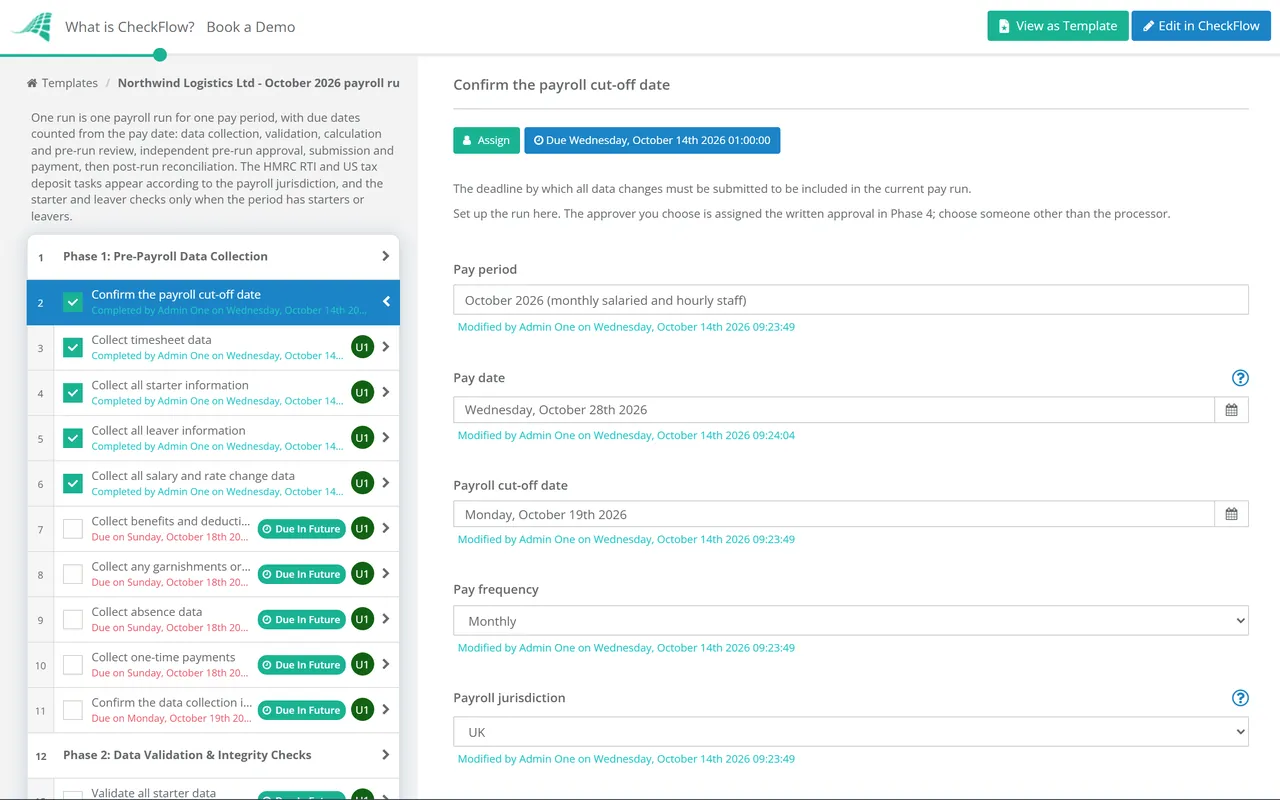
Use This Template Free See Live Example
No Credit Card Required

Three Reasons Your Payroll Process Needs to Be Documented

Knowledge retention

Without it: The payroll process lives in the payroll manager’s head. When they go on leave, are sick, or leave the business, the knowledge leaves with them. The person covering discovers gaps — at the worst possible moment, just before a pay date.

An SOP provides: A complete, current reference document that any trained team member can follow to process payroll correctly — without relying on institutional memory.

Regulatory compliance

Without it: Payroll tax deadlines are missed because the process relies on one person remembering them. PAYE submissions go in late. FPS or RTI filings are incorrect. FICA deposits miss the deposit schedule. Each of these triggers interest and penalties.

An SOP provides: A process that has every compliance deadline built in as a task with a due date, independent of individual memory.

Accuracy and error reduction

Without it: Payroll calculations are performed without a structured review step. An incorrect salary change is applied to the wrong period. A new starter is not set up with the correct tax code. A leaver’s final pay includes a full month’s salary rather than a pro-rated amount.

An SOP provides: A defined pre-run validation and calculation review step that catches errors before the payroll is submitted and employees are paid.

What the Payroll Processing SOP Checklist Covers

This checklist covers six phases of the payroll processing cycle — from pre-payroll data collection through to post-run reconciliation and compliance filing. Each phase is structured for consistency regardless of who runs the payroll.

Phase 1

Pre-Payroll Data Collection

The quality of a payroll run is determined by the quality of the data that goes into it. Data collection errors caught before submission cost minutes. Errors caught after payment cost hours — and employee trust.

  • Confirm the payroll cut-off date — the deadline by which all data changes must be submitted to be included in the current pay run
  • Collect timesheet data — approved timesheets for all hourly, variable, or overtime-eligible employees; confirm approval before processing
  • Collect all starter information — new employees joining this pay period; employment contract, W-4 (US) or P45/starter declaration (UK), bank details, and any special tax arrangements
  • Collect all leaver information — employees leaving in this pay period; termination date, outstanding leave entitlement, and any pay-in-lieu-of-notice
  • Collect all salary and rate change data — approved change requests for salary increases, promotions, or pay reductions; confirm effective date
  • Collect benefits and deduction changes — changes to pension contributions, health insurance, salary sacrifice arrangements, or any other benefit deductions
  • Collect any garnishments or court orders — new or modified garnishments received during the period; priority order confirmed if multiple garnishments apply
  • Collect absence data — unpaid leave, sick leave affecting sick pay, and any other absence-related pay adjustments
  • Collect one-time payments — bonuses, commission payments, expense reimbursements to be included in payroll, and any other non-recurring items
  • Confirm the data collection is complete — all expected changes received and logged; confirm with HR that no additional changes are outstanding
Phase 2

Data Validation & Integrity Checks

  • Validate all starter data — correct tax code or withholding setup, correct pay rate, correct department and cost centre, and valid bank details entered
  • Validate all leaver data — correct termination date, final pay calculation is correct (pro-rated salary, outstanding leave paid out at the correct rate), and PILON tax treatment is correct
  • Validate all pay changes — confirm the new rate is applied from the correct effective date; partial period calculations reviewed
  • Validate timesheet data — hours are within expected ranges; unusual overtime volumes or absences flagged for confirmation before processing
  • Validate deduction data — pension contributions at the correct rate; benefit deductions are current and correct; garnishments are calculated correctly and in priority order
  • Check for duplicate records — confirm no employee appears twice in the pay run; confirm no duplicate bank details (which may indicate data error)
  • Confirm all employee personal details are current — address, NI/SSN, and tax code current in the system; annual verification is best practice
Phase 3

Gross Pay Calculation & Pre-Run Review

  • Run the payroll calculation — gross pay, all deductions, and net pay calculated by the payroll system
  • Review the payroll variance report — compare gross pay to the previous period; investigate any employee whose pay has changed by more than a defined threshold without an approved change request
  • Check total payroll cost against budget — does the total payroll cost broadly match expectations? Large unexplained variances require investigation
  • Verify starter calculations — confirm new starters’ first pay is pro-rated correctly and tax withholding is set up correctly
  • Verify leaver calculations — confirm termination pay is correct; P45 (UK) or W-2 process (US) initiated
  • Check pension and statutory deductions are correct — employee and employer pension contributions; PAYE and NI (UK) or federal and state withholding (US)
  • Check any statutory payments — SSP, SMP, SPP (UK) or applicable US state disability payments; correct calculation and correct recovery against HMRC/state agency
Phase 4

Pre-Run Approval & Sign-Off

  • Prepare the pre-run approval summary — total headcount, total gross pay, total deductions, total net pay, and variance from prior period with explanations
  • Submit for pre-run approval — to the defined authorising manager (HR director, CFO, or finance director depending on the organisation’s payroll governance policy)
  • Ensure the approver is independent — the person processing the payroll data should not be the person approving it; this is a key payroll internal control
  • Obtain written approval — email confirmation or system sign-off with a named approver and timestamp
  • Confirm the payroll run date and payment date — consistent with the pay cycle calendar; any deviation (e.g. for a bank holiday) communicated to all employees
Phase 5

Payroll Submission & Payment Processing

  • Submit payroll to the payroll provider or process internally — via payroll software; confirm submission confirmation received
  • Submit the Real Time Information (RTI) Full Payment Submission (FPS) to HMRC — UK: on or before the pay date; late FPS submissions trigger penalties
  • File the federal and state payroll tax deposits — US: on the EFTPS deposit schedule (semi-weekly or monthly based on lookback period)
  • Process payroll bank payment — net pay to each employee via BACS/ACH; confirm payment file submitted and accepted
  • Confirm employer pension contributions submitted — to the pension provider by the statutory deadline (19th/22nd of the month following the tax month in UK)
  • Send payslips to employees — electronic or physical; confirm all employees have received their payslip
Phase 6

Post-Run Reconciliation & Compliance

  • Reconcile the payroll journal to the payroll run — gross pay, all deductions, net pay, employer NI/FICA, and employer pension; journal posted to the correct accounts and cost centres
  • Confirm all bank payments have processed — employees have been paid the correct amount; any returned payments investigated and resolved promptly
  • Reconcile payroll tax liabilities — PAYE/NI (UK) or federal/state withholding (US) collected against what has been remitted; no unexplained variance
  • Address any payroll queries from employees — a defined process for employees to raise payslip queries; target resolution within 2 business days
  • Update the payroll register — year-to-date earnings, deductions, and tax for each employee updated and confirmed
  • Archive the payroll run — all data, calculations, approval records, and payment confirmations retained for the required period (minimum 3 years in UK; 4 years in US)

Key Payroll Compliance Deadlines

UK Payroll
  • RTI Full Payment Submission (FPS): On or before the pay date, every pay run
  • Monthly PAYE and NI payment to HMRC: 19th of the following tax month (22nd for electronic payment)
  • Auto-enrolment pension contributions: 19th/22nd of the month following the tax month
  • P60 to employees: 31 May following the tax year end (5 April)
  • P11D (benefits in kind): 6 July following the tax year end
US Payroll
  • EFTPS deposit schedule: Semi-weekly (Wednesday/Friday) or monthly, based on lookback period
  • Form 941 (Employer’s Quarterly Federal Tax Return): Last day of the month following each quarter end
  • W-2 to employees and IRS: 31 January
  • Form 940 (FUTA): 31 January
  • State payroll tax filings: Varies by state; confirm current deadlines with each applicable state agency

These are indicative deadlines for common payroll situations. Always verify current deadlines with HMRC, the IRS, and applicable state agencies — deadlines change and penalties for late filing apply regardless of the reason for lateness.

Why Run Your Payroll SOP in CheckFlow?

1

Payroll runs consistently regardless of who is running it

CheckFlow’s payroll SOP checklist is the documented process that ensures payroll quality does not depend on institutional memory. A payroll administrator covering for a colleague follows the same structured process — the same validation steps, the same compliance deadlines, the same pre-run approval — as the senior payroll manager who normally runs it. Quality does not degrade when people are absent.


2

Compliance deadlines built into the process

Every payroll compliance deadline — EFTPS deposit dates, RTI FPS filings, pension contribution deadlines — is a task in CheckFlow with a due date and a named owner. The system sends reminders before deadlines rather than relying on payroll staff to remember them. A missed filing is a process failure, not a memory failure — and process failures are preventable.

3

A segregated approval trail for every payroll run

The pre-run approval step — where a second named person reviews and authorises the payroll before submission — is enforced in CheckFlow’s checklist structure. The submission task cannot advance until the approval task is marked complete by the named approver. The payroll governance control that is most commonly bypassed in busy periods is the one CheckFlow makes non-bypassable.

Payroll data forms a key part of the month-end journal. CheckFlow’s Month-End Close Checklist includes payroll journal posting and reconciliation as a structured close step — coordinating the payroll process with the broader accounting close. See the Month-End Close Checklist →

Payroll processing is one of the best examples of a standard operating procedure that benefits from being run as a recurring checklist. Learn more about CheckFlow’s SOP software capability. See CheckFlow for SOPs →

Frequently Asked Questions

What should a payroll processing SOP include?

+

A payroll processing SOP covers the full recurring payroll cycle across six phases: pre-payroll data collection (timesheets, starters, leavers, pay changes, deduction changes, and any one-time payments), data validation (verifying all input data is correct, within expected ranges, and approved before processing), gross pay calculation and pre-run review (running the payroll calculation, reviewing the variance report, and checking totals against budget), pre-run approval (independent review and sign-off before submission), payroll submission and payment (submitting to the payroll provider, filing RTI or EFTPS as required, and processing the bank payment), and post-run reconciliation (reconciling the payroll journal, confirming payments processed, and archiving documentation). The SOP should specify named owners for each phase and include all compliance filing deadlines.

Why is a payroll pre-run approval important?

+

The pre-run approval is the primary internal control against payroll errors and payroll fraud. An independent review of the payroll calculation before submission catches errors that the person who processed the data will not see — because they are too close to the data to spot anomalies. It also prevents the single-person control risk where one person can both process and submit payroll without any oversight. The pre-run approval should compare the current run against the prior period, investigate any employee whose pay has changed significantly without an approved change request, and confirm the total payroll cost is within budget expectations.

What is RTI and why does it matter for UK payroll?

+

Real Time Information (RTI) is the HMRC system under which UK employers report payroll information to HMRC on or before each pay day. The Full Payment Submission (FPS) is the return that employers must submit for every pay run, containing details of each employee’s gross pay, deductions, and net pay. The FPS must be submitted on or before the date employees are paid — not after. Late FPS submissions attract automatic penalties for employers with 50 or more employees. Employers with fewer than 50 employees receive a grace period for the first late submission in a tax year. All FPS submissions must be made via payroll software — HMRC no longer accepts paper returns.

What records should be retained after each payroll run?

+

UK employers must retain payroll records for a minimum of three years after the end of the tax year to which they relate. US employers must keep payroll tax records for at least four years. Records that should be retained include the payroll register (showing gross pay, all deductions, and net pay for each employee), the pre-run approval documentation, RTI FPS submissions (UK) or Form 941 filings (US), bank payment confirmations, payslips, and any change authorisations applied in the period. Organised, accessible retention is important — HMRC and the IRS can request records with limited notice.

Is CheckFlow free for this template?

+

14-day free trial, no card required. The Business plan is $10 per user per month after the trial. Full details at checkflow.io/pricing.

Run a Consistent, Compliant Payroll Cycle — Every Time, Regardless of Who Is Running It

Free trial — no credit card required.