Before the money is committed
- Business need and total cost of ownership
- Capex or opex, asset class and useful life
- Payback, NPV, IRR and quotes
- Approval by delegated authority or the board
Last reviewed: October 2026
No Credit Card Required
Printed from checkflow.io/templates/finance-accounting/capex-approval-checklist
Capital spending is the money a business finds hardest to get back. This free capex approval checklist gives controllers, finance managers and CFOs a single gate that every capital request passes through before anything is committed. It covers the request and total cost, the capex or opex decision under your accounting framework and capitalisation policy, the financial case (payback, NPV and IRR), quotes and risk reviews, approval by delegated authority, and the hand-off to purchasing and the fixed asset register, ending with a post-investment review. Three questions at the start decide the rest: requests outside the approved capital budget get a funding phase, requests above the board threshold get a board approval phase, and technology or property requests get the extra technical reviews.
A capital asset passes through three controls: the approval gate, delivery, and the fixed asset register. This template is only the first. It ends when the purchase order is raised and the asset details are handed to the people who look after the register, with one task left open for the review six to twelve months later.
The gate matters most for decisions that look routine. A large construction project gets a board paper anyway. The spend that slips through is mid-sized: a replacement vehicle, a server refresh, a fit-out ordered in three separate purchase orders. A single checklist used for every request above your capitalisation threshold means the same questions are asked of the forklift as of the factory extension, scaled by the approval tier rather than by who is asking.
Seven phases take a request from the first description to the post-investment review. Phase 3 appears only for spend outside the approved capital budget, and Phase 6 only when the total cost is above the board’s threshold.
Completed by the requester with the budget holder. The three scope questions decide which later phases and tasks appear.
Owned by the finance reviewer, before anyone builds a business case on the wrong accounting.
Shown only when the request is not in the approved capital budget.
Each approval task is assigned to a named person and holds the checklist until it is answered.
Shown only when the total project cost is above the board or investment committee threshold.
Approval limits are set by your own delegation of authority, usually approved by the board, so there are no standard figures. The matrix below is an example for a mid-sized company, in its reporting currency, to show the shape most matrices take. Replace the amounts with yours and enter them as the options of the tier question in Phase 1.
| Total project cost (example) | Budgeted spend | Unbudgeted spend | Sourcing |
|---|---|---|---|
| Below the capitalisation threshold | Not a capex request: buy through the normal purchase order process | As budgeted | Purchasing policy |
| Up to 25,000 | Budget holder and finance reviewer | Plus CFO approval of funding | One written quote |
| 25,000 to 250,000 | Department head and finance director | Plus CFO approval of funding | Three quotes or a documented single-source reason |
| 250,000 to 1,000,000 | CFO and CEO | CFO and CEO, reported to the board | Competitive tender |
| Above 1,000,000 | Board, after investment committee review | Board | Competitive tender |
Accounting and tax answer the capex question differently, which is why Phase 2 records both. The accounting test decides what goes on the balance sheet. The tax rules decide when the company gets relief, and in both the US and the UK the tax deduction for most equipment now arrives much faster than the accounting depreciation.
| Question | United States | United Kingdom |
|---|---|---|
| Accounting recognition | ASC 360; no set capitalisation threshold, so companies set one on materiality grounds | FRS 102 Section 17 or IAS 16: recognise when future economic benefits are probable and cost can be measured reliably; no set threshold |
| Small items for tax | De minimis safe harbour election: up to $2,500 per invoice or item without an applicable financial statement, $5,000 with one (which also needs written expensing procedures in place at the start of the tax year) | No equivalent threshold; most plant and machinery qualifies for the £1 million Annual Investment Allowance |
| Main relief for equipment | 100% bonus depreciation for qualifying property acquired and placed in service after 19 January 2025; Section 179 expensing up to $2,560,000 for tax years beginning in 2026 | Full expensing for companies (100% first-year allowance on new main-rate plant and machinery, 50% on special-rate); a 40% first-year allowance from 1 January 2026, also open to unincorporated businesses |
| Software | Internal-use software under ASC 350-40; ASU 2025-06 replaces the project-stage model from annual periods beginning after 15 December 2027 | Configuration of cloud software the company does not control is usually an expense under IFRS (IFRS Interpretations Committee agenda decision, April 2021) |
| Leases | ASC 842: most leases on the balance sheet as right-of-use assets | IFRS 16, and FRS 102 Section 20 as amended for periods beginning on or after 1 January 2026 |
What changed recently. The One Big Beautiful Bill Act, signed on 4 July 2025, made 100% bonus depreciation permanent for qualifying property acquired after 19 January 2025 and raised the Section 179 limit to $2.5 million, indexed for inflation. In the UK, the Autumn Budget on 26 November 2025 introduced the 40% first-year allowance and cut the main pool writing-down allowance from 18% to 14% from April 2026. For FRS 102 reporters, most leases come onto the balance sheet from 2026. None of this changes your capitalisation threshold, which is an accounting policy, but it changes the after-tax cash flows in the business case.
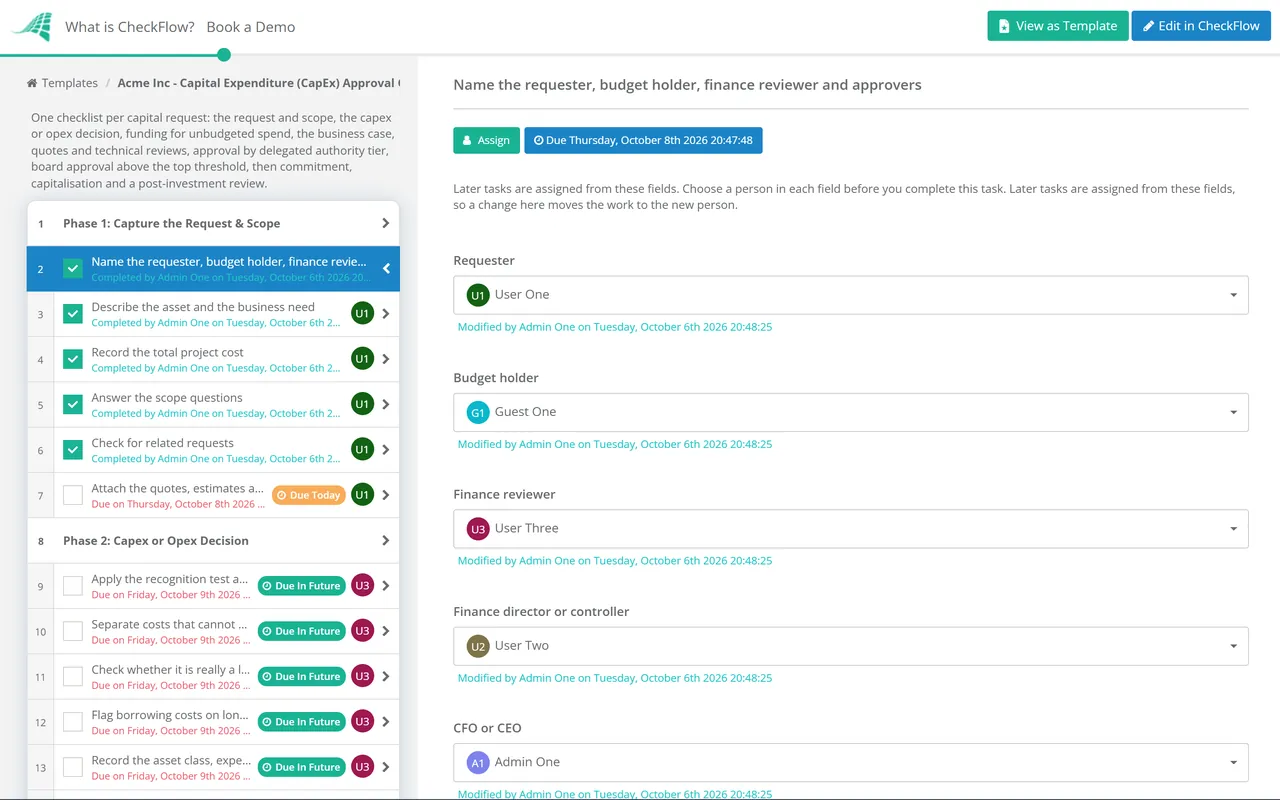
The tier chosen in Phase 1 shows the right approval tasks, each assigned to a named approver. Nothing moves on until they answer Approved or Not approved, and the board phase only appears when the amount calls for it.
The capex or opex decision, asset class, useful life and in-service date are recorded in Phase 2, so the person who updates the register in Phase 7 starts from a decision rather than an invoice.
Quotes, the business case, the board minute and every approval sit on the tasks that produced them, with a timestamped trail you can export. Analytics show which requests are stuck and with whom.
Approval is the first step, not the last. The Purchase Order Approval Checklist takes over when the order is raised, the Capital Project Checklist runs larger projects through delivery, and the Fixed Asset Register Review Checklist keeps the register honest afterwards. Capital requests usually start in the Annual Budget Planning Checklist.
CheckFlow is not an accounting system, fixed asset software or a financial modelling tool: it does not calculate NPV or depreciation. It runs the workflow around them, with your capital projects or cost centres held as a data set for live dropdowns.
Describe the process in a sentence and the AI checklist generator drafts the phases and tasks for you.
It is the set of checks a capital spending request goes through before the company commits to it: a description of the need and the total cost, a decision on whether the cost is capital or operating, a financial case, quotes, and approval by the people the delegation of authority names for that amount. It ends with a purchase order and, later, a review of whether the investment delivered what was promised.
Capital expenditure buys or improves an asset that will benefit the business for more than one year, so it goes on the balance sheet and is depreciated over its useful life. Operating expenditure covers running costs such as repairs, subscriptions and training, and is charged to profit as incurred. Under IAS 16 and FRS 102 an item is capitalised when future economic benefits are probable and its cost can be measured reliably.
Neither IFRS, FRS 102 nor US GAAP sets one; it is an accounting policy based on materiality. Many US companies align it with the IRS de minimis safe harbour, which allows up to $2,500 per invoice or item to be expensed for tax, or $5,000 for a company with an applicable financial statement such as audited accounts. Whatever you choose, write it down and apply it consistently.
The people named in your delegation of authority for the total project cost. Typically the budget holder and finance approve smaller requests, the CFO and CEO approve larger ones, and the board or an investment committee approves anything above a set amount. Unbudgeted requests usually need a level higher than budgeted ones, and the requester should never be the final approver.
A short review, usually six to twelve months after the asset goes into use, that compares the actual cost, timing and benefits with the approved business case. It shows whether the investment worked and how reliable your business cases are.
14-day free trial, no card required. The Business plan is $10 per user per month after the trial. Full details at checkflow.io/pricing.
14-day free trial, no credit cardFull refund in your first 30 daysUS hosting, EU on request