Ransomware Response Checklist Template

A ransomware attack forces a dozen decisions in the first day, most of them under pressure from people who want the systems back by lunchtime. The organisations that recover well made those decisions in advance and wrote them down.

Ransomware is the incident type where the generic plan runs out fastest. The encryption is only the visible part: the attackers have usually been inside for days, have taken copies of data to threaten publication, and have often gone after the backups first. Restoring too early brings them back. Paying without checking sanctions lists can create a second legal problem. This free ransomware response checklist is the playbook for that one scenario. It runs as a sub-playbook of the Cybersecurity Incident Response Checklist, from the first encrypted file to a signed-off recovery: isolation that keeps evidence, a backup check before anyone restores, the extortion decision with legal and sanctions screening, rebuilding identity, restoring in business order, and the reports that follow.

Use This Template Free See Live Example
No Credit Card Required

Why Ransomware Needs Its Own Playbook

A general incident response plan sets out roles, severity levels and the broad flow from detection to recovery and lessons learned, which is how NIST SP 800-61 Rev. 3 frames it through the CSF 2.0 Detect, Respond and Recover functions. Ransomware adds decisions a general plan does not spell out. Can we trust our backups? Is the identity system itself compromised? Has data left the building? Will we engage with the attacker at all, and who decides? If those questions are first asked on the day, they are answered by whoever is loudest on the call.

Modern ransomware is usually double extortion. The attacker encrypts systems to stop the business and steals data to threaten a leak if the ransom is not paid. That means a successful restore from backup does not end the incident. You may still have a personal data breach to assess and report, and a leak site to watch. CISA’s #StopRansomware Guide and the UK NCSC’s ransomware guidance both treat ransomware as a data breach risk as well as an availability problem, and this checklist does the same.

General incident plan

Covers every incident type

Owner: the security lead or incident manager.

Scope: triage, containment, investigation, recovery and lessons learned for any security incident.

Decisions it leaves open: backup trust, identity rebuild, ransom engagement and leak monitoring.

Ransomware playbook

Covers one scenario in depth

Owner: the same incident lead, with named roles for legal, finance and the executive sponsor.

Scope: encryption and extortion, from isolation to restoring in tiers and reporting the payment decision.

Decisions it makes in advance: who may authorise contact with the attacker, which backups are trusted and which systems come back first.

Keep both. Open the general incident record first, so the timeline, severity and notification triggers live in one place, then start this playbook from it when ransomware is confirmed. If data theft is confirmed, the Data Breach Response Checklist takes over the notification workstream.

What the Ransomware Response Checklist Covers

Seven phases take a ransomware attack from the first alert to a signed-off recovery. The extortion phase appears only when a ransom demand has been received.

Phase 1

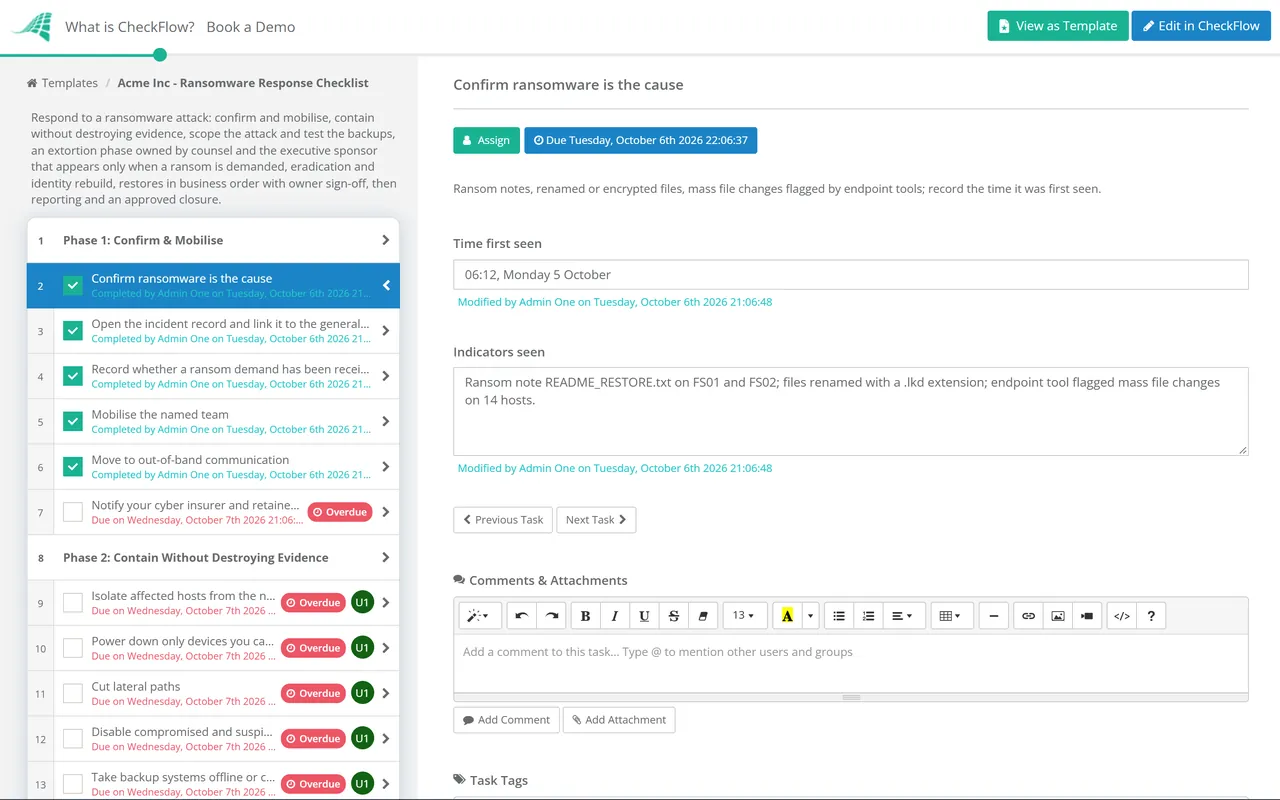
Phase 1: Confirm & Mobilise

Owned by the incident lead. The answers in this phase decide which later phases appear.

  • Confirm ransomware is the cause — ransom notes, renamed or encrypted files, mass file changes flagged by endpoint tools; record the time it was first seen
  • Open the incident record and link it to the general incident response checklist — severity, business units affected and the first known host
  • Record whether a ransom demand has been received and whether data theft is claimed or suspected — yes, no or not yet known
  • Mobilise the named team — incident lead, IT recovery lead, legal counsel, communications, finance and the executive sponsor who holds payment authority
  • Move to out-of-band communication — personal phones or a pre-arranged backup channel, assuming email and chat are visible to the attacker
  • Notify your cyber insurer and retained incident response firm — many policies require notice before you appoint outside help or incur costs
Phase 2

Phase 2: Contain Without Destroying Evidence

Isolation tasks are assigned to the IT recovery lead; evidence tasks to the forensic lead.

  • Isolate affected hosts from the network — through the endpoint tool or by pulling the network connection, rather than powering them off
  • Power down only devices you cannot disconnect — shutting down loses the memory evidence investigators may need
  • Cut lateral paths — disable remote access, VPN and remote management tools until they are checked, and block the attacker’s known IP addresses and domains
  • Disable compromised and suspicious accounts — prioritise domain admin, service and backup accounts, and revoke cloud sessions and tokens
  • Take backup systems offline or confirm they are isolated — attackers routinely target backup consoles and snapshots to block recovery
  • Preserve evidence — a sample of encrypted files, the ransom note, logs exported off the affected network and a chain-of-custody record
Phase 3

Phase 3: Scope & Check the Backups

The restore decision in task 6 needs approval from the IT recovery lead and the system owner.

  • Identify the ransomware variant — from the ransom note, file extension or the investigator’s analysis; check No More Ransom for a free decryptor
  • Establish the initial access route and earliest attacker activity — phishing, exposed remote desktop, an unpatched VPN or stolen credentials
  • List every affected system and data store — encrypted, accessed or unknown — and attach the list to the record
  • Check that backups are intact and predate the compromise — restore points, immutability, and whether the backup console itself was accessed
  • Scan the chosen restore points for the attacker’s tools and persistence before restoring anything
  • Decide what can be restored, what must be rebuilt and what is lost — recorded with the reasoning
Phase 4

Phase 4: Extortion Decision

Appears only when Phase 1 records a ransom demand. Every task is assigned to legal counsel or the executive sponsor, not to IT.

  • Do not contact the attacker until the decision owner has approved it — any contact goes through counsel or a specialist negotiator
  • Report the attack to law enforcement — FBI field office or IC3 in the US, Report Fraud (formerly Action Fraud) or the NCSC in the UK, or your national authority
  • Screen the attacker and any payment route against sanctions lists — OFAC in the US, OFSI in the UK; paying a sanctioned party can be unlawful even if you did not know
  • Check whether a ban or reporting duty applies to you — public bodies and regulated critical infrastructure in some countries face new payment rules
  • Record the decision on paying, with the reasons, the people who made it and the legal advice received — including a decision not to pay
  • Where a decryptor is obtained, test it on copies in an isolated environment before it touches production data
Phase 5

Phase 5: Eradicate & Rebuild Identity

  • Remove every foothold — malware, scheduled tasks, new accounts, remote access tools installed by the attacker and changes to group policy
  • Reset privileged credentials — domain and cloud admins, service accounts and the backup system, from a clean device
  • Reset the Active Directory KRBTGT account password twice, with replication between the resets, where domain controllers were compromised
  • Close the way in — patch the exploited flaw, remove exposed remote desktop, and enforce MFA on the abused account type
  • Rebuild domain controllers and other critical servers from known-good media where they cannot be trusted
Phase 6

Phase 6: Restore in Business Order

Each restore tier needs sign-off from the system owner before the next tier starts.

  • Restore identity, network and security tooling first — directory services, DNS, endpoint protection and logging
  • Restore critical business systems in the agreed priority order — from the business impact analysis, not from whoever asks loudest
  • Scan each restored system before reconnecting it to the production network
  • Watch for re-entry — heightened alerting on the restored systems and on the accounts the attacker used, for an agreed period
  • Confirm business operations are back — the business owner tests the service and signs it off
Phase 7

Phase 7: Report, Review & Close

Notification tasks switch on when Phase 1 records data theft as claimed, suspected or not yet known.

  • Hand any personal data exposure to the data breach response workstream — the regulator clock may already be running
  • Monitor the attacker’s leak site and dark web channels for your data — usually through your incident response firm or threat intelligence provider
  • File any mandatory reports — sector regulators, cyber incident reporting rules and, where you paid, payment reporting duties
  • Hold a blameless lessons-learned review and raise improvement actions with owners and dates — backup immutability, MFA coverage, remote access and detection
  • Approve closure — the executive sponsor and head of security confirm that evidence is retained and actions are tracked

The First 72 Hours, and Who Has to Be Told

Every ransomware incident is different, but the order of the first decisions rarely is. The timeline below shows where each phase usually sits. Treat the timings as a guide for planning a tabletop exercise, not a target you will always meet.

First hour

Confirm, isolate, mobilise

Ransomware is confirmed, affected hosts are isolated rather than switched off, the named team is called on an out-of-band channel and the insurer is told.

Hours 1–12

Contain and preserve

Compromised accounts are disabled, remote access is cut, backups are protected, and logs and a sample of encrypted files are preserved.

Hours 12–48

Scope and decide

The variant, entry point and affected systems are known. Backups are checked. If there is a ransom demand, legal and sanctions screening run before any decision on contact.

Days 2–7

Rebuild and restore

Identity is rebuilt, the way in is closed, and systems come back tier by tier with sign-off at each step.

Within 72 hours of awareness

Regulator decisions

If personal data may have been taken, the GDPR and UK GDPR clock for notifying the regulator is running. Other sector deadlines can be shorter.

Reporting duties depend on your sector and location, so confirm them with counsel. In the US, the Treasury’s Office of Foreign Assets Control warned in its September 2021 advisory that ransom payments to sanctioned persons can breach sanctions law, and that prompt reporting to law enforcement and cooperation count as mitigating factors. The Cyber Incident Reporting for Critical Infrastructure Act of 2022 will require covered entities to report ransom payments to CISA within 24 hours of paying and covered incidents within 72 hours, but those duties start only once CISA’s final rule takes effect, which had not happened as of October 2026. SEC registrants must disclose a material incident on Form 8-K within four business days of determining that it is material. HHS treats ransomware on systems holding electronic protected health information as a presumed HIPAA breach unless a low probability of compromise can be shown.

In the UK, the government confirmed in July 2025 that it will ban ransom payments by public sector bodies and regulated critical national infrastructure, require other organisations to notify the government before paying, and introduce mandatory reporting of ransomware attacks. The legislation had not been passed as of October 2026, so check the current position before relying on it. The ICO and NCSC have both said that paying a ransom does not protect the data or reduce regulatory penalties. In the EU, entities covered by NIS2 must send an early warning of a significant incident within 24 hours. Phase 7’s reporting tasks can be edited as these rules change.

Why Run Ransomware Response in CheckFlow?

1

The extortion decision is owned, not improvised

The extortion phase only appears when a demand exists, and every task in it is assigned to counsel or the executive sponsor by name. Nobody in IT can be pushed into opening a chat with the attacker, and the decision is recorded with its reasons whichever way it goes.

2

Restores happen in order

Approvals between restore tiers mean identity and security tools come back before the finance system, and each system owner signs off their service. The checklist shows exactly which tier is in progress when the board asks.

3

The record answers the insurer

Every action carries a name and a time. Ransom notes, log exports, backup checks and legal advice are attached to the task they support, which is the evidence an insurer, regulator or lawyer will ask for.

CheckFlow is not a backup, EDR or decryption tool. It runs the human side of the response around those tools: who decides, who restores what, and what was reported. Recovery depends on backups you have already proven, which is what the Backup Verification & Restore Test Checklist is for, and the disaster recovery checklist guide explains how to plan the restore order before you need it.

Rehearse this playbook before it is real. Run it as the scenario in the Incident Response Tabletop Exercise Checklist at least once a year, and use the Cyber Insurance Readiness Checklist to confirm the controls your insurer expects, such as MFA, EDR and offline backups, are actually in place.

Frequently Asked Questions

What should a ransomware response checklist include?

+

It should cover confirming the attack and mobilising a named team, isolating systems without destroying evidence, checking that backups are intact before restoring, a separate decision process for any ransom demand, rebuilding identity, restoring systems in business priority order, and the reports that follow. The two parts most plans leave out are the backup check and the extortion decision, and both cause the most expensive mistakes when they are improvised.

Should we pay the ransom?

+

Law enforcement agencies, including the FBI and the UK NCSC, advise against paying. Payment does not guarantee a working decryptor, does not stop the attacker publishing stolen data, and can mark you as a willing payer. It can also be unlawful if the attacker is on a sanctions list. If an organisation does consider paying, the decision belongs to its executives with legal advice, after sanctions screening and a report to law enforcement, and should be recorded with its reasons. This checklist does not make the decision for you; it makes sure the right people make it, in the right order.

Should we switch off infected computers?

+

Usually not. Disconnect them from the network instead, through your endpoint tool or by unplugging the network cable, and leave them powered on. CISA’s #StopRansomware Guide recommends powering down only devices that cannot be disconnected, because shutting a machine down loses the memory evidence that can show how the attacker got in and, occasionally, recover encryption keys.

Is a ransomware attack a data breach?

+

Often, yes. Most ransomware groups now steal data before encrypting it, so you should assume data may have been taken until the investigation shows otherwise. Under GDPR and UK GDPR, losing access to personal data can itself count as a personal data breach, even without theft. In US healthcare, HHS presumes that ransomware on systems holding electronic protected health information is a reportable breach unless a risk assessment shows a low probability that the data was compromised.

How do we know our backups are safe to restore?

+

Check three things before restoring: the restore point predates the attacker’s first activity, not just the encryption; the backup system itself was not accessed or altered; and the restored data is free of the attacker’s tools. Immutable or offline copies are far more likely to survive. The best answer is a restore test you ran before the attack, which is why this playbook pairs with a monthly backup verification routine.

Who needs to be notified after a ransomware attack?

+

It depends on your sector and location. Typical parties are your cyber insurer, law enforcement, the data protection regulator if personal data is involved, affected individuals if the risk to them is high, sector regulators, customers under contract, and, for SEC registrants, investors through a Form 8-K if the incident is material. Some countries are adding specific ransomware reporting duties, including payment reporting. Confirm the list with counsel during the incident and record every decision, including decisions not to notify.

Is CheckFlow free for this template?

+

14-day free trial, no card required. The Business plan is $10 per user per month after the trial. Full details at checkflow.io/pricing.

Decide Who Does What Before the Ransom Note Appears

Free trial — no credit card required.