Owned by HR and the line manager
Covers: contract, payroll, policies, welcome, probation.
Done when: the new hire is settled, paid and has passed probation.
Risk if missed: a poor start and an early leaver.
No Credit Card Required
Printed from checkflow.io/templates/managed-services/msp-technician-onboarding-checklist
Hiring a technician at an MSP is not like hiring at most businesses. On day one the new starter can be given access to the PSA, the RMM, the documentation platform, the password vault and the remote access tools, and between them those reach every client you look after. Give all of it at once and you have widened your attack surface before they have closed a ticket. Hold it all back and they spend a fortnight unable to help. This free MSP technician onboarding checklist gives service managers and service-desk leads a repeatable way to bring each new technician up to speed. It covers least-privilege accounts before day one, orientation on your clients, services and SLAs, security and confidentiality, tools training and shadowing, a ticket ladder that grants elevated access only with a service manager’s approval, and the 30, 60 and 90-day reviews. A conditional phase adds onsite readiness for field technicians.
A general onboarding process still applies to a new technician. The contract, right-to-work checks, payroll, the welcome and the probation reviews are the same as for anyone else, and the Employee Onboarding Checklist covers them well. What it can’t cover is the part specific to an MSP: access to other organisations’ systems, and the judgement to use it safely.
That part belongs to the service manager. It decides which clients the technician can see, which roles they hold in the RMM and in client tenants, when they are trusted to run scripts or reset an administrator’s MFA, and how the service desk’s rules on tickets and time entries are learned before they become habits. Run the two checklists side by side: HR owns one, the service manager owns the other, and neither assumes the other has handled the access.
Covers: contract, payroll, policies, welcome, probation.
Done when: the new hire is settled, paid and has passed probation.
Risk if missed: a poor start and an early leaver.
Covers: client access, tools, security, service rules, the ticket ladder.
Done when: the technician works independently with exactly the access their role needs.
Risk if missed: an over-privileged account that reaches every client.
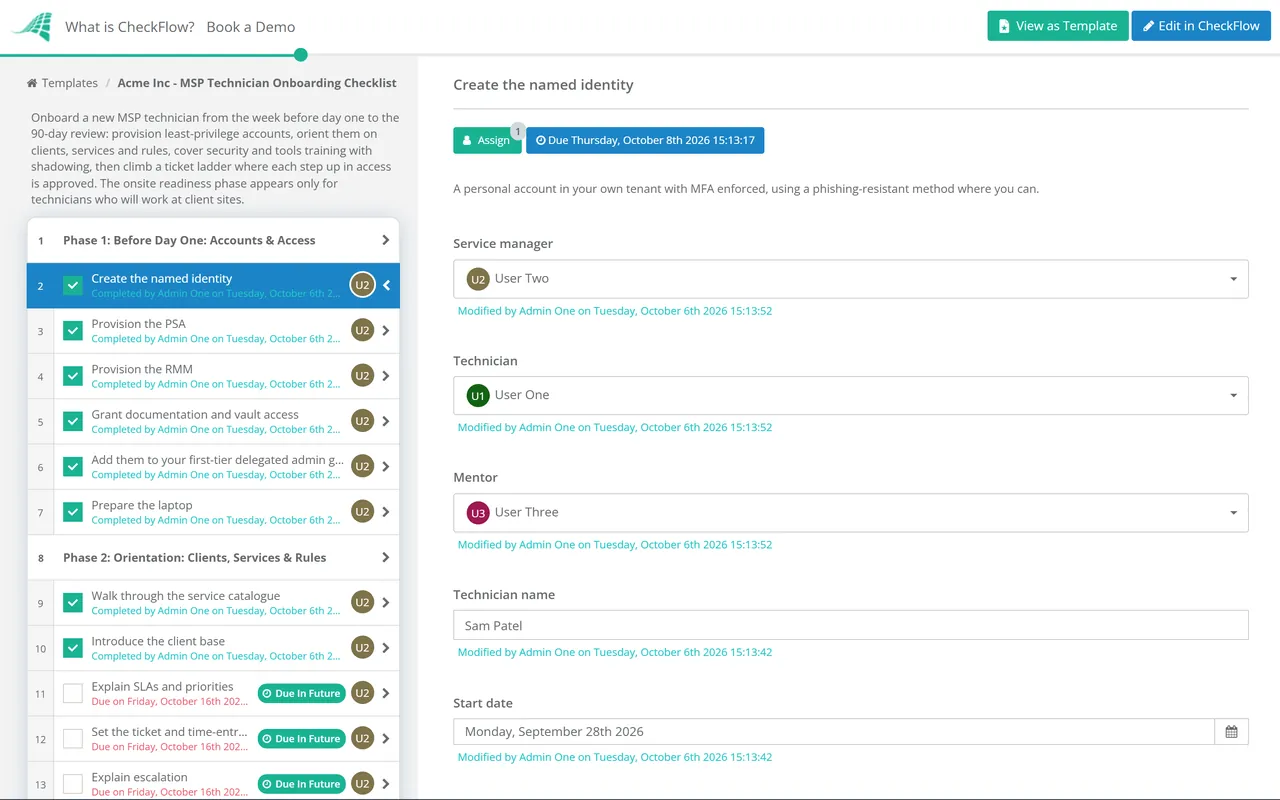
Seven phases take a new technician from accounts before day one to the 90-day review. Phase 6 appears only for field or onsite technicians.
Grant the first rung of the ladder only. Everything else is approved later, in Phase 5.
Each rung adds access. The service manager approves every step up, and the approval is recorded.
Shown only for technicians who visit client sites. Conditional logic removes it for desk-based roles.
A ticket ladder ties access to demonstrated competence. Each rung lists the work a technician takes on and the access that work needs, and the service manager approves every step up. The rungs below are a common pattern, not a standard. Adapt them to your service tiers and the tools you use, and write down the criteria for each step up so two service managers would make the same decision.
| Rung | Typical work | Access | To move up |
|---|---|---|---|
| 1. Requests | Password resets, new users, how-to questions | PSA, read-only RMM, help desk roles in client tenants | Clean ticket notes and verified identity on every reset |
| 2. First-line incidents | Incidents for assigned clients, with escalation | Remote control, documentation for assigned clients | Good first-contact resolution and accurate time entries |
| 3. Second-line | Server, network and Microsoft 365 issues | Higher admin roles for assigned clients, RMM scripting | Service manager approval and a mentor’s sign-off |
| 4. Projects and escalations | Onboarding, migrations, change work | Broader client scope, change rights, policy edits | Service manager approval and a review of recent changes |
MSPs are attractive targets because one compromised account can reach many clients. CISA’s joint advisory on threats to MSPs asks providers to apply least privilege in their own and their customers’ environments, to require MFA on every account with access to customer environments and to disable accounts that are not in use. Microsoft requires MFA on every user account in a partner tenant, and recommends assigning partner users to delegated admin security groups rather than a standing admin agent role.
Two newer patterns make the security phase more than a formality. Attackers have posed as employees to persuade help desks to reset passwords and move MFA to a device they control, which is why caller verification is trained before a technician takes a reset ticket. And legitimate remote access software is regularly abused, which is why a new technician should know exactly which tools you use, and treat anything else on a client device as suspicious. Neither lesson sticks if it is taught once in a slide deck, so the checklist puts each one on a named task with a due date and a person who confirms it was done.
Launch the checklist for each new starter with the start date, service manager and mentor filled in. Relative due dates put the account tasks before day one and the reviews at 30, 60 and 90 days, and conditional logic adds the onsite phase only for field technicians.
The step up the ticket ladder is an approval. Until the service manager marks it approved, the task that grants the access stays locked, and the record shows who approved what and when. That is the kind of evidence an insurerThat record is what an insurer or a client’s auditor asks for.rsquo;s questionnaire or a clientThat record is what an insurer or a client’s auditor asks for.rsquo;s auditor is likely to ask for.
Assign tasks to the service manager, the mentor, HR and the technician, each with a due date. The my-work view shows each person what is theirs today, and the grid view shows every new starter’s progress in one place.
Technician onboarding is one of the internal processes the MSP process management guide recommends standardising early, because it shapes how every later ticket is handled. See how CheckFlow for MSPs runs it alongside client processes, and how CheckFlow’s onboarding software handles the HR side.
When a technician leaves, the access you granted rung by rung has to come off just as carefully. The IT offboarding security checklist covers removal, and the MSP Client Onboarding Checklist is a good second-rung project for a technician to shadow.
Describe the process in a sentence and the AI checklist generator drafts the phases and tasks for you.
Most MSPs expect a new service desk technician to handle simple requests within the first two weeks and first-line incidents within a month or two, with the 90-day review confirming them in the role. Experienced hires move up the ladder faster, but they still start on the first rung, because they need to learn your clients, your tools and your rules before they are given broad access.
Enough to do first-rung work and no more: a named account with MFA, the PSA with a technician role, read-only or tier-one RMM access for the clients they will support, documentation and vault access for those clients, and the delegated admin groups for their tier. Global admin roles, RMM scripting and access to every client in the vault should wait for an approved step up.
A ticket ladder is a set of rungs that match types of work to the access they need, from simple requests up to second-line and project work. A technician moves up when they have shown they can handle the current rung well, and the service manager approves each move. It ties privilege to competence and makes the reasons for each permission easy to explain later.
Microsoft’s guidance is to assign Microsoft Entra roles to security groups in your partner tenant and manage access by adding users to those groups. Build groups by tier, give the first-tier group the least-privileged roles for help desk work, and add a new technician to that group only. Moving up a rung then means adding them to another group, which is easy to record and to reverse.
A general employee onboarding checklist covers HR: contracts, payroll, policies, the welcome and probation. This template covers what is specific to an MSP technician: least-privilege access to client environments, your service rules, your tools, security training for help desk work and a graduated ticket ladder. Run both together. HR owns the employee checklist and the service manager owns this one.
Train caller verification before a technician takes a single reset ticket, and make it a rule, not a judgement call. Confirm a caller’s identity through a channel you already hold on record, such as a call back to a known number, before resetting a password or changing MFA. CISA has documented attackers posing as employees to get help desks to move MFA to a device they control.
14-day free trial, no card required. The Business plan is $10 per user per month after the trial. Full details at checkflow.io/pricing.
14-day free trial, no credit cardFull refund in your first 30 daysUS hosting, EU on request