Software Developer Onboarding Checklist Template

A new developer can have a laptop, an email address and single sign-on on day one and still be unable to build the code by Friday. The engineering half of onboarding usually lives in a wiki page nobody has tested since the last hire.

This free software developer onboarding checklist is for engineering managers, tech leads and onboarding buddies who want every new engineer to follow the same path from the first clone to the first merged pull request. It covers access to the code host with MFA, a local environment that builds and passes the tests, a walkthrough of the architecture, the team’s coding standards and review process, a deliberately chosen first issue, and a 30-day review. If the developer will join the on-call rotation, a final phase adds shadowing before they carry the pager alone. Laptops, email and SSO are IT’s job and are covered in our IT onboarding checklist guide; this template only checks they are in hand. For the HR side of a new hire, run the Employee Onboarding Checklist alongside it.

Use This Template Free See Live Example
No Credit Card Required

Developer Onboarding Starts Where IT Onboarding Stops

IT onboarding ends when the new starter can log in. For most roles that is close to the finish line. For a developer it is the starting point, because the work they were hired for sits behind another layer of tools: the code host, the CI pipeline, the package registries, the staging environments, the secrets manager and, eventually, the paging tool. None of these belong to IT in most teams, and none of them appear on a standard new-hire checklist. So they get granted from memory, by whoever happens to be around, and the new developer spends their first week asking which repository matters and why the build fails on their machine.

The fix is to give the engineering half its own checklist with its own owners. The manager decides the level of access and approves each step up. The buddy proves the setup guide still works and pairs on the hard parts. The developer works through the environment, notes every gap they hit and opens their first pull request within a planned window. Splitting the work this way also makes it easy to see where a slow start came from: an access request nobody approved, a broken setup step or a first issue that turned out to be far bigger than it looked.

IT team

Gets them logged in

  • Laptop and device management
  • Email, SSO and the identity account
  • Company-wide apps
Engineering manager

Decides and approves

  • Access level for each system
  • The first issue
  • Step-ups and the on-call decision
Onboarding buddy

Removes friction

  • Tests the setup guide first
  • Pairs on environment problems
  • Reviews alongside the new starter
New developer

Builds, learns and ships

  • Gets the tests passing locally
  • Logs what the docs got wrong
  • Merges the first pull request

What the Software Developer Onboarding Checklist Covers

Seven phases run from the week before the start date to the 30-day review. The on-call phase appears only for developers who will join the rotation.

Phase 1

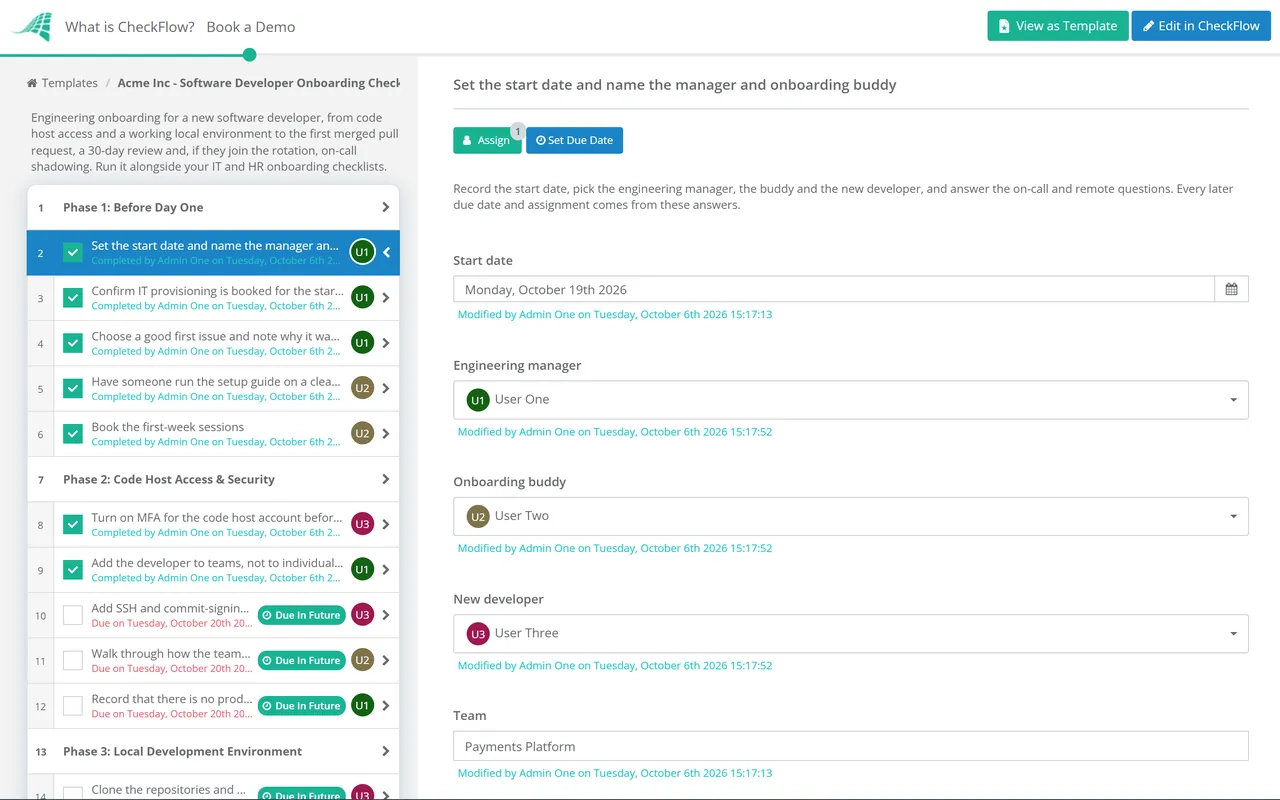
Phase 1: Before Day One

  • Set the start date and name the manager and onboarding buddy — and answer two questions: on-call, and remote for the first week
  • Confirm IT provisioning is booked for the start date — laptop, email and SSO follow your IT process; this step only checks they are in hand
  • Choose a good first issue and note why it was chosen — small, well defined and touching the normal build, test and deploy path
  • Have someone run the setup guide on a clean machine — the most recent joiner is ideal, and anything broken gets fixed now
  • Book the first-week sessions — architecture walkthrough, code review introduction and the team’s regular meetings
Phase 2

Phase 2: Code Host Access & Security

IT owns the device and single sign-on. This phase covers only the engineering tools that sit on top of them.

  • Turn on MFA for the code host account before granting repo access
  • Add the developer to teams, not to individual repositories — write access to the team’s repositories, CI, the issue tracker and docs, with no admin rights
  • Add SSH and commit-signing keys tied to the work account — signing keys only if your protected branches require signed commits
  • Walk through how the team handles secrets — where they live, how to get development credentials, why none go in a commit and who to tell if one leaks
  • Record that there is no production write access in week one
Phase 3

Phase 3: Local Development Environment

The phase is done when the developer can build the code and get a green test run on their own machine.

  • Clone the repositories and build them using the setup guide — as written, without help, so the gaps show up
  • Run the full test suite locally and get it green
  • Run the application against seed or sandbox data — never a copy of production data
  • Install the linters, formatters and pre-commit hooks the team uses
  • Note every setup step that failed or was unclear — the fixes make an easy early pull request
  • Remote only: finish setup on a screen-share with the buddy — shown when the developer is remote in their first week
Phase 4

Phase 4: Codebase, Architecture & Standards

  • Walk through the system architecture with a senior engineer — services, data stores, queues and the decision records that explain them
  • Go through the coding standards and what the linter already enforces — so human review can focus on what tools cannot check
  • Learn how code review works on this team — approvals needed, code owners, required checks, expected turnaround and tone
  • Review two open pull requests alongside the buddy
  • Trace one request through the logs and dashboards in staging
Phase 5

Phase 5: First Pull Request & Deploy

  • Agree what done means for the first issue — acceptance criteria, tests expected and who will review
  • Open the first pull request with a clear description and tests
  • Work through review comments until the pull request is approved
  • Follow the merged change through CI to staging and production
  • Manager approves the step up to standard engineering access — an approval task, so the checklist waits for the decision
Phase 6

Phase 6: 30-Day Review

  • Hold a 30-day check-in on what slowed the developer down
  • Update the setup guide and onboarding docs with what was learned
  • Review the access granted so far against what the role uses — remove anything granted “just in case”
  • Agree the next pieces of work and the areas the developer will own
Phase 7 — If Joining On-Call

Phase 7: On-Call Shadowing

Shown only when the answer to “Will this developer join the on-call rotation?” is Yes. Due dates run from the 30-day check-in.

  • Read the runbooks, the incident process and recent postmortems
  • Get paging tool access and send a test page — to confirm alerts reach the developer’s phone
  • Shadow the primary on-call engineer for a full rotation
  • Take primary on-call with an experienced engineer as reverse shadow
  • Manager approves joining the on-call rotation

Staged Access: What a New Developer Gets, and When

Least privilege means giving each person the minimum access they need to do their job, a principle set out in NIST’s security glossary. For a new developer that minimum changes quickly, so the checklist grants access in stages instead of all at once. The table below shows a common pattern. Adjust it to your own systems, but keep the principle: each step up is a decision someone records, not a favour someone grants in chat.

System Week one After the Phase 5 approval Why
Code hostMFA on; team membership with write access to the team’s repositoriesUnchanged; admin rights stay with a small group of ownersBranch protection means write access still cannot skip review
CI/CD pipelineView runs and logs, re-run their own buildsTrigger deploys through the pipeline once a change is approvedChanges reach production through the pipeline, not from a laptop
Staging and devFull use, with seed or sandbox dataFull useSomewhere safe to test the first change
ProductionRead-only dashboards and logs; no write accessWrite access only where the role needs it, approved and loggedMistakes in week one stay out of live systems
SecretsDevelopment credentials from the secrets managerProduction secrets reach services through the pipeline, not peopleA secret pasted into chat or a commit has to be rotated
Paging toolNoneAdded in Phase 7, first as a shadowOnly for developers joining the rotation

The code host can enforce much of this for you. GitHub, for example, lets organisation owners require two-factor authentication for every member, and its protected branches can require a set number of approving reviews, passing status checks, code owner review and signed commits before anything merges. Those settings are what make it safe to give a new joiner write access in week one.

Secrets need the same care. The OWASP Secrets Management Cheat Sheet recommends a central secrets manager rather than credentials in source code, detection through pre-commit hooks and CI scanning, and immediate revocation and rotation when a secret is exposed. Some code hosts add a server-side check too: GitHub’s push protection blocks pushes that contain detected secrets. For on-call, the Google SRE book describes copying pages to a new engineer, then a “reverse shadow” in which they take primary while an experienced engineer watches, and it suggests curated postmortems as reading for newcomers. Phase 7 follows that sequence.

Why Run Developer Onboarding in CheckFlow?

1

On-call only when it applies

One answer on the first task, “Will this developer join the on-call rotation?”, decides whether the shadowing phase appears. A second, about working remotely in week one, adds the screen-share setup session. A developer who will never carry a pager, or who starts in the office, never sees steps that do not apply to them.
2

Access steps up on approval

The move from week-one access to standard engineering access is an approval task assigned to the manager picked in Phase 1. The checklist waits until it is approved, and the record shows who approved it and when, which is useful at your next access review.

3

Dates and owners set once

Enter the start date and pick the manager and buddy, and every task gets an owner and a due date: the setup guide test before day one, the first pull request in the second week, the 30-day check-in on time. Move the start date and the schedule moves with it.

Most new developers need both checklists: one for IT and one for engineering. CheckFlow’s IT onboarding checklist software runs the laptop, account and SSO side, with tasks assigned to IT and due dates set from the same start date.

Software and SaaS companies use CheckFlow for more than onboarding: release checklists, access reviews, incident follow-ups and customer onboarding. See how it fits on our page for technology companies.

Frequently Asked Questions

What should a software developer onboarding checklist include?

+

The engineering steps that a general onboarding checklist leaves out: code host access with MFA, team-based repository permissions, a briefing on secrets, a local environment that builds and passes the tests, an architecture walkthrough, the coding standards and review process, a chosen first issue taken through to a merged and deployed pull request, and a 30-day review of both the experience and the access granted. Add on-call shadowing for developers who will join the rotation.

How is developer onboarding different from IT onboarding?

+

IT onboarding gives every new starter a working device, an identity account, email and the company-wide apps. Developer onboarding starts after that and covers the tools engineering owns: repositories, CI/CD, environments, secrets and the paging tool, plus the knowledge needed to change the code safely. Run both, with IT owning the first and the engineering manager owning the second.

Should a new developer have production access in their first week?

+

Read-only access to dashboards and logs helps them learn how the system behaves. Write access is a different matter. A common practice is to hold it back until the developer has merged and deployed a change through the normal pipeline, and then grant only what the role needs, with the decision recorded. In this template that decision is the manager’s approval task at the end of Phase 5.

What makes a good first issue for a new developer?

+

A real change that can be finished in a few days, with a clear definition of done and no hidden dependencies on other teams. It should touch the normal path from branch to test to review to deploy, so the developer exercises the whole process once. Bug fixes, small features behind an existing flag and fixes to the setup guide itself all work well. Pick it before day one, so the developer is not handed whatever happens to be at the top of the backlog.

When should a new developer join the on-call rotation?

+

Once they know the system well enough to follow a runbook and have seen real incidents handled. That usually means a period of reading runbooks and postmortems, a full rotation shadowing the primary engineer, then a rotation as primary with an experienced engineer as backup. The template makes the final step a manager approval, so nobody is added to the rota by default.

How do we stop the setup guide going out of date?

+

Test it on every hire. Phase 1 asks someone to run the guide on a clean machine before the start date, Phase 3 asks the new developer to note every step that failed or confused them, and Phase 6 makes updating the guide a task with an owner and a due date. A guide that is exercised and corrected with each new starter stays close to how the code really builds, rather than how it built two years ago.

Is CheckFlow free for this template?

+

14-day free trial, no card required. The Business plan is $10 per user per month after the trial. Full details at checkflow.io/pricing.

Take Every New Developer From First Clone to First Merge

Free trial — no credit card required.