Configure, train, go live
Asks: does it work, and do people use it?
Owned by: the application and business owners.
Template: the New Software Implementation Checklist.
Last reviewed: October 2026
No Credit Card Required
Printed from checkflow.io/templates/information-technology/ai-tool-rollout-checklist
This free AI tool rollout checklist is for IT managers, security leads and MSPs bringing a generative AI tool into an organisation: an office-suite assistant, a chat assistant or a coding assistant. It runs from the approved-tools list and shadow AI, through vendor data terms, an oversharing check, labels and DLP, SSO, licences and logging, to the acceptable use policy, training and a pilot that ends in a named go-live decision.
Most of an AI rollout is ordinary implementation work: single sign-on, licences, training, a pilot and support. Three questions are new. Where do prompts, files and answers go once staff type them in? What can the assistant read on each person’s behalf? And which AI tools are staff already using without asking?
The second question catches most organisations out. Microsoft’s documentation says Microsoft 365 Copilot only surfaces organisational data that each user has at least view permission for, and Google says Gemini in Workspace follows existing Workspace permissions. Neither breaks your permissions, but both make them visible. A salary spreadsheet shared with everyone years ago was hard to stumble on. An assistant asked about pay finds it in seconds, which is why the oversharing check comes before licences.
Asks: does it work, and do people use it?
Owned by: the application and business owners.
Template: the New Software Implementation Checklist.
Asks: what goes in, what can it see, and how do staff check what comes out?
Owned by: IT and security, with the business owner.
Template: this checklist.
An organisation rolling out a bought assistant is usually a deployer under the EU AI Act, not a provider, and drafting or summarising is not a high-risk use unless the tool is pointed at something Annex III lists, such as screening job applicants. The duty that reaches almost every deployer is AI literacy under Article 4, handled in Phase 5.
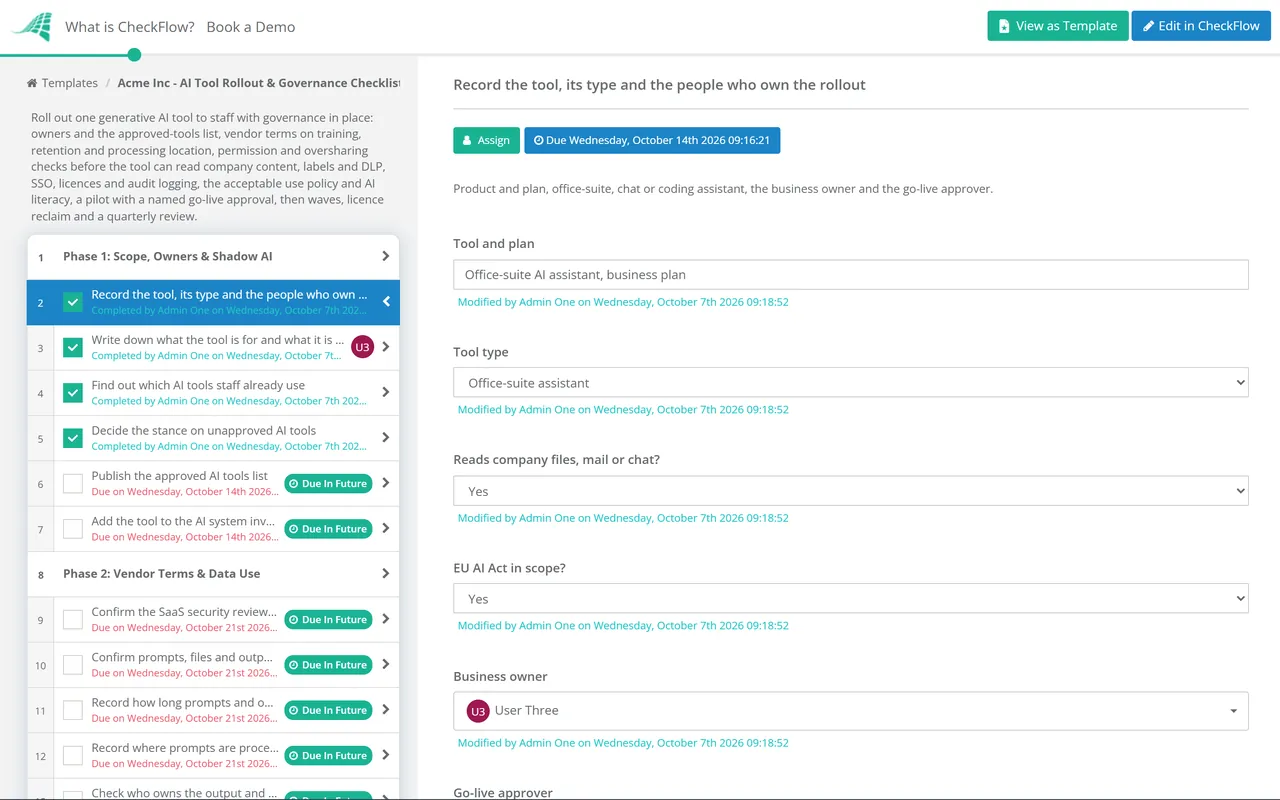
Seven phases take one AI tool from approval to everyday use. Three answers on the first task decide whether the coding assistant, oversharing and AI literacy tasks appear, and the go-live approver signs off before licences go beyond the pilot. Run it once per tool; Phase 7 books a quarterly governance review.
The first task records the three scope answers, the business owner and the go-live approver. They decide what appears in Phases 3 to 6.
The full vendor security review runs before this phase. These tasks check only the AI-specific terms, on the plan you are buying.
The three oversharing tasks appear only when the tool reads company files, mail or chat. An assistant shows each person what they could already open, so fix permissions before it does.
The coding assistant task appears only when the tool type is Coding assistant.
The AI literacy record appears only when the EU AI Act is in scope. The training belongs in every rollout.
The audit log check appears only when the tool reads company files, mail or chat. The go-live decision halts the checklist until the approver named in Phase 1 records it.
Each kind of tool fails in its own way, which is why the first task asks for the type.
| Question | Office-suite assistant | Chat assistant | Coding assistant |
|---|---|---|---|
| What it can see | Mail, files, chats and meetings the user can open | What staff paste or upload, plus any connectors you enable | Code in the editor and the repositories in scope |
| Main risk | Oversharing made visible | Sensitive data in prompts; personal accounts | Secrets in code; suggestions copied from licensed code |
| First control | Permissions clean-up and labels | SSO, domain claim and DLP | Repository scope and secret scanning |
| Watch in the pilot | Answers built from files the user should not see | Restricted files uploaded | Suggestions merged without review |
Article 4 of the EU AI Act has applied since 2 February 2025. The Digital Omnibus on AI, Regulation (EU) 2026/1744, in force since 27 July 2026, rewrote it: providers and deployers must take measures to support the AI literacy of staff and others using AI systems on their behalf, taking account of their knowledge, experience and the context of use, rather than ensure a sufficient level of it. The duty is softer but has not gone; a record of what each role received is the simplest evidence. This is not legal advice.
Check the logging before the pilot, not after. In Microsoft 365, Purview Audit (Standard) records Copilot interactions automatically when auditing is on, including the files used to answer, and Restricted Content Discovery can temporarily hide chosen SharePoint sites from organisation-wide search and Copilot without changing permissions. Other suites have their own equivalents.
Conditional logic reads the first task and adds the oversharing, coding assistant and AI literacy tasks only where they apply. Template versioning ties each rollout to the version it ran.
The go-live approver is picked in a members field and the decision task is assigned to them. The checklist halts until they record Approved or Not approved, and the activity trail keeps who decided and when.
Oversharing reports, vendor terms and training records attach to the tasks that produced them. The approved tools list can live in a data set each run reads, and a quarterly recurring schedule opens the governance review.
This checklist rolls out one tool. The EU AI Act Compliance Checklist classifies every AI system you build, buy or use, and the ISO 42001 AI Management System Checklist keeps governance audited year after year. Before Phase 2, the SaaS Procurement Security Review Checklist covers certifications, SSO and the data processing agreement, and the Data Classification Review Checklist makes sure the levels Phase 3 relies on are applied.
If your assistant connects to your process tool, the CheckFlow MCP server lets it start checklists and complete tasks inside processes you have already approved. Its key is bound to a named member, so it reaches no further than that person, and the activity trail records every change it makes. Put it on the approved list like any other tool.
Describe the process in a sentence and the AI checklist generator drafts the phases and tasks for you.
The approved tools and plans, the data classifications allowed in each, and the uses that are out of bounds, such as decisions about people without human review. Add the duty to check output before relying on it, when to say a document was drafted with AI, how to report a problem, and that unapproved tools must not be used with company data.
Copilot only shows each user content they already have permission to see, so the work is fixing permissions nobody knew were wrong. Run an oversharing report, start with links open to the whole organisation and sensitive sites shared with very large groups, and have site owners confirm access. Restricted Content Discovery can keep chosen sites out of Copilot and organisation-wide search while that review runs.
Usually not on business plans, but check the contract for the plan you buy. Microsoft states that prompts, responses and data accessed through Microsoft Graph are not used to train the foundation models behind Copilot, and Google says Workspace does not use customer data to train models without permission. Free and consumer plans often have different terms, which is one reason to keep company data out of them.
Providers and deployers must take measures to support AI literacy among staff and others who operate or use AI systems on their behalf, suited to their knowledge, experience and the context of use. It has applied since 2 February 2025; the Digital Omnibus softened the wording in 2026 without removing the duty. Role-based training with a record of who received it is the practical answer. Confirm your position with your advisers.
Find it first, without blame: sign-in logs, expense claims, browser extensions and an anonymous survey show what people use and why. Then offer an approved tool that does the job, publish which data may go where, and block or restrict the rest. Banning everything without an alternative tends to push use onto personal devices, where IT sees nothing.
14-day free trial, no card required. The Business plan is $10 per user per month after the trial. Full details at checkflow.io/pricing.
14-day free trial, no credit cardFull refund in your first 30 daysUS hosting, EU on request