LinkedIn Sales Navigator Message Checklist Template

LinkedIn drives 80% of B2B social media leads. But 47% of buyers are more likely to consider a vendor only when outreach is personalised. A checklist separates the pipeline generators from the noise generators.

LinkedIn is the most powerful B2B prospecting channel available to most sales and marketing teams — with over one billion members and 80% of all B2B social media leads flowing through it. But the signal-to-noise ratio on LinkedIn outreach is deteriorating rapidly. The same message sent to 500 contacts from a bulk automation tool is the noise. The message that references something specific about the person’s recent activity, acknowledges their actual situation, and bridges clearly to a relevant value proposition is the signal — and LinkedIn’s own data shows it is 47% more likely to receive a positive response when it is genuinely personalised. A structured LinkedIn outreach process addresses both ends of the quality problem: better targeting (Sales Navigator filters to find the right ICP contacts), better pre-outreach engagement (profile visits and content engagement before the first message), better message quality (a specific framework rather than a generic template), and a disciplined follow-up sequence (sequenced messages spaced 2–5 days apart improve conversions 49% over one-off attempts). This free checklist gives B2B sales teams, SDRs, and marketing leaders a structured framework for the full LinkedIn Sales Navigator outreach workflow.

Use This Template Free See Live Example
No Credit Card Required

Four Types of LinkedIn Outreach — When to Use Each

Message Type 1

Connection Request (300 chars)

When: Initial contact with 2nd or 3rd-degree connections. The first touch.

What to include: One specific reference to them (their content, their role, a mutual connection) and one clear, honest reason for connecting. No pitch.

What not to include: A sales pitch in the connection note. “I’d love to show you how…” destroys the relationship before it starts.

Message Type 2

Direct Message to 1st-degree

When: After connection is accepted, or to existing 1st-degree connections.

What to include: Personalised reference, relevant value proposition, low-friction ask (open question, not “book a call”).

Best length: Under 200 words performs better. Shorter messages get higher response rates.

Message Type 3

InMail (Sales Navigator)

When: Need to reach someone immediately who hasn’t accepted a connection request; or in accounts where connection building is too slow.

Character limit: 200-character subject line; 1,900-character body.

Note: InMail credits are limited; use for high-value targets only.

Message Type 4

Follow-up Sequence

When: No response to initial message after 3–5 business days.

How many: 2–3 follow-ups maximum before withdrawing. Each adds new information or perspective — not just “following up”.

Spacing: 3–5 business days between each touch. Sequenced follow-ups improve conversions 49% over one-off attempts.

What the LinkedIn Sales Navigator Outreach Checklist Covers

Seven phases from ICP definition and list building through profile optimisation, pre-outreach engagement, connection request, initial message, follow-up sequence, and response handling.

Phase 1

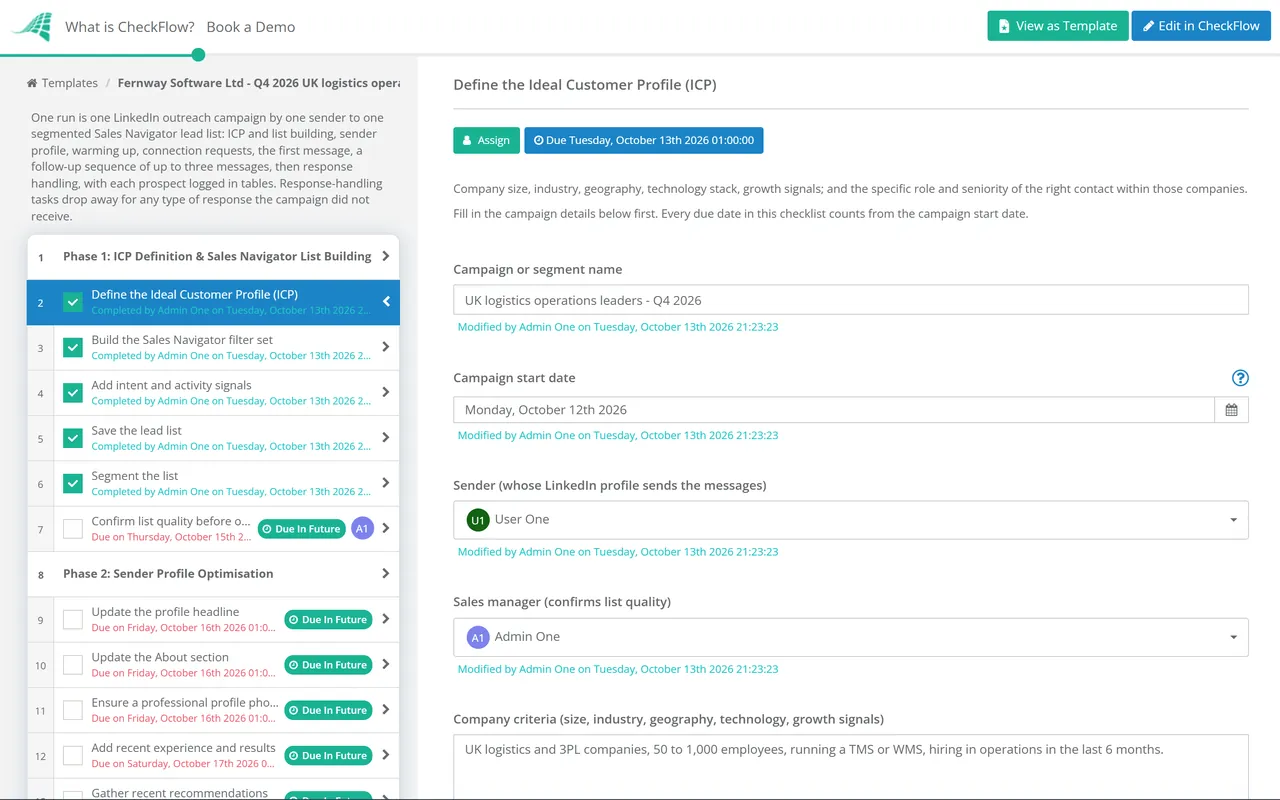
Phase 1: ICP Definition & Sales Navigator List Building

Sales Navigator is a list-building and intelligence tool. Its value is in the precision of targeting — narrowing from 900 million LinkedIn members to the 200 decision-makers who match your ICP. Broad targeting wastes Sales Navigator credits and produces low-quality outreach.

  • Define the Ideal Customer Profile (ICP) — company size, industry, geography, technology stack, growth signals; and the specific role and seniority of the right contact within those companies
  • Build the Sales Navigator filter set — company headcount, industry, geography, title keywords, and seniority level; use Boolean search for complex role titles
  • Add intent and activity signals — “Changed jobs in past 90 days”, “Mentioned in the news”, “Posted on LinkedIn in past 30 days”; contacts showing activity are warmer
  • Save the lead list — in Sales Navigator; set up alerts for key signals (job changes, company news)
  • Segment the list — by persona type or company tier; messaging for a Head of Operations at a 50-person company should not be the same as a VP at a 5,000-person enterprise
  • Confirm list quality before outreach — spot-check 10–15 profiles; are these genuinely ICP-fit contacts?
Phase 2

Phase 2: Sender Profile Optimisation

81% of B2B buyers research a vendor’s profile before responding to any inquiry. If someone receiving your outreach visits your profile and sees a half-complete LinkedIn page with no compelling content, the outreach fails regardless of message quality.

  • Update the profile headline — not job title; a clear statement of who you help and how; the first thing a prospect sees
  • Update the About section — focused on the problems you solve for customers, not a resume summary; include a clear call to action
  • Ensure a professional profile photo — not a logo; not a holiday photo; a clear, professional headshot
  • Add recent experience and results — quantified outcomes for the current and recent roles; social proof for the prospect who is evaluating whether to respond
  • Gather recent recommendations — from clients or colleagues; strengthen credibility
  • Publish or repurpose recent content — a prospect who visits your profile and finds recent, relevant content is significantly more likely to respond
Phase 3

Phase 3: Pre-Outreach Engagement (Warming Up)

Outreach tied to recent activity boosts response rates by 32%. Two days of genuine engagement before sending a connection request turns cold outreach into warm outreach.

  • View the prospect’s profile — intentionally; many prospects receive a notification and will view your profile in return
  • Follow the prospect’s company page — signals interest in their work
  • Engage with a recent post — a genuine, specific comment (not “Great post!”) on something the prospect or their company published; creates the “recognition” that makes your message non-cold
  • Research for personalisation hooks — recent content they published, a company announcement, a challenge they mentioned, a mutual connection; the specific hook that shows you have done your homework
Phase 4

Phase 4: Connection Request

  • Draft the connection note — within 300 characters; one specific reference (“I saw your post about X”), one honest reason for connecting (“working with similar teams in your space”), no pitch
  • Avoid the generic — “I’d like to add you to my professional network” is the worst connection note; it says nothing and signals no research
  • Send the connection request — and log it in the tracking system; date sent, contact, and personalisation hook used
Phase 5

Phase 5: Initial Message After Connection

  • Wait for acceptance before messaging — sending a pitch immediately after a connection is accepted is the “LinkedIn handshake and pitch” mistake
  • Draft the initial message using the personalised value framework: Reference — name something specific (their role, their content, their company’s situation); Acknowledge — name a challenge or context they likely face given their role; Bridge — connect your solution to that specific challenge, briefly; Transition — a low-friction ask; not “book a call” on the first message; “does this resonate with what you’re seeing?”
  • Keep the message under 150 words — shorter messages get higher response rates; long messages signal effort but produce less engagement
  • Do not attach a calendar link in the first message — the first message is a conversation starter; the calendar comes after a positive response
Phase 6

Phase 6: Follow-Up Sequence

Sequenced follow-ups spaced 2–5 business days apart improve conversions 49% over one-off outreach. Each follow-up must add something new — a different angle, a relevant resource, a case study, a changed hook — not just “just following up.”

  • Follow up if no response after 4 business days — with a different angle; share a relevant piece of content, a data point, or a different framing of the value
  • Second follow-up after another 4–5 business days — a “break-up” message often performs best here: “I’ll stop following up after this — but if X ever becomes a priority, I’d love to connect.”
  • Maximum 3 follow-ups total — after three unanswered messages, mark as not responding; revisit in 3–6 months with a new hook
  • Log all message activity — in the CRM or tracking tool; date, message type, and response
Phase 7

Phase 7: Response Handling & Conversion

  • Respond promptly to positive responses — within the same business day; the prospect’s attention is highest when they just responded
  • Continue the conversation before pitching — ask a qualifying question; understand their situation before sending a full solution pitch
  • Move to a call naturally — “Given what you’ve shared, it sounds like a 15-minute call might be useful — are you open to that?”
  • Handle “not right now” gracefully — “Completely understand. Would it be helpful if I followed up in Q[X]?” — keeps the door open without being pushy
  • Handle negative responses professionally — “Thanks for letting me know — appreciate you taking the time to respond.” Do not argue or push back

This checklist is available as a free, runnable template in CheckFlow — with daily outreach volume tasks, follow-up sequence tracking, and a full activity log for pipeline attribution.

Use This Template Free

Four Things That Make a LinkedIn Message Worth Replying To

1

Specificity

References something real about the person — a recent post, a company announcement, their specific role challenge. Not “I noticed you work in HR.” Try “Saw your post about onboarding velocity — it’s something a lot of IT managers I speak to are also trying to solve.”

2

Relevance

Connects your value proposition to their specific situation, not to your product features. “For teams managing IT onboarding across multiple departments” is relevant. “Our software has 50 features and three pricing tiers” is not.

3

Brevity

Under 150 words. The shorter the message, the lower the cognitive cost of reading it. The lower the cost, the more likely it gets read. Long messages signal effort but produce less engagement than short, sharp ones.

4

A low-friction ask

“Does this resonate?” or “Worth a quick chat?” is a conversation starter. “Can I book 30 minutes on your calendar?” on the first message is a transaction request — and most people are not ready to transact.

Why Run LinkedIn Outreach in CheckFlow?

1

A consistent daily outreach process at scale

LinkedIn outreach that happens when someone gets around to it is not a pipeline generator — it is an occasional activity. CheckFlow’s recurring daily outreach checklist assigns the ICP review, profile research, engagement, and message tasks for a defined daily outreach volume, ensuring the process runs consistently on every working day with a documented record of every touch.
2

Follow-up sequence tracking that prevents both ghosting and harassment

The two failure modes of LinkedIn outreach are never following up (losing the 49% conversion improvement sequencing provides) and following up too aggressively (damaging the relationship). CheckFlow’s sequence tracking assigns follow-up tasks at the defined intervals, with a maximum follow-up count enforced — preventing both failure modes.

3

A full outreach record for pipeline attribution

Understanding which LinkedIn outreach activity is producing pipeline requires a complete record of every message sent, every response received, and every conversation that progressed to a call. CheckFlow’s outreach tracking log provides this data — enabling testing of different message approaches and attribution of pipeline to specific outreach activity.

LinkedIn outreach is most effective when supported by valuable content the prospect can reference. CheckFlow’s Digital Content Strategy Checklist covers the content production process that gives outreach teams valuable resources to share. See the Digital Content Strategy Checklist →

LinkedIn profile optimisation depends on a clear brand voice and messaging framework. CheckFlow’s Brand Development Checklist covers the brand positioning and messaging foundation that individual LinkedIn profiles should reflect. See the Brand Development Checklist →

Frequently Asked Questions

What should a LinkedIn Sales Navigator outreach process include?

+

A LinkedIn Sales Navigator outreach process covers seven phases: ICP definition and list building (defining the ideal customer profile and using Sales Navigator filters to build a targeted, segmented prospect list), profile optimisation (ensuring the sender’s profile is compelling for prospects who visit it), pre-outreach engagement (viewing profiles, following company pages, and engaging genuinely with recent content before connecting), connection request (a personalised 300-character note with a specific reference and honest reason for connecting), initial message (personalised framework: reference, acknowledge, bridge, transition), follow-up sequence (2–3 follow-ups at 4–5 day intervals, each adding new value), and response handling (prompt responses, qualifying questions, and natural progression to a call).

How personalised do LinkedIn messages need to be?

+

Research from LinkedIn and independent studies consistently shows that personalised outreach outperforms generic messages significantly — with 47% higher likelihood of consideration and 32% higher response rates when messages reference recent activity. “Personalised” does not mean spending 30 minutes on each prospect — it means including at least one specific, genuine reference that demonstrates you looked at their profile, their content, or their company before reaching out. The minimum viable personalisation is a single specific reference that the prospect knows could not have been sent to 500 other people.

How many follow-ups should you send if there is no response?

+

Research supports 2–3 follow-up messages after the initial outreach, spaced 3–5 business days apart, with sequenced follow-ups improving conversions 49% over one-off outreach. The third follow-up is typically most effective as a “break-up” message — acknowledging you have reached out several times and stating you will not follow up further, which often produces responses from prospects who were considering but had not prioritised replying. After three unanswered messages, stop the sequence and revisit in 3–6 months with a different hook or a changed value proposition.

What is Sales Navigator and why is it worth the cost?

+

LinkedIn Sales Navigator is a premium LinkedIn product that provides advanced search filters, lead and account tracking, CRM integration, and activity signals not available in standard LinkedIn. The advanced filters — which include company headcount, industry, growth rate, technology used, seniority, and role keywords — enable precise targeting of ICP contacts that standard LinkedIn search cannot match. Activity signals (“Changed jobs in past 90 days”, “Mentioned in the news”) allow prioritisation of warm contacts. For B2B sales teams where LinkedIn is a primary outbound channel, Sales Navigator is one of the highest ROI sales tools available when combined with a structured, consistent outreach process.

Is CheckFlow free to use for this template?

+

You can start a free 14-day trial with no credit card required, giving you full access to all features including this template. The Business plan is $10 per user per month after the trial. Full details at checkflow.io/pricing.

Build a LinkedIn Outreach Process That Generates Pipeline — Not Noise

Free trial — no credit card required.