Project Management Documentation Checklist Template

The project that has no written decision log produces “I thought we agreed” as its most common status meeting item. The project that has no up-to-date risk register treats every risk as a surprise. The project that produces no lessons learned record repeats the same mistakes in the next project.

Every project generates decisions, risks, changes, and lessons — the question is whether they are documented and accessible or whether they live in individuals’ inboxes, meeting memories, and outdated spreadsheets. When project documentation is managed well, new team members can onboard quickly from written records; scope disputes are resolved by reference to the signed requirements specification; risk review meetings are focused because the risk register reflects the current reality; and post-project reviews produce insights that actually improve subsequent projects. When it is managed poorly, every status meeting restates decisions already made because they were not recorded; scope creep is unchecked because there is no agreed baseline to creep from; and lessons learned are a list of retrospective regrets produced too late to influence any future project that is already underway. A structured project documentation checklist creates the right document at the right phase of the project lifecycle, maintains each document to a single source of truth, and ensures that the documentation produced is used — not filed and forgotten. This free checklist gives project managers, PMO teams, and project leads a structured framework for the full project documentation lifecycle.

Use This Template Free See Live Example
No Credit Card Required

Which Document Is Needed at Which Project Phase

Initiation

  • Project Charter — the authority document that defines the project’s purpose, scope, objectives, key stakeholders, and the project manager’s mandate
  • Stakeholder Register — who is affected by the project, what their interest is, and how they will be engaged

Planning

  • Requirements Specification — what the project must deliver (scope baseline)
  • Project Plan — schedule, milestones, dependencies, budget, and resource plan (cost and schedule baseline)
  • RAID Log — Risks, Assumptions, Issues, and Dependencies; the living log of all project uncertainty
  • Communications Plan — who gets what information, how often, and through which channel

Execution

  • Status Report — regular update on progress, budget consumed, risks raised, and decisions needed
  • Change Log — all change requests raised; impact assessed; approved or rejected
  • Decision Log — every material project decision recorded with the rationale, the decision-maker, and the date
  • Meeting Minutes — the record of every significant project meeting with actions, owners, and deadlines

Monitoring & Control

  • Risk Register (updated) — the RAID log maintained with current status; risks that materialised recorded as issues
  • Budget tracking — actual vs planned spend
  • Schedule tracking — actual progress vs baseline schedule

Closure

  • Project Completion Report — final deliverables sign-off, budget reconciliation, and objective assessment
  • Lessons Learned Register — what went well and what to do differently; structured for future use

What the Project Management Documentation Checklist Covers

This checklist covers the full project documentation lifecycle in six phases — from initiation documents through to project closure and archiving.

Phase 1

Phase 1: Project Initiation Documentation

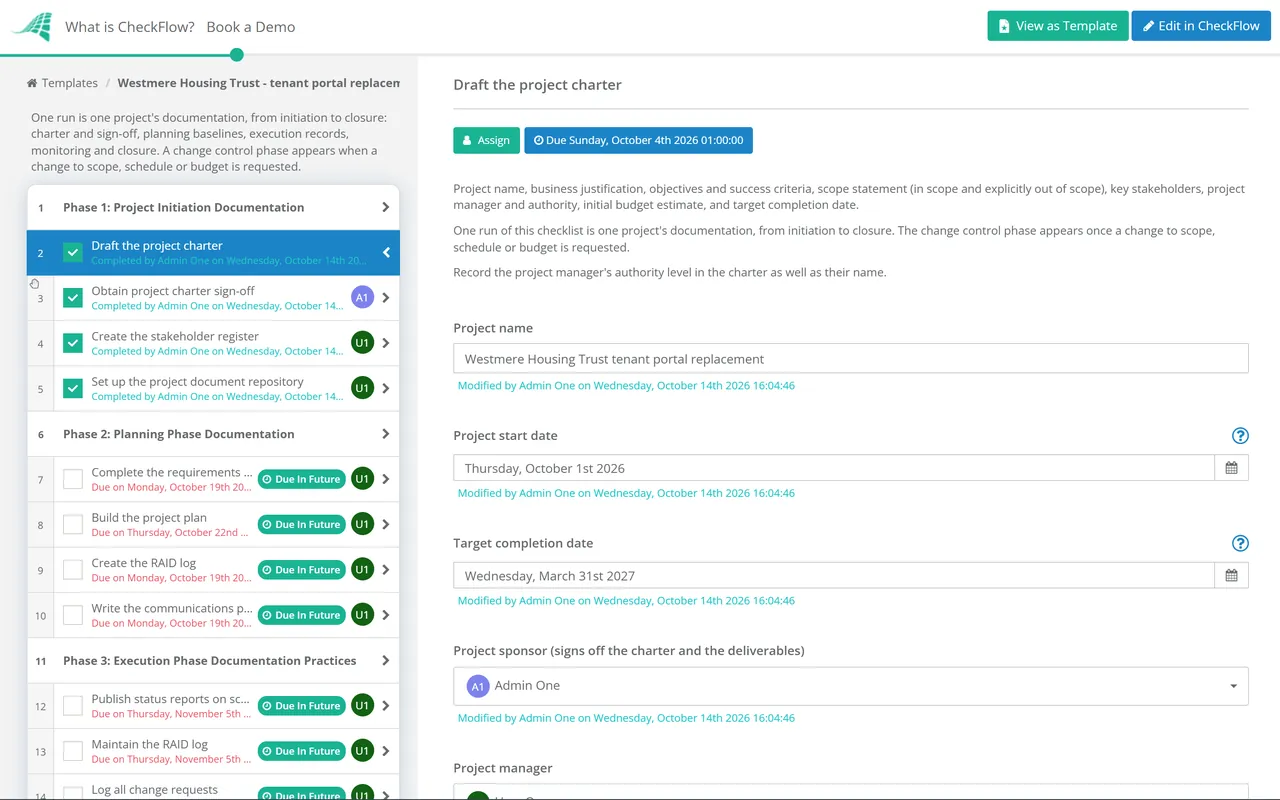
  • Draft the project charter — project name, business justification, objectives and success criteria, scope statement (in scope and explicitly out of scope), key stakeholders, project manager and authority, initial budget estimate, and target completion date
  • Obtain project charter sign-off — from the project sponsor and any other required approvers; this is the formal mandate to proceed
  • Create the stakeholder register — name, role, interest in the project, influence level, and engagement approach; reviewed and updated throughout the project
  • Set up the project document repository — a single location for all project documents; with a clear naming convention and version control; communicated to all team members
Phase 2

Phase 2: Planning Phase Documentation

  • Complete the requirements specification — what the project must deliver to meet its objectives; signed off by the product owner or project sponsor; this is the scope baseline
  • Build the project plan — work breakdown structure, task schedule with dependencies, milestones, resource assignments, and budget allocation; this is the cost and schedule baseline
  • Create the RAID log — Risks (what might go wrong, likelihood, impact, mitigation), Assumptions (conditions assumed to be true), Issues (problems already materialised), Dependencies (external factors the project relies on)
  • Write the communications plan — who receives what information, how often, and by what method; status report schedule confirmed
Phase 3

Phase 3: Execution Phase Documentation Practices

Documentation in the execution phase is maintained, not produced from scratch. The documents created in initiation and planning are live documents — updated as the project progresses. A status report that does not reflect reality is not a status report; it is a false comfort.

  • Publish status reports on schedule — per the communications plan; covering: RAG status, progress against milestone schedule, budget actuals vs plan, risks raised since last report, and decisions required
  • Maintain the RAID log — updated at minimum weekly; new risks logged; existing risks’ status updated; issues raised and managed
  • Log all change requests — any change to scope, schedule, or budget must be formally requested, assessed for impact, and approved or rejected before implementation
  • Maintain the decision log — every material decision recorded within 24 hours of being made; date, decision, decision-maker, and rationale
  • Produce meeting minutes — for every significant project meeting; distributed within 24 hours; actions with owners and deadlines highlighted
Phase 4

Phase 4: Change Control

Scope creep — the gradual expansion of project scope without corresponding changes to budget, timeline, or resources — is the most common cause of project overrun. It is prevented by a change control process that makes every scope change a deliberate decision with assessed impact, not an informal addition.

  • Every scope change is raised as a formal change request — description of the change, the business reason, and who is requesting it
  • Change impact assessed — effect on schedule, budget, resources, and other in-scope deliverables
  • Change request reviewed and decided — approved, rejected, or deferred; by the appropriate authority (project manager for minor; sponsor for significant)
  • Approved changes reflected in the plan — project plan, requirements specification, and budget updated; the original baseline preserved for variance analysis
Phase 5

Phase 5: Monitoring & Progress Tracking Documentation

  • Track actuals vs plan weekly — schedule: tasks completed vs planned; budget: costs incurred vs approved budget; highlighted variances investigated
  • Update the RAID log at every team meeting — risks reviewed; new risks added; closed risks marked closed
  • Escalate red items promptly — any risk or issue that has become high-probability/high-impact escalated to the project sponsor before the next status report
Phase 6

Phase 6: Project Closure Documentation

  • Obtain formal sign-off on deliverables — from the product owner or project sponsor; written confirmation that the project outputs meet the requirements specification
  • Produce the project completion report — objectives achieved vs original objectives, final budget vs approved budget, schedule variance, and summary of changes made
  • Conduct the lessons learned workshop — with the project team; what went well (do more of this), what could be improved (do differently), and specific process recommendations for future projects
  • Write the lessons learned register — structured for searchability and future use; not a narrative complaint but specific, actionable recommendations
  • Archive the project documentation — complete document set in the repository; accessible for future reference; retention period confirmed

The RAID Log — the Single Most Useful Project Management Document Most Teams Never Maintain

The RAID log (Risks, Assumptions, Issues, Dependencies) is the living document that tracks all project uncertainty in one place. Risks are things that might happen and could affect the project; issues are things that have already happened and are affecting the project; assumptions are conditions the plan treats as true that may not be; and dependencies are elements the project relies on that are outside its direct control.

A well-maintained RAID log is the most useful tool for project review meetings, sponsor updates, and escalation decisions — because it provides an immediate, honest view of the project’s uncertainty profile. A project with a growing issues log and declining risk mitigation activity is a project heading for trouble; a project whose RAID log shows all risks mitigated, all assumptions confirmed, and all dependencies resolved is a project in good shape. The RAID log makes this visible.

Risks

Things that might happen. Each risk has a likelihood, an impact, a mitigation action, and an owner. Risks are reviewed regularly; closed when they are no longer applicable or have been fully mitigated.

Assumptions

Conditions the project plan treats as true. Each assumption should be validated during the project; if an assumption proves false, it becomes a risk or an issue.

Issues

Problems that have already materialised and are currently affecting the project. Issues have an owner, a resolution action, and a target resolution date. Unresolved high-impact issues are escalated.

Dependencies

External factors the project relies on — other teams, third parties, infrastructure, regulatory approvals. Each dependency is tracked; delays to dependencies trigger risk or issue entries.

Why Use CheckFlow for Project Management Documentation?

1

Every project document produced at the right phase — automatically

A checklist that reminds project managers to create the project charter at initiation, the RAID log at planning, the change log when the first change is requested, and the lessons learned register at closure means no document is forgotten at the phase where it should exist. CheckFlow’s project documentation checklist triggers each document type at the relevant project phase.

2

Status reporting on a consistent, scheduled cadence

Status reports that are produced when someone asks for them are status reports that arrive too late to prevent the problems they describe. CheckFlow’s recurring status reporting task generates the report checklist on the defined schedule — weekly, fortnightly, or monthly — with the standard sections as a structured prompt.

3

Lessons learned that are actually used

The lessons learned register that is produced at project closure and then filed without being reviewed at the start of the next similar project is not a learning organisation. CheckFlow’s lessons learned tasks produce a structured, searchable register that can be surfaced at the initiation of the next project — making the lessons actionable rather than archival.

Capital projects require the most comprehensive project documentation, with governance documentation from concept through to handover. CheckFlow’s Capital Project Checklist covers the full capital project management process. See the Capital Project Checklist →

Major projects typically begin with a business case that must be documented before the project is authorised. CheckFlow’s Business Case Checklist covers the structured process for developing and presenting a business case. See the Business Case Checklist →

Frequently Asked Questions

What project management documents are needed?

+

Core project management documents by phase include: initiation (project charter and stakeholder register), planning (requirements specification, project plan, RAID log, communications plan), execution (status reports, change log, decision log, meeting minutes), monitoring (RAID log maintenance, budget and schedule variance tracking), and closure (project completion report, lessons learned register, document archive). The minimum viable set for any project of material size is: project charter, requirements specification, project plan, RAID log, status reports, change log, and lessons learned register.

What is a project charter and why is it necessary?

+

A project charter is the initiation document that formally authorises a project and gives the project manager the mandate to apply organisational resources to project activities. A well-written charter includes: the business justification (why this project is being done), the objectives and measurable success criteria (how success will be evaluated), the scope statement (what is in scope and what is explicitly out of scope), key stakeholders, the project manager’s identity and authority level, initial budget estimate, and target timeline. The project charter is signed by the project sponsor — the person with the organisational authority to fund and prioritise the project.

What should a project status report contain?

+

A project status report should contain: overall RAG status (Red/Amber/Green) against schedule, budget, and scope; progress since the last report (milestones achieved, tasks completed); current schedule position (on track, ahead, or behind by how much); current budget position (spend to date vs budget, forecast at completion vs approved budget); new risks raised or existing risks changed since the last report; issues requiring decisions from the sponsor or steering committee; and planned activities for the next reporting period.

What is change control and why is it important?

+

Change control is the process by which any proposed change to an approved project scope, schedule, or budget is formally requested, assessed for impact, and approved or rejected before being implemented. Without change control, project scope creep accumulates informally — additions are made without corresponding budget or schedule adjustment, eventually producing an overrun that is attributed to poor planning rather than to the accumulation of uncontrolled changes. A formal change log that records every change request, its assessed impact, and the approval decision is the mechanism by which the project manager can demonstrate that scope changes were deliberate decisions rather than management failures.

Is CheckFlow free for this template?

+

14-day free trial, no card required. The Business plan is $10 per user per month after the trial. Full details at checkflow.io/pricing.

Document Every Project Decision, Risk, and Lesson — In One Structured Process

Free trial — no credit card required.