Supply Ordering & Inventory Restock Checklist Template

Running out of printer paper at 9am on a Monday is not a supply chain problem — it is a process problem. A structured supply management process ensures the right supplies are always available without holding more than needed and spending more than budgeted.

Office supplies feel like a minor operational concern until they are not available when needed. The printer that cannot print because nobody ordered toner. The restroom without soap or paper towels. The kitchen without coffee on a morning when the team has a client visit. Each of these is a small failure, but small failures accumulate into a picture of operational disorder that affects morale, client presentation, and staff confidence in the organisation’s management. A structured supply ordering and restock process addresses all of these: a supply register that captures what is held and at what level, reorder points that trigger purchasing before stock runs out, a defined approval process that prevents unauthorised buying, and a receiving and storage process that maintains accurate stock counts. The goal is not a sophisticated procurement programme — it is a simple, consistently applied process that means the right supplies are always available without overspending or over-ordering. This free checklist gives office managers, operations coordinators, and facilities teams a structured framework for the full supply ordering and restock cycle.

Use This Template Free See Live Example
No Credit Card Required

Office Supply Categories and Their Management Priorities

High Priority

Critical Operational Supplies

Printer paper, toner and ink cartridges, IT consumables, coffee and kitchen essentials.

Risk of running out: Immediate operational disruption.

Management approach: Tight reorder points; minimum 2-week safety stock; daily visual check for toner/ink.

High Priority

Hygiene and Cleaning Supplies

Restroom supplies (soap, paper towels, toilet tissue), cleaning products, bin bags, sanitiser.

Risk of running out: Health, hygiene, and employee/visitor experience.

Management approach: Weekly stock check; standing order with regular delivery.

Medium Priority

Stationery and Office Consumables

Pens, notebooks, folders, sticky notes, tape, staples.

Risk of running out: Low operational impact; medium cost of ad hoc procurement.

Management approach: Monthly stock check; consolidated order cycle.

Variable Priority

Maintenance Consumables

Light bulbs, batteries, minor spare parts, cleaning equipment.

Risk of running out: Depends on the item; light bulbs are operational; specialist spares may have long lead times.

Management approach: Item-specific; minimum stock levels set by usage rate and criticality.

The Supply Ordering & Restock Checklist

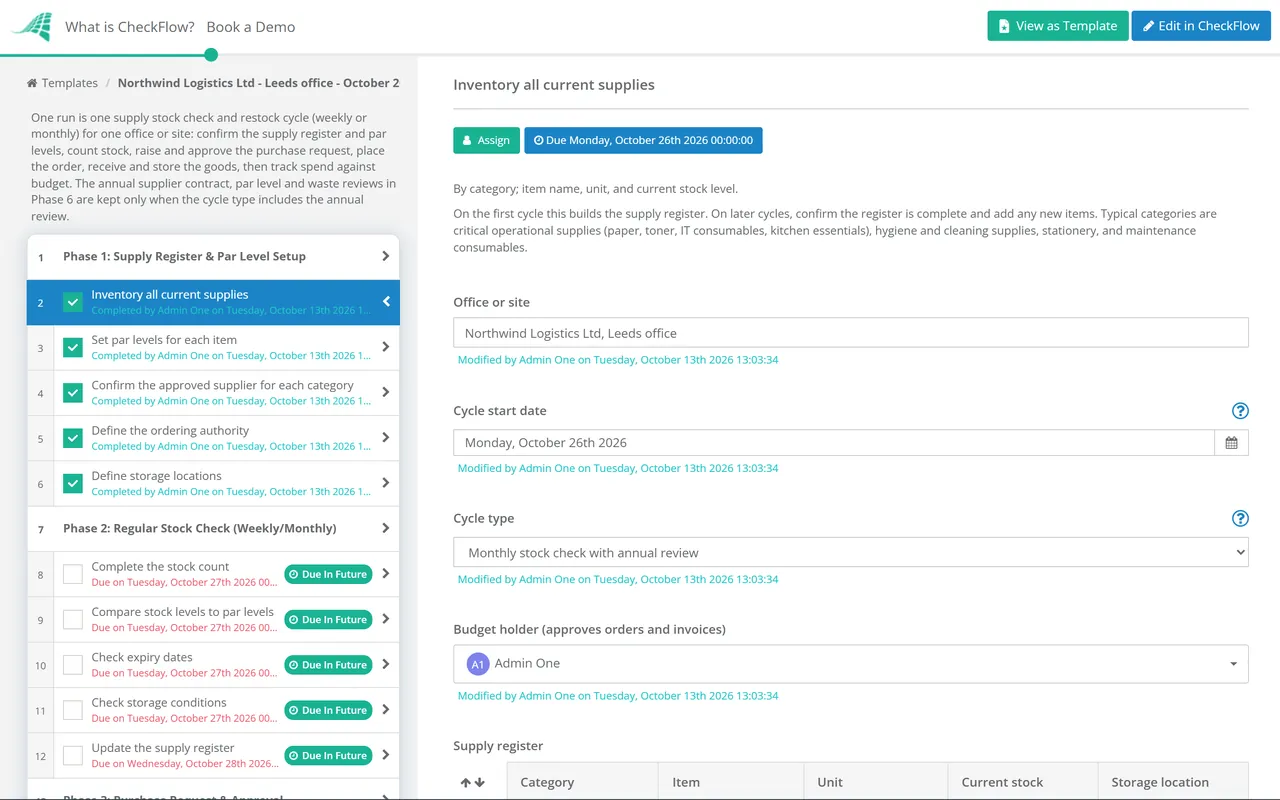
Six phases covering the complete supply management cycle — from register setup and regular stock counts through purchase approval, ordering, goods receipt, and budget tracking.

Phase 1

Supply Register & Par Level Setup

A supply register that captures every item, its location, its reorder point, and its approved supplier is the foundation of the process. Without it, ordering is reactive and stock levels are a guess.

  • Inventory all current supplies — by category; item name, unit, and current stock level
  • Set par levels for each item — the minimum stock level at which a reorder is triggered; based on average weekly consumption × order lead time, plus safety stock
  • Confirm the approved supplier for each category — preferred supplier, account reference, and ordering method (website, phone, standing order)
  • Define the ordering authority — who can order what, up to what value? Approvals required for orders above a defined threshold
  • Define storage locations — for each supply category; labelled; FIFO applied for perishable or date-sensitive items
Phase 2

Regular Stock Check (Weekly/Monthly)

  • Complete the stock count — by supply category; count every item; record actual stock on hand; do not estimate
  • Compare stock levels to par levels — identify every item at or below the reorder point
  • Check expiry dates — for any perishable or date-sensitive supplies (cleaning chemicals, food items, first aid supplies); remove expired items
  • Check storage conditions — supplies stored correctly (dry, at appropriate temperature, no chemical mixing hazards); FIFO applied
  • Update the supply register — with current stock levels; generate the reorder list
Phase 3

Purchase Request & Approval

  • Compile the reorder list — all items at or below par level; with required quantity (to bring back to maximum stock level)
  • Confirm the preferred supplier for each item — from the supply register; use approved suppliers; do not purchase from unapproved suppliers without prior approval
  • Raise the purchase request — through the defined process; not ad hoc
  • Obtain approval — if the order value requires authorisation; from the named approver
  • Confirm the order fits within budget — check available supplies budget balance before ordering
Phase 4

Order Placement

  • Place the order — with the approved supplier; confirm quantity, unit, and delivery address
  • Obtain the order confirmation — reference number, confirmed items, quantities, and expected delivery date
  • Record the order — in the supply register or purchase log; order date, supplier, reference, and expected delivery
  • Flag any supply issues — items out of stock with the supplier; alternative source identified for critical items
Phase 5

Goods Receipt & Storage

  • Check the delivery against the order — item, quantity, and condition; note any discrepancy on the delivery note before signing
  • Report damaged or incorrect deliveries — to the supplier immediately; request credit or replacement
  • Store in the correct location — labelled storage; FIFO applied for items with date sensitivity
  • Update the supply register — with the received quantities; stock levels reflect the current position
  • Approve and process the invoice — against the order and delivery; query any discrepancy before payment
Phase 6

Budget Tracking & Annual Review

  • Track supplies spend against budget — monthly; cumulative year-to-date spend vs annual budget; flag any significant variance
  • Review unusually high consumption — any item being consumed significantly faster than expected; may indicate over-ordering, theft, or waste
  • Review the supplier contracts — annually; are rates still competitive? Standing order arrangements reviewed; consolidation opportunities (fewer suppliers, better terms)?
  • Review par levels annually — when headcount, working patterns, or usage rates change; par levels must reflect current consumption
  • Identify waste reduction opportunities — excessive paper consumption, duplicate ordering, end-of-shelf-life waste; reduce before the next budget cycle

How to Set a Reorder Point That Prevents Stockouts Without Over-Ordering

The Reorder Point Formula

Reorder Point = (Average weekly consumption × Order lead time in weeks) + Safety stock
Example: Printer paper
Average weekly consumption: 10 reams
Order lead time: 1 week
Safety stock: 5 reams (half a week’s usage)
Reorder point: (10 × 1) + 5 = 15 reams

When the stock count falls to 15 reams or below, place the next order. The order should bring stock back to the maximum level — typically 4–6 weeks’ supply for most office consumables.

The reorder point should be reviewed when: usage rates change (headcount increase or decrease), lead times change (new supplier or seasonal delays), or the item has been stocked out unexpectedly (reorder point was too low).

Why Run Your Supply Ordering Process in CheckFlow?

1

A recurring stock check and ordering cycle that happens automatically

The office that orders supplies reactively — when someone notices something has run out — is the office that runs out of toner on Monday morning. CheckFlow’s recurring feature generates the stock review workflow automatically every week or month, assigned to the responsible person, with every supply category as a structured task. The check happens because the process schedules it.


2

Budget tracking built into the ordering process

Supply budget overruns almost always come from multiple people ordering separately without visibility of each other’s purchases. CheckFlow’s purchase request task includes a budget check as a required step before the order is placed — ensuring every purchase decision is made with current budget visibility.

3

A supply register that survives staff changes

The supply process that depends on one office manager’s memory for reorder points, supplier contacts, and account references fails every time that person takes leave or moves on. CheckFlow’s supply register and ordering workflow documents every item, reorder point, supplier reference, and ordering method — surviving any staff change without disrupting the process.

Office supplies are ordered from vendors who need to be set up correctly in the AP system. CheckFlow’s Vendor Onboarding Checklist covers the process for setting up new supply vendors correctly. See the Vendor Onboarding Checklist →

Office maintenance consumes cleaning supplies, light bulbs, and maintenance consumables that need to be tracked in the supply register. CheckFlow’s Office Maintenance Schedule identifies the consumables the maintenance programme requires. See the Office Maintenance Schedule →

Frequently Asked Questions

What should an office supply ordering and restock process include?

+

An office supply ordering and restock process covers six phases: supply register setup (inventorying all supplies with par levels, approved suppliers, and storage locations), regular stock check (weekly or monthly count, comparison to par levels, expiry check, storage verification), purchase request and approval (compiled reorder list, supplier confirmation, budget check, and approval routing), order placement (placing with approved suppliers, obtaining order confirmation), goods receipt and storage (checking against order, reporting discrepancies, FIFO storage, stock register update), and budget management (monthly tracking, consumption analysis, annual supplier and par level review).

What is a par level in office supply management?

+

A par level (or reorder point) is the minimum stock quantity at which a reorder is triggered — the level below which the organisation cannot wait for the next routine ordering cycle. It is calculated as the average weekly consumption multiplied by the order lead time, plus a safety stock buffer. Par levels prevent both stockouts (by ensuring reorders happen before stock runs out) and over-ordering (by setting a defined trigger rather than ordering every time someone notices something is low). Par levels should be reviewed whenever headcount, usage rates, or supplier lead times change.

How should office supply spend be controlled?

+

Office supply spend is controlled through four mechanisms: approved supplier lists (purchases are made only from approved suppliers at pre-negotiated rates), purchase authority limits (named individuals can place orders up to a defined value; above that, approval is required), consolidated ordering (purchases accumulated and placed in a single weekly or monthly order rather than ad hoc; reduces both administrative cost and delivery charges), and budget tracking (every purchase recorded against the supplies budget, with cumulative spend reviewed monthly). The most common cause of supply budget overruns is multiple people ordering independently without visibility of each other’s purchases.

How often should office supplies be restocked?

+

The optimal restocking frequency varies by supply category. Critical operational supplies (printer paper, toner) should be checked weekly with same-week reordering if at or below par level. Hygiene supplies (restroom consumables, cleaning products) should be checked weekly and ordered on a standing delivery or consolidated weekly order. General stationery and consumables suit a monthly stock count and consolidated order. The restocking frequency should ensure that no supply category reaches zero before the next order arrives — the safety stock in the par level calculation provides the buffer.

Is CheckFlow free for this template?

+

You can start a free 14-day trial with no credit card required, giving you full access to all features including this template. The Business plan is $10 per user per month after the trial. Full details at checkflow.io/pricing.

Keep Every Office Supply Stocked, Tracked, and Within Budget

Free trial — no credit card required.