A structured appointment scheduling process that verifies insurance before the patient arrives, reduces no-shows through systematic reminders, and keeps the schedule running efficiently every day.
The healthcare appointment scheduling process is where the clinical operation and the revenue cycle first meet — and where both most commonly fail. A patient who arrives to discover their insurance has lapsed, or that their specialist referral was not verified, does not receive timely care and represents an unbillable visit. A no-show rate of 18–23% that was not addressed with a structured reminder workflow represents both lost revenue and missed care opportunity. An appointment booked for the wrong provider type, without adequate appointment duration, or without the pre-visit documentation the clinician needs, wastes clinical time and frustrates patients. A structured appointment scheduling workflow prevents all of these — by running the same defined sequence of checks and communications for every appointment, every day, regardless of how busy the front desk is. This free checklist gives medical office managers, practice administrators, and scheduling staff a structured framework for an efficient, patient-centred, revenue-cycle-aware scheduling process.
Why Appointment Scheduling Is the First Step in the Revenue Cycle
Every appointment scheduled is a revenue cycle event from the moment it is booked. The information collected at scheduling — insurance details, patient demographics, referral status, and prior authorisation requirements — determines whether the visit can be billed, and billed correctly. Practices that treat scheduling as purely a calendar function and defer insurance verification to the front desk on the day of the appointment discover problems at the worst possible moment: in front of the patient, with the clinician’s schedule already committed.
The no-show problem is equally consequential. Industry data consistently places healthcare no-show rates between 18–23% of scheduled appointments. At an average visit value of $150–$300, a primary care practice with 50 appointments per day and a 20% no-show rate is experiencing $1,500–$3,000 of daily revenue risk that a structured reminder and confirmation workflow can meaningfully reduce. No-show management is not optional — it is revenue cycle management starting from the scheduling desk.
The Healthcare Appointment Scheduling Workflow Checklist
Six phases covering every appointment — from initial request and insurance verification through booking, reminders, pre-appointment preparation, and no-show management.
Phase 1
Appointment Request & Initial Screening
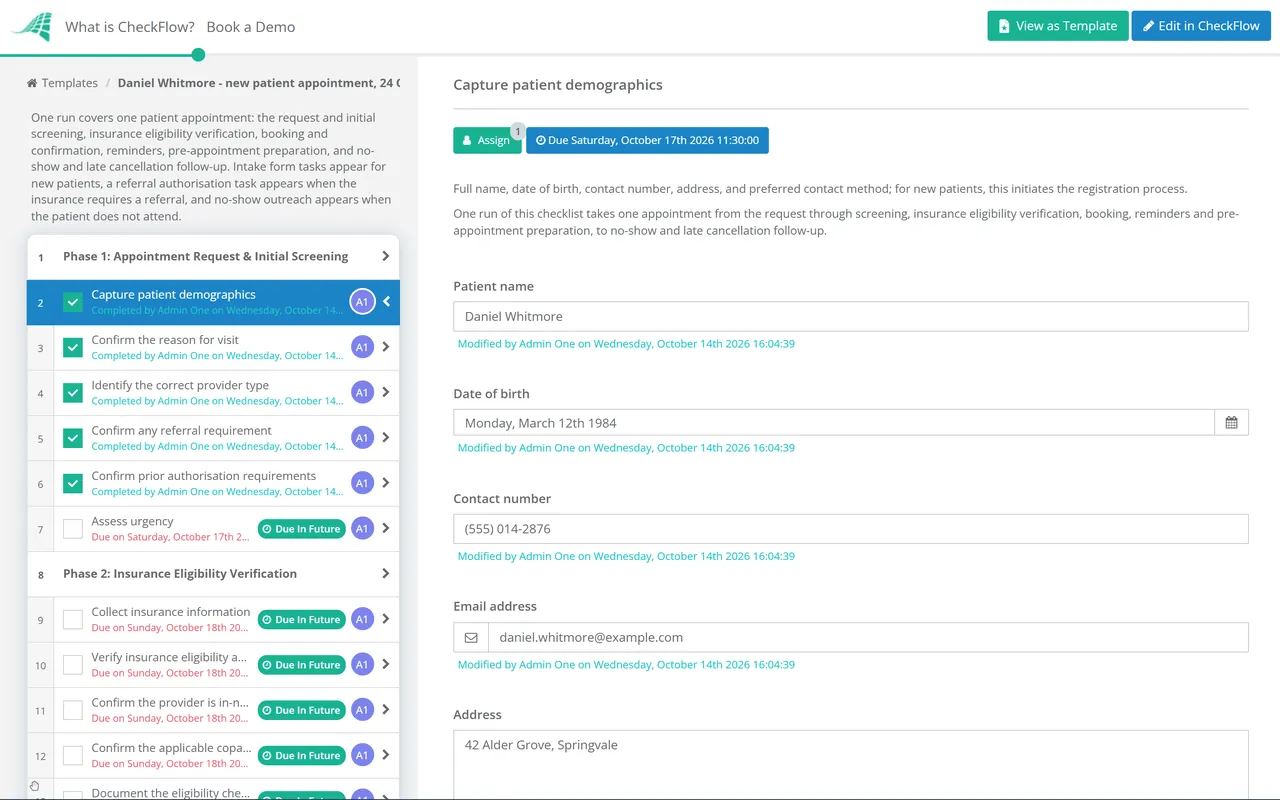
Capture patient demographics — full name, date of birth, contact number, address, and preferred contact method; for new patients, this initiates the registration process
Confirm the reason for visit — chief complaint or type of appointment (new patient, follow-up, annual wellness, procedure, urgent); this determines the appointment type and duration
Identify the correct provider type — confirm the appointment requires the appropriate specialty, provider level (MD, NP, PA), or specific named provider
Confirm any referral requirement — does the patient’s insurance require a referral for specialist visits? Confirm referral is in place or being obtained before scheduling
Confirm prior authorisation requirements — does the planned procedure or service require prior authorisation? Flag for PA team before confirming the appointment
Assess urgency — is the appointment routine, soon (within days), or urgent? Triage to the appropriate scheduling queue; flag urgent cases for clinical review if needed
Phase 2
Insurance Eligibility Verification
Insurance eligibility verification should happen at scheduling — not at the front desk on the day of the appointment. Discovering coverage issues on arrival means the patient is already in the clinic, a room is committed, and the clinical team is waiting.
Collect insurance information — primary insurance plan, insurance ID number, group number, and subscriber details; secondary insurance if applicable
Verify insurance eligibility and active coverage — electronically via the payer portal or clearinghouse; confirm the plan is active on the scheduled appointment date
Confirm the provider is in-network — for the patient’s insurance plan; out-of-network benefits and cost implications communicated to the patient if in-network is unavailable
Confirm the applicable copay, deductible, and coinsurance — patient financial responsibility communicated at scheduling; no surprises at the front desk
Confirm referral is authorised in the payer system — for specialist visits requiring referral; confirm the referral is valid and covers the planned service
Document the eligibility check result — date checked, payer, result, and any outstanding items in the patient record
Phase 3
Appointment Booking & Confirmation
Book the appointment in the scheduling system — correct provider, correct appointment type and duration, correct location or telehealth link
Confirm no scheduling conflicts — provider not double-booked; appointment type matches the available slot duration
Capture appointment-specific preparation instructions — does the patient need to fast, bring specific documents, stop taking certain medications, or arrive early for paperwork? Document in the booking
Send the appointment confirmation via the patient’s preferred channel (phone, text, email, patient portal) — HIPAA-compliant communication method only
Confirm new patient intake forms are sent — digital or physical; to be completed before the appointment where possible
Add to the appointment tracking system — confirm appointment is visible in the daily schedule for the clinical and front desk teams
Phase 4
Appointment Reminders & Confirmation Sequence
Send the 72-hour reminder — three days before the appointment; confirm the date, time, location, and any preparation instructions; invite the patient to confirm or reschedule
Send the 24-hour reminder — one day before; brief and direct; include the address or telehealth link; request confirmation
Follow up on unconfirmed appointments — patients who have not confirmed 24 hours before their appointment should receive an outbound call
Manage cancellations received from reminders — log the cancellation; offer rebooking; fill the cancelled slot from the waitlist or schedule
Use HIPAA-compliant channels for all appointment communications — standard SMS and email are not encrypted; confirm patient consent for communication method used
Phase 5
Pre-Appointment Preparation & Clinical Readiness
Review the next day’s schedule — daily review to confirm no outstanding eligibility issues, referrals, or prior authorisations for tomorrow’s appointments
Confirm patient intake forms are received — chase outstanding new patient paperwork; confirm in the schedule if any additional arrival time is needed for forms completion
Pull and review patient records — clinical team has access to relevant history, test results, and last visit notes before the appointment
Confirm any special requirements — accessibility needs, interpreter service, or specific clinical setup requirements for any patient on tomorrow’s schedule
Stage any required clinical materials — for scheduled procedures, confirm equipment, supplies, or test kits are available and prepared
Phase 6
No-Show & Late Cancellation Management
Define and document the no-show policy — what constitutes a no-show, any applicable fee, and how many no-shows result in discharge from the practice
Log no-shows and late cancellations in the patient record — for pattern identification and policy enforcement
Attempt outreach to no-show patients — same-day outreach for patients who did not arrive; documented in the patient record
Offer rebooking to no-show patients who have a genuine reason — confirm the care need is addressed
Fill open slots from the waitlist — a maintained waitlist allows same-day slot filling; reduces lost clinical capacity
Track no-show rates by provider and appointment type — data for improving reminder strategy and identifying high-risk appointment types
Every Scheduling Step That Impacts the Revenue Cycle
Step 1
Insurance verification at booking
Catches coverage lapses, out-of-network situations, and missing referrals before the patient arrives.
Step 2
Prior authorisation check
Procedures without prior auth are not reimbursable. Catching this at scheduling allows 3–7 days to obtain authorisation before the appointment.
Step 3
Copay communication
Patients informed of their financial responsibility at booking arrive prepared to pay. Patients surprised by a copay at the front desk have lower satisfaction and lower payment rates.
Step 4
Eligibility re-verification day before
Insurance can change between booking and appointment (particularly for patients on employer-sponsored plans at year-end). Day-before verification catches late changes.
Step 5
No-show management
An unmanaged no-show slot represents 100% revenue loss for that time. A waitlist-managed slot can be filled at 0 additional cost.
Why Run Your Scheduling Workflow in CheckFlow?
1
A consistent scheduling workflow for every appointment type
Different appointment types have different requirements — new patient appointments need more eligibility work and intake form management; specialist appointments may need referral verification; procedures need prior authorisation. CheckFlow lets the scheduling team run appointment-type-specific workflows automatically, ensuring the right checks happen for every type of booking.

2
Insurance verification tasks that cannot be skipped
Eligibility verification is the task most often deferred under a busy schedule — pushed to the front desk, then forgotten. CheckFlow’s scheduling checklist assigns eligibility verification as a required step before confirmation is sent. The workflow cannot advance to booking confirmation while eligibility is outstanding.
3
A complete scheduling audit trail for billing and compliance
HIPAA requires documentation of patient communications. Revenue cycle audits require evidence of eligibility verification and prior authorisation. Every completed task in CheckFlow is timestamped — the eligibility check date, the reminder sent, the confirmation received, and any patient communication is documented automatically.
Patient scheduling begins the patient encounter — but the intake process completes it. CheckFlow’s Patient Intake Checklist covers the full patient registration and intake workflow that follows the scheduled appointment. See the Patient Intake Checklist →
All patient communications in the scheduling workflow — confirmations, reminders, and no-show outreach — must comply with HIPAA. CheckFlow’s HIPAA Compliance Audit Checklist covers the communication safeguards required for patient messaging. See the HIPAA Compliance Audit Checklist →
What should a healthcare appointment scheduling workflow include?
+
A healthcare appointment scheduling workflow covers six phases: appointment request and initial screening (capturing reason for visit, confirming provider type, and identifying referral and prior authorisation requirements), insurance eligibility verification (confirming active coverage, in-network status, and patient financial responsibility), appointment booking (scheduling the correct appointment type and duration and sending a HIPAA-compliant confirmation), reminder and confirmation sequence (72-hour and 24-hour reminders via patient-consented channels, with follow-up on unconfirmed appointments), pre-appointment preparation (next-day schedule review, intake form collection, and clinical readiness), and no-show management (logging, outreach, rebooking, and waitlist slot filling).
When should insurance eligibility be verified?
+
At the time of scheduling — not on the day of the appointment. Verifying eligibility at scheduling allows 24–48 hours or more to resolve issues before the patient arrives: lapsed coverage can be addressed, alternative insurance can be identified, out-of-network implications can be communicated, and referrals or prior authorisations can be obtained. Verifying eligibility at the front desk on the appointment day places the practice in the position of either turning away the patient or providing care it may not be able to bill. Eligibility should also be re-verified the day before high-value appointments, as coverage can change between booking and appointment date.
What is the average healthcare no-show rate and how can it be reduced?
+
Healthcare no-show rates average 18–23% across primary care, specialist, and outpatient settings, though rates vary significantly by practice type, patient population, and appointment lead time. The most effective interventions are: a structured reminder sequence (automated reminders at 72 hours and 24 hours before the appointment), two-way confirmation (requesting that patients confirm or reschedule, not just passively receiving a reminder), phone outreach for unconfirmed appointments, and waitlist management to fill cancelled slots. Overbooking strategies exist but require careful calibration to avoid extended wait times for patients who do arrive.
What HIPAA requirements apply to appointment scheduling communications?
+
Patient communications containing appointment details — date, time, provider name, and particularly any mention of the clinical reason for the visit — may constitute Protected Health Information (PHI) if they identify the patient and relate to health information. Standard unencrypted SMS and email are generally not considered HIPAA-compliant for transmitting PHI without patient consent. Practices should use HIPAA-compliant messaging platforms, obtain patient consent for communication method, and limit information included in scheduling reminders to the minimum necessary. The patient portal is typically the most HIPAA-compliant channel for appointment-related communications.
Is CheckFlow free for this template?
+
You can start a free 14-day trial with no credit card required, giving you full access to all features including this template. The Business plan is $10 per user per month after the trial. Full details at checkflow.io/pricing.
Run an Efficient, Compliant Scheduling Workflow for Every Appointment
Free trial — no credit card required.
Do you like cookies? 🍪 We use cookies to ensure you get the best experience on our website. Learn more